A database is a container for collections. Each database gets its own set of files on the host file system. A single MongoDB server typically has multiple databases.数据库是集合的容器。每个数据库在主机文件系统上都有自己的一组文件。一个MongoDB服务器通常有多个数据库。
Databases Tab数据库选项卡
The Databases tab lists the existing databases for your MongoDB deployment. To access the Databases tab, click the deployment name in the Connections Sidebar.“数据库”选项卡列出了MongoDB部署的现有数据库。要访问“数据库”选项卡,请单击“连接”侧边栏中的部署名称。
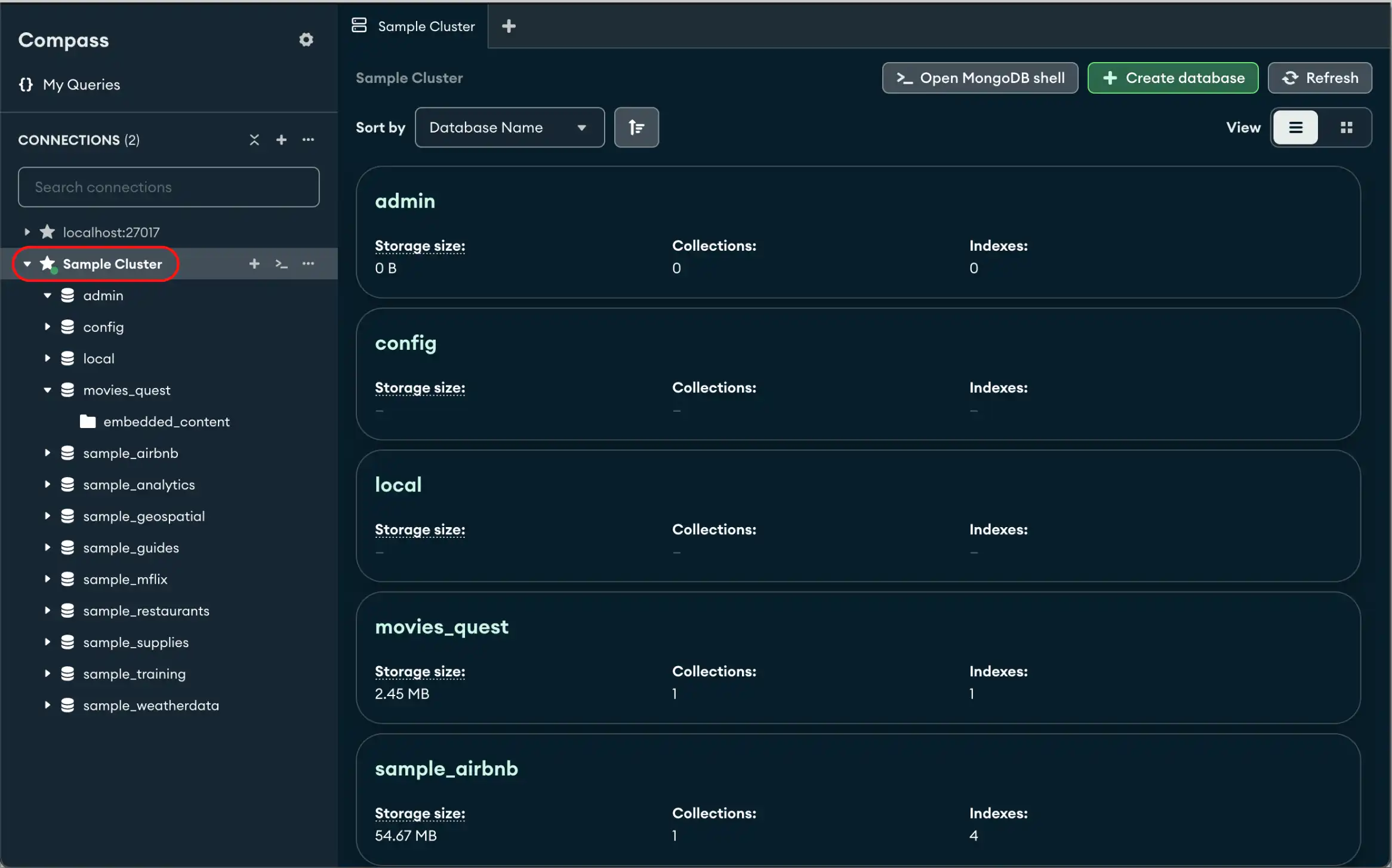
From this view, you can click a database name in the sidebar to view its collections. Alternatively, you can view database collections by clicking the desired database in the left-hand navigation.从这个视图中,您可以单击侧边栏中的数据库名称来查看其集合。或者,您可以通过单击左侧导航中的所需数据库来查看数据库集合。
You can also create or drop databases from this view.您还可以从该视图创建或丢弃数据库。
Note
If you're granted a custom role or privilege to a database but lack privileges to list server namespaces, Compass lists the database in the Databases screen with an empty database icon , and the database name turns grey. Compass displays the database this way even if it doesn't exist.如果您被授予数据库的自定义角色或权限,但缺乏列出服务器命名空间的权限,Compass将在“数据库”屏幕中列出数据库,并显示一个空的数据库图标,数据库名称将变为灰色。Compass以这种方式显示数据库,即使它不存在。
To avoid seeing these databases, you can disable the Infer Additional Namespaces from Privileges setting in the Compass settings panel.为了避免看到这些数据库,您可以在Compass设置面板中禁用“从权限推断其他命名空间”设置。
Create a Database创建数据库
Open the Create Database dialog.打开“创建数据库”对话框。
In the Connections Sidebar, you can click the icon to the right of the connection name to bring up the Create Database dialog. Alternatively, you can right-click any database on the left-hand menu and select Create database from the dropdown to bring up the dialog.在“连接”侧边栏中,您可以单击连接名称右侧的图标以打开“创建数据库”对话框。或者,您可以右键单击左侧菜单上的任何数据库,然后从下拉列表中选择“创建数据库”以打开对话框。
Enter database and first collection information.输入数据库和第一个集合信息。
In the dialog, enter the name of the database to create and its first collection. Both the database name and the collection name are required.在对话框中,输入要创建的数据库及其第一个集合的名称。数据库名称和集合名称都是必需的。
If you want to create a capped collection, select the Capped Collection checkbox and enter the maximum bytes.如果要创建封顶集合,请选中上限集合复选框并输入最大字节数。
If you want to use custom collation on the collection, select the Use Custom Collation checkbox and select the desired collation settings.如果要在集合上使用自定义排序规则,请选中“使用自定义排序”复选框,然后选择所需的排序规则设置。
If your deployment is connected using In-Use Encryption, you can use Queryable Encryption on the newly created collection. Check the Queryable Encryption option and indicate the following encryption properties:如果部署是使用“使用中加密”连接的,则可以在新创建的集合上使用可查询加密。勾选中“可查询加密”选项,并指示以下加密属性:
Encrypted Fields.加密字段。- (Optional)
KMS Provider.KMS提供商。 - (Optional)
Key Encryption Key.键加密键。
Drop a Database丢弃数据库
Click the trash can icon for the database.单击数据库的垃圾桶图标。
From the Databases tab, to delete a database, click on the trash can icon for that database, or right-click the database and select Drop database. A confirmation dialog appears.在“数据库”选项卡中,要删除数据库,请单击该数据库的垃圾桶图标,或右键单击该数据库并选择“丢弃数据库”。此时会出现一个确认对话框。
Limitations局限性
Creating and dropping databases is not permitted in MongoDB Compass Readonly Edition.MongoDB Compass只读版不允许创建和删除数据库。