What is the Compass Isolated Edition?Compass隔离版是什么?
Compass Isolated Edition restricts network requests to only the MongoDB server chosen on the Connect screen. Compass隔离版将网络请求限制为仅限于在连接屏幕上选择的MongoDB服务器。All other outbound connections are not permitted in this edition, meaning no additional firewall configuration is required when running Compass Isolated Edition.此版本不允许所有其他出站连接,这意味着运行Compass隔离版时不需要额外的防火墙配置。
What is the performance impact of running this tool?运行此工具对性能有何影响?
Testing has shown that MongoDB Compass has minimal impact in prototype deployments, though additional performance testing and monitoring is in progress.测试表明,MongoDB Compass对原型部署的影响很小,尽管正在进行额外的性能测试和监控。
You should only execute queries that are indexed appropriately in the database to avoid scanning the entire collection.您应该只执行在数据库中适当索引的查询,以避免扫描整个集合。
How does Compass handle confidential data?Compass如何处理机密数据?
MongoDB Compass stores and retrieves sensitive data such as passwords using a credentials API specific to the operating system running Compass. The credentials API securely handles sensitive information by encrypting and protecting access to your data.MongoDB Compass使用运行Compass的操作系统特有的凭证API存储和检索密码等敏感数据。凭据API通过加密和保护对数据的访问,安全地处理敏感信息。
MongoDB Compass stores the following data using the credentials API:MongoDB Compass使用凭证API存储以下数据:
MongoDB server passwords,MongoDB服务器密码,SSH passwords for tunneling,用于隧道传输的SSH密码,- TLS/SSL passphrases
MongoDB Compass utilizes a node.js native add-on, Keytar, to communicate with and store data in the operating system's credentials API. MongoDB Compass利用node.js原生插件Keytar与操作系统的凭证API通信并将数据存储在其中。For more information on how Keytar operates and the specific APIs it accesses, refer to the Keytar Github documentation.有关Keytar如何操作及其访问的特定API的更多信息,请参阅Keytar Github文档。
Does Compass Maintain Logs?Compass是否维护日志?
As part of normal operation, MongoDB Compass maintains a running log of events. Compass logs provide a history of operations and can help diagnose errors. 作为正常操作的一部分,MongoDB Compass会维护一个事件的运行日志。Compass日志提供操作历史,可以帮助诊断错误。For more information on Compass logs, including their format and location, see Retrieve Compass Logs.有关Compass日志的更多信息,包括其格式和位置,请参阅检索Compass日志。
Why am I seeing a warning about a non-genuine MongoDB server?为什么我看到关于非正版MongoDB服务器的警告?
Starting in MongoDB Compass 1.19, Compass displays a warning message when connected to non-genuine MongoDB instances as these instances may behave differently from the official MongoDB instances; e.g. missing or incomplete features, different feature behaviors, etc.从MongoDB Compass 1.19开始,Compass在连接到非正版MongoDB实例时显示警告消息,因为这些实例的行为可能与官方MongoDB实例不同;例如,缺失或不完整的特征、不同的特征行为等。
What happens to long running queries?长时间运行的查询会发生什么?
As a precaution, Compass aborts long running queries to prevent excessive querying on your database.作为预防措施,Compass会中止长时间运行的查询,以防止对数据库进行过度查询。
Slow Sampling缓慢采样
All queries that Compass sends to your MongoDB instance have a timeout flag set which automatically aborts a request if it takes longer than the specified timeout. This timeout is currently set to 10 seconds. Compass发送到MongoDB实例的所有查询都设置了一个超时标志,如果请求超过指定的超时时间,该标志会自动中止请求。此超时当前设置为10秒。If sampling on the database takes longer, Compass will notify you about the timeout and give you the options of (a) retrying with a longer timeout (60 seconds) or (b) running a different query.如果在数据库上采样需要更长的时间,Compass将通知您超时时间,并为您提供以下选项:(a)以更长的超时时间(60秒)重试,或(b)运行其他查询。
Note
Sampling time may be affected by a number of factors, like load on the server, number of documents and existence of a suitable index for your query.采样时间可能受到许多因素的影响,如服务器上的负载、文档数量以及是否存在适合您查询的索引。
It is recommended that you only increase the sampling timeout if you are not connected to a production instance, as this may negatively affect the performance and response time of your database.建议仅在未连接到生产实例的情况下增加采样超时,因为这可能会对数据库的性能和响应时间产生负面影响。
Slow Schema Analysis慢速模式分析
If the database returns documents faster than the specified timeout (10 or 60 seconds), but the schema analysis of the documents takes longer than expected (due to complex, large documents), Compass gives you the option to abort the analysis step and show the partial results.如果数据库返回文档的速度快于指定的超时时间(10或60秒),但文档的模式分析时间比预期的要长(由于复杂的大型文档),Compass为您提供了中止分析步骤并显示部分结果的选项。
Why are some features of MongoDB Compass not working?为什么MongoDB Compass的某些功能不起作用?
If you can connect to your MongoDB instance using MongoDB Compass but some features do not work as expected, your system firewall may be blocking network requests required by MongoDB Compass. MongoDB Compass must connect to external services to enable features such as:如果您可以使用MongoDB Compass连接到MongoDB实例,但某些功能无法按预期工作,则系统防火墙可能会阻止MongoDB Compass所需的网络请求。MongoDB Compass必须连接到外部服务才能启用以下功能:
Third party mapping services第三方地图服务Intercom对讲机Bugsnag for error reporting错误报告的错误
To fix this issue, configure your system firewall to allow incoming connections for MongoDB Compass. Ensure ports 要解决此问题,请配置系统防火墙以允许MongoDB Compass的传入连接。确保MongoDB Compass和Compass连接的MongoDB部署的主机之间的端口80 and 443 are open between MongoDB Compass and the host for the MongoDB deployment to which Compass connects.80和443打开。
Compass Isolated Edition restricts network requests to only the MongoDB server chosen on the Connect screen. All other outbound connections are not permitted in this edition, meaning no additional firewall configuration is required when running Compass Isolated Edition.Compass隔离版将网络请求限制为仅限于在连接屏幕上选择的MongoDB服务器。此版本不允许所有其他出站连接,这意味着运行Compass隔离版时不需要额外的防火墙配置。
How do I view and modify my Privacy Settings?如何查看和修改我的隐私设置?
To view and modify your MongoDB Compass privacy settings, from the top-level menu:要查看和修改MongoDB Compass隐私设置,请从顶级菜单中:
Click MongoDB Compass.单击MongoDB Compass。Click Settings.单击设置。Under Settings, click Privacy.在“设置”下,单击“隐私”。
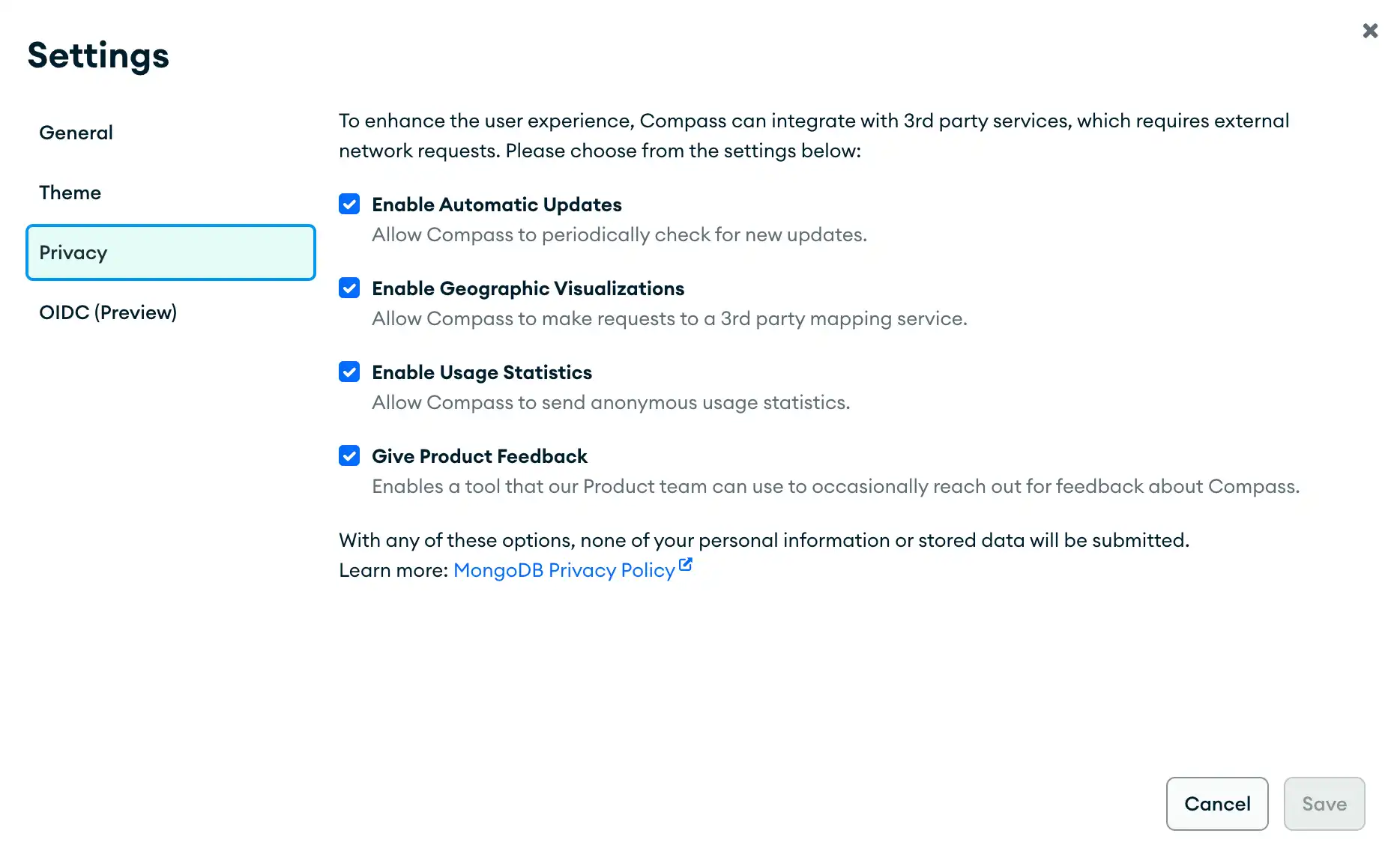
The privacy settings dialog allows you to toggle various MongoDB Compass settings such as enabling automatic updates. See the following screenshot for all available privacy settings options:隐私设置对话框允许您切换各种MongoDB Compass设置,例如启用自动更新。请参阅以下屏幕截图,了解所有可用的隐私设置选项:
Note
Automatic updates are not available in Compass Isolated Edition.Compass隔离版中没有自动更新功能。
How do I enable geographic visualizations?如何启用地理可视化?
You can enable geographic visualizations in MongoDB Compass in your privacy settings. When Enable Geographic Visualizations is selected, MongoDB Compass is allowed to make requests to a third-party mapping service.您可以在隐私设置中启用MongoDB Compass中的地理可视化。当选择“启用地理可视化”时,MongoDB Compass可以向第三方地图服务发出请求。
Note
Third party mapping services are not available in Compass Isolated Edition.Compass隔离版中不提供第三方地图服务。