If the query bar displays the Skip option, you can specify how many documents to skip before returning the result set.如果查询栏显示“跳过”选项,则可以指定在返回结果集之前跳过多少文档。
Set Documents to Skip将文档设置为跳过
To specify the number of documents to skip:要指定要跳过的文档数量,请执行以下操作:
In the Query Bar, click Options.在查询栏中,单击“选项”。Enter an integer representing the number of documents to skip into the Skip field.在“跳过”字段中输入一个整数,表示要跳过的文档数量。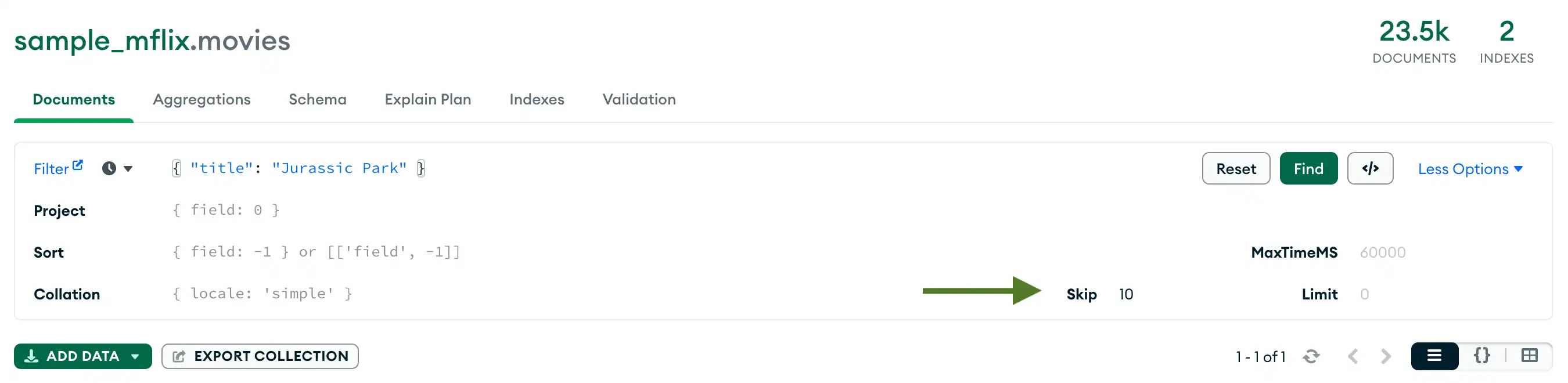
Click Find to run the query and view the updated results.单击“查找”运行查询并查看更新的结果。
Clear the Query清除查询
To clear the query bar and the results of the query, click Reset.要清除查询栏和查询结果,请单击“重置”。
How Does the Compass Query Compare to MongoDB and SQL Queries?Compass查询与MongoDB和SQL查询相比如何?
$skip corresponds to the 对应于SQL LIMIT ... OFFSET ... clause in a SQL SELECT statement.SELECT语句中的LIMIT ... OFFSET ...子句。
Example示例
You have a 3,235 articles. You would like to see a list of articles grouped in blocks of 50, starting with the 436th record.你有3235篇文章。您希望看到以50个区块分组的文章列表,从第436条记录开始。
- SQL
SELECT * FROM article
LIMIT 50 OFFSET 435;
MongoDB AggregationMongoDB聚合db.article.aggregate(
{ $limit : 50 },
{ $skip : 435 }
);Compass Skip OptionCompass跳过选项$skip : 435
Learn More了解更多
See the 请参阅MongoDB手册中的skip entry in the MongoDB Manual.skip条目。