Questions, concerns or feedback on MongoDB Compass are appreciated.感谢您对MongoDB Compass提出问题、疑虑或反馈。
Enterprise Support企业支持
If you have an enterprise or professional MongoDB subscription, you can submit a ticket to the Commercial Support JIRA for direct feedback and support.如果您有企业或专业MongoDB订阅,您可以向商业支持JIRA提交工单,以获得直接反馈和支持。
Submit a Bug Report提交Bug报告
To report a bug, submit a ticket to the MongoDB Compass JIRA.要报告错误,请向MongoDB Compass JIRA提交工单。
Procedure过程
Click Create in the top navigation bar in JIRA to open the ticket creation dialog单击JIRA顶部导航栏中的“创建”以打开工单创建对话框
Use the Affected Version/s to list the version(s) of Compass in which the issue occurs使用“受影响的版本”列出出现问题的Compass版本
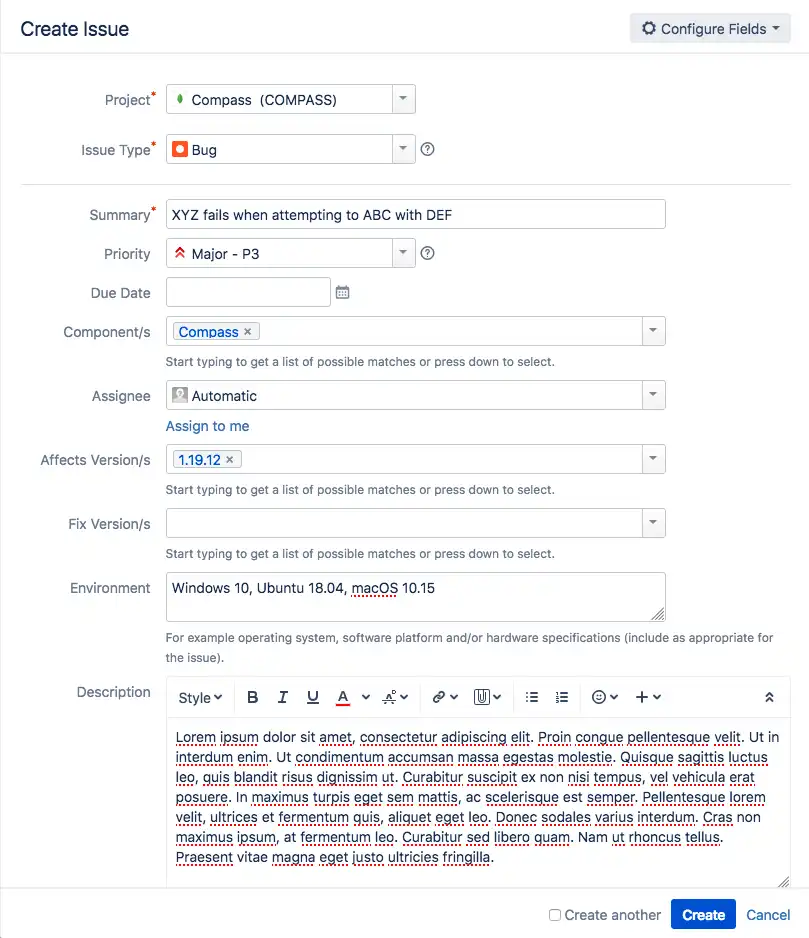
Vote on Bug Tickets对Bug门票进行投票
After you login to JIRA, you can vote for a bug ticket in the People section on the right-hand side of the ticket. Issues with more votes are more likely to be prioritized by the Compass development team.登录JIRA后,您可以在工单右侧的“人员”部分为错误工单投票。Compass开发团队更有可能优先考虑投票较多的问题。
Submit a Feature Request提交功能请求
You can submit Compass feature requests using the MongoDB Feedback Portal.您可以使用MongoDB反馈门户提交Compass功能请求。
Procedure过程
Log in to the Feedback Portal using your email使用电子邮件登录反馈门户
Provide a one sentence summary of your feedback提供一句话的反馈摘要
You can use the search bar to see if there are any matching or similar feature requests that have already been submitted. If those requests exist, you can vote on those requests您可以使用搜索栏查看是否已提交任何匹配或类似的功能请求。如果存在这些请求,您可以对这些请求进行投票
Fill in the requested information for your feature:为功能填写所需信息:
In addition to describing your idea, explain:除了描述你的想法,还要解释:
The problem you're trying to solve.你试图解决的问题。Your desired outcome or enhancement.你想要的结果或增强。How the request adds value or solves a business need.请求如何增加价值或解决业务需求。
To help give context for your idea, you can also attach a screenshot or other documents.为了帮助你的想法提供背景,你还可以附上截图或其他文档。
The Feedback Engine directs you to a page with your feature request. You automatically vote on all features you submit.反馈引擎会将您引导到一个包含功能请求的页面。您将自动对提交的所有功能进行投票。
Find and Vote on Existing Feature Requests查找现有功能请求并对其进行投票
You can vote for features you would like to see added to MongoDB Compass. Feature requests with more votes are more likely to be prioritized by the Compass development team.您可以投票选择您希望添加到MongoDB Compass的功能。Compass开发团队更有可能优先考虑具有更多投票权的功能请求。
To search for features, use the Search all ideas search bar.要搜索功能,请使用“搜索所有想法”搜索栏。
To vote for issues, click Vote for the issues you would like to see added.要为问题投票,请单击“为您希望添加的问题投票”。
Other Feedback其他反馈
For other feedback, email compass@mongodb.com.如需其他反馈,请发送电子邮件至compass@mongodb.com。