To ensure that you are using the latest Compass features and improvements, we recommend using the latest version of MongoDB Compass. To upgrade Compass, you can either manually install the latest version or enable automatic updates.为确保您使用的是最新的Compass功能和改进,我们建议您使用最新版本的MongoDB Compass。要升级Compass,您可以手动安装最新版本或启用自动更新。
Important
MongoDB Compass undergoes continuous development, with the latest stable versions receiving active support and updates. We encourage using the latest release for optimal functionality and security.MongoDB Compass不断发展,最新的稳定版本得到了积极的支持和更新。我们鼓励使用最新版本以获得最佳功能和安全性。
Manually Install the Latest Version of Compass手动安装最新版本的Compass
You can download and install the latest version of Compass from the MongoDB Downloads page at any time. Check the Software Requirements for your operating system and desired version of Compass to ensure Compass is compatible with your system. You do not need to uninstall previous versions of Compass to upgrade.您可以随时从MongoDB下载页面下载并安装最新版本的Compass。检查操作系统和所需版本的Compass的软件要求,以确保Compass与系统兼容。您无需卸载Compass的早期版本即可升级。
Note
If you are running macOS Catalina or later, you may have to modify your system settings to grant Compass permission to run. For more information, see Install Compass.如果您运行的是macOS Catalina或更高版本,则可能需要修改系统设置以授予Compass运行权限。有关更多信息,请参阅安装Compass。
Enable Automatic Updates启用自动更新
You can enable automatic updates to the latest version of Compass in the Privacy section of the MongoDB Compass > Settings dialog.您可以在“MongoDB Compass”>“设置”对话框的“隐私”部分启用Compass最新版本的自动更新。
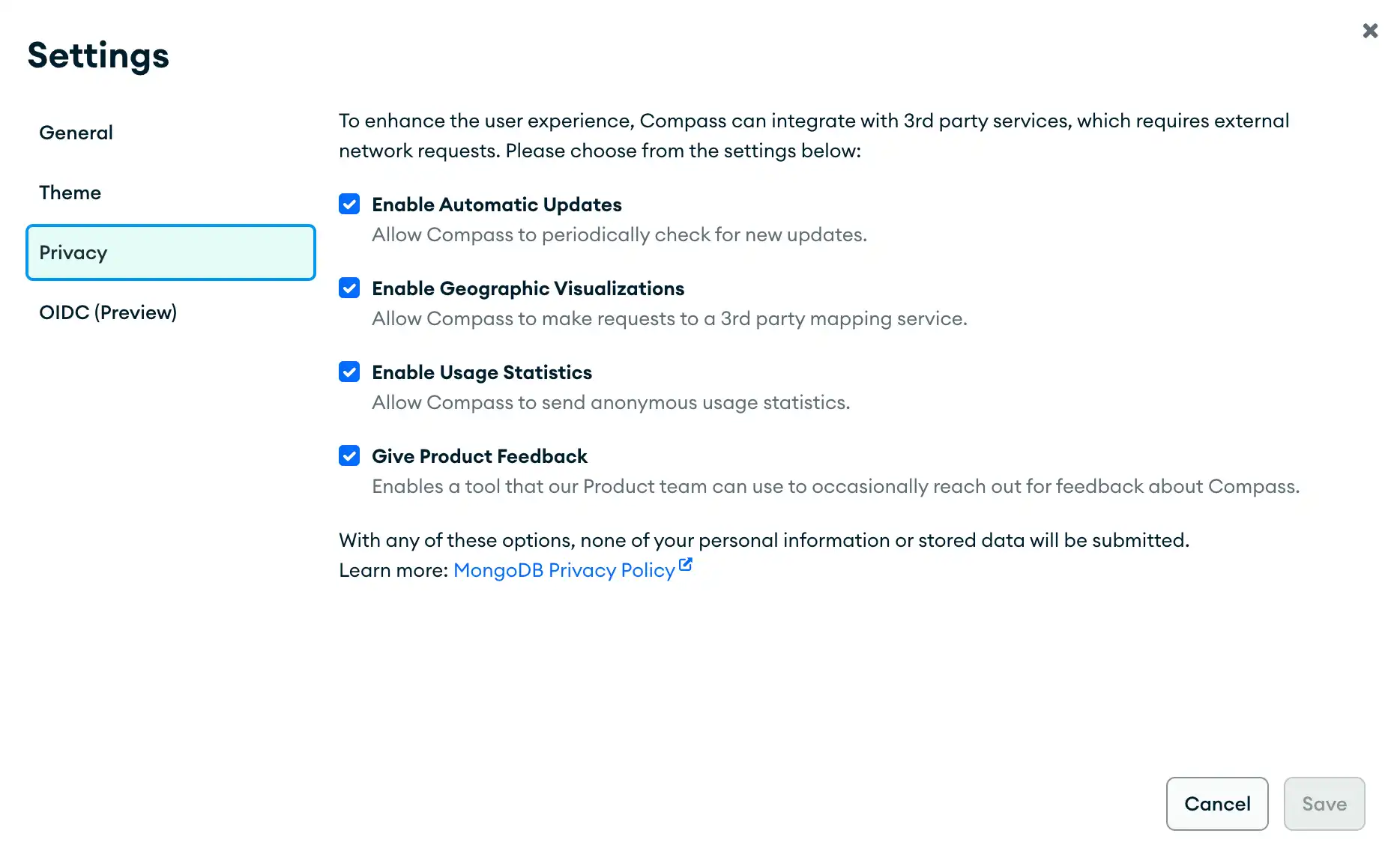
If you enable auto updates and did not downgrade MongoDB Compass, Compass automatically updates the application when MongoDB releases new versions. The update does not require your explicit confirmation. After your machine finishes the update, Compass shows a notification suggesting that you restart the application to apply the update. Compass does not apply the version update until you restart the application.如果启用自动更新并且没有降级MongoDB Compass,Compass会在MongoDB发布新版本时自动更新应用程序。更新不需要明确确认。在计算机完成更新后,Compass会显示一条通知,建议您重新启动应用程序以应用更新。Compass在您重新启动应用程序之前不会应用版本更新。
If you enable auto updates and downgraded MongoDB Compass by manually installing an earlier version, Compass does not automatically update when MongoDB releases a new version. If a newer version is available, Compass asks you to confirm that you want to install the update through a notification. You can dismiss the notification to avoid updating.如果您通过手动安装早期版本启用自动更新并降级MongoDB Compass,则Compass在MongoDB发布新版本时不会自动更新。如果有更新版本可用,Compass会通过通知要求您确认是否要安装更新。您可以取消通知以避免更新。
To update Compass before the next automatic update, click Check for updates in the MongoDB Compass system menu:要在下一次自动更新之前更新Compass,请在MongoDB Compass系统菜单中单击“检查更新”:
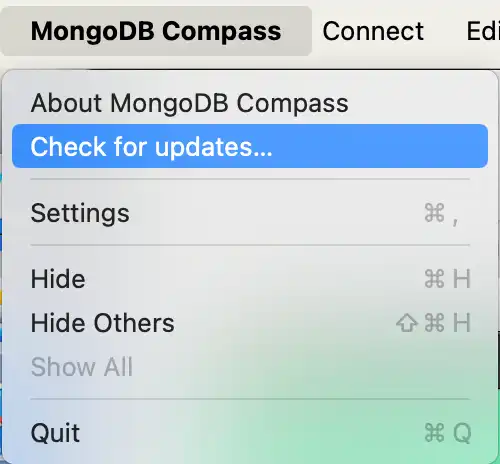
If an update is available, Compass shows a notification that asks if you want to install and restart the application immediately.如果有可用的更新,Compass会显示一条通知,询问您是否要立即安装并重新启动应用程序。
While an update is in progress, Compass disables the Check for updates menu option and shows that your machine is installing an update.在更新过程中,Compass会禁用“检查更新”菜单选项,并显示计算机正在安装更新。
Allow Keychain Access for Recent and Favorite Connections允许最近和收藏夹连接的钥匙链访问
On macOS systems, the first time that you update MongoDB Compass to version 1.20 or later, you will need to allow access to your system storage for each saved connection in Recents and Favorites.在macOS系统上,当您第一次将MongoDB Compass更新到1.20或更高版本时,您需要允许在“最近使用”和“收藏夹”中为每个保存的连接访问系统存储。
When prompted for your keychain password, click Always Allow to prevent being prompted for your password in the future. This ensures MongoDB Compass has access to your saved connections when updating to new versions.当系统提示您输入钥匙链密码时,单击“始终允许”以防止将来提示您输入密码。这确保了MongoDB Compass在更新到新版本时可以访问您保存的连接。
Migrate to Compass from Compass Community从Compass社区迁移到Compass
To migrate from Compass Community edition to the fully-featured edition of Compass and retain any saved data such as saved connection strings and favorite queries, you must migrate that data to your new edition of MongoDB Compass.要从Compass社区版迁移到功能齐全的Compass版本并保留任何已保存的数据,如已保存的连接字符串和收藏夹查询,您必须将这些数据迁移到新版本的MongoDB Compass。
MongoDB Compass stores saved connections, queries, and aggregation pipelines in folders in your file system. You can copy these folders to the corresponding folder for your upgraded Compass version to avoid recreating your saved data.MongoDB Compass将保存的连接、查询和聚合管道存储在文件系统中的文件夹中。您可以将这些文件夹复制到升级后的Compass版本的相应文件夹中,以避免重新创建保存的数据。
Procedure过程
Download the fully-featured edition of MongoDB Compass from the downloads page.从下载页面下载功能齐全的MongoDB Compass版本。Refer to the following table to see where your MongoDB Compass data is stored based on your operating system:请参阅下表,了解MongoDB Compass数据根据操作系统存储在哪里:Operating System操作系统Data Location数据位置macOS ~/Library/Application Support/MongoDB Compass CommunityWindows %APPDATA%/MongoDB Compass CommunityLinux One of either:其中之一:$XDG_CONFIG_HOME/MongoDB Compass Community/~/.config/MongoDB Compass Community
Copy the following folders from your Compass Community edition folder to your fully-featured Compass folder:将以下文件夹从Compass社区版文件夹复制到功能齐全的Compass文件夹:ConnectionsFavoriteQueriesRecentQueriesSavedPipelines
The fully-featured Compass folder is located in the same directory as your Compass Community edition folder.功能齐全的Compass文件夹与Compass社区版文件夹位于同一目录中。Launch the fully-featured edition of MongoDB Compass.推出功能齐全的MongoDB Compass版本。