Overview概述
In this guide, you can learn how to store and retrieve large files in MongoDB using GridFS. GridFS is a specification that describes how to split files into chunks during storage and reassemble them during retrieval. 在本指南中,您可以学习如何使用GridFS在MongoDB中存储和检索大文件。GridFS是一个规范,描述了如何在存储过程中将文件拆分为块,并在检索过程中重新组装它们。The driver implementation of GridFS manages the operations and organization of the file storage.GridFS的驱动程序实现管理文件存储的操作和组织。
Use GridFS if the size of your file exceeds the BSON-document size limit of 16 megabytes. For more detailed information on whether GridFS is suitable for your use case, see the GridFS Server manual page.如果文件大小超过BSON文档大小限制16 MB,请使用GridFS。有关GridFS是否适合您的用例的更多详细信息,请参阅GridFS服务器手册页。
Navigate the following sections to learn more about GridFS operations and implementation:浏览以下部分以了解有关GridFS操作和实现的更多信息:
How GridFS WorksGridFS的工作原理
GridFS organizes files in a bucket, a group of MongoDB collections that contain the chunks of files and descriptive information. Buckets contain the following collections, named using the convention defined in the GridFS specification:GridFS将文件组织在一个桶中,桶是一组包含文件块和描述性信息的MongoDB集合。桶包含以下集合,使用GridFS规范中定义的约定命名:
Thechunkscollection stores the binary file chunks.chunks集合存储二进制文件块。Thefilescollection stores the file metadata.files集合存储文件元数据。
When you create a new GridFS bucket, the driver creates the 当您创建新的GridFS 桶时,驱动程序会创建chunks and files collections, prefixed with the default bucket name fs, unless you specify a different name. The driver also creates an index on each collection to ensure efficient retrieval of files and related metadata. chunks和files集合,前缀为默认桶名称fs,除非您指定了其他名称。驱动程序还为每个集合创建索引,以确保高效检索文件和相关元数据。The driver only creates the GridFS bucket on the first write operation if it does not already exist. The driver only creates indexes if they do not exist and when the bucket is empty. For more information on GridFS indexes, see the Server manual page on GridFS Indexes.如果GridFS 桶不存在,驱动程序仅在第一次写入操作时创建它。驱动程序仅在索引不存在且桶为空时创建索引。有关GridFS索引的更多信息,请参阅GridFS索引上的服务器手册页。
When storing files with GridFS, the driver splits the files into smaller pieces, each represented by a separate document in the 当使用GridFS存储文件时,驱动程序将文件拆分为更小的部分,每个部分由chunks collection. chunks集合中的单独文档表示。It also creates a document in the 它还在文件集合中创建一个文档,其中包含唯一的文件id、文件名和其他文件元数据。您可以从内存或流中上传文件。下图描述了GridFS在上传到桶时如何拆分文件:files collection that contains a unique file id, file name, and other file metadata. You can upload the file from memory or from a stream. The following diagram describes how GridFS splits files when uploading to a bucket:
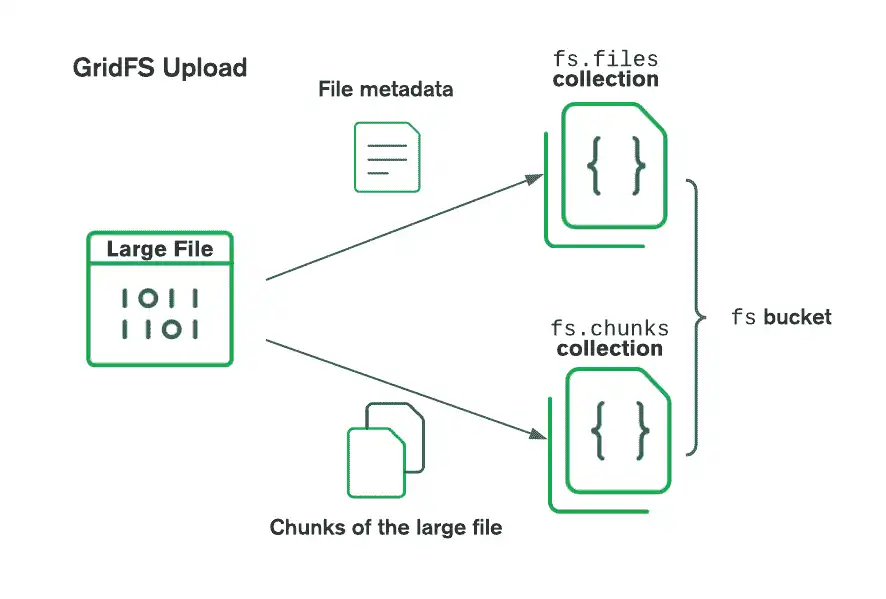
When retrieving files, GridFS fetches the metadata from the 检索文件时,GridFS从指定桶中的files collection in the specified bucket and uses the information to reconstruct the file from documents in the chunks collection. You can read the file into memory or output it to a stream.files集合中获取元数据,并使用该信息从chunks集合中的文档重建文件。您可以将文件读入内存或将其输出到流中。
Create a GridFS Bucket创建GridFS 桶
Create a bucket or get a reference to an existing one to begin storing or retrieving files from GridFS. Create a 创建一个桶或获取对现有桶的引用,以开始从GridFS存储或检索文件。创建一个GridFSBucket instance, passing a database as the parameter. You can then use the GridFSBucket instance to call read and write operations on the files in your bucket:GridFSBucket实例,传递一个数据库作为参数。然后,您可以使用GridFSBucket实例对桶中的文件调用读写操作:
const db = client.db(dbName);
const bucket = new mongodb.GridFSBucket(db);
Pass your bucket name as the second parameter to the 将桶名称作为第二个参数传递给create() method to create or reference a bucket with a custom name other than the default name fs, as shown in the following example:create()方法,以创建或引用具有默认名称fs以外的自定义名称的桶,如下例所示:
const bucket = new mongodb.GridFSBucket(db, { bucketName: 'myCustomBucket' });For more information, see the GridFSBucket API documentation.有关更多信息,请参阅GridFSBucket API文档。
Upload Files上传文件
Use the 使用openUploadStream() method from GridFSBucket to create an upload stream for a given file name. You can use the pipe() method to connect a Node.js read stream to the upload stream. GridFSBucket中的openUploadStream()方法为给定的文件名创建上传流。您可以使用pip()方法将Node.js读取流连接到上传流。The openUploadStream() method allows you to specify configuration information such as file chunk size and other field/value pairs to store as metadata.openUploadStream()方法允许您指定配置信息,如文件块大小和其他字段/值对,以存储为元数据。
The following example shows how to pipe a Node.js read stream, represented by the variable 以下示例显示了如何将Node.js读取流(由变量fs, to the openUploadStream() method of a GridFSBucket instance:fs表示)管道传输到GridFSBucket实例的openUploadStream()方法:
fs.createReadStream('./myFile').
     pipe(bucket.openUploadStream('myFile', {
         chunkSizeBytes: 1048576,
         metadata: { field: 'myField', value: 'myValue' }
     }));
See the openUploadStream() API documentation for more information.有关更多信息,请参阅openUploadStream()API文档。
Retrieve File Information检索文件信息
In this section, you can learn how to retrieve file metadata stored in the 在本节中,您可以学习如何检索存储在GridFS 桶的files collection of the GridFS bucket. The metadata contains information about the file it refers to, including:files集合中的文件元数据。元数据包含有关它所引用的文件的信息,包括:
The文件的_idof the file_idThe name of the file文件的名称The length/size of the file文件的长度/大小The upload date and time上传日期和时间A一个metadatadocument in which you can store any other informationmetadata文档,您可以在其中存储任何其他信息
Call the 调用find() method on the GridFSBucket instance to retrieve files from a GridFS bucket. The method returns a FindCursor instance from which you can access the results.GridFSBucket实例上的find()方法从GridFS 桶中检索文件。该方法返回一个FindCursor实例,您可以从中访问结果。
The following code example shows you how to retrieve and print file metadata from all your files in a GridFS bucket. Among the different ways that you can traverse the retrieved results from the 以下代码示例向您展示了如何从GridFS 桶中的所有文件中检索和打印文件元数据。在遍历FindCursor iterable, the following example uses the for await...of syntax to display the results:FindCursor可迭代对象检索结果的不同方法中,以下示例使用for await...of语法用于显示结果:
const cursor = bucket.find({});
for await (const doc of cursor) {
   console.log(doc);
}
The find() method accepts various query specifications and can be combined with other methods such as sort(), limit(), and project().find()方法接受各种查询规范,可以与sort()、limit()和project()等其他方法组合使用。
For more information on the classes and methods mentioned in this section, see the following resources:有关本节中提到的类和方法的更多信息,请参阅以下资源:
Download Files下载文件
You can download files from your MongoDB database by using the 您可以使用openDownloadStreamByName() method from GridFSBucket to create a download stream.GridFSBucket中的openDownloadStreamByName()方法从MongoDB数据库下载文件,以创建下载流。
The following example shows you how to download a file referenced by the file name, stored in the 以下示例显示了如何将存储在filename field, into your working directory:filename字段中的文件名引用的文件下载到工作目录中:
bucket.openDownloadStreamByName('myFile').
     pipe(fs.createWriteStream('./outputFile'));
Note
If there are multiple documents with the same 如果有多个文档具有相同的filename value, GridFS will stream the most recent file with the given name (as determined by the uploadDate field).filename值,GridFS将以给定的名称(由uploadDate字段确定)流式传输最新的文件。
Alternatively, you can use the 或者,您可以使用openDownloadStream() method, which takes the _id field of a file as a parameter:openDownloadStream()方法,该方法将文件的_id字段作为参数:
bucket.openDownloadStream(ObjectId("60edece5e06275bf0463aaf3")).
     pipe(fs.createWriteStream('./outputFile'));
Note
The GridFS streaming API cannot load partial chunks. When a download stream needs to pull a chunk from MongoDB, it pulls the entire chunk into memory. The 255 kilobyte default chunk size is usually sufficient, but you can reduce the chunk size to reduce memory overhead.GridFS流API无法加载部分块。当下载流需要从MongoDB中提取一个块时,它会将整个块拉入内存。255千字节的默认块大小通常就足够了,但您可以减小块大小以减少内存开销。
For more information on the 有关openDownloadStreamByName() method, see its API documentation.openDownloadStreamByName()方法的更多信息,请参阅其API文档。
Rename Files文件重命名
Use the 使用rename() method to update the name of a GridFS file in your bucket. You must specify the file to rename by its _id field rather than its file name.rename()方法更新桶中GridFS文件的名称。您必须通过_id字段而不是文件名指定要重命名的文件。
Note
The rename() method only supports updating the name of one file at a time. To rename multiple files, retrieve a list of files matching the file name from the bucket, extract the _id field from the files you want to rename, and pass each value in separate calls to the rename() method.rename()方法一次只支持更新一个文件的名称。要重命名多个文件,请从桶中检索与文件名匹配的文件列表,从要重命名的文件中提取_id字段,并在单独的调用中将每个值传递给rename()方法。
The following example shows how to update the 以下示例显示了如何通过引用文档的filename field to "newFileName" by referencing a document's _id field:_id字段将文件名字段更新为“newFileName”:
bucket.rename(ObjectId("60edece5e06275bf0463aaf3"), "newFileName");For more information on this method, see the rename() API documentation.有关此方法的更多信息,请参阅rename()API文档。
Delete Files删除文件
Use the 使用delete() method to remove a file from your bucket. You must specify the file by its _id field rather than its file name.delete()方法从桶中删除文件。您必须通过_id字段而不是文件名指定文件。
Note
The delete() method only supports deleting one file at a time. To delete multiple files, retrieve the files from the bucket, extract the _id field from the files you want to delete, and pass each value in separate calls to the delete() method.delete()方法一次只支持删除一个文件。要删除多个文件,请从桶中检索文件,从要删除的文件中提取_id字段,并在单独的调用中将每个值传递给delete()方法。
The following example shows you how to delete a file by referencing its 以下示例显示了如何通过引用文件的_id field:_id字段来删除文件:
bucket.delete(ObjectId("60edece5e06275bf0463aaf3"));For more information on this method, see the delete() API documentation.有关此方法的更多信息,请参阅delete()API文档。
Delete a GridFS Bucket删除GridFS桶
Use the 使用drop() method to remove a bucket's files and chunks collections, which effectively deletes the bucket. The following code example shows you how to delete a GridFS bucket:drop()方法删除桶的files和chunks集合,这有效地删除了桶。以下代码示例显示了如何删除GridFS 桶:
bucket.drop();For more information on this method, see the drop() API documentation.有关此方法的更多信息,请参阅drop()API文档。