Overview概述
This guide shows you how to create an application that uses the MongoDB Node.js driver to connect to a MongoDB cluster hosted on MongoDB Atlas. The Node.js driver is a library of functions that you can use to connect to and communicate with MongoDB.本指南向您展示了如何创建一个使用MongoDB Node.js驱动程序连接到MongoDB Atlas上托管的MongoDB集群的应用程序。Node.js驱动程序是一个函数库,您可以使用它连接到MongoDB并与之通信。
Tip
MongoDB Atlas is a fully managed cloud database service that hosts your MongoDB deployments. You can create your own free (no credit card required) MongoDB Atlas deployment by following the steps in this guide.MongoDB Atlas是一个完全托管的云数据库服务,可以托管您的MongoDB部署。您可以按照本指南中的步骤创建自己的免费(不需要信用卡)MongoDB Atlas部署。
Follow the steps in this guide to connect a sample Node.js application to a MongoDB Atlas deployment. If you prefer to connect to MongoDB using a different driver or programming language, see our list of official drivers.按照本指南中的步骤将示例Node.js应用程序连接到MongoDB Atlas部署。如果您更喜欢使用其他驱动程序或编程语言连接到MongoDB,请参阅官方驱动程序列表。
Download and Install下载并安装
Install dependencies安装依赖项
Ensure you have the following dependencies installed in your development environment:确保在开发环境中安装了以下依赖项:
Node.js v16.20.1 or laterNode.js v16.20.1或更高版本npm
(Node Package Manager)(Node包管理器)
To learn how to install Node.js and npm, see Downloading and installing Node.js and npm in the npm documentation.要了解如何安装Node.js和npm,请参阅npm文档中的下载和安装Node.js与npm。
Create a project directory创建项目目录
In your shell, run the following command to create a directory called 在shell中,运行以下命令为此项目创建一个名为node_quickstart for this project:node_quickstart的目录:
mkdir node_quickstartThen, run the following commands to navigate into the directory and initialize your Node.js project:然后,运行以下命令导航到目录并初始化Node.js项目:
cd node_quickstart
npm init -y
When the initialization command successfully completes, you have a 当初始化命令成功完成时,您的package.json file in your node_quickstart directory.node_quickstart目录中有一个package.json文件。
Install the Node.js Driver安装Node.js驱动程序
Run the following command from your project directory to install the driver:从项目目录运行以下命令以安装驱动程序:
npm install mongodb@7.0This command performs the following actions:此命令执行以下操作:
Downloads the下载mongodbpackage and the dependencies it requiresmongodb包及其所需的依赖项Saves the package in the将包保存在node_modulesdirectorynode_modules目录中Records the dependency information in the在package.jsonfilepackage.json文件中记录依赖关系信息
After you complete these steps, you have a new project directory with the driver dependencies installed.完成这些步骤后,您将有一个安装了驱动程序依赖项的新项目目录。
Create a MongoDB Deployment创建MongoDB部署
You can create a free tier MongoDB deployment on MongoDB Atlas to store and manage your data. MongoDB Atlas hosts and manages your MongoDB database in the cloud.您可以在MongoDB Atlas上创建一个免费的MongoDB部署层来存储和管理您的数据。MongoDB Atlas在云中托管和管理您的MongoDB数据库。
Create a free MongoDB deployment on Atlas在Atlas上创建免费的MongoDB部署
Complete the MongoDB Get Started guide to set up a new Atlas account and load sample data into a new free tier MongoDB deployment.完成MongoDB开始使用指南,以设置新的Atlas帐户并将示例数据加载到新的免费层MongoDB部署中。
After you complete these steps, you have a new free tier MongoDB deployment on Atlas, database user credentials, and sample data loaded in your database.完成这些步骤后,您将在Atlas上有一个新的免费层MongoDB部署、数据库用户凭据和加载到数据库中的示例数据。
Create a Connection String创建连接字符串
You can connect to your MongoDB deployment by providing a connection URI, also called a connection string, which instructs the driver on how to connect to a MongoDB deployment and how to behave while connected.您可以通过提供连接URI(也称为连接字符串)连接到您的MongoDB部署,该URI指示驱动程序如何连接到MongoDB部署以及连接时的行为。
The connection string includes the hostname or IP address and port of your deployment, the authentication mechanism, user credentials when applicable, and connection options.连接字符串包括部署的主机名或IP地址和端口、身份验证机制、用户凭据(如适用)和连接选项。
Find your MongoDB Atlas connection string查找您的MongoDB Atlas连接字符串
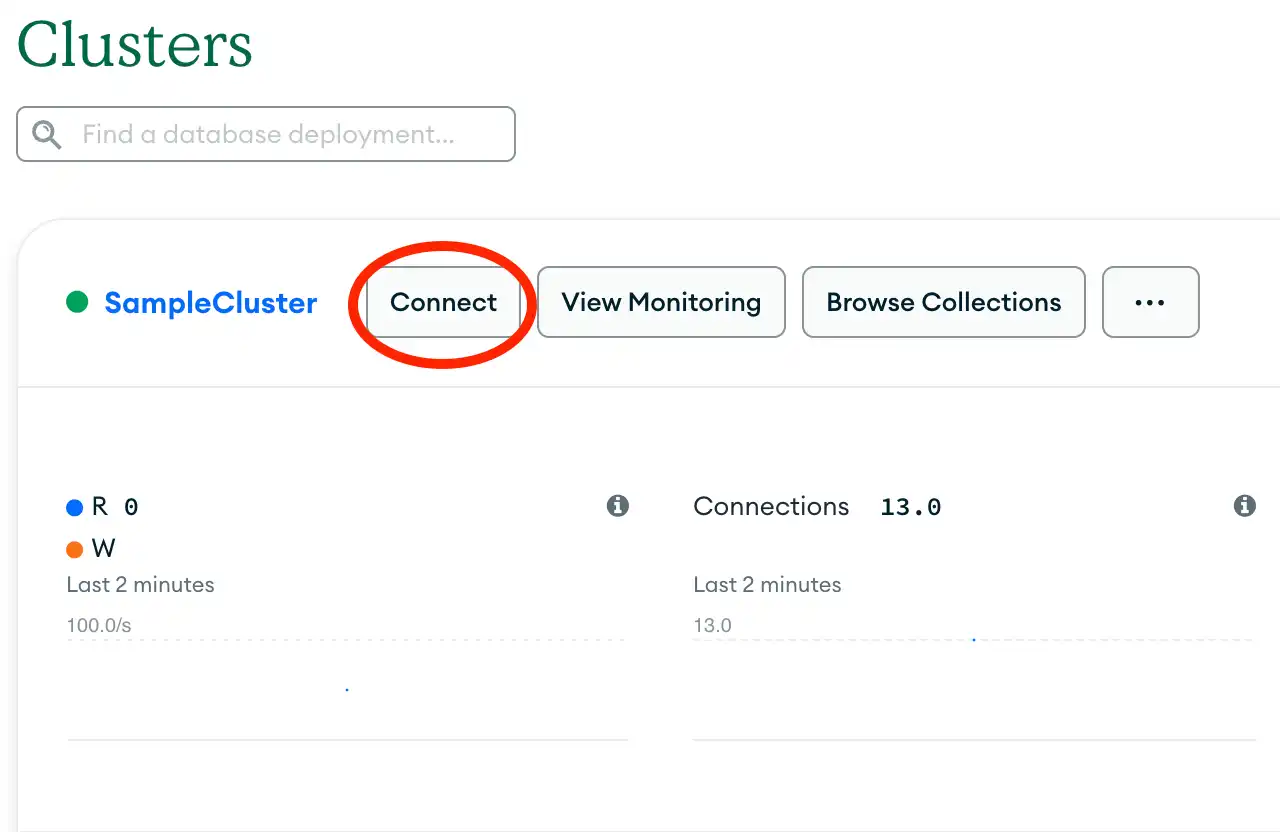
To retrieve your connection string for the deployment that you created in the previous section, log into your Atlas account and navigate to the Clusters section and click the Connect button for your new deployment.要检索您在上一节中创建的部署的连接字符串,请登录您的Atlas帐户并导航到“聚集”部分,然后单击新部署的“连接”按钮。
Copy your connection string复制您的连接字符串
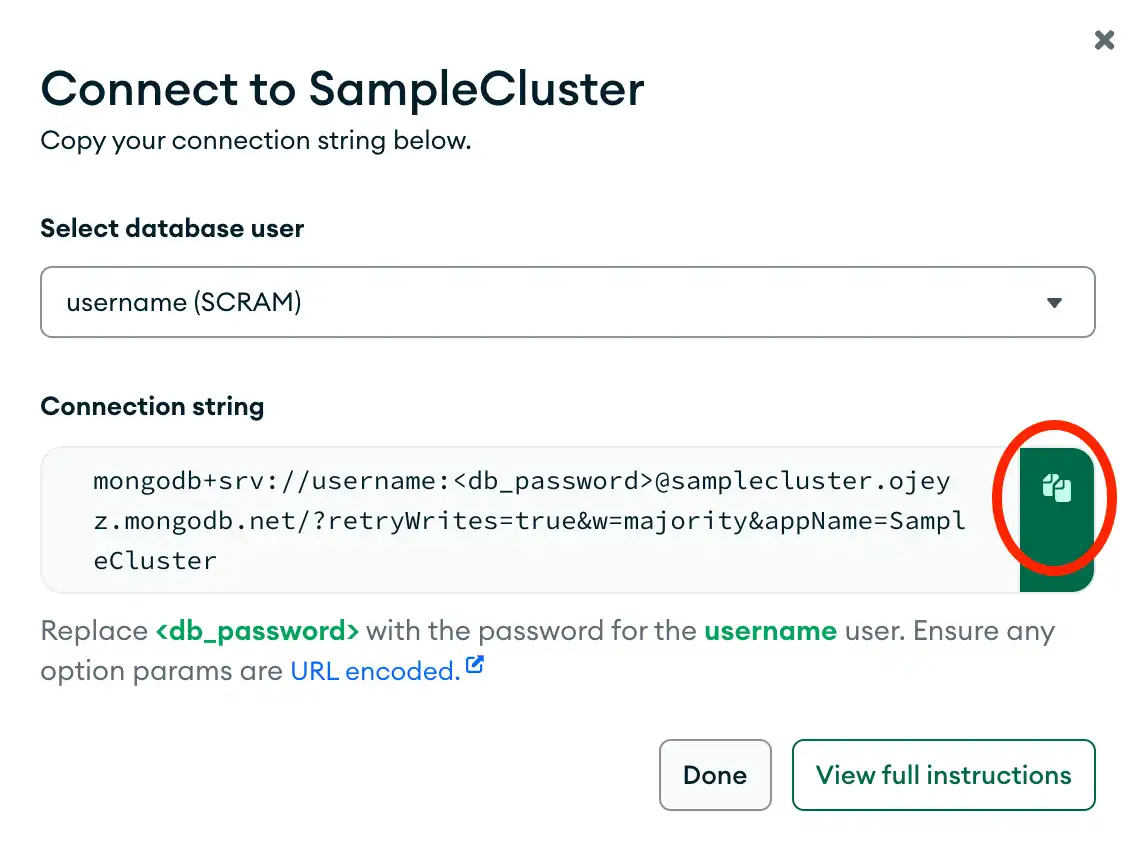
Click the button on the right of the connection string to copy it to your clipboard, as shown in the following screenshot:单击连接字符串右侧的按钮将其复制到剪贴板,如下图所示:
Update the placeholders更新占位符
Paste your connection string into a file in your preferred text editor and replace the 将连接字符串粘贴到首选文本编辑器中的文件中,并将username and <db_password> placeholders with your database user's username and password.username和<db_password>占位符替换为数据库用户的用户名和密码。
Save this file to a safe location for use in the next section.将此文件保存到安全位置,以便在下一节中使用。
After completing these steps, you have a connection string that contains your database username and password.完成这些步骤后,您将获得一个包含数据库用户名和密码的连接字符串。
Connect to MongoDB连接到MongoDB
Create your Node.js application创建Node.js应用程序
In your 在node_quickstart directory, create a file called index.js for your application.node_quickstart目录中,为您的应用程序创建一个名为index.js的文件。
Copy and paste the following code into the 将以下代码复制并粘贴到index.js file:index.js文件中:
const { MongoClient } = require('mongodb');

async function runGetStarted() {
  // Replace the uri string with your connection string将uri字符串替换为连接字符串
  const uri = '<connection string URI>';
  const client = new MongoClient(uri);

  try {
    const database = client.db('sample_mflix');
    const movies = database.collection('movies');

    // Queries for a movie that has a title value of 'Back to the Future'查询标题值为“回到未来”的电影
    const query = { title: 'Back to the Future' };
    const movie = await movies.findOne(query);

    console.log(movie);
  } finally {
    await client.close();
  }
}
runGetStarted().catch(console.dir);Assign the connection string指定连接字符串
Replace the 将<connection string uri> placeholder with the connection string that you copied from the Create a Connection String step of this guide.<connection string uri>占位符替换为您从本指南的“创建连接字符串”步骤中复制的连接字符串。
Run your Node.js application运行Node.js应用程序
From your project directory, run the following command to start the application:在项目目录中,运行以下命令以启动应用程序:
node index.jsThe output includes details about the retrieved movie document:输出包括有关检索到的电影文档的详细信息:
{
  _id: ...,
  plot: 'A young man is accidentally sent 30 years into the past...',
  genres: [ 'Adventure', 'Comedy', 'Sci-Fi' ],
  ...
  title: 'Back to the Future',
  ...
}
If you encounter an error or see no output, verify that you specified the proper connection string in the 如果遇到错误或没有看到输出,请验证是否在index.js file and that you loaded the sample data.index.js文件中指定了正确的连接字符串,以及是否加载了示例数据。
After you complete these steps, you have a working application that uses the driver to connect to your MongoDB deployment, query the sample data, and print out the result.完成这些步骤后,您就有了一个工作应用程序,它使用驱动程序连接到您的MongoDB部署,查询示例数据,并打印出结果。
Next Steps后续步骤
Congratulations on completing the quick start tutorial!恭喜您完成快速入门教程!
Note
If you run into issues on this step, ask for help by using the MongoDB Stack Overflow tag or the MongoDB Reddit community. 如果你在这一步遇到问题,请使用MongoDB Stack Overflow标签或MongoDB Reddit社区寻求帮助。You can submit feedback by using the Rate this page tab on the right or bottom right side of this page.您可以使用此页面右侧或右下角的“评价此页面”选项卡提交反馈。
In this tutorial, you created a Node.js application that connects to a MongoDB deployment hosted on MongoDB Atlas and retrieves a document that matches a query.在本教程中,您创建了一个Node.js应用程序,该应用程序连接到MongoDB Atlas上托管的MongoDB部署,并检索与查询匹配的文档。
Learn more about the Node.js driver from the following resources:从以下资源中了解有关Node.js驱动程序的更多信息:
Discover how to configure your MongoDB connection in the Connect to MongoDB section.在连接到MongoDB部分了解如何配置MongoDB连接。Discover how to perform read and write operations in the CRUD Operations section.在CRUD操作部分了解如何执行读写操作。