Overview概述
Learn about the Key Management System (KMS) providers In-Use Encryption supports.了解键管理系统(KMS)提供商的使用中加密支持。
Reasons to Use a Remote Key Management System使用远程键管理系统的原因
Using a remote Key Management System to manage your Customer Master Key has the following advantages over using your local filesystem to host it:与使用本地文件系统托管客户主键相比,使用远程键管理系统管理客户主键具有以下优势:
Secure storage of the key with access auditing通过访问审核安全存储键Reduced risk of access permission issues降低访问权限问题的风险Availability and distribution of the key to remote clients键的可用性和向远程客户端的分发Automated key backup and recovery自动键备份和恢复Centralized encryption key lifecycle management集中式加密键生命周期管理
Additionally, for the following KMS providers, your KMS remotely encrypts and decrypts your Data Encryption Key, ensuring your Customer Master Key is never exposed to your Queryable Encryption or CSFLE enabled application:此外,对于以下KMS提供商,KMS会远程加密和解密数据加密键,确保客户主键永远不会暴露给可查询加密或启用CSFLE的应用程序:
Amazon Web Services KMS亚马逊网络服务KMSAzure Key VaultAzure键库Google Cloud KMS谷歌云KMS
Key Management System Tasks关键管理系统任务
In In-Use Encryption, your Key Management System:在使用加密中,键管理系统:
Creates and encrypts the Customer Master Key创建并加密客户主键Encrypts the Data Encryption Keys created by your application对应用程序创建的数据加密键进行加密Decrypts Data Encryption Keys解密数据加密键
To learn more about Customer Master Keys and Data Encryption Keys, see Encryption Keys and Key Vaults.要了解有关客户主键和数据加密键的更多信息,请参阅加密键和键库。
Create and Store your Customer Master Key创建并存储客户主键
To create a Customer Master Key, configure your Key Management System to generate your Customer Master Key as follows:要创建客户主键,请按如下方式配置键管理系统以生成客户主键:
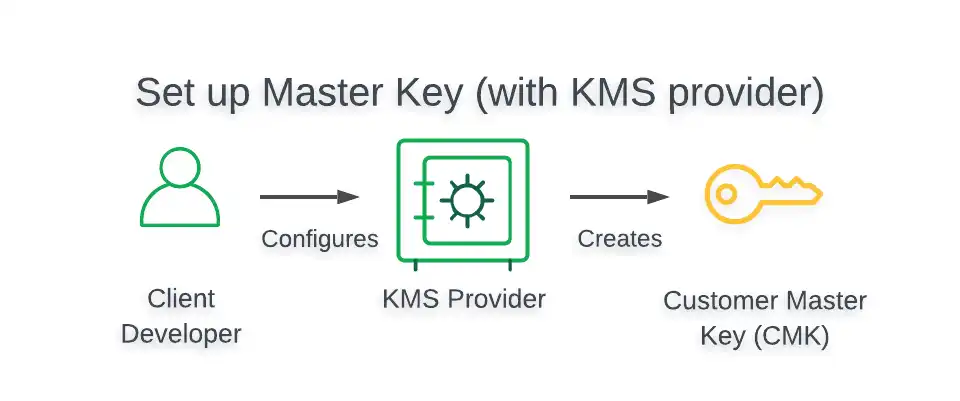
To view a tutorial that demonstrates how to create and store a CMK in your preferred KMS, see the Queryable Encryption Automatic Encryption Tutorial or CSFLE Automatic Encryption Tutorial.要查看演示如何在首选KMS中创建和存储CMK的教程,请参阅可查询加密自动加密教程或CSFLE自动加密教程。
Create and Encrypt a Data Encryption Key创建并加密数据加密键
To create a Data Encryption Key:要创建数据加密键,请执行以下操作:
Instantiate a在可查询加密或启用CSFLE的应用程序中实例化ClientEncryptioninstance in your Queryable Encryption or CSFLE enabled application:ClientEncryption实例:Provide a提供一个kmsProvidersobject that specifies the credentials your application uses to authenticate with your KMS provider.kmsProviders对象,该对象指定应用程序用于向KMS提供商进行身份验证的凭据。
Create a Data Encryption Key with the使用应用程序中CreateDataKeymethod of theClientEncryptionobject in your application.ClientEncryption对象的CreateDataKey方法创建数据加密键。Provide a提供一个dataKeyOptsobject that specifies with which key your KMS should encrypt your new Data Encryption Key.dataKeyOpts对象,指定KMS应使用哪个键加密新的数据加密键。
To view a tutorial demonstrating how to create and encrypt a Data Encryption Key, see the following resources:要查看演示如何创建和加密数据加密键的教程,请参阅以下资源:
Queryable Encryption Quick Start可查询加密快速入门Queryable Encryption Automatic Encryption Tutorial可查询加密自动加密教程CSFLE Quick StartCSFLE快速入门CSFLE Automatic Encryption TutorialCSFLE自动加密教程
To view the structure of 要查看所有支持的KMS提供程序的kmsProviders and dataKeyOpts objects for all supported KMS providers, see Supported Key Management Services.kmsParoviders和dataKeyOpts对象的结构,请参阅支持的键管理服务。
Supported Key Management Services支持的键管理服务
The following sections of this page present the following information for all Key Management System providers:本页的以下部分提供了所有键管理系统提供商的以下信息:
Architecture of In-Use Encryption enabled client启用加密的客户端架构Structure ofkmsProvidersobjectskmsProvider对象的结构Structure ofdataKeyOptsobjectsdataKeyOpts对象的结构
Both Queryable Encryption and CSFLE support the following Key Management System providers:可查询加密和CSFLE都支持以下键管理系统提供程序:
Amazon Web Services KMS亚马逊网络服务KMSAzure Key VaultAzure键库Google Cloud Platform KMS谷歌云平台KMS- KMIP
Local Key Provider本地键提供者
Amazon Web Services KMS亚马逊网络服务KMS
This section provides information related to using AWS Key Management Service in your Queryable Encryption or CSFLE enabled application.本节提供有关在可查询加密或启用CSFLE的应用程序中使用AWS键管理服务的信息。
To view a tutorial demonstrating how to use AWS KMS in your application, see Overview: Enable Queryable Encryption or Use Automatic Client-Side Field Level Encryption with AWS.要查看演示如何在应用程序中使用AWS KMS的教程,请参阅概述:启用可查询加密或使用AWS的自动客户端字段级加密。
Architecture建筑
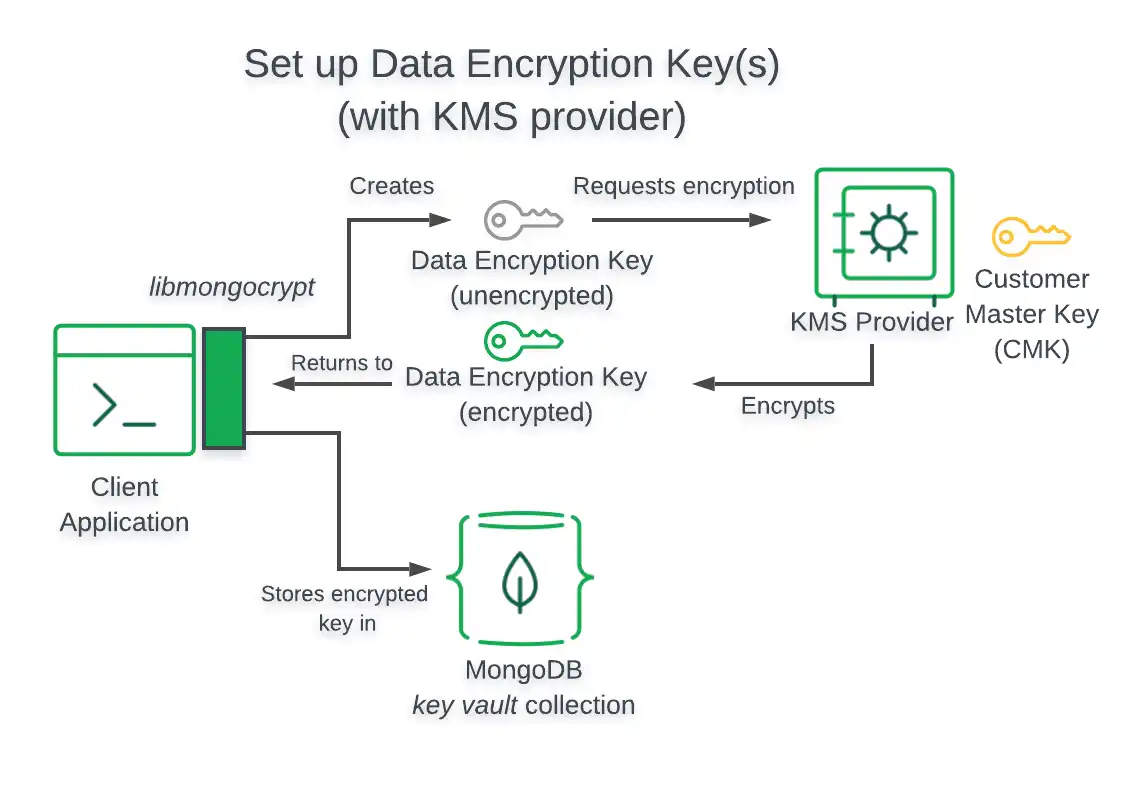
The following diagram describes the architecture of a Queryable Encryption enabled application using AWS KMS.下图描述了使用AWS KMS的启用可查询加密的应用程序的架构。
Note
Client Can't Access Customer Master Key客户端无法访问客户主键
When using the preceding Key Management System, your Queryable Encryption enabled application does not have access to your Customer Master Key.使用上述键管理系统时,启用了可查询加密的应用程序无法访问客户主键。
kmsProviders Object对象
The following table presents the structure of a 下表显示了AWS KMS的kmsProviders object for AWS KMS:kmsProviders对象的结构:
| Access Key ID | Yes | Yes | |
| Secret Access Key | Yes | Yes | |
| Session Token | No | Yes |
dataKeyOpts Object对象
The following table presents the structure of a 下表显示了AWS KMS的dataKeyOpts object for AWS KMS:dataKeyOpts对象的结构:
key | Yes | |
region | No | |
endpoint | No |
Azure Key VaultAzure键库
This section provides information related to using Azure Key Vault in your Queryable Encryption or CSFLE enabled application.本节提供有关在可查询加密或启用CSFLE的应用程序中使用Azure键库的信息。
To view a tutorial demonstrating how to use Azure Key Vault in your application, see Overview: Enable Queryable Encryption or Use Automatic Client-Side Field Level Encryption with Azure.要查看演示如何在应用程序中使用Azure键库的教程,请参阅概述:启用可查询加密或使用Azure的自动客户端字段级加密。
Architecture架构
The following diagram describes the architecture of a Queryable Encryption enabled application using Azure Key Vault.下图描述了使用Azure键库的启用可查询加密的应用程序的体系结构。
Note
Client Can't Access Customer Master Key客户端无法访问客户主键
When using the preceding Key Management System, your Queryable Encryption enabled application does not have access to your Customer Master Key.使用上述键管理系统时,启用了可查询加密的应用程序无法访问客户主键。
kmsProviders Object对象
The following table presents the structure of a 下表显示了Azure键库的kmsProviders object for Azure Key Vault:kmsProviders对象的结构:
azure.tenantId | Yes | |
azure.clientId | Yes | |
azure.clientSecret | Yes | |
azure.identityPlatformEndpoint | No |
dataKeyOpts Object对象
The following table presents the structure of a 下表显示了Azure键库的dataKeyOpts object for Azure Key Vault:dataKeyOpts对象的结构:
keyName | Yes | |
keyVersion | ||
keyVaultEndpoint | Yes | myVaultName.vault.azure.net |
Warning
If you do not include a 如果不包含keyVersion field, Azure Key Vault attempts to decrypt Data Encryption Keys using the latest Customer Master Key. keyVersion字段,Azure键库将尝试使用最新的客户主键解密数据加密键。If you rotate the CMK but do not rewrap the Data Encryption Keys with the new master key, attempting to decrypt an existing DEK fails, since the DEK is encrypted with the previous version of the CMK.如果您旋转CMK,但不使用新的主键重写数据加密键,则尝试解密现有的DEK失败,因为DEK是用以前版本的CMK加密的。
Google Cloud Platform KMS谷歌云平台KMS
This section provides information related to using Google Cloud Key Management in your Queryable Encryption or CSFLE enabled application.本节提供有关在可查询加密或启用CSFLE的应用程序中使用Google Cloud键管理的信息。
To view a tutorial demonstrating how to use GCP KMS in your application, see Overview: Enable Queryable Encryption or Use Automatic Client-Side Field Level Encryption with GCP.要查看演示如何在应用程序中使用GCP KMS的教程,请参阅概述:启用可查询加密或使用GCP的自动客户端字段级加密。
Architecture架构
The following diagram describes the architecture of a Queryable Encryption enabled application using GCP KMS.下图描述了使用GCP KMS的启用可查询加密的应用程序的体系结构。
Note
Client Can't Access Customer Master Key客户端无法访问客户主键
When using the preceding Key Management System, your Queryable Encryption enabled application does not have access to your Customer Master Key.使用上述键管理系统时,启用了可查询加密的应用程序无法访问客户主键。
kmsProviders Object对象
The following table presents the structure of a 下表显示了GCP KMS的kmsProviders object for GCP KMS:kmsProviders对象的结构:
email | Yes | |
privateKey | Yes |
|
endpoint | No |
dataKeyOpts Object对象
The following table presents the structure of a 下表显示了GCP KMS的dataKeyOpts object for GCP KMS:dataKeyOpts对象的结构:
projectId | Yes | |
location | Yes | |
keyRing | Yes | |
keyName | Yes | |
keyVersion | No | |
endpoint | No | cloudkms.googleapis.com.cloudkms.googleapis.com。 |
KMIP
This section provides information related to using a KMIP compliant Key Management System in your Queryable Encryption or CSFLE enabled application.本节提供有关在可查询加密或启用CSFLE的应用程序中使用符合KMIP的键管理系统的信息。
To learn how to set up KMIP with HashiCorp Vault, see the How to Set Up HashiCorp Vault KMIP Secrets Engine with MongoDB CSFLE or Queryable Encryption blog post.要了解如何使用HashiCorp Vault设置KMIP,请参阅如何使用MongoDB CSFLE或可查询加密设置HashiCorpVault KMIP键引擎的博客文章。
Architecture架构
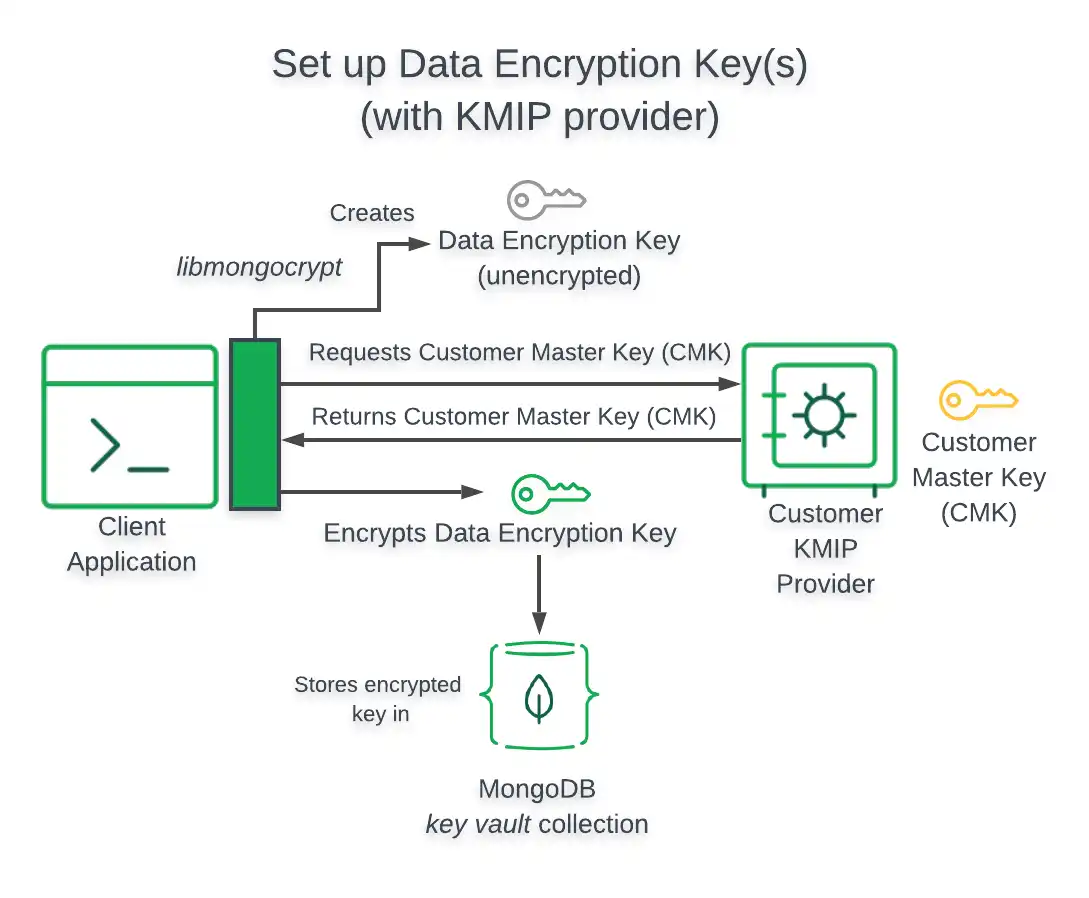
The following diagram describes the architecture of a Queryable Encryption enabled application using a KMIP-compliant key provider.下图描述了使用符合KMIP的键提供程序的启用可查询加密的应用程序的架构。
Important
Client Accesses Customer Master Key客户端访问客户主键
When your Queryable Encryption enabled application uses a KMIP-compliant key provider without specifying the 当启用了可查询加密的应用程序在不指定委托选项的情况下使用delegated option, your application directly accesses your Customer Master Key. delegated(委派)选项设置为true。
kmsProviders Object对象
The following table presents the structure of a 下表显示了符合KMIP的键管理系统的kmsProviders object for a KMIP compliant Key Management System:kmsProviders对象的结构:
Note
Authenticate through TLS/SSL通过TLS/SSL进行身份验证
Your Queryable Encryption enabled application authenticates through TLS/SSL when using KMIP.使用KMIP时,启用了可查询加密的应用程序通过TLS/SSL进行身份验证。
endpoint | Yes |
dataKeyOpts Object对象
The following table presents the structure of a 下表显示了符合KMIP的键管理系统的dataKeyOpts object for a KMIP compliant Key Management System:dataKeyOpts对象的结构:
keyId | No |
|
endpoint | Yes | |
delegated | No |
IMPORTANT: |
Local Key Provider本地键提供者
This section provides information related to using a Local Key Provider in your Queryable Encryption or CSFLE enabled application.本节提供有关在可查询加密或启用CSFLE的应用程序中使用本地键提供程序的信息。
Warning
Secure your Local Key File in Production在生产环境中保护本地键文件
We recommend storing your Customer Master Keys in a remote Key Management System (KMS). To learn how to use a remote KMS in your Queryable Encryption implementation, see the Queryable Encryption Tutorials guide.我们建议将客户主键存储在远程键管理系统(KMS)中。要了解如何在可查询加密实现中使用远程KMS,请参阅可查询加密教程指南。
If you choose to use a local key provider in production, exercise great caution and do not store it on the file system. Consider injecting the key into your client application using a sidecar process, or use another approach that keeps the key secure.如果您选择在生产中使用本地键提供程序,请务必谨慎,不要将其存储在文件系统上。考虑使用sidecar进程将键注入客户端应用程序,或使用另一种确保键安全的方法。
To view a tutorial demonstrating how to use a Local Key Provider for testing Queryable Encryption, see the Queryable Encryption Quick Start or CSFLE Quick Start.要查看演示如何使用本地键提供程序测试可查询加密的教程,请参阅可查询加密快速入门或CSFLE快速入门。
Architecture架构
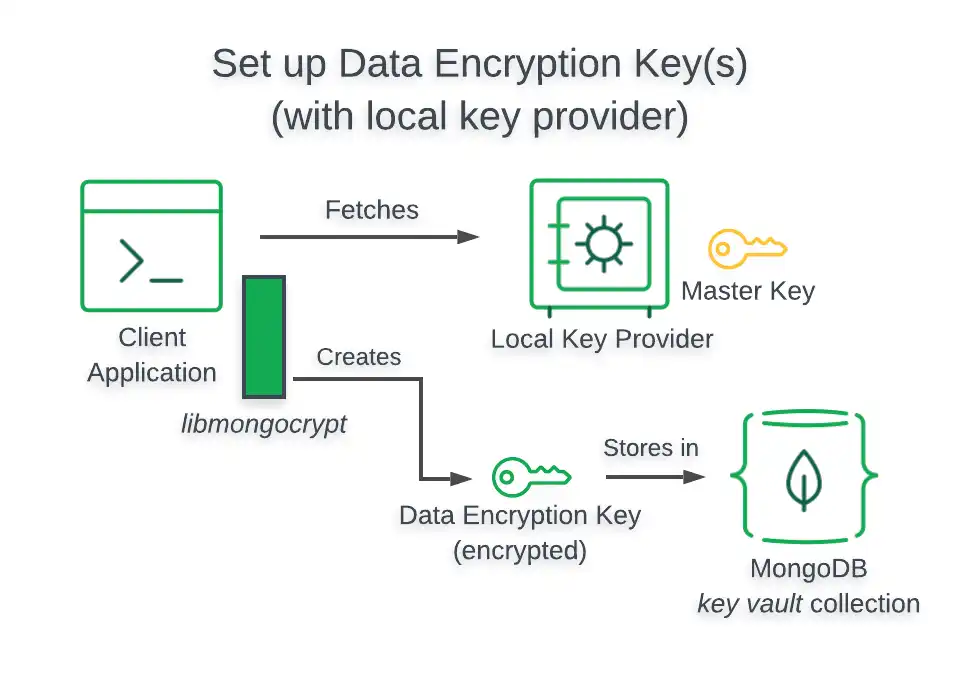
When you use a Local Key Provider for testing, your application retrieves your Customer Master Key from the computer it runs on. To use a Local Key Provider in production, use an approach that doesn't store the key on the file system. For example, you can inject the key into the client process via a sidecar.当您使用本地键提供程序进行测试时,应用程序会从其运行的计算机中检索客户主键。要在生产中使用本地键提供方,请使用不将键存储在文件系统上的方法。例如,您可以通过sidecar将键注入客户端进程。
The following diagram describes the architecture of a Queryable Encryption-enabled application using a Local Key Provider.下图描述了使用本地键提供程序的启用可查询加密的应用程序的体系结构。
kmsProviders Object对象
The following table presents the structure of a 下表显示了本地键提供程序的kmsProviders object for a Local Key Provider:kmsProviders对象的结构:
key | Yes |
dataKeyOpts Object对象
When you use a Local Key Provider, you specify your Customer Master Key through your 当您使用本地键提供程序时,您可以通过kmsProviders object.kmsProviders对象指定客户主键。