Replica set members can use keyfiles to authenticate each other as members of the same deployment.副本集成员可以使用键文件作为同一部署的成员相互进行身份验证。
A keyfile can contain multiple keys and membership authentication is established if at least one key is common across members. This allows for rolling upgrade of the keys without downtime.一个键文件可以包含多个键,如果成员之间至少有一个键是通用的,则建立成员身份验证。这允许在不停机的情况下滚动升级键。
The following tutorial steps through the process to update the key for a replica set without downtime. 以下教程将逐步介绍在不停机的情况下更新副本集键的过程。[1]
Warning
The example keys in this tutorial are for illustrative purposes only. Do NOT use for your deployment. Instead, generate a keyfile using any method you choose (for example, 本教程中的示例键仅用于说明目的。请勿用于部署。相反,使用您选择的任何方法(例如openssl rand -base64 756, etc.).openssl rand -base64 756等)生成键文件。
Consider a replica set where each member's keyfile contains the following key:考虑一个副本集,其中每个成员的键文件都包含以下键:
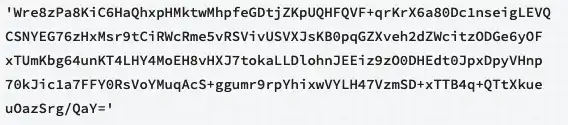
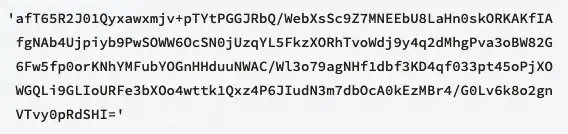
The following procedure updates the replica set members to use a new key:以下过程更新副本集成员以使用新键:
| [1] | |
Procedure过程
1. Modify the Keyfile to Include Old and New Keys修改键文件以包含旧键和新键
Modify each member's keyfile to include both the old and new keys. You can specify multiple keys either as strings enclosed in quotes or as a sequence of keys.修改每个成员的键文件,使其同时包含旧键和新键。您可以将多个键指定为引号括起来的字符串或键序列。
Warning
The example keys in this tutorial are for illustrative purposes only. Do NOT use for your deployment. Instead, generate a keyfile using any method you choose (e.g. 本教程中的示例键仅用于说明目的。请勿用于部署。相反,使用您选择的任何方法(例如openssl rand -base64 756, etc.).openssl rand -base64 756等)生成键文件。
You can specify multiple key strings as a sequence of key strings (optionally enclosed in single or double quotes).您可以将多个键字符串指定为键字符串序列(可选地括在单引号或双引号中)。

2. Restart Each Member重新启动每个成员
Once all the keyfiles contain both the old and new keys, restart each member one at a time.一旦所有键文件都包含新旧键,请一次重新启动每个成员。
For each secondary member, connect 对于每个次要成员,将mongosh to the member and:mongosh连接到该成员,然后:
Use the使用db.shutdownServer()method to shut down the member:db.shutdownServer()方法关闭成员:use admin
db.shutdownServer()Restart the member.重新启动成员。
For the primary, connect 对于primary,将mongosh to the member andmongosh连接到成员,然后
Use使用rs.stepDown()to step down the member:rs.stepDown()来降低成员的级别:rs.stepDown()Use the使用db.shutdownServer()method to shut down the member:db.shutdownServer()方法关闭成员:use admin
db.shutdownServer()Restart the member.重新启动成员。
Since the keyfiles contains both the old and new keys, all members can now accept either keys for membership authentication.由于键文件包含旧键和新键,因此所有成员现在都可以接受任一键进行成员身份验证。
3. Update Keyfile Content to the New Key Only仅将键文件内容更新为新键
Warning
The example keys in this tutorial are for illustrative purposes only. 本教程中的示例键仅用于说明目的。Do NOT use for your deployment. Instead, generate a keyfile using any method you choose (e.g. 请勿用于部署。相反,使用您选择的任何方法(例如openssl rand-base64 756等)生成键文件。openssl rand -base64 756, etc.).
Modify each member's keyfile to include only the new password.修改每个成员的键文件,使其仅包含新密码。
4. Restart Each Member重新启动每个成员
Once all the keyfiles contain the new key only, restart each member one at a time.一旦所有键文件仅包含新键,请一次重新启动每个成员。
For each secondary member, connect 对于每个次要成员,将mongosh to the member and:mongosh连接到该成员,然后:
Use the使用db.shutdownServer()method to shut down the member:db.shutdownServer()方法关闭成员:use admin
db.shutdownServer()Restart the member.重新启动成员。
For the primary, connect 对于primary,将mongosh to the member andmongosh连接到成员,然后
Use使用rs.stepDown()to step down the member:rs.stepDown()来降低成员的级别:rs.stepDown()Use the使用db.shutdownServer()method to shut down the member:db.shutdownServer()方法关闭成员:use admin
db.shutdownServer()Restart the member.重新启动成员。
All members now accept only the new key for membership authentication.所有成员现在只接受用于成员身份验证的新键。