The MongoDB Shell, MongoDB Shell,mongosh, is a JavaScript and Node.js REPL environment for interacting with MongoDB deployments in Atlas, locally, or on another remote host. Use the MongoDB Shell to test queries and interact with the data in your MongoDB database.mongosh,是一个JavaScript和Node.js REPL环境,用于与Atlas中的MongoDB部署、本地或其他远程主机进行交互。使用MongoDB Shell测试查询并与MongoDB数据库中的数据交互。
_Spot.webp)
Access MongoDB From Your Shell从Shell访问MongoDB
Connect to MongoDB连接到MongoDB
Find Your Connection String查找连接字符串
Find your connection string. The connection string varies depending on the type of deployment you're connecting to.查找连接字符串。连接字符串因您连接到的部署类型而异。
Learn how to find your connection string for Atlas.了解如何查找Atlas的连接字符串。
Or connect to a self-hosted deployment.或者连接到自托管部署。
Connect to MongoDB连接到MongoDB
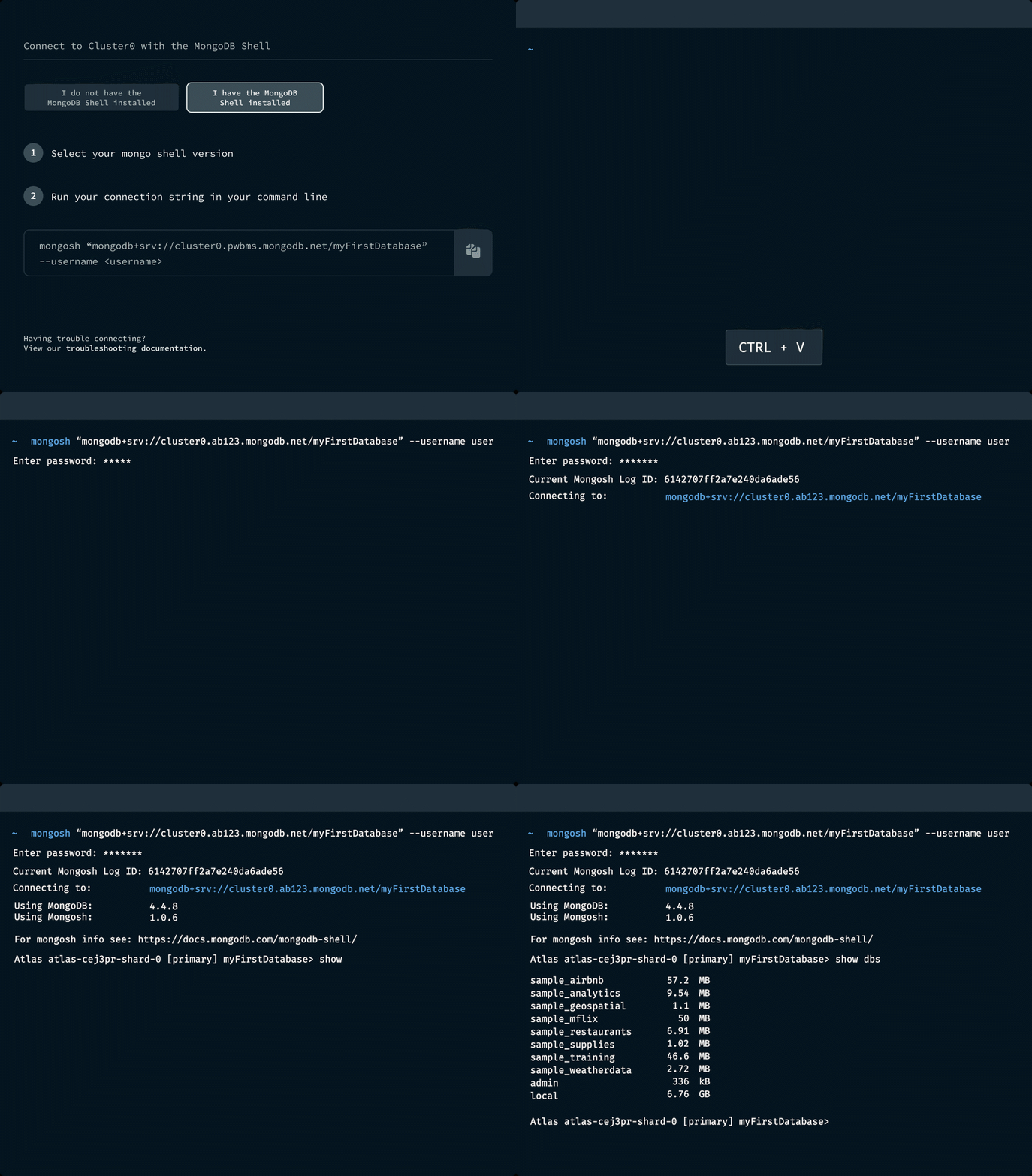
Connect to a MongoDB deployment using the connection string.使用连接字符串连接到MongoDB部署。
The following connection string connects to an Atlas deployment:以下连接字符串连接到Atlas部署:
mongosh "mongodb+srv://mycluster.abcd1.mongodb.net/myFirstDatabase" --apiVersion 1 --username <username>Interact with Your Data与数据交互
Use your chosen connection type to view your data, import documents, and run queries.使用您选择的连接类型查看数据、导入文档和运行查询。
For more information, refer to Perform CRUD Operations.有关更多信息,请参阅执行CRUD操作。
Perform CRUD and Aggregation执行CRUD和聚合
Insert Documents插入文档
mongosh supports common insert opererations, including:支持常见的插入操作,包括:
For more information and examples, refer to Insert Documents.有关更多信息和示例,请参阅插入文档。
Read Documents阅读文档
Use the 使用db.collection.find() method to query documents in a collection. For more information and examples, refer to Query Documents.db.collection.find()方法查询集合中的文档。有关更多信息和示例,请参阅查询文档。
Update Documents更新文档
mongosh supports common update operations, including:支持常见的更新操作,包括:
For more information and examples, refer to Update Documents.有关更多信息和示例,请参阅更新文档。
Delete Documents删除文档
mongosh supports common delete operations, including:支持常见的删除操作,包括:
For more information and examples, refer to Delete Documents.有关更多信息和示例,请参阅删除文档。
Run Aggregation Pipelines运行聚合管道
You can run aggregation pipelines in 您可以使用mongosh using the db.collection.aggregate() method. db.collection.aggregate()方法在mongosh中运行聚合管道。Aggregation pipelines transform your documents into aggregated results based on the stages you specify. For more information and examples, refer to Run Aggregation Pipelines.聚合管道根据您指定的阶段将文档转换为聚合结果。有关更多信息和示例,请参阅运行聚合管道。

Administer and Manage管理和经营
Manage Databases and Collections管理数据库和集合
View information about databases, create collections or views, or drop databases - all from your shell. See all Database Methods.查看有关数据库的信息,创建集合或视图,或删除数据库——所有这些都可以从shell中完成。查看所有数据库方法。
Perform collection operations, create or delete indexes, or explain queries with Collection Methods.执行集合操作,创建或删除索引,或使用集合方法解释查询。
Administer Servers管理服务器
Manage replication or sharding conveniently in your shell.在shell中方便地管理复制或分片。
Check server status with a variety of Server Status Methods.使用各种服务器状态方法检查服务器状态。
Manage Users and Roles管理用户和角色
Create or update roles, define and update privileges, or drop roles using Role Management Methods.使用角色管理方法创建或更新角色、定义和更新权限或删除角色。
Create and update users, authenticate users, and manage user roles with User Management Methods.使用用户管理方法创建和更新用户、对用户进行身份验证和管理用户角色。
_Spot.webp)
Automate with Scripts使用脚本实现自动化
Run Scripts for CRUD or Administrative Tasks运行CRUD或管理任务的脚本
Write scripts to run with the MongoDB Shell that perform CRUD or administrative operations in MongoDB.编写脚本与MongoDB Shell一起运行,在MongoDB中执行CRUD或管理操作。
For example, if you have a JS file that seeds synthetic or mock data into MongoDB in your development or staging environment, run the file with:例如,如果你有一个JS文件,在你的开发或测试环境中将合成或模拟数据种子放入MongoDB中,请使用以下命令运行该文件:
mongosh YOUR_JS_FILENAME.jsExplore a tutorial that uses the MongoDB Shell with JavaScript to access MongoDB: 探索使用MongoDB Shell和JavaScript访问MongoDB的教程:Write Scripts.
Create Custom Helper Functions with .mongoshrc使用.mongoshrc创建自定义帮助函数
Repeatedly writing large helper functions in the Shell? Store them in a .mongoshrc config file. 在Shell中反复编写大型辅助函数?将它们存储在.mongoshrc配置文件中。For example, if you often find yourself converting date strings to ISO format for queries, create a function in 例如,如果您经常发现自己需要将日期字符串转换为ISO格式进行查询,请在.mongoshrc to handle it:.mongoshrc中创建一个函数来处理它:
function toISO(dateString) {
   return new Date(dateString).toISOString();
}
Then, call the function in 然后,在mongosh:mongosh中调用函数:
db.clientConnections.find( { connectTime: toISO("06/07/2017") } )For more information, refer to Execute Code From a Configuration File.有关更多信息,请参阅从配置文件执行代码。
Use or Publish Snippets使用或发布代码段
Pull existing snippets into your codebase for convenient reuse. 将现有的代码片段拉入代码库,以方便重用。Or create and share snippets for your custom use case.或者为自定义用例创建和共享代码片段。
For example, you might have a snippet that validates the data you import daily as a cron job. You can publish this snippet, so your development team can access it. Publish to a community registry or configure a private registry.例如,您可能有一个代码段,用于验证您每天作为cron作业导入的数据。您可以发布此代码段,以便开发团队可以访问它。发布到社区注册表或配置私有注册表。
For more information, refer to Registries and Registry Configuration.有关更多信息,请参阅注册表和注册表配置。
_Spot.webp)
Other Powerful Features其他强大功能

Use an external or built-in editor to work with multiline functions. Go beyond the line-oriented 使用外部或内置编辑器来处理多行函数。超越面向行的mongosh default console.mongosh默认控制台。

Access session logs for any session within the last 30 days. Find the command syntax you can't quite remember, or look for common commands you can script.访问过去30天内任何会话的会话日志。找到你不太记得的命令语法,或者寻找你可以编写脚本的常见命令。

Find out which methods 找出mongosh supports. Get example syntax and parameter details for supported methods.mongosh支持哪些方法。获取支持方法的示例语法和参数详细信息。