Indexes are special data structures that improve query performance. Indexes store a portion of a collection's data in an easy-to-traverse form. The index stores the value of a specific field or set of fields, ordered by the value of the field.索引是提高查询性能的特殊数据结构。索引以易于遍历的形式存储集合的一部分数据。索引存储特定字段或字段集的值,按字段值排序。
To improve query performance, build indexes on fields that appear often in queries and for all operations that sort by a field.为了提高查询性能,请在查询中经常出现的字段以及按字段排序的所有操作上构建索引。
Queries on an indexed field can use the index to limit the number of documents that must be scanned to find matching documents.对索引字段的查询可以使用索引来限制必须扫描才能找到匹配文档的文档数量。Sort operations on an indexed field can return documents pre-sorted by the index.对索引字段的排序操作可以返回按索引预排序的文档。
To learn more about indexes, see Indexes.要了解有关索引的更多信息,请参阅索引。
Note
Considerations注意事项
Indexes have some negative performance impact on write operations. For collections with high write-to-read ratio, indexes are expensive since each insert must also update any indexes. 索引对写操作有一些负面的性能影响。对于具有高读写比的集合,索引是昂贵的,因为每次插入都必须更新任何索引。For a detailed list of considerations for indexes, see Operational Considerations for Indexes.有关索引注意事项的详细列表,请参阅索引的操作注意事项。
Indexes Tab索引选项卡
The Indexes tab lists the existing indexes for a collection.“索引”选项卡列出了集合的现有索引。
To access the Indexes tab for a collection, click on the collection on the left hand pane and select the Indexes tab.要访问集合的“索引”选项卡,请单击左侧窗格中的集合,然后选择“索引”标签。
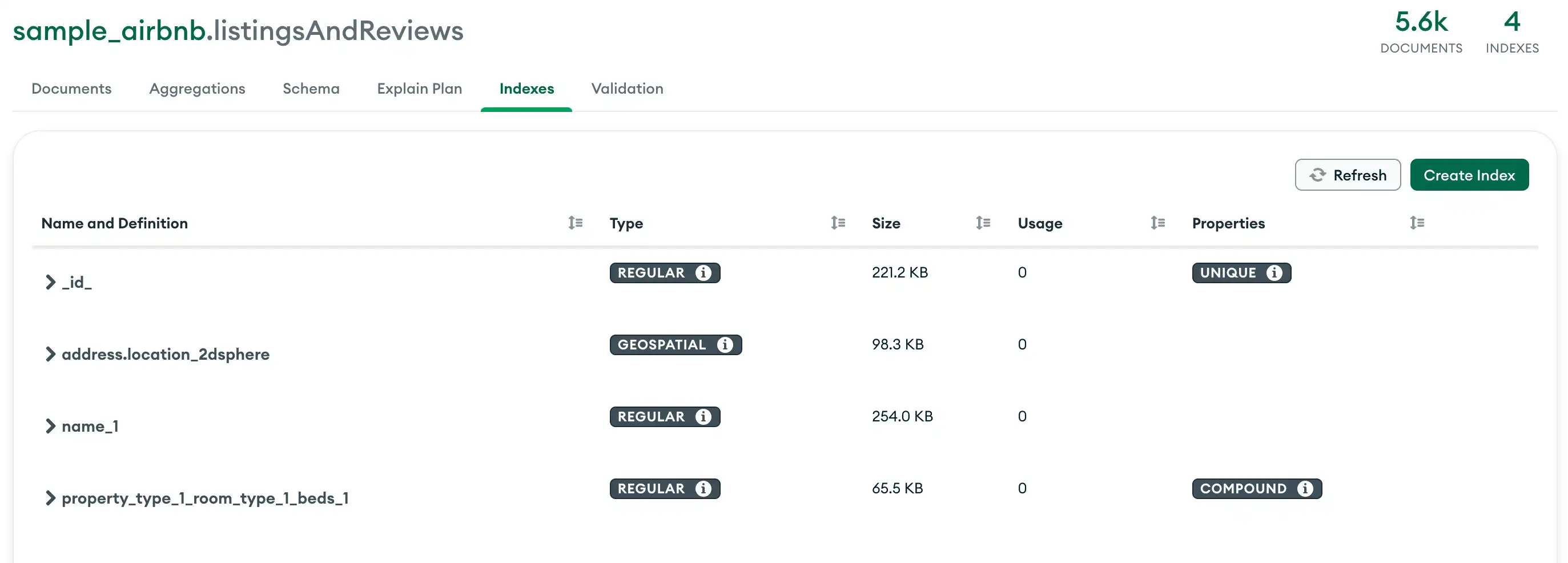
For each index, Compass displays the following information:Compass为每个索引显示以下信息:
| Type | |
| Size | |
| Usage | |
| Properties |
Create an Index创建索引
Open the index creation dialog打开索引创建对话框
From the Indexes tab, click the Create Index button.在“索引”选项卡中,单击“创建索引”按钮。
Add fields to the index向索引中添加字段
Specify an index key.指定索引键。To specify an existing document field as an index key, select the field from the dropdown list.要将现有文档字段指定为索引键,请从下拉列表中选择该字段。To specify a field that does not exist in any document as an index key, enter the field name in the input box.要将任何文档中都不存在的字段指定为索引键,请在输入框中输入字段名称。To create a compound index, click the icon next to the index type dropdown.要创建复合索引,请单击索引类型下拉列表旁边的加号图标。
Use the dropdown to the right of each field name to specify the index type. You can specify one of the following types:使用每个字段名称右侧的下拉列表指定索引类型。您可以指定以下类型之一:Ascending升序Descending降序2dsphere二维球面Text文本
Tip
To learn how to specify a wildcard index, see Create a Wildcard Index.要了解如何指定通配符索引,请参阅创建通配符索引。
Optional. Specify index options可选。指定索引选项
Compass supports the following index options:Compass支持以下索引选项:
| TTL | ||
| ||
| ||
Create an Atlas Search Index创建Atlas搜索索引
Atlas Search indexes let you query data in Atlas Search. For more information, see Create and Manage an Atlas Search Index.Atlas Search索引允许您在Atlas Search中查询数据。有关更多信息,请参阅创建和管理Atlas搜索索引。
Create an Atlas Vector Search Index创建Atlas矢量搜索索引
Atlas Vector Search indexes enable you to index vector data and other data types, which facilitates semantic searches on the indexed fields. For more information, see Create an Atlas Vector Search Index.Atlas矢量搜索索引使您能够对矢量数据和其他数据类型进行索引,这有助于对索引字段进行语义搜索。有关更多信息,请参阅创建Atlas矢量搜索索引。
Create a Wildcard Index创建通配符索引
You can create wildcard indexes to support queries against unknown or arbitrary fields. To create a wildcard index in Compass, manually type the wildcard index field (您可以创建通配符索引来支持对未知或任意字段的查询。要在Compass中创建通配符索引,请在“选择字段名”输入中手动键入通配符索引字段(<field>.$**) into the Select a field name input.<field>.$**)。
Example示例
Consider a collection where documents contain a 考虑一个文档包含userMetadata object. The fields within the userMetadata object may vary between documents.userMetadata对象的集合。userMetadata对象中的字段可能因文档而异。
You can create a wildcard index on 您可以在userMetadata to account for all potential fields within the object. Type the following into the Select a field name input:userMetadata上创建通配符索引,以考虑对象中的所有潜在字段。在“选择字段名称”输入中键入以下内容:
userMetadata.$**Specify a type (为通配符索引指定一种类型(ascending or descending) for your wildcard index, then click Create Index.ascending(升序)或descending(降序)),然后单击“创建索引”。
Compass shows the type of your new index as Wildcard.Compass将新索引的类型显示为“通配符”。
Hide or Unhide an Index隐藏或取消隐藏索引
You can hide an index from the query planner to evaluate the potential impact of dropping an index without actually dropping the index.您可以在查询计划器中隐藏索引,以评估在不实际删除索引的情况下删除索引的潜在影响。
Hover over the index.将鼠标悬停在索引上。
From the Indexes tab, hover over the index you want to hide.在“索引”选项卡中,将鼠标悬停在要隐藏的索引上。
Click the Hide Index button.单击“隐藏索引”按钮。
Click the closed-eye icon on the right that appears when you hover over your selected index.将鼠标悬停在所选索引上时,单击右侧出现的闭眼图标。
Click Confirm.单击“确认”。
In the dialog box, confirm the index you want to hide. After you confirm your selection, a Hidden badge appears under the Properties column.在对话框中,确认要隐藏的索引。确认选择后,“属性”列下会出现一个“隐藏”徽章。
To unhide your index, repeat steps 1-3. After you unhide your index, Compass removes the Hidden badge from the Properties column.要取消隐藏索引,请重复步骤1-3。取消隐藏索引后,Compass会从“属性”列中删除“隐藏”徽章。
Drop an Index删除索引
Click the trash can icon for the index to drop.单击要删除索引的垃圾桶图标。
From the Indexes tab, to delete an index, click on the trash can icon for that index. A confirmation dialog appears.在“索引”选项卡中,要删除索引,请单击该索引的垃圾桶图标。此时会出现一个确认对话框。
Limitations局限性
Creating, hiding, and dropping indexes is not permitted in MongoDB Compass Readonly Edition.MongoDB Compass只读版不允许创建、隐藏和删除索引。You can manage Atlas Search indexes in Compass if your deployment is local, has an Atlas cluster tier of M10 or larger, and runs MongoDB 7.0 or higher.如果部署是本地的,具有M10或更大的Atlas集群层,并且运行MongoDB 7.0或更高版本,则可以在Compass中管理Atlas搜索索引。Tip
For clusters running an earlier version of MongoDB, you can manage your Atlas Search indexes using the Atlas UI, the Atlas CLI, or the Atlas Administration API.对于运行早期版本MongoDB的集群,您可以使用Atlas UI、Atlas CLI或Atlas Administration API管理Atlas搜索索引。