You can export your schema after analyzing it. This is useful for sharing your schema and comparing schemas across collections.您可以在分析模式后导出它。这对于共享模式和跨集合比较模式非常有用。
Before you Begin开始之前
If you have not already done so, analyze your schema:如果您还没有这样做,请分析模式:
Once your schema has been analyzed, use the following procedure to export your schema.分析完模式后,使用以下过程导出模式。
Steps步骤
Click Export Schema.单击“导出模式”。
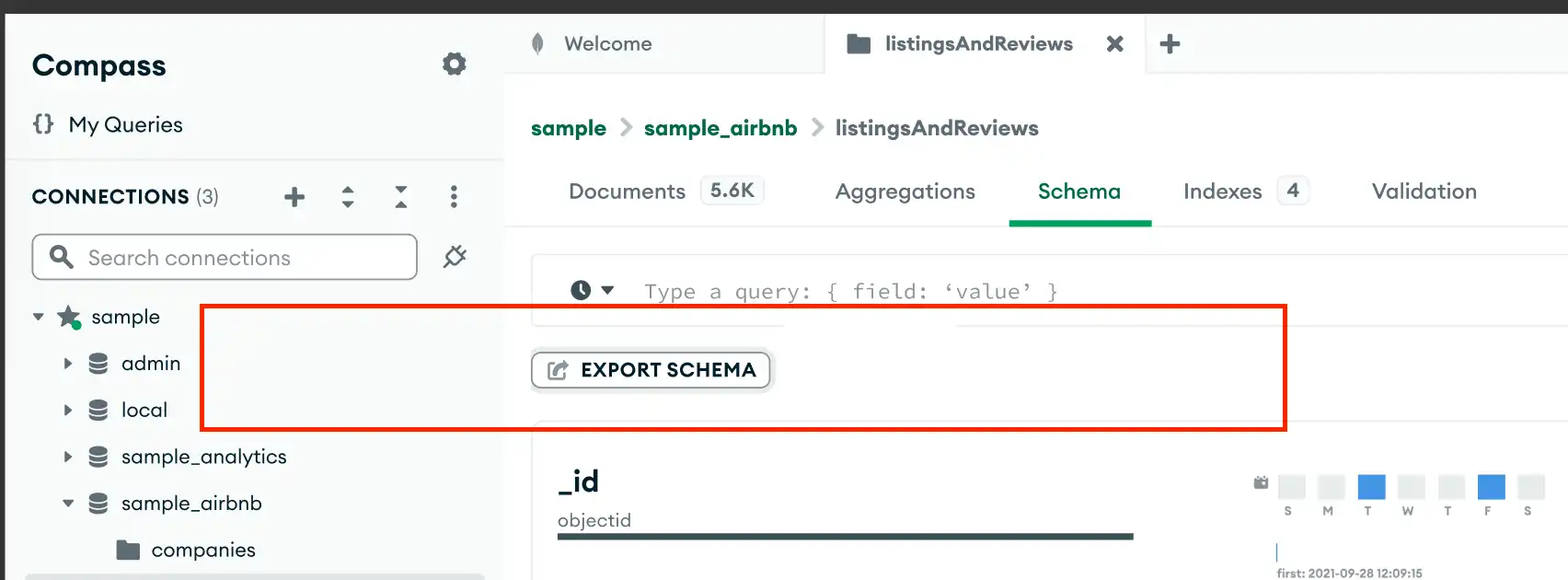
The Export Schema button appears in the top-left corner of the viewport.“导出模式”按钮出现在视口的左上角。
Select the export format.选择导出格式。
In the Export JSON Schema modal, select the format to export to.在导出JSON模式中,选择要导出的格式。
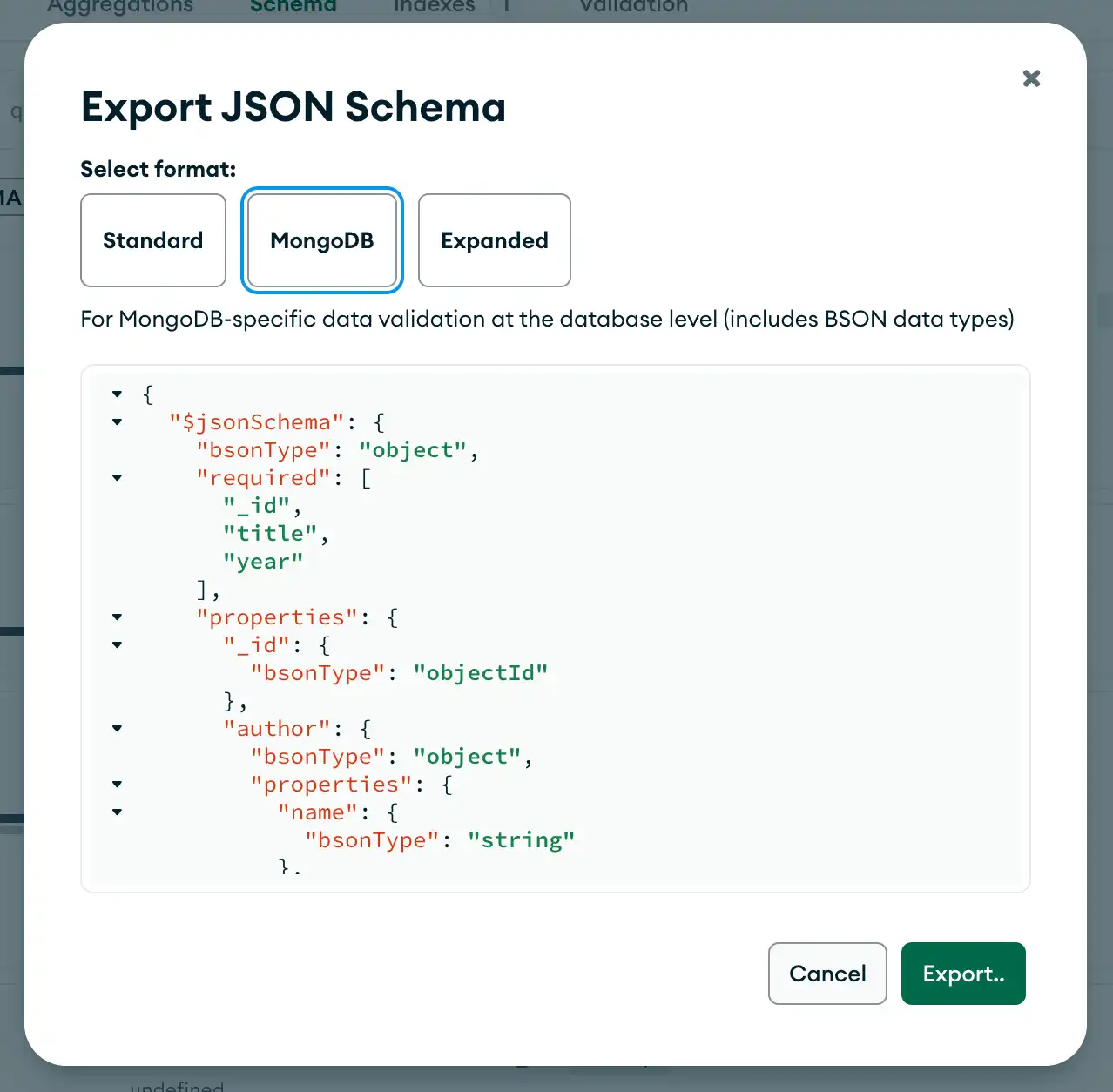
You can export your schema to the following formats:您可以将模式导出为以下格式:
Standard format标准格式- MongoDB
format格式 Expanded扩展的format格式
Standard Format Schema Object Properties标准格式模式对象属性
Standard format schema objects contain the following fields:标准格式模式对象包含以下字段:
type | string or array | |
required | array of strings | |
properties | object | |
items | document |
This is not an exhaustive list of all possible fields. For details on additional fields, see the official JSON Schema spec.这不是所有可能字段的详尽列表。有关其他字段的详细信息,请参阅官方的JSON Schema规范。
MongoDB Format Schema Object PropertiesMongoDB格式模式对象属性
MongoDB format schema objects contain the following fields:MongoDB格式模式对象包含以下字段:
bsonType | string or array of strings | |
required | array of strings | |
properties | document | |
items | document |
This is not an exhaustive list of all possible fields. For details on additional fields, see the official JSON Schema spec.这不是所有可能字段的详尽列表。有关其他字段的详细信息,请参阅官方的JSON Schema规范。
Expanded Format Schema Object Properties扩展格式架构对象属性
Expanded format schema objects contain these fields in addition to the Standard Schema fields:除了标准模式字段外,扩展格式模式对象还包含以下字段:
x-bsonType | string or array | |
x-metadata | document | |
hasDuplicates | boolean | true if a single value appears multiple times in this field. Otherwise false.true。否则就是假的。 |
probability | float | |
count | integer | |
x-sampleValues | array |
This is not an exhaustive list of all possible fields. For details on additional fields, see the official JSON Schema spec.这不是所有可能字段的详尽列表。有关其他字段的详细信息,请参阅官方的JSON Schema规范。
Limitations局限性
Compass cannot export a schema that has more than 1000 distinct fields. If you try to export a schema with more than 1000 distinct fields, Compass returns an error.Compass无法导出具有1000多个不同字段的模式。如果尝试导出具有1000多个不同字段的模式,Compass将返回错误。
Example Schema示例模式
The following example uses a collection of 3 documents, each with a 以下示例使用3个文档的集合,每个文档都有一个title field and unique information about that movie:title字段和关于该电影的唯一信息:
[
  {
    "_id": { "$oid": "573a1390f29313caabcd6223" },
    "title": "The Poor Little Rich Girl",
    "plot": "Gwen's family is rich, but her parents ignore her and most of the serv...",
    "year": 1917,
  },
  {
    "_id": { "$oid": "573a1391f29313caabcd7616" },
    "title": "Salomè",
    "plot": "Salome, the daughter of Herodias, seduces her step-father/uncle Herod, ...",
    "year": 1922,
    "genres": [ "drama", "horror" ]
  },
  {
    "_id": { "$oid": "573a1392f29313caabcd9c1b" },
    "title": "Payment Deferred",
    "year": 1932,
  },
]
You can import the above example to MongoDB Compass to experiment with schema outputs. To import the example collection into MongoDB Compass:您可以将上述示例导入MongoDB Compass,以尝试模式输出。要将示例集合导入MongoDB Compass:
Copy the JSON documents to your clipboard.将JSON文档复制到剪贴板。
Copy the above JSON documents.复制上述JSON文档。
The example above outputs the following schema:上面的示例输出以下模式:
Standard Export Format标准导出格式
{
  "$schema": "https://json-schema.org/draft/2020-12/schema",
  "type": "object",
  "required": [
    "_id",
    "title",
    "year"
  ],
  "properties": {
    "_id": {
      "$ref": "#/$defs/ObjectId"
    },
    "genres": {
      "type": "array",
      "items": {
        "type": "string"
      }
    },
    "plot": {
      "type": "string"
    },
    "title": {
      "type": "string"
    },
    "year": {
      "type": "integer"
    }
  },
  "$defs": {
    "ObjectId": {
      "type": "object",
      "properties": {
        "$oid": {
          "type": "string",
          "pattern": "^[0-9a-fA-F]{24}$"
        }
      },
      "required": [
        "$oid"
      ],
      "additionalProperties": false
    }
  }
}
MongoDB Export FormatMongoDB导出格式
{
  "$jsonSchema": {
    "bsonType": "object",
    "required": [
      "_id",
      "title",
      "year"
    ],
    "properties": {
      "_id": {
        "bsonType": "objectId"
      },
      "genres": {
        "bsonType": "array",
        "items": {
          "bsonType": "string"
        }
      },
      "plot": {
        "bsonType": "string"
      },
      "title": {
        "bsonType": "string"
      },
      "year": {
        "bsonType": "int"
      }
    }
  }
}
Expanded Export Format扩展导出格式
Sample values are limited to the first 100 characters.样本值限制为前100个字符。
{
  "type": "object",
  "x-bsonType": "object",
  "required": [
    "_id",
    "title",
    "year"
  ],
  "properties": {
    "_id": {
      "$ref": "#/$defs/ObjectId",
      "x-bsonType": "objectId",
      "x-metadata": {
        "hasDuplicates": false,
        "probability": 1,
        "count": 3
      },
      "x-sampleValues": [
        "573a1391f29313caabcd7616",
        "573a1392f29313caabcd9c1b",
        "573a1390f29313caabcd6223"
      ]
    },
    "genres": {
      "type": "array",
      "x-bsonType": "array",
      "x-metadata": {
        "hasDuplicates": true,
        "probability": 0.3333333333333333,
        "count": 1
      },
      "items": {
        "type": "string",
        "x-bsonType": "string",
        "x-metadata": {
          "hasDuplicates": false,
          "probability": 1,
          "count": 2
        },
        "x-sampleValues": [
          "drama",
          "horror"
        ]
      }
    },
    "plot": {
      "type": "string",
      "x-bsonType": "string",
      "x-metadata": {
        "hasDuplicates": false,
        "probability": 0.6666666666666666,
        "count": 2
      },
      "x-sampleValues": [
        "Salome, the daughter of Herodias, seduces her step-father/uncle Herod, ...",
        "Gwen's family is rich, but her parents ignore her and most of the serv..."
      ]
    },
    "title": {
      "type": "string",
      "x-bsonType": "string",
      "x-metadata": {
        "hasDuplicates": false,
        "probability": 1,
        "count": 3
      },
      "x-sampleValues": [
        "Salomè",
        "Payment Deferred",
        "The Poor Little Rich Girl"
      ]
    },
    "year": {
      "type": "integer",
      "x-bsonType": "int",
      "x-metadata": {
        "hasDuplicates": false,
        "probability": 1,
        "count": 3
      },
      "x-sampleValues": [
        1922,
        1932,
        1917
      ]
    }
  },
  "$defs": {
    "ObjectId": {
      "type": "object",
      "properties": {
        "$oid": {
          "type": "string",
          "pattern": "^[0-9a-fA-F]{24}$"
        }
      },
      "required": [
        "$oid"
      ],
      "additionalProperties": false
    }
  }
}