If you use Kerberos authentication to connect to your MongoDB deployment, you can enable the 如果您使用Kerberos身份验证连接到MongoDB部署,则可以在MongoDB Compass上启用showKerberosPasswordField option on MongoDB Compass.showKerberosPasswordField选项。
About This Task关于此任务
The password field is not necessary for Kerberos authentication, so Compass disables the Kerberos身份验证不需要密码字段,因此Compass默认禁用showKerberosPasswordField option by default.showKerberosPasswordField选项。
If you enable the 如果启用showKerberosPasswordField, MongoDB Compass displays the Provide password directly option, which contains the Password field. You can find the Kerberos Password under the Advanced Connection Options > Authentication tab on the Compass connection form.showKerberosPasswordField,MongoDB Compass将显示“直接提供密码”选项,其中包含密码字段。您可以在Compass连接窗体的“高级连接选项”>“身份验证”选项卡下找到Kerberos密码。
Procedure过程
You can enable the 您可以在以下任一位置启用showKerberosPasswordField option in either:showKerberosPasswordField选项:
The Compass Settings panel.Compass设置面板。The command line.命令行。A configuration file.配置文件。
Compass Settings PanelCompass设置面板
To open the MongoDB Compass Settings Panel, click the gear icon on the left column of the Compass home screen.要打开MongoDB Compass设置面板,请单击Compass主屏幕左列上的齿轮图标。
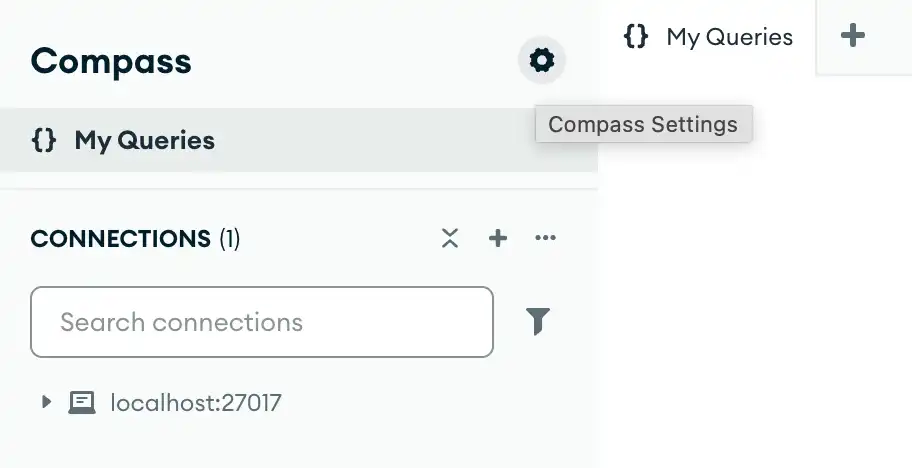
Alternatively, you can use keyboard shortcuts to open the Settings panel:或者,您可以使用键盘快捷键打开“设置”面板:
- Windows / Linux:
Ctrl+, - Mac:
⌘+,
Compass opens a dialog box where you can configure your MongoDB Compass settings.Compass打开一个对话框,您可以在其中配置MongoDB Compass设置。
Command Line命令行
The following command starts Compass from the command line and sets the 以下命令从命令行启动Compass并设置--showKerberosPasswordField option:--showKerberosPasswordField选项:
<path-to-Compass-executable> --readOnlyNote
The name and filepath of the Compass executable depend on your operating system.Compass可执行文件的名称和文件路径取决于操作系统。
Configuration File配置文件
You can specify the Compass configuration file in either EJSON or YAML format. The following configurations set the 您可以以EJSON或YAML格式指定Compass配置文件。以下配置将showKerberosPasswordField option to true:showKerberosPasswordField选项设置为true:
EJSON
{ "showKerberosPasswordField": true }YAML
showKerberosPasswordField: trueLearn More了解更多
To learn more about the MongoDB Compass configuration file, see Configuration File Settings.要了解有关MongoDB Compass配置文件的更多信息,请参阅配置文件设置。