You can specify a default sort order for documents shown in Compass through the Settings panel.您可以通过“设置”面板为Compass中显示的文档指定默认排序顺序。
Note
If you specify a sort order through a query in the Query Bar, the sort order that you specify in the query overrides the default sort order.如果通过查询栏中的查询指定排序顺序,则在查询中指定的排序顺序将覆盖默认排序顺序。
If you save a query, Compass does not save the default sort order as part of the saved query.如果保存查询,Compass不会将默认排序顺序保存为已保存查询的一部分。
About This Task关于此任务
You can choose one of the following default sort options:您可以选择以下默认排序选项之一:
| _id: 1 | _id field_id字段升序排序 |
| _id: -1 | _id field_id字段降序排序 |
| $natural: -1 |
|
Note
The default sort option you select does not apply to views or time series collections.您选择的默认排序选项不适用于视图或时间序列集合。
Procedure过程
To open the MongoDB Compass Settings Panel, click the gear icon on the left column of the Compass home screen.要打开MongoDB Compass设置面板,请单击Compass主屏幕左列上的齿轮图标。
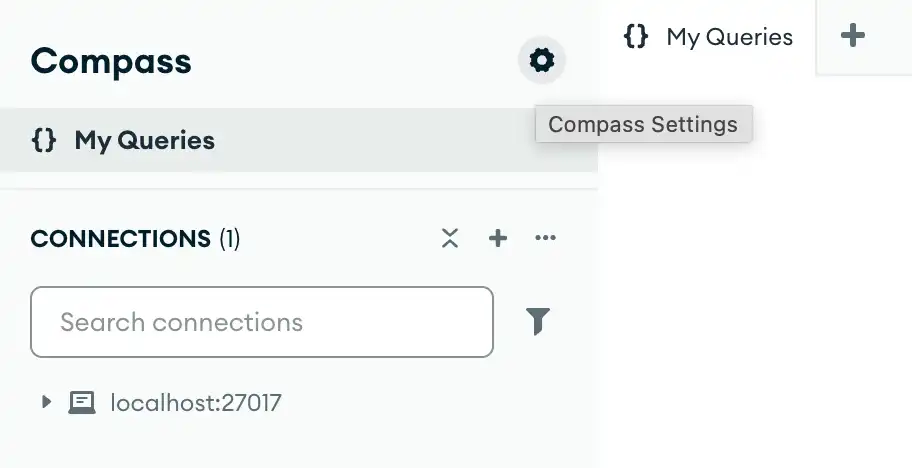
Alternatively, you can use keyboard shortcuts to open the Settings panel:或者,您可以使用键盘快捷键打开“设置”面板:
- Windows / Linux:
Ctrl+, - Mac:
⌘+,
Compass opens a dialog box where you can configure your MongoDB Compass settings.Compass打开一个对话框,您可以在其中配置MongoDB Compass设置。
Note
If you do not specify a default sort order, Compass uses the MongoDB server default sort order of 如果不指定默认排序顺序,Compass将使用MongoDB服务器默认排序顺序$natural: 1, unless otherwise specified in the Query Bar.$natural:1,除非在查询栏中另有指定。