Views are read-only results of an aggregation run against a collection. 视图是对集合进行聚合运行的只读结果。Views provide easy access to the results of an aggregation without requiring the reader of the view to execute the pipeline. 视图提供了对聚合结果的轻松访问,而不需要视图的读取器执行管道。Views can also help keep your data secure by only giving users access to a predefined result set, as opposed to having access to the underlying collection.视图还可以通过只允许用户访问预定义的结果集,而不是访问底层集合,来帮助保护数据安全。
Collections Screen集合屏幕
The Collections screen lists the existing collections and views in the selected database. Each list item includes the name and other general information for the collection or view.“集合”屏幕列出了所选数据库中的现有集合和视图。每个列表项都包括集合或视图的名称和其他一般信息。
To access the Collections screen for a database, from the Databases screen either:要访问数据库的“集合”屏幕,请从数据库屏幕执行以下操作之一:
Click a Database Name in the main Databases view, or在主“数据库”视图中单击“数据库名称”,或Click a database in the left navigation.单击左侧导航中的数据库。
Compass displays views in the Collections Screen with a special icon, and indicates the collection from which the view was created.Compass在“集合”屏幕中使用特殊图标显示视图,并指示创建视图的集合。
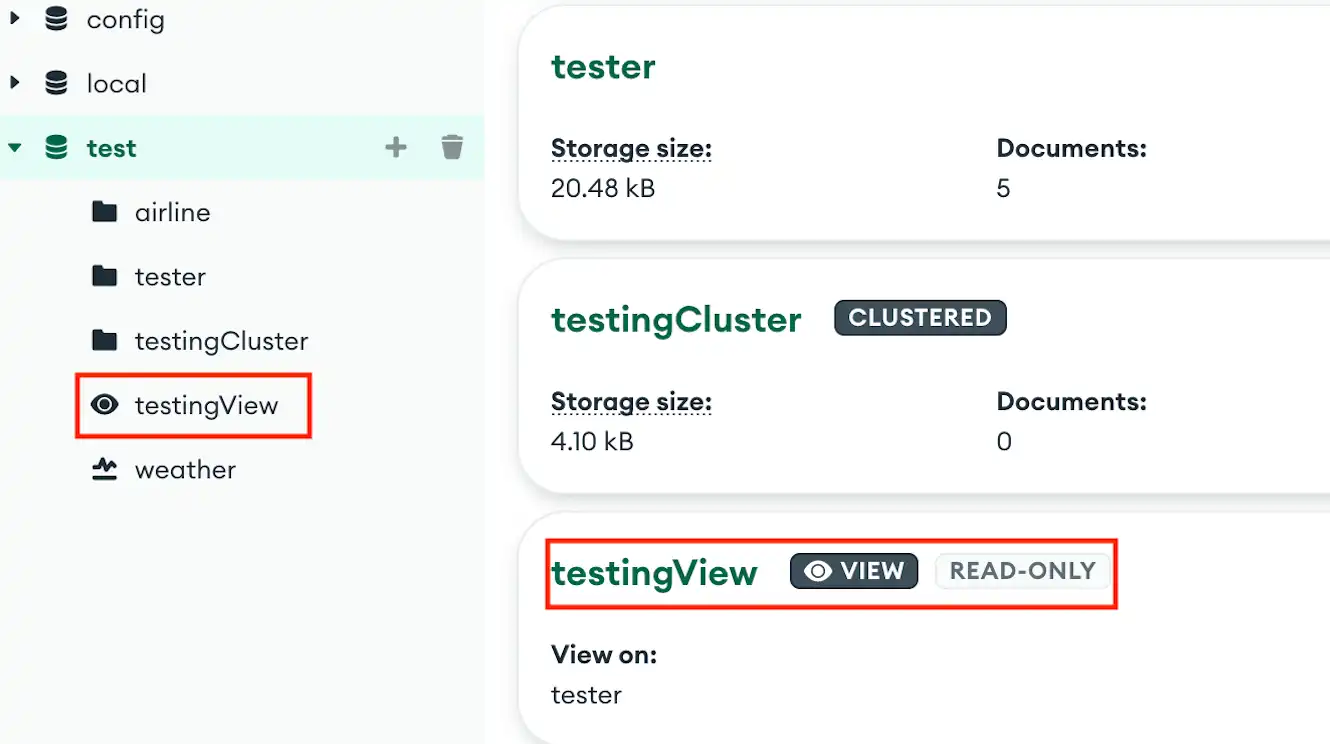
View Information查看信息
The Collections screen displays the following information for each view in the selected database:“集合”屏幕显示所选数据库中每个视图的以下信息:
View name视图名称Collection from which the view was created创建视图的集合
Create a View创建视图
To create a view, you must use the Aggregation Pipeline Builder. The output of your pipeline's final stage becomes the content of the view.要创建视图,必须使用聚合管道生成器。管道最后阶段的输出将成为视图的内容。
To create a view from your pipeline results:要从管道结果创建视图,请执行以下操作:
Create an aggregation pipeline in the pipeline builder. For detailed instructions on using the pipeline builder, see Create an Aggregation Pipeline.在管道生成器中创建聚合管道。有关使用管道生成器的详细说明,请参阅创建聚合管道。Click the arrow next to the Save button at the top of the pipeline builder.单击管道生成器顶部“保存”按钮旁边的箭头。Click Create a View.单击“创建视图”。Enter a name for your view.输入视图的名称。Click Create.单击“创建”。
Compass creates a view from your pipeline results in the same database where the pipeline was created.Compass从创建管道的同一数据库中创建管道结果的视图。
Open a View打开视图
To open a view, use one of the following methods:要打开视图,请使用以下方法之一:
Click the desired view from the Collections screen.从“集合”屏幕中单击所需的视图。Click the desired view in the left-hand navigation.在左侧导航中单击所需的视图。Right-click on the desired view in the left-hand navigation and select Open in new tab from the drop-down menu.右键单击左侧导航中所需的视图,然后从下拉菜单中选择“在新选项卡中打开”。
After you open a view, Compass shows you that view's Documents Tab. Compass provides the following information and functionality for the view:打开视图后,Compass会显示该视图的“文档”选项卡。Compass为该视图提供以下信息和功能:
Duplicate a View复制视图
You can duplicate a view to modify an existing view while retaining the original.您可以复制视图以修改现有视图,同时保留原始视图。
To duplicate a view:要复制视图,请执行以下操作:
Hover over the desired view in the left navigation.将鼠标悬停在左侧导航中所需的视图上。Click the appearing Ellipses (...) button, or right-click the view.单击出现的“省略号(…)”按钮,或右键单击视图。In the drop-down menu, click Duplicate View.在下拉菜单中,单击“复制视图”。Enter a name for the new view.输入新视图的名称。Click Duplicate.单击“复制”。
Modify the Source of a View修改视图的源
Note
Considerations注意事项
Views are read-only, and cannot inherently be modified. This procedure describes modifying the underlying source of a view.视图是只读的,不能修改。此过程描述了修改视图的“底层源代码”。
When you modify a view, Compass cannot retain collation information associated with the view. Any collation information must be re-entered in the pipeline builder during modification.修改视图时,Compass无法保留与视图关联的排序规则信息。在修改过程中,必须在管道生成器中重新输入任何排序信息。
To modify the source of a view:要修改视图的源代码,请执行以下操作:
Hover over the desired view in the left navigation.将鼠标悬停在左侧导航中所需的视图上。Click the appearing Ellipses (...) button, or right-click the view.单击出现的“省略号(…)按钮”,或右键单击视图。In the dropdown, click Modify view. This button opens the aggregation pipeline builder and populates the pipeline used to create the view.在下拉列表中,单击“修改视图”。此按钮打开聚合管道生成器,并填充用于创建视图的管道。Modify the pipeline as desired. For detailed instructions on using the pipeline builder, see Create an Aggregation Pipeline.根据需要修改管道。有关使用管道生成器的详细说明,请参阅创建聚合管道。Click Update View at the top of the pipeline builder.单击管道生成器顶部的“更新视图”。
Drop a View丢弃视图
To drop a view from the database:要从数据库中丢弃视图,请执行以下操作:
Hover over the desired view in the left navigation.将鼠标悬停在左侧导航中所需的视图上。Click the appearing Ellipses (...) button, or right-click the view.单击出现的“省略号(…)”按钮,或右键单击视图。In the dropdown, click Drop View.在下拉列表中,单击“丢弃视图”。In the modal, enter the name of the view.在模式中,输入视图的名称。Click Drop Collection.单击“丢弃集合”。