Definition定义
$densifyNew in version 5.1.在版本5.1中新增。Creates new documents in a sequence of documents where certain values in a field are missing.在字段中缺少某些值的文档序列中创建新文档。You can use您可以使用$densifyto:$density来:Fill gaps in time series data.填补时间序列数据中的空白。Add missing values between groups of data.在数据组之间添加缺失的值。Populate your data with a specified range of values.用指定范围的值填充数据。
Syntax语法
The $densify stage has this syntax:$density阶段具有以下语法:
{
   $densify: {
      field: <fieldName>,
      partitionByFields: [ <field 1>, <field 2> ... <field n> ],
      range: {
         step: <number>,
         unit: <time unit>,
         bounds: < "full" || "partition" > || [ < lower bound >, < upper bound > ]
      }
   }
}
The $densify stage takes a document with these fields:$density阶段需要一个包含以下字段的文档:
field |
| |
partitionByFields |
| |
range | ||
range.bounds |
| |
range.step |
| |
range.unit | field是日期,则为必需项。 |
|
Behavior and Restrictions行为和限制
field Restrictions限制
For documents that contain the specified field, 对于包含指定$densify errors if:field的文档,如果出现以下情况,则$densify会出错:
Any document in the collection has a集合中的任何文档都具有日期类型的fieldvalue of type date and the unit field is not specified.field值,并且未指定unit字段。Any document in the collection has a集合中的任何文档都有一个数字类型的fieldvalue of type numeric and the unit field is specified.field值,并且指定了unit字段。Thefieldname begins with$. You must rename the field if you want to densify it. To rename fields, use$project.field名以$开头。如果要加密字段,必须重命名字段。要重命名字段,请使用$project。New in version 8.1.在版本8.1中新增。fieldshares its prefix with any field in thepartitionByFieldsarray. For example, the following combinations offieldandpartitionByFieldsresult in an error:field与partitionByFields数组中的任何字段共享其前缀。例如,以下field和partitionByFields的组合会导致错误:field: "timestamp",partitionByFields: ["timestamp"]field: "timestamp",partitionByFields: ["timestamp.hours"]field: "timestamp.hours",partitionByFields: ["timestamp"]
partitionByFields Restrictions限制
$densify errors if any field name in the partitionByFields array:partitionByFields数组中有任何字段名,则$densify会出错:
Evaluates to a non-string value.计算结果为非字符串值。Begins with以$.$开头。
range.bounds Behavior行为
If range.bounds is an array:如果range.bounds是一个数组:
The lower bound indicates the start value for the added documents, irrespective of documents already in the collection.下限表示添加文档的起始值,与集合中已有的文档无关。The lower bound is inclusive.下限是包容性的。The upper bound is exclusive.上限是排他性的。$densifydoes not filter out documents with field values outside of the specified bounds.不会筛选出field值超出指定范围的文档。
Note
Starting in MongoDB 8.0, 从MongoDB 8.0开始,$densify treats bounds with an equal lower and upper bound as an empty set and does not generate a document with the bound as the field value.$densify将具有相等下限和上限的边界视为空集,并且不会生成以绑定为字段值的文档。
In prior versions, 在早期版本中,如果集合中尚未包含具有绑定值的文档,则$densify treats bounds with an equal lower and upper bound as a closed interval and generates a document with the bound value as a field value if the collection does not already contain a document with the bound value.$densify将具有相等下限和上限的边界视为闭区间,并生成具有绑定值作为字段值的文档。
For example, a range.bounds of 例如,在8.0之前的版本中,range.bounds是[10, 10] generates an extra document with field value 10 in versions prior to 8.0, but does not generate such a document in 8.0 and later.[10,10]会生成一个字段值为10的额外文档,但在8.0及更高版本中不会生成这样的文档。
Order of Output输出顺序
$densify does not guarantee sort order of the documents it outputs.不保证它输出的文档的排序顺序。
To guarantee sort order, use 要保证排序顺序,请在要排序的字段上使用$sort on the field you want to sort by.$sort。
Examples示例
MongoDB Shell
Densify Time Series Data强化时间序列数据
Create a 创建一个包含四小时内温度读数的weather collection that contains temperature readings over four hour intervals.weather集合。
db.weather.insertMany( [
   {
      "metadata": { "sensorId": 5578, "type": "temperature" },
      "timestamp": ISODate("2021-05-18T00:00:00.000Z"),
      "temp": 12
   },
   {
      "metadata": { "sensorId": 5578, "type": "temperature" },
      "timestamp": ISODate("2021-05-18T04:00:00.000Z"),
      "temp": 11
   },
   {
      "metadata": { "sensorId": 5578, "type": "temperature" },
      "timestamp": ISODate("2021-05-18T08:00:00.000Z"),
      "temp": 11
   },
   {
      "metadata": { "sensorId": 5578, "type": "temperature" },
      "timestamp": ISODate("2021-05-18T12:00:00.000Z"),
      "temp": 12
   }
] )
This example uses the 此示例使用$densify stage to fill in the gaps between the four-hour intervals to achieve hourly granularity for the data points:$density阶段填充四小时间隔之间的间隙,以实现数据点的每小时粒度:
db.weather.aggregate( [
   {
     $densify: {
         field: "timestamp",
         range: {
           step: 1,
           unit: "hour",
           bounds:[ ISODate("2021-05-18T00:00:00.000Z"), ISODate("2021-05-18T08:00:00.000Z") ]
         }
     }
   }
] )
In the example:在示例中:
The$densifystage fills in the gaps of time in between the recorded temperatures.$densify阶段填补了记录温度之间的时间间隔。field: "timestamp"densifies the稠密化timestampfield.timestamp字段。
range:step: 1increments the将timestampfield by 1 unit.timestamp字段递增1个单位。unit: hourdensifies the按小时稠密化timestampfield by the hour.timestamp字段。bounds: [ ISODate("2021-05-18T00:00:00.000Z"), ISODate("2021-05-18T08:00:00.000Z") ]sets the range of time that is densified.设置稠密化的时间范围。
In the following output, the 在以下输出中,$densify stage fills in the gaps of time between the hours of 00:00:00 and 08:00:00.$density阶段填补了00:00:00和08:00:00之间的时间间隔。
[
 {
   _id: ObjectId("618c207c63056cfad0ca4309"),
   metadata: { sensorId: 5578, type: 'temperature' },
   timestamp: ISODate("2021-05-18T00:00:00.000Z"),
   temp: 12
 },
 { timestamp: ISODate("2021-05-18T01:00:00.000Z") },
 { timestamp: ISODate("2021-05-18T02:00:00.000Z") },
 { timestamp: ISODate("2021-05-18T03:00:00.000Z") },
 {
   _id: ObjectId("618c207c63056cfad0ca430a"),
   metadata: { sensorId: 5578, type: 'temperature' },
   timestamp: ISODate("2021-05-18T04:00:00.000Z"),
   temp: 11
 },
 { timestamp: ISODate("2021-05-18T05:00:00.000Z") },
 { timestamp: ISODate("2021-05-18T06:00:00.000Z") },
 { timestamp: ISODate("2021-05-18T07:00:00.000Z") },
 {
   _id: ObjectId("618c207c63056cfad0ca430b"),
   metadata: { sensorId: 5578, type: 'temperature' },
   timestamp: ISODate("2021-05-18T08:00:00.000Z"),
   temp: 11
 }
 {
   _id: ObjectId("618c207c63056cfad0ca430c"),
   metadata: { sensorId: 5578, type: 'temperature' },
   timestamp: ISODate("2021-05-18T12:00:00.000Z"),
   temp: 12
 }
]
Densification with Partitions用隔板进行致密化
Create a 创建一个包含两种咖啡豆数据的coffee collection that contains data for two varieties of coffee beans:coffee集合:
db.coffee.insertMany( [
  {
     "altitude": 600,
     "variety": "Arabica Typica",
     "score": 68.3
  },
  {
     "altitude": 750,
     "variety": "Arabica Typica",
     "score": 69.5
  },
  {
     "altitude": 950,
     "variety": "Arabica Typica",
     "score": 70.5
  },
  {
     "altitude": 1250,
     "variety": "Gesha",
     "score": 88.15
  },
  {
     "altitude": 1700,
     "variety": "Gesha",
     "score": 95.5,
     "price": 1029
  }
 ] )
Densify the Full Range of Values稠密化全部值范围
This example uses 此示例使用$densify to densify the altitude field for each coffee variety:$density来稠密化每种咖啡variety(品种)的altitude(海拔高度)字段:
db.coffee.aggregate( [
  {
     $densify: {
       field: "altitude",
       partitionByFields: [ "variety" ],
       range: {
           bounds: "full",
           step: 200
       }
     }
 }
] )
The example aggregation:示例聚合:
Partitions the documents by按varietyto create one grouping forArabica Typicaand one forGeshacoffee.variety(品种)对文档进行分区,为Arabica Typica咖啡和Gesha咖啡创建一个分组。Specifies a指定一个fullrange, meaning that the data is densified across the full range of existing documents for each partition.full范围,这意味着在每个分区的现有文档的整个范围内对数据进行加密。Specifies a指定stepof200, meaning new documents are created ataltitudeintervals of200.step(步长)为200,这意味着以200的altitude(海拔高度)间隔创建新文档。
The aggregation outputs the following documents:聚合输出以下文档:
[
 {
   _id: ObjectId("618c031814fbe03334480475"),
   altitude: 600,
   variety: 'Arabica Typica',
   score: 68.3
 },
 {
   _id: ObjectId("618c031814fbe03334480476"),
   altitude: 750,
   variety: 'Arabica Typica',
   score: 69.5
 },
 { variety: 'Arabica Typica', altitude: 800 },
 {
   _id: ObjectId("618c031814fbe03334480477"),
   altitude: 950,
   variety: 'Arabica Typica',
   score: 70.5
 },
 { variety: 'Gesha', altitude: 600 },
 { variety: 'Gesha', altitude: 800 },
 { variety: 'Gesha', altitude: 1000 },
 { variety: 'Gesha', altitude: 1200 },
 {
   _id: ObjectId("618c031814fbe03334480478"),
   altitude: 1250,
   variety: 'Gesha',
   score: 88.15
 },
 { variety: 'Gesha', altitude: 1400 },
 { variety: 'Gesha', altitude: 1600 },
 {
   _id: ObjectId("618c031814fbe03334480479"),
   altitude: 1700,
   variety: 'Gesha',
   score: 95.5,
   price: 1029
 },
 { variety: 'Arabica Typica', altitude: 1000 },
 { variety: 'Arabica Typica', altitude: 1200 },
 { variety: 'Arabica Typica', altitude: 1400 },
 { variety: 'Arabica Typica', altitude: 1600 }
]
This image visualizes the documents created with 此图将使用$densify:$density创建的文档可视化:
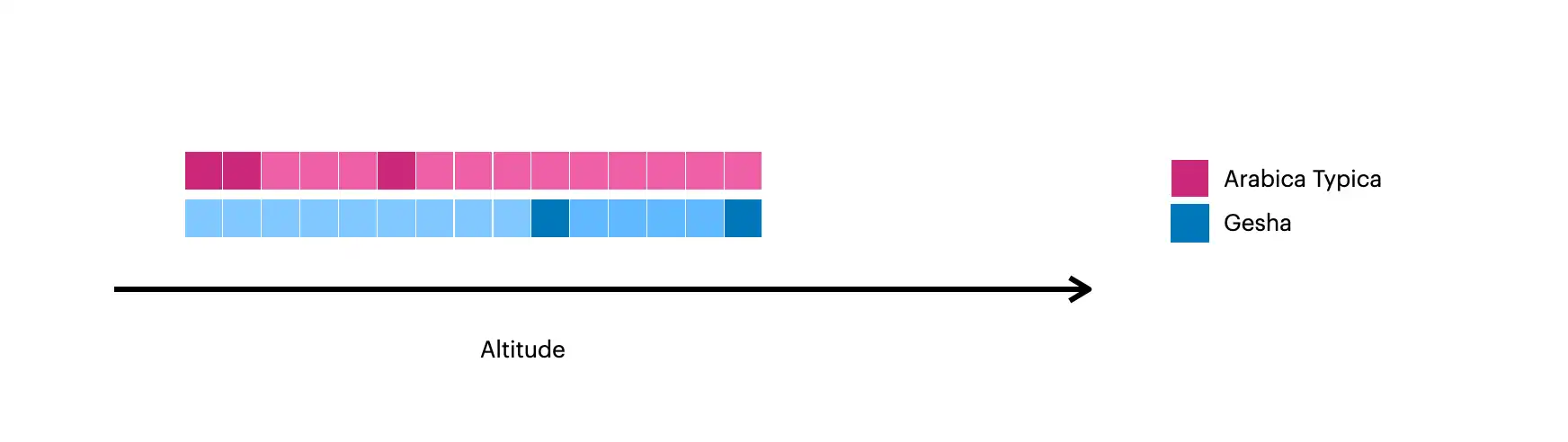
The darker squares represent the original documents in the collection.较深的方块代表集合中的原始文件。The lighter squares represent the documents created with较浅的方块代表用$densify.$density创建的文档。
Densify Values within Each Partition每个分区内的密度值
This example uses 此示例使用$densify to only densify gaps in the altitude field within each variety:$density仅稠密化每个variety(品种)内altitude(海拔高度)字段中的间隙:
db.coffee.aggregate( [
 {
     $densify: {
       field: "altitude",
       partitionByFields: [ "variety" ],
       range: {
           bounds: "partition",
           step: 200
       }
     }
 }
] )
The example aggregation:示例聚合:
Partitions the documents by按varietyto create one grouping forArabica Typicaand one forGeshacoffee.variety(品种对文档进行分区,为Arabica Typica咖啡和Gesha咖啡创建一个分组。Specifies a指定partitionrange, meaning that the data is densified within each partition.partition范围,这意味着数据在每个分区内加密。For the对于Arabica Typicapartition, the range is600-950.Arabica Typica分区,范围为600-950。For the对于Geshapartition, the range is1250-1700.Gesha分区,范围为1250-1700。
Specifies a指定stepof200, meaning new documents are created ataltitudeintervals of200.step(步长)为200,这意味着以200的altitude(海拔高度)间隔创建新文档。
The aggregation outputs the following documents:聚合输出以下文档:
[
 {
   _id: ObjectId("618c031814fbe03334480475"),
   altitude: 600,
   variety: 'Arabica Typica',
   score: 68.3
 },
 {
   _id: ObjectId("618c031814fbe03334480476"),
   altitude: 750,
   variety: 'Arabica Typica',
   score: 69.5
 },
 { variety: 'Arabica Typica', altitude: 800 },
 {
   _id: ObjectId("618c031814fbe03334480477"),
   altitude: 950,
   variety: 'Arabica Typica',
   score: 70.5
 },
 {
   _id: ObjectId("618c031814fbe03334480478"),
   altitude: 1250,
   variety: 'Gesha',
   score: 88.15
 },
 { variety: 'Gesha', altitude: 1450 },
 { variety: 'Gesha', altitude: 1650 },
 {
   _id: ObjectId("618c031814fbe03334480479"),
   altitude: 1700,
   variety: 'Gesha',
   score: 95.5,
   price: 1029
 }
]
This image visualizes the documents created with 此图将使用$densify:$density创建的文档可视化:
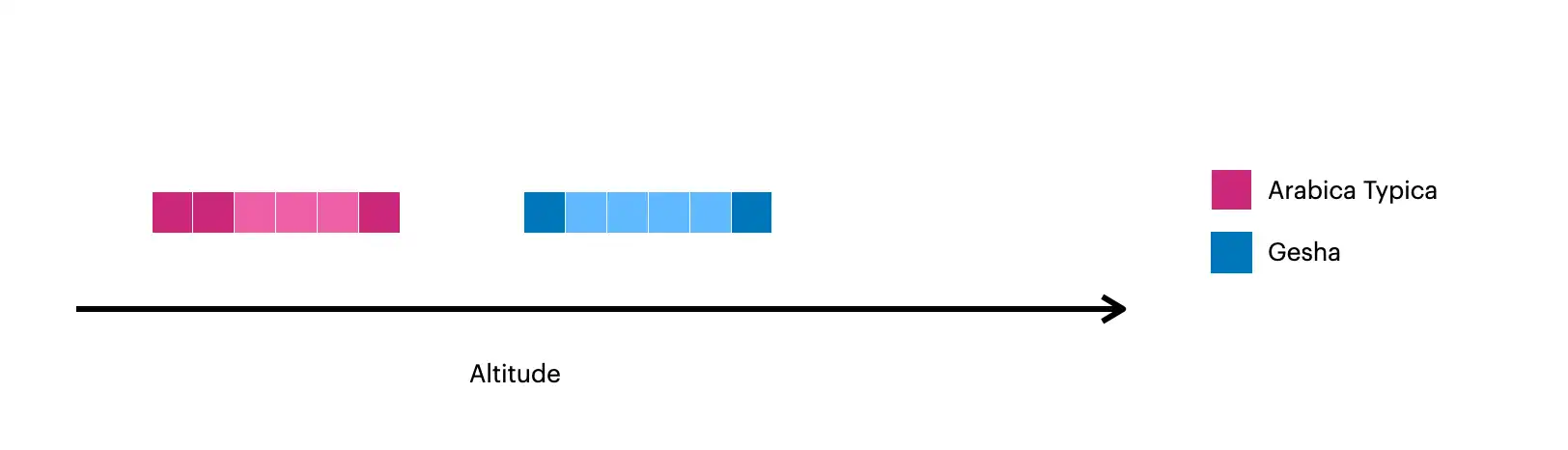
The darker squares represent the original documents in the collection.较深的方块代表集合中的原始文件。The lighter squares represent the documents created with较浅的方块代表用$densify.$density创建的文档。
C#
The C# examples on this page use the 本页上的C#示例使用Atlas示例数据集中的sample_weatherdata.data collection from the Atlas sample datasets. sample_weatherdata.data集合。To learn how to create a free MongoDB Atlas cluster and load the sample datasets, see Get Started in the MongoDB .NET/C# Driver documentation.要了解如何创建免费的MongoDB Atlas集群并加载示例数据集,请参阅MongoDB NET/C#驱动程序文档中的入门。
The following 以下Weather and Point classes model the documents in the sample_weatherdata.data collection:Weather和Point类对sample_weatherdata.data集合中的文档进行建模:
public class Weather
{
public Guid Id { get; set; }
public Point Position { get; set; }
[]
public DateTime Timestamp { get; set; }
}
public class Point
{
public float[] Coordinates { get; set; }
}The sample_weatherdata.data collection contains the following documents, which contain measurements for the same position field, one hour apart:sample_weatherdata.data集合包含以下文档,其中包含相隔一小时的同一position字段的测量值:
Document{{ _id=5553a..., position=Document{{type=Point, coordinates=[-47.9, 47.6]}}, ts=Mon Mar 05 08:00:00 EST 1984, ... }}
Document{{ _id=5553b..., position=Document{{type=Point, coordinates=[-47.9, 47.6]}}, ts=Mon Mar 05 09:00:00 EST 1984, ... }}
To use the MongoDB .NET/C# driver to add a 要使用MongoDB NET/C#驱动程序向聚合管道添加$densify stage to an aggregation pipeline, call the Densify() method on a PipelineDefinition object.$density阶段,请在PipelineDefinition对象上调用Densify()方法。
The following example creates a pipeline stage that adds a document at every 15-minute interval between the previous two documents. The code then groups these documents by the values of their 以下示例创建了一个管道阶段,该阶段在前两个文档之间每隔15分钟添加一个文档。然后,代码将这些文档按其Position.Coordinates field.Position.Coordinates(位置坐标)字段的值进行分组。
var densifyTimeRange = new DensifyDateTimeRange(
    new DensifyLowerUpperDateTimeBounds(
        lowerBound: new DateTime(1984, 3, 5, 8, 0, 0),
        upperBound: new DateTime(1984, 3, 5, 9, 0, 0)
    ),
    step: 15,
    unit: DensifyDateTimeUnit.Minutes
);

var pipeline = new EmptyPipelineDefinition<Weather>()
    .Densify(
        field: w => w.Timestamp,
        range: densifyTimeRange,
        partitionByFields: [w => w.Position.Coordinates]);
The previous aggregation stage generates the following highlighted documents in the collection:前一个聚合阶段在集合中生成以下突出显示的文档:
Document{{ _id=5553a..., position=Document{{type=Point, coordinates=[-47.9, 47.6]}}, ts=Mon Mar 05 08:00:00 EST 1984, ... }}
Document{{ position=Document{{coordinates=[-47.9, 47.6]}}, ts=Mon Mar 05 08:15:00 EST 1984 }}
Document{{ position=Document{{coordinates=[-47.9, 47.6]}}, ts=Mon Mar 05 08:30:00 EST 1984 }}
Document{{ position=Document{{coordinates=[-47.9, 47.6]}}, ts=Mon Mar 05 08:45:00 EST 1984 }}
Document{{ _id=5553b..., position=Document{{type=Point, coordinates=[-47.9, 47.6]}}, ts=Mon Mar 05 09:00:00 EST 1984, ... }}
Node.js
The Node.js examples on this page use the 此页面上的Node.js示例使用Atlas示例数据集中的sample_weatherdata.data collection from the Atlas sample datasets. sample_weatherdata.data集合。To learn how to create a free MongoDB Atlas cluster and load the sample datasets, see Get Started in the MongoDB Node.js driver documentation.要了解如何创建免费的MongoDB Atlas集群并加载示例数据集,请参阅MongoDB Node.js驱动程序文档中的入门。
The sample_weatherdata.data collection contains the following documents, which contain measurements for the same position field, one hour apart:sample_weatherdata.data集合包含以下文档,其中包含相隔一小时的同一position(位置)字段的测量值:
{_id: new ObjectId(...), ts: 1984-03-05T13:00:00.000Z, position: {type: 'Point', coordinates: [-47.9, 47.6]}, ... },
{_id: new ObjectId(...), ts: 1984-03-05T14:00:00.000Z, position: {type: 'Point', coordinates: [-47.9, 47.6]}, ... }
To use the MongoDB Node.js driver to add a 要使用MongoDB Node.js驱动程序向聚合管道添加$densify stage to an aggregation pipeline, use the $densify operator in a pipeline object.$density阶段,请在管道对象中使用$density运算符。
The following example creates a pipeline stage that adds a document at every 15-minute interval between the previous two documents. The code then groups these documents by the values of their 以下示例创建了一个管道阶段,该阶段在前两个文档之间每隔15分钟添加一个文档。然后,代码根据position.coordinates field. The example then runs the aggregation pipeline:position.coordinates(位置坐标)字段的值对这些文档进行分组。然后,该示例运行聚合管道:
const pipeline = [
  {
    $densify: {
      field: "ts",
      partitionByFields: ["position.coordinates"],
      range: {
        step: 15,
        unit: "minute",
        bounds: [new Date(1984, 3, 5, 8, 0, 0), new Date(1984, 3, 5, 9, 0, 0)]
      }
    }
  }
];

const cursor = collection.aggregate(pipeline);
return cursor;
The previous aggregation stage generates the following highlighted documents in the collection:前一个聚合阶段在集合中生成以下突出显示的文档:
{ _id: new ObjectId(...), ts: 1984-03-05T13:00:00.000Z, position: {type: 'Point', coordinates: [-47.9, 47.6]}, ... },
{ position: { coordinates: [-47.9, 47.6] }, ts: 1984-03-05T13:15:00.000Z },
{ position: { coordinates: [-47.9, 47.6] }, ts: 1984-03-05T13:30:00.000Z },
{ position: { coordinates: [-47.9, 47.6] }, ts: 1984-03-05T13:45:00.000Z },
{ _id: new ObjectId(...), ts: 1984-03-05T14:00:00.000Z, position: {type: 'Point', coordinates: [-47.9, 47.6]}, ... }