➤ Use the Select your language drop-down menu in the upper-right to set the language of the following examples or select MongoDB Compass.使用右上角的“选择语言”下拉菜单设置以下示例的语言,或选择MongoDB Compass。
This page provides examples of insert operations in MongoDB.本页提供MongoDB中插入操作的示例。
You can insert documents in MongoDB by using the following methods:您可以使用以下方法在MongoDB中插入文档:
Your programming language's driver.你的编程语言的驱动程序。The MongoDB Atlas UI. To learn more, see Insert Documents in the MongoDB Atlas UI.MongoDB Atlas用户界面。要了解更多信息,请参阅MongoDB Atlas UI中的插入文档。MongoDB Compass.MongoDBCompass。
Note
Creating a Collection创建集合
If the collection does not currently exist, insert operations will create the collection.如果该集合当前不存在,插入操作将创建该集合。
Insert Documents in the MongoDB Atlas UI在MongoDB Atlas用户界面中插入文档
To insert a document in the MongoDB Atlas UI, complete the following steps. To learn more about working with documents in the MongoDB Atlas UI, see Create, View, Update, and Delete Documents.要在MongoDB Atlas UI中插入文档,请完成以下步骤。要了解有关在MongoDB Atlas UI中使用文档的更多信息,请参阅创建、查看、更新和删除文档。
In the MongoDB Atlas UI, go to the Clusters page for your project.在MongoDB Atlas UI中,转到项目的“集群”页面。
Warning
Navigation Improvements In Progress导航改进正在进行中
We're currently rolling out a new and improved navigation experience. If the following steps don't match your view in the Atlas UI, see the preview Atlas documentation.我们目前正在推出一种新的、改进的导航体验。如果以下步骤与Atlas UI中的视图不匹配,请参阅Atlas预览文档。
If it's not already displayed, select the organization that contains your desired project from the Organizations menu in the navigation bar.如果尚未显示,请从导航栏的“组织”菜单中选择包含所需项目的组织。If it's not already displayed, select your project from the Projects menu in the navigation bar.如果尚未显示,请从导航栏中的“项目”菜单中选择您的项目。If it's not already displayed, click Clusters in the sidebar.如果尚未显示,请单击侧栏中的“集群”。
The Clusters page displays.将显示“群集”页面。
Navigate to the collection导航到集合
For the cluster to which you want to add documents, click Browse Collections.对于要添加文档的集群,单击“浏览集合”。In the left navigation pane, select the database.在左侧导航窗格中,选择数据库。In the left navigation pane, select the collection.在左侧导航窗格中,选择集合。
Add the documents添加文档
Click Insert Document.单击“插入文档”。Click the {} icon, which opens the JSON view.单击{}图标,打开JSON视图。Paste the document array into the text entry field. For example, the following entry creates four documents, each of which contain three fields:将文档数组粘贴到文本输入字段中。例如,以下条目创建了四个文档,每个文档包含三个字段:[
{ "prodId": 100, "price": 20, "quantity": 125 },
{ "prodId": 101, "price": 10, "quantity": 234 },
{ "prodId": 102, "price": 15, "quantity": 432 },
{ "prodId": 103, "price": 17, "quantity": 320 }
]
Insert a Single Document插入单个文档
MongoDB Shell
db.collection.insertOne() inserts a single document into a collection.db.collection.insertOne()将单个文档插入到集合中。
The following example inserts a new document into the 以下示例将新文档插入到inventory collection. inventory集合中。If the document does not specify an 如果文档没有指定_id field, MongoDB adds the _id field with an ObjectId value to the new document. _id字段,MongoDB会将具有ObjectId值的_id字段添加到新文档中。See Insert Behavior.请参见插入行为。
Compass
To insert a single document using MongoDB Compass:要使用MongoDB Compass插入单个文档,请执行以下操作:
Navigate to the collection you wish to insert the document into:导航到要将文档插入的集合:In the left-hand MongoDB Compass navigation pane, click the database to which your target collection belongs.在左侧的MongoDB Compass导航窗格中,单击目标集合所属的数据库。From the database view, click the target collection name.在数据库视图中,单击目标集合名称。
Click the Add Data button, then click Insert document:单击“添加数据”按钮,然后单击“插入文档”: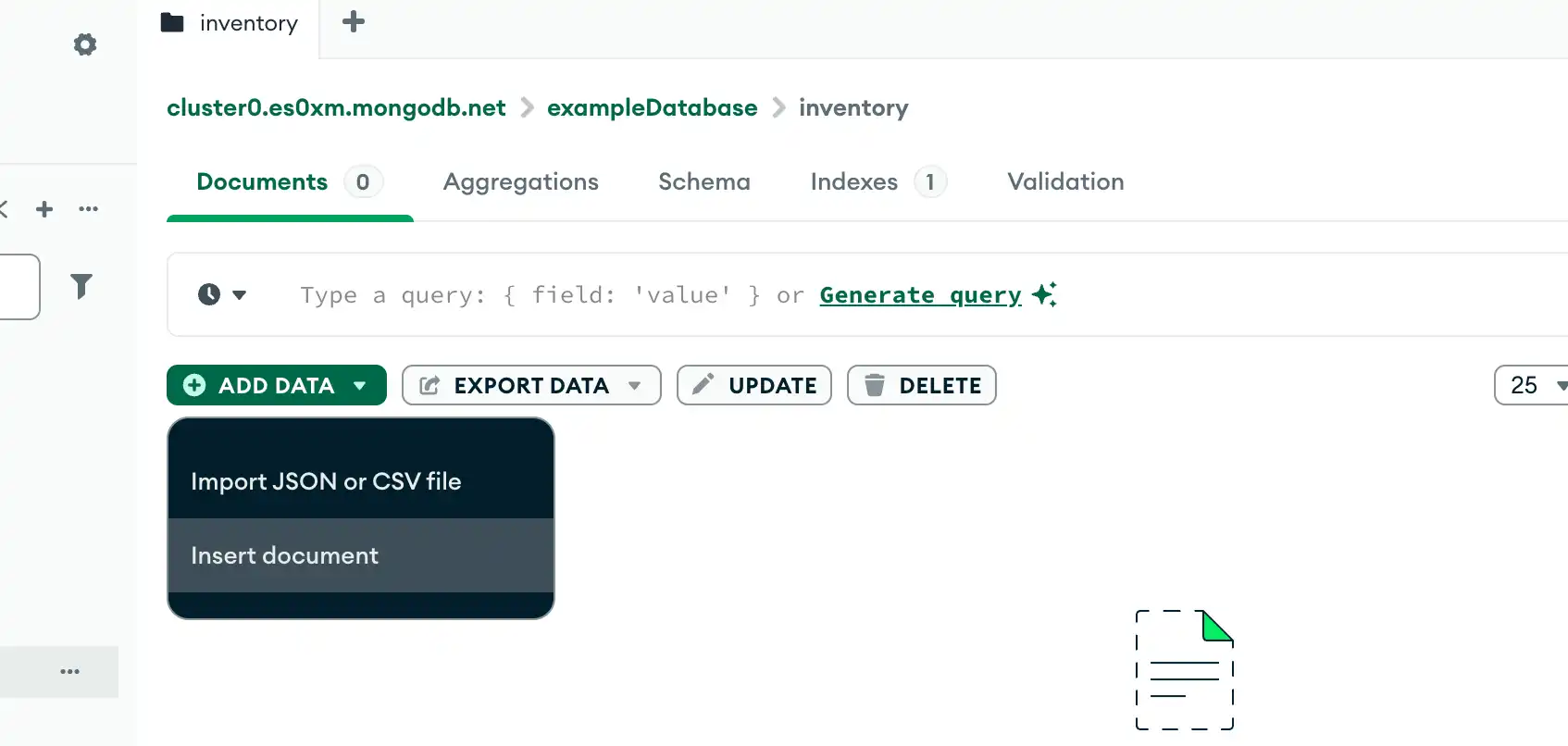
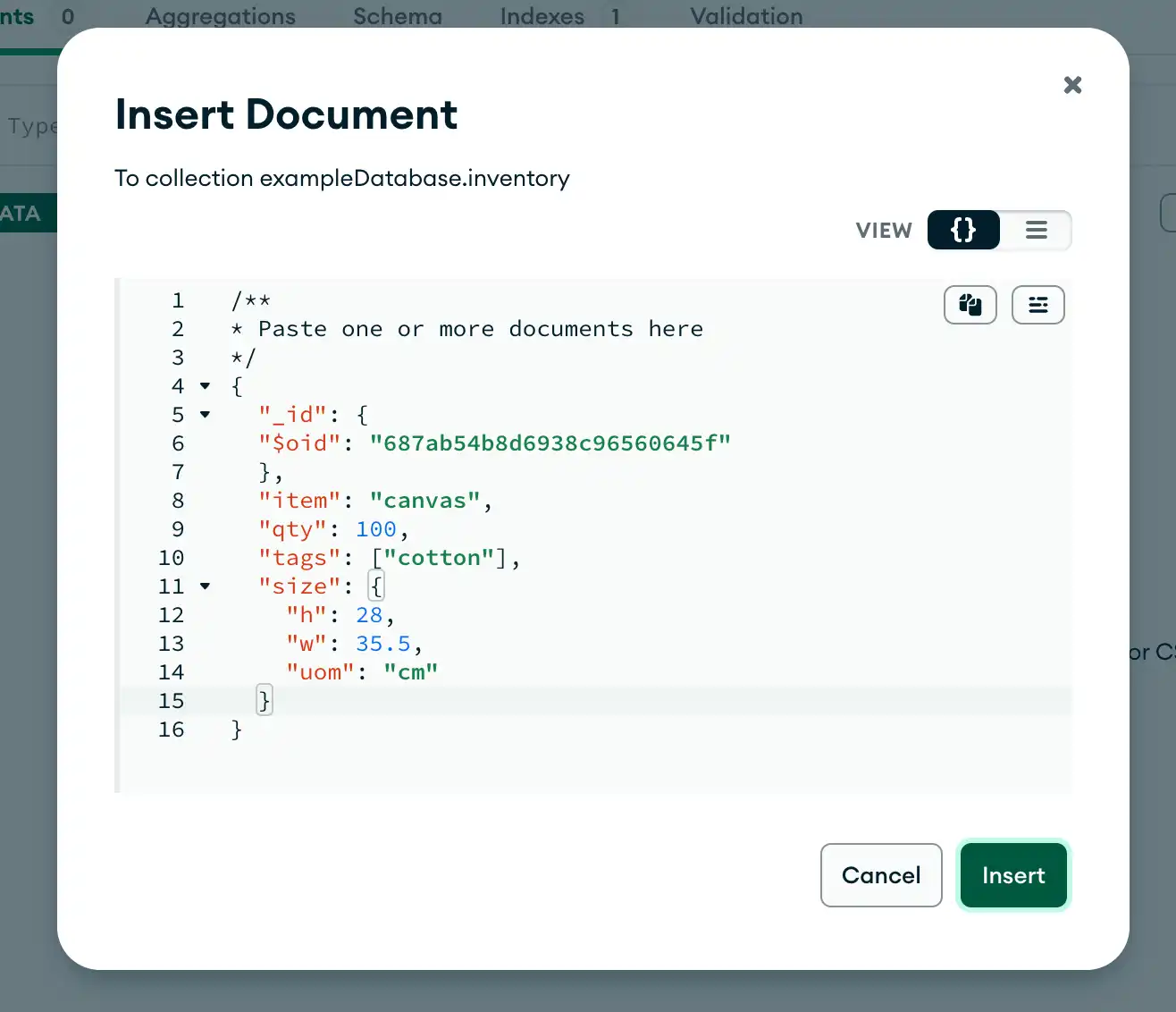
Paste in your document. For example, you can paste the following code into Compass to insert a粘贴到文档中。例如,您可以将以下代码粘贴到Compass中,将canvasdocument into theinventorycollection:canvas文档插入到inventory集合中:{
"item": "canvas",
"qty": 100,
"tags": ["cotton"],
"size": {
"h": 28,
"w": 35.5,
"uom": "cm"
}
}Click Insert.单击“插入”。
The following example inserts a new document into the test.inventory collection:以下示例将新文档插入到test.inventory集合中:
C
The following example inserts a new document into the 以下示例将新文档插入到inventory collection. inventory集合中。If the document does not specify an 如果文档没有指定_id field, the C driver adds the _id field with an ObjectId value to the new document. _id字段,C驱动程序会将具有ObjectId值的_id字段添加到新文档中。For more information, see Insert Behavior.有关详细信息,请参阅插入行为。
C#
IMongoCollection.InsertOne() inserts a single document into a collection.将单个文档插入到集合中。
The following example inserts a new document into the 以下示例将新文档插入到inventory collection. If the document does not specify an _id field, the C# driver adds the _id field with an ObjectId value to the new document. inventory集合中。如果文档没有指定_id字段,C#驱动程序会将具有ObjectId值的_id字段添加到新文档中。See Insert Behavior.请参见插入行为。
Go
Collection.InsertOne inserts a single document into a collection.将单个文档插入到集合中。
The following example inserts a new document into the 以下示例将新文档插入到inventory collection. If the document does not specify an _id field, the driver adds the _id field with an ObjectId value to the new document. inventory集合中。如果文档没有指定_id字段,驱动程序会将具有ObjectId值的_id字段添加到新文档中。See Insert Behavior.请参见插入行为。
Java(Async)
com.mongodb.reactivestreams.client.MongoCollection.insertOne inserts a single document into a collection with the Java Reactive Streams Driver:使用Java Reactive Streams驱动程序将单个文档插入到集合中:
{ item: "canvas", qty: 100, tags: ["cotton"], size: { h: 28, w: 35.5, uom: "cm" } }The following example inserts the document above into the 以下示例将上述文档插入到inventory collection. inventory集合中。If the document does not specify an 如果文档没有指定_id field, the driver adds the _id field with an ObjectId value to the new document. _id字段,驱动程序会将具有ObjectId值的_id字段添加到新文档中。See Insert Behavior.请参见插入行为。
Java(Sync)
com.mongodb.client.MongoCollection.insertOne inserts a single document into a collection.
The following example inserts a new document into the 以下示例将新文档插入到inventory collection. If the document does not specify an _id field, the driver adds the _id field with an ObjectId value to the new document. See Insert Behavior.inventory集合中。如果文档没有指定_id字段,驱动程序会将具有ObjectId值的_id字段添加到新文档中。请参见插入行为。
Kotlin(Coroutine)
MongoCollection.insertOne inserts a single document into a collection.将单个文档插入到集合中。
The following example inserts a new document into the 以下示例将新文档插入到inventory collection. If the document does not specify an _id field, the driver adds the _id field with an ObjectId value to the new document. inventory集合中。如果文档没有指定_id字段,驱动程序会将具有ObjectId值的_id字段添加到新文档中。See Insert Behavior.请参见插入行为。
Motor
motor.motor_asyncio.AsyncIOMotorCollection.insert_one inserts a single document into a collection.将单个文档插入到集合中。
The following example inserts a new document into the 以下示例将新文档插入到inventory collection. If the document does not specify an _id field, the Motor driver adds the _id field with an ObjectId value to the new document. See Insert Behavior.inventory集合中。如果文档没有指定_id字段,则Motor驱动程序会将具有ObjectId值的_id字段添加到新文档中。请参见插入行为。
Node.js
Collection.insertOne() inserts a single document into a collection.将单个文档插入到集合中。
The following example inserts a new document into the 以下示例将新文档插入到inventory collection. If the document does not specify an _id field, the Node.js driver adds the _id field with an ObjectId value to the new document. inventory集合中。如果文档没有指定_id字段,Node.js驱动程序会将具有ObjectId值的_id字段添加到新文档中。See Insert Behavior.请参见插入行为。
PHP
MongoDB\\Collection::insertOne() inserts a single document into a collection.将单个文档插入到集合中。
The following example inserts a new document into the 以下示例将新文档插入到inventory collection. If the document does not specify an _id field, the PHP driver adds the _id field with an ObjectId value to the new document. See Insert Behavior.inventory集合中。如果文档没有指定_id字段,PHP驱动程序会将具有ObjectId值的_id字段添加到新文档中。请参见插入行为。
Python
pymongo.collection.Collection.insert_one inserts a single document into a collection.将单个文档插入到集合中。
The following example inserts a new document into the 以下示例将新文档插入到inventory collection. If the document does not specify an _id field, the PyMongo driver adds the _id field with an ObjectId value to the new document. See Insert Behavior.inventory集合中。如果文档没有指定_id字段,PyMongo驱动程序会将具有ObjectId值的_id字段添加到新文档中。请参见插入行为。
Ruby
Mongo::Collection#insert_one() inserts a single document into a collection.将单个文档插入到集合中。
The following example inserts a new document into the 以下示例将新文档插入到inventory collection. inventory集合中。If the document does not specify an 如果文档没有指定_id field, the Ruby driver adds the _id field with an ObjectId value to the new document. _id字段,Ruby驱动程序会将具有ObjectId值的_id字段添加到新文档中。See Insert Behavior.请参见插入行为。
Scala
collection.insertOne() inserts a single document into a collection.将单个文档插入到集合中。
The following example inserts a new document into the 以下示例将新文档插入到inventory collection. inventory集合中。If the document does not specify an 如果文档没有指定_id field, the Scala driver adds the _id field with an ObjectId value to the new document. _id字段,Scala驱动程序会将具有ObjectId值的_id字段添加到新文档中。See Insert Behavior.请参见插入行为。
MongoDB Shell
db.inventory.insertOne(
   { item: "canvas", qty: 100, tags: ["cotton"], size: { h: 28, w: 35.5, uom: "cm" } }
)
Compass
C
mongoc_collection_t *collection;
bson_t *doc;
bool r;
bson_error_t error;

collection = mongoc_database_get_collection (db, "inventory");
doc = BCON_NEW (
   "item", BCON_UTF8 ("canvas"),
   "qty", BCON_INT64 (100),
   "tags", "[",
   BCON_UTF8 ("cotton"),
   "]",
   "size", "{",
   "h", BCON_DOUBLE (28),
   "w", BCON_DOUBLE (35.5),
   "uom", BCON_UTF8 ("cm"),
   "}");

r = mongoc_collection_insert_one (collection, doc, NULL, NULL, &error);
bson_destroy (doc);

if (!r) {
   MONGOC_ERROR ("%s\n", error.message);
   goto done;
}
C#
var document = new BsonDocument
{
    { "item", "canvas" },
    { "qty", 100 },
    { "tags", new BsonArray { "cotton" } },
    { "size", new BsonDocument { { "h", 28 }, { "w", 35.5 }, { "uom", "cm" } } }
};
collection.InsertOne(document);
Go
result, err := coll.InsertOne(
	context.TODO(),
	bson.D{
		{"item", "canvas"},
		{"qty", 100},
		{"tags", bson.A{"cotton"}},
		{"size", bson.D{
			{"h", 28},
			{"w", 35.5},
			{"uom", "cm"},
		}},
	})
Java(Async)
Document canvas = new Document("item", "canvas")
        .append("qty", 100)
        .append("tags", singletonList("cotton"));

Document size = new Document("h", 28)
        .append("w", 35.5)
        .append("uom", "cm");
canvas.put("size", size);

Publisher<Success> insertOnePublisher = collection.insertOne(canvas);
Java(Sync)
Document canvas = new Document("item", "canvas")
        .append("qty", 100)
        .append("tags", singletonList("cotton"));

Document size = new Document("h", 28)
        .append("w", 35.5)
        .append("uom", "cm");
canvas.put("size", size);

collection.insertOne(canvas);
Kotlin(Coroutine)
result = collection.insertOne(
Document("item", "canvas")
    .append("qty", 100)
    .append("tags", listOf("cotton"))
    .append("size", Document("h", 28)
        .append("w", 35.5)
        .append("uom", "cm")
    )
Motor
await db.inventory.insert_one(
    {
        "item": "canvas",
        "qty": 100,
        "tags": ["cotton"],
        "size": {"h": 28, "w": 35.5, "uom": "cm"},
    }
)
Node.js
await db.collection('inventory').insertOne({
  item: 'canvas',
  qty: 100,
  tags: ['cotton'],
  size: { h: 28, w: 35.5, uom: 'cm' }
});
PHP
$insertOneResult = $db->inventory->insertOne([
    'item' => 'canvas',
    'qty' => 100,
    'tags' => ['cotton'],
    'size' => ['h' => 28, 'w' => 35.5, 'uom' => 'cm'],
]);
Python
db.inventory.insert_one(
    {
        "item": "canvas",
        "qty": 100,
        "tags": ["cotton"],
        "size": {"h": 28, "w": 35.5, "uom": "cm"},
    }
)
Ruby
client[:inventory].insert_one({ item: 'canvas',
                                qty: 100,
                                tags: [ 'cotton' ],
                                size: { h: 28, w: 35.5, uom: 'cm' } })
Scala
collection.insertOne(
  Document("item" -> "canvas", "qty" -> 100, "tags" -> Seq("cotton"), "size" -> Document("h" -> 28, "w" -> 35.5, "uom" -> "cm"))
).execute()
MongoDB Shell
insertOne() returns a document that includes the newly inserted document's 返回一个包含新插入文档的_id field value. For an example of a return document, see db.collection.insertOne() reference._id字段值的文档。有关返回文档的示例,请参阅db.collection.insertOne()参考。
Compass
Note
MongoDB Compass generates the MongoDB Compass自动生成_id field and its value automatically. The generated ObjectId consists of a unique randomly generated hexadecimal value._id字段及其值。生成的ObjectId由一个唯一的随机生成的十六进制值组成。
You can change this value prior to inserting your document so long as it remains unique and is a valid 您可以在插入文档之前更改此值,只要它保持唯一并且是有效的ObjectId. ObjectId。For more information on the 有关_id field, see _id Field._id字段的更多信息,请参阅_id字段。
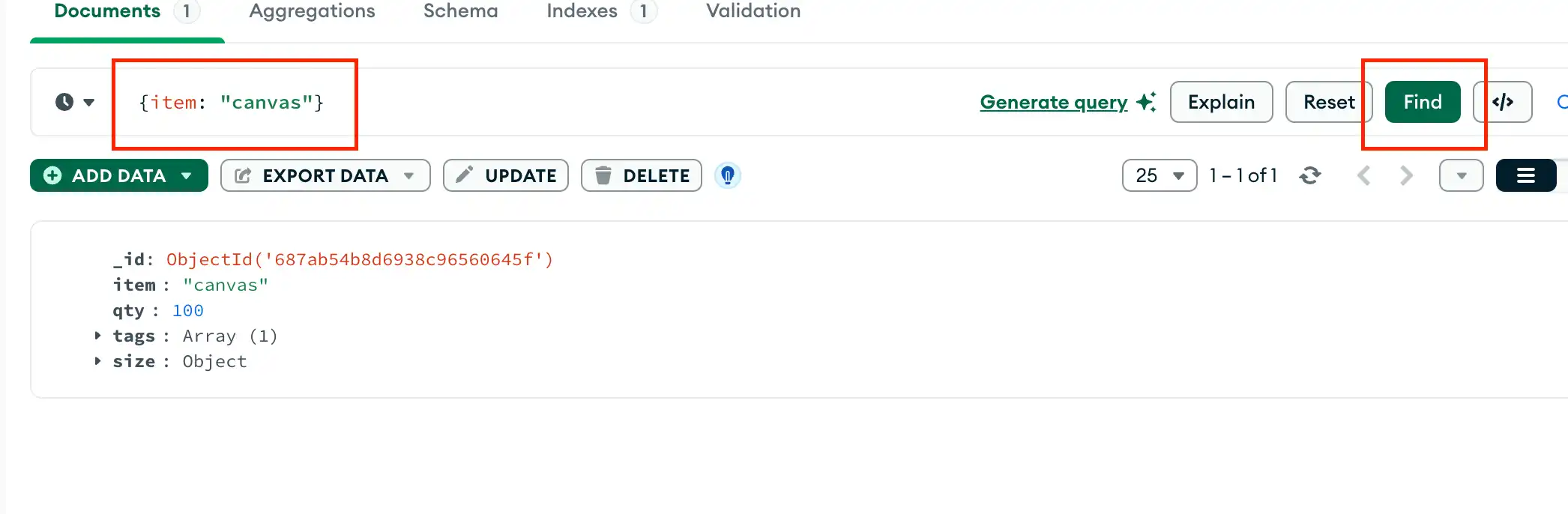
To retrieve the document that you just inserted, query the collection by specifying a filter in the MongoDB Compass query bar and clicking Find to execute the query.要检索您刚才插入的文档,请在MongoDB Compass查询栏中指定一个筛选器并单击“查找”以执行查询,从而查询集合。
The following filter specifies that MongoDB Compass only return documents where the 以下筛选器指定MongoDB Compass仅返回item field is equal to canvas. item字段等于canvas的文档。For more information on the MongoDB Compass Query Bar, see Query Bar.有关MongoDB Compass查询栏的更多信息,请参阅查询栏。
C
mongoc_collection_insert_one returns 如果成功,则返回true if successful, or returns false and sets error if there are invalid arguments or a server or network error.true;如果存在无效参数或服务器或网络错误,则返回false并设置错误。
To retrieve the document that you just inserted, query the collection:要检索您刚才插入的文档,请查询集合:
C#
To retrieve the document that you just inserted, query the collection:
Go
Collection.InsertOne function returns an instance of InsertOneResult whose 函数返回InsertedID attribute contains the _id of the newly inserted document.InsertOneResult的实例,其InsertedID属性包含新插入文档的_id。
To retrieve the document that you just inserted, query the collection:要检索您刚才插入的文档,请查询集合:
Java(Async)
com.mongodb.reactivestreams.client.MongoCollection.insertOne returns a Publisher object. The 返回Publisher inserts the document into a collection when subscribers request data.Publisher对象。当订阅者请求数据时,Publisher会将文档插入到集合中。
To retrieve the document that you just inserted, query the collection:要检索您刚才插入的文档,请查询集合:
Java(Sync)
com.mongodb.client.MongoCollection.insertOne returns an instance of InsertOneResult. 返回InsertOneResult的实例。You can access the 您可以通过对结果调用_id field of the inserted document by calling the getInsertedId() method on the result.getInsertedId()方法来访问插入文档的_id字段。
To retrieve the document that you just inserted, query the collection:要检索您刚才插入的文档,请查询集合:
Kotlin(Coroutine)
MongoCollection.insertOne returns an instance of InsertOneResult. 返回InsertOneResult的实例。You can access the 您可以通过访问结果的_id field of the inserted document by accessing the insertedId field of the result.insertedId字段来访问插入文档的_id字段。
To retrieve the document that you just inserted, query the collection:要检索您刚才插入的文档,请查询集合:
Motor
insert_one returns an instance of 返回pymongo.results.InsertOneResult whose inserted_id field contains the _id of the newly inserted document.pymongo.results.InsertOneResult的实例,其inserted_id字段包含新插入文档的_id。
To retrieve the document that you just inserted, query the collection:要检索您刚才插入的文档,请查询集合:
Node.js
insertOne() returns a promise that provides a 返回一个提供result. The result.insertedId promise contains the _id of the newly inserted document.result的promise。result.insertedId promise包含新插入文档的_id。
To retrieve the document that you just inserted, query the collection:要检索您刚才插入的文档,请查询集合:
PHP
Upon successful insert, the 插入成功后,insertOne() method returns an instance of MongoDB\\InsertOneResult whose getInsertedId() method returns the _id of the newly inserted document.insertOne()方法返回MongoDB\\InsertOneResult的一个实例,其getInsertedId()方法将返回新插入文档的_id。
To retrieve the document that you just inserted, query the collection:要检索您刚才插入的文档,请查询集合:
Python
insert_one returns an instance of 返回pymongo.results.InsertOneResult whose inserted_id field contains the _id of the newly inserted document.pymongo.results.InsertOneResult的实例,其inserted_id字段包含新插入文档的_id。
To retrieve the document that you just inserted, query the collection:要检索您刚才插入的文档,请查询集合:
Ruby
Upon successful insert, the 插入成功后,insert_one() method returns an instance of Mongo::Operation::Result, whose inserted_id attribute contains the _id of the newly inserted document.insert_one()方法返回Mongo::Operation::Result的实例,其inserted_id属性包含新插入文档的_id。
To retrieve the document that you just inserted, query the collection:要检索您刚才插入的文档,请查询集合:
Scala
Upon successful insert, the 成功插入后,collection.insertOne() method returns an instance of collection.insertOne().results(); whose inserted_id attribute contains the _id of the newly inserted document.collection.insertOne()方法返回collection.insertOne().results();的实例;其inserted_id属性包含新插入文档的_id。
To retrieve the document that you just inserted, query the collection:要检索您刚才插入的文档,请查询集合:
MongoDB Shell
db.inventory.find( { item: "canvas" } )Compass
C
mongoc_collection_t *collection;
bson_t *filter;
mongoc_cursor_t *cursor;

collection = mongoc_database_get_collection (db, "inventory");
filter = BCON_NEW ("item", BCON_UTF8 ("canvas"));
cursor = mongoc_collection_find_with_opts (collection, filter, NULL, NULL);
C#
var filter = Builders<BsonDocument>.Filter.Eq("item", "canvas");
var result = collection.Find(filter).ToList();
Go
cursor, err := coll.Find(
	context.TODO(),
	bson.D{{"item", "canvas"}},
)
Java(Async)
FindPublisher<Document> findPublisher = collection.find(eq("item", "canvas"));Java(Sync)
FindIterable<Document> findIterable = collection.find(eq("item", "canvas"));Kotlin(Coroutine)
val flowInsertOne = collection
    .find(eq("item", "canvas"))
    .firstOrNull()
Motor
cursor = db.inventory.find({"item": "canvas"})Node.js
const cursor = db.collection('inventory').find({ item: 'canvas' });PHP
$cursor = $db->inventory->find(['item' => 'canvas']);Python
cursor = db.inventory.find({"item": "canvas"})Ruby
client[:inventory].find(item: 'canvas')Scala
val observable = collection.find(equal("item", "canvas"))Insert Multiple Documents插入多个文档
MongoDB Shell
db.collection.insertMany() can insert multiple documents into a collection. Pass an array of documents to the method.可以将多个文档插入到集合中。将一组文档传递给该方法。
The following example inserts three new documents into the 以下示例将三个新文档插入到inventory collection. If the documents do not specify an _id field, MongoDB adds the _id field with an ObjectId value to each document. inventory集合中。如果文档没有指定_id字段,MongoDB会将具有ObjectId值的_id字段添加到每个文档中。See Insert Behavior.请参见插入行为。
Compass
For instructions on inserting documents using MongoDB Compass, see Insert Documents. You can paste the following documents into the Insert Document dialog in Compass to insert multiple 有关使用MongoDB Compass插入文档的说明,请参阅插入文档。您可以将以下文档粘贴到Compass中的“插入文档”对话框中,以将多个项目文档插入到item documents into the inventory collection:inventory集合中:
C
mongoc_bulk_operation_insert_with_opts inserts multiple documents into a collection. You must pass an iterable of documents to the method.将多个文档插入到集合中。您必须将文档的可迭代对象传递给该方法。
The following example inserts three new documents into the 以下示例将三个新文档插入到inventory collection. If the documents do not specify an _id field, the C driver adds the _id field with an ObjectId value to each document. inventory集合中。如果文档没有指定_id字段,C驱动程序会将具有ObjectId值的_id字段添加到每个文档中。See Insert Behavior.请参见插入行为。
C#
IMongoCollection.InsertMany() can insert multiple documents into a collection. Pass an enumerable collection of documents to the method.可以将多个文档插入到集合中。将可枚举的文档集合传递给该方法。
The following example inserts three new documents into the 以下示例将三个新文档插入到inventory collection. If the documents do not specify an _id field, the driver adds the _id field with an ObjectId value to each document. See Insert Behavior.inventory集合中。如果文档没有指定_id字段,则驱动程序会将具有ObjectId值的_id字段添加到每个文档中。请参见插入行为。
Go
Collection.InsertMany can insert multiple documents into a collection.可以将多个文档插入到集合中。
The following example inserts three new documents into the 以下示例将三个新文档插入到inventory collection. inventory集合中。If the documents do not specify an 如果文档没有指定_id field, the driver adds the _id field with an ObjectId value to each document. _id字段,则驱动程序会将具有ObjectId值的_id字段添加到每个文档中。See Insert Behavior.请参见插入行为。
Java(Async)
com.mongodb.reactivestreams.client.MongoCollection.html.insertMany inserts the following documents with the Java Reactive Streams Driver:使用Java Reactive Streams驱动程序插入以下文档:
{ item: "journal", qty: 25, tags: ["blank", "red"], size: { h: 14, w: 21, uom: "cm" } }
{ item: "mat", qty: 85, tags: ["gray"], size: { h: 27.9, w: 35.5, uom: "cm" } }
{ item: "mousepad", qty: 25, tags: ["gel", "blue"], size: { h: 19, w: 22.85, uom: "cm" } }
The following example inserts three new documents into the 以下示例将三个新文档插入到inventory collection. inventory集合中。If the documents do not specify an 如果文档没有指定_id field, the driver adds the _id field with an ObjectId value to each document. _id字段,则驱动程序会将具有ObjectId值的_id字段添加到每个文档中。See Insert Behavior.请参见插入行为。
Java(Sync)
com.mongodb.client.MongoCollection.insertMany can insert multiple documents into a collection. Pass a list of documents to the method.可以将多个文档插入到集合中。将文档列表传递给该方法。
The following example inserts three new documents into the 以下示例将三个新文档插入到inventory collection. inventory集合中。If the documents do not specify an 如果文档没有指定_id field, the driver adds the _id field with an ObjectId value to each document. _id字段,则驱动程序会将具有ObjectId值的_id字段添加到每个文档中。See Insert Behavior.请参见插入行为。
Kotlin(Coroutine)
MongoCollection.insertMany inserts multiple documents into a collection. Pass a list of documents as a parameter to the method.将多个文档插入到集合中。将文档列表作为参数传递给该方法。
The following example inserts three new documents into the 以下示例将三个新文档插入到inventory collection. If the documents do not specify an _id field, the driver adds an ObjectId value to each document. See Insert Behavior.inventory集合中。如果文档没有指定_id字段,驱动程序会向每个文档添加一个ObjectId值。请参见插入行为。
Motor
motor.motor_asyncio.AsyncIOMotorCollection.insert_many can insert multiple documents into a collection. Pass an iterable of documents to the method.可以将多个文档插入到集合中。将文档的可迭代对象传递给该方法。
The following example inserts three new documents into the 以下示例将三个新文档插入到inventory collection. If the documents do not specify an _id field, the PyMongo driver adds the _id field with an ObjectId value to each document. inventory集合中。如果文档没有指定_id字段,PyMongo驱动程序会将具有ObjectId值的_id字段添加到每个文档中。See Insert Behavior.请参见插入行为。
Node.js
Collection.insertMany() can insert multiple documents into a collection. Pass an array of documents to the method.可以将多个文档插入到集合中。将一组文档传递给该方法。
The following example inserts three new documents into the 以下示例将三个新文档插入到inventory collection. If the documents do not specify an _id field, the Node.js driver adds the _id field with an ObjectId value to each document. See Insert Behavior.inventory集合中。如果文档没有指定_id字段,Node.js驱动程序会将具有ObjectId值的_id字段添加到每个文档中。请参见插入行为。
PHP
MongoDB\\Collection::insertMany() can insert multiple documents into a collection. Pass an array of documents to the method.可以将多个文档插入到集合中。将一组文档传递给该方法。
The following example inserts three new documents into the 以下示例将三个新文档插入到inventory collection. If the documents do not specify an _id field, the PHP driver adds the _id field with an ObjectId value to each document. inventory集合中。如果文档没有指定_id字段,PHP驱动程序会将具有ObjectId值的_id字段添加到每个文档中。See Insert Behavior.请参见插入行为。
Python
pymongo.collection.Collection.insert_many can insert multiple documents into a collection. Pass an iterable of documents to the method.可以将多个文档插入到集合中。将文档的可迭代对象传递给该方法。
The following example inserts three new documents into the 以下示例将三个新文档插入到inventory collection. If the documents do not specify an _id field, the PyMongo driver adds the _id field with an ObjectId value to each document. inventory集合中。如果文档没有指定_id字段,PyMongo驱动程序会将具有ObjectId值的_id字段添加到每个文档中。See Insert Behavior.请参见插入行为。
Ruby
Mongo::Collection#insert_many() can insert multiple documents into a collection. Pass an array of documents to the method.可以将多个文档插入到集合中。将一组文档传递给该方法。
The following example inserts three new documents into the 以下示例将三个新文档插入到inventory collection. If the documents do not specify an _id field, the Ruby driver adds the _id field with an ObjectId value to each document. inventory集合中。如果文档没有指定_id字段,Ruby驱动程序会将具有ObjectId值的_id字段添加到每个文档中。See Insert Behavior.请参见插入行为。
Scala
collection.insertMany() can insert multiple documents into a collection.可以将多个文档插入到集合中。
The following example inserts three new documents into the 以下示例将三个新文档插入到inventory collection. inventory集合中。If the documents do not specify an 如果文档没有指定_id field, the Scala driver adds the _id field with an ObjectId value to each document. _id字段,Scala驱动程序会将具有ObjectId值的_id字段添加到每个文档中。See Insert Behavior.请参见插入行为。
MongoDB Shell
db.inventory.insertMany([
   { item: "journal", qty: 25, tags: ["blank", "red"], size: { h: 14, w: 21, uom: "cm" } },
   { item: "mat", qty: 85, tags: ["gray"], size: { h: 27.9, w: 35.5, uom: "cm" } },
   { item: "mousepad", qty: 25, tags: ["gel", "blue"], size: { h: 19, w: 22.85, uom: "cm" } }
])
Compass
[
    { "item": "canvas", "qty": 100, "size": { "h": 28, "w": 35.5, "uom": "cm" }, "status": "A" },
    { "item": "journal", "qty": 25, "size": { "h": 14, "w": 21, "uom": "cm" }, "status": "A" },
    { "item": "mat", "qty": 85, "size": { "h": 27.9, "w": 35.5, "uom": "cm" }, "status": "A" },
    { "item": "mousepad", "qty": 25, "size": { "h": 19, "w": 22.85, "uom": "cm" }, "status": "P" },
    { "item": "notebook", "qty": 50, "size": { "h": 8.5, "w": 11, "uom": "in" }, "status": "P" },
    { "item": "paper", "qty": 100, "size": { "h": 8.5, "w": 11, "uom": "in" }, "status": "D" },
    { "item": "planner", "qty": 75, "size": { "h": 22.85, "w": 30, "uom": "cm" }, "status": "D" },
    { "item": "postcard", "qty": 45, "size": { "h": 10, "w": 15.25, "uom": "cm" }, "status": "A" },
    { "item": "sketchbook", "qty": 80, "size": { "h": 14, "w": 21, "uom": "cm" }, "status": "A" },
    { "item": "sketch pad", "qty": 95, "size": { "h": 22.85, "w": 30.5, "uom": "cm" }, "status": "A" }
]
C
mongoc_collection_t *collection;
mongoc_bulk_operation_t *bulk;
bson_t *doc;
bool r;
bson_error_t error;
bson_t reply;

collection = mongoc_database_get_collection (db, "inventory");
bulk = mongoc_collection_create_bulk_operation_with_opts (collection, NULL);
doc = BCON_NEW (
   "item", BCON_UTF8 ("journal"),
   "qty", BCON_INT64 (25),
   "tags", "[",
   BCON_UTF8 ("blank"), BCON_UTF8 ("red"),
   "]",
   "size", "{",
   "h", BCON_DOUBLE (14),
   "w", BCON_DOUBLE (21),
   "uom", BCON_UTF8 ("cm"),
   "}");

r = mongoc_bulk_operation_insert_with_opts (bulk, doc, NULL, &error);
bson_destroy (doc);
if (!r) {
   MONGOC_ERROR ("%s\n", error.message);
   goto done;
}

doc = BCON_NEW (
   "item", BCON_UTF8 ("mat"),
   "qty", BCON_INT64 (85),
   "tags", "[",
   BCON_UTF8 ("gray"),
   "]",
   "size", "{",
   "h", BCON_DOUBLE (27.9),
   "w", BCON_DOUBLE (35.5),
   "uom", BCON_UTF8 ("cm"),
   "}");

r = mongoc_bulk_operation_insert_with_opts (bulk, doc, NULL, &error);
bson_destroy (doc);
if (!r) {
   MONGOC_ERROR ("%s\n", error.message);
   goto done;
}

doc = BCON_NEW (
   "item", BCON_UTF8 ("mousepad"),
   "qty", BCON_INT64 (25),
   "tags", "[",
   BCON_UTF8 ("gel"), BCON_UTF8 ("blue"),
   "]",
   "size", "{",
   "h", BCON_DOUBLE (19),
   "w", BCON_DOUBLE (22.85),
   "uom", BCON_UTF8 ("cm"),
   "}");

r = mongoc_bulk_operation_insert_with_opts (bulk, doc, NULL, &error);
bson_destroy (doc);
if (!r) {
   MONGOC_ERROR ("%s\n", error.message);
   goto done;
}

/* "reply" is initialized on success or error */
r = (bool) mongoc_bulk_operation_execute (bulk, &reply, &error);
if (!r) {
   MONGOC_ERROR ("%s\n", error.message);
}
C#
var documents = new BsonDocument[]
{
    new BsonDocument
    {
        { "item", "journal" },
        { "qty", 25 },
        { "tags", new BsonArray { "blank", "red" } },
        { "size", new BsonDocument { { "h", 14 }, { "w", 21 }, {  "uom", "cm"} } }
    },
    new BsonDocument
    {
        { "item", "mat" },
        { "qty", 85 },
        { "tags", new BsonArray { "gray" } },
        { "size", new BsonDocument { { "h", 27.9 }, { "w", 35.5 }, {  "uom", "cm"} } }
    },
    new BsonDocument
    {
        { "item", "mousepad" },
        { "qty", 25 },
        { "tags", new BsonArray { "gel", "blue" } },
        { "size", new BsonDocument { { "h", 19 }, { "w", 22.85 }, {  "uom", "cm"} } }
    },
};
collection.InsertMany(documents);
Go
result, err := coll.InsertMany(
	context.TODO(),
	[]any{
		bson.D{
			{"item", "journal"},
			{"qty", int32(25)},
			{"tags", bson.A{"blank", "red"}},
			{"size", bson.D{
				{"h", 14},
				{"w", 21},
				{"uom", "cm"},
			}},
		},
		bson.D{
			{"item", "mat"},
			{"qty", int32(25)},
			{"tags", bson.A{"gray"}},
			{"size", bson.D{
				{"h", 27.9},
				{"w", 35.5},
				{"uom", "cm"},
			}},
		},
		bson.D{
			{"item", "mousepad"},
			{"qty", 25},
			{"tags", bson.A{"gel", "blue"}},
			{"size", bson.D{
				{"h", 19},
				{"w", 22.85},
				{"uom", "cm"},
			}},
		},
	})
Java(Async)
Document journal = new Document("item", "journal")
        .append("qty", 25)
        .append("tags", asList("blank", "red"));

Document journalSize = new Document("h", 14)
        .append("w", 21)
        .append("uom", "cm");
journal.put("size", journalSize);

Document mat = new Document("item", "mat")
        .append("qty", 85)
        .append("tags", singletonList("gray"));

Document matSize = new Document("h", 27.9)
        .append("w", 35.5)
        .append("uom", "cm");
mat.put("size", matSize);

Document mousePad = new Document("item", "mousePad")
        .append("qty", 25)
        .append("tags", asList("gel", "blue"));

Document mousePadSize = new Document("h", 19)
        .append("w", 22.85)
        .append("uom", "cm");
mousePad.put("size", mousePadSize);

Publisher<Success> insertManyPublisher = collection.insertMany(asList(journal, mat, mousePad));
Java(Sync)
Document journal = new Document("item", "journal")
        .append("qty", 25)
        .append("tags", asList("blank", "red"));

Document journalSize = new Document("h", 14)
        .append("w", 21)
        .append("uom", "cm");
journal.put("size", journalSize);

Document mat = new Document("item", "mat")
        .append("qty", 85)
        .append("tags", singletonList("gray"));

Document matSize = new Document("h", 27.9)
        .append("w", 35.5)
        .append("uom", "cm");
mat.put("size", matSize);

Document mousePad = new Document("item", "mousePad")
        .append("qty", 25)
        .append("tags", asList("gel", "blue"));

Document mousePadSize = new Document("h", 19)
        .append("w", 22.85)
        .append("uom", "cm");
mousePad.put("size", mousePadSize);

collection.insertMany(asList(journal, mat, mousePad));
Kotlin(Coroutine)
results = collection.insertMany(
listOf(
    Document("item", "journal")
        .append("qty", 25)
        .append("tags", listOf("blank", "red"))
        .append("size", Document("h", 14)
            .append("w", 21)
            .append("uom", "cm")
        ),
    Document("item", "mat")
        .append("qty", 25)
        .append("tags", listOf("gray"))
        .append("size", Document("h", 27.9)
            .append("w", 35.5)
            .append("uom", "cm")
        ),
    Document("item", "mousepad")
        .append("qty", 25)
        .append("tags", listOf("gel", "blue"))
        .append("size", Document("h", 19)
            .append("w", 22.85)
            .append("uom", "cm")
        )
)
Motor
await db.inventory.insert_many(
    [
        {
            "item": "journal",
            "qty": 25,
            "tags": ["blank", "red"],
            "size": {"h": 14, "w": 21, "uom": "cm"},
        },
        {
            "item": "mat",
            "qty": 85,
            "tags": ["gray"],
            "size": {"h": 27.9, "w": 35.5, "uom": "cm"},
        },
        {
            "item": "mousepad",
            "qty": 25,
            "tags": ["gel", "blue"],
            "size": {"h": 19, "w": 22.85, "uom": "cm"},
        },
    ]
)
Node.js
await db.collection('inventory').insertMany([
  {
    item: 'journal',
    qty: 25,
    tags: ['blank', 'red'],
    size: { h: 14, w: 21, uom: 'cm' }
  },
  {
    item: 'mat',
    qty: 85,
    tags: ['gray'],
    size: { h: 27.9, w: 35.5, uom: 'cm' }
  },
  {
    item: 'mousepad',
    qty: 25,
    tags: ['gel', 'blue'],
    size: { h: 19, w: 22.85, uom: 'cm' }
  }
]);
PHP
$insertManyResult = $db->inventory->insertMany([
    [
        'item' => 'journal',
        'qty' => 25,
        'tags' => ['blank', 'red'],
        'size' => ['h' => 14, 'w' => 21, 'uom' => 'cm'],
    ],
    [
        'item' => 'mat',
        'qty' => 85,
        'tags' => ['gray'],
        'size' => ['h' => 27.9, 'w' => 35.5, 'uom' => 'cm'],
    ],
    [
        'item' => 'mousepad',
        'qty' => 25,
        'tags' => ['gel', 'blue'],
        'size' => ['h' => 19, 'w' => 22.85, 'uom' => 'cm'],
    ],
]);
Python
db.inventory.insert_many(
    [
        {
            "item": "journal",
            "qty": 25,
            "tags": ["blank", "red"],
            "size": {"h": 14, "w": 21, "uom": "cm"},
        },
        {
            "item": "mat",
            "qty": 85,
            "tags": ["gray"],
            "size": {"h": 27.9, "w": 35.5, "uom": "cm"},
        },
        {
            "item": "mousepad",
            "qty": 25,
            "tags": ["gel", "blue"],
            "size": {"h": 19, "w": 22.85, "uom": "cm"},
        },
    ]
)
Ruby
client[:inventory].insert_many([{ item: 'journal',
                                  qty: 25,
                                  tags: ['blank', 'red'],
                                  size: { h: 14, w: 21, uom: 'cm' }
                                },
                                { item: 'mat',
                                  qty: 85,
                                  tags: ['gray'],
                                  size: { h: 27.9, w: 35.5, uom: 'cm' }
                                },
                                { item: 'mousepad',
                                  qty: 25,
                                  tags: ['gel', 'blue'],
                                  size: { h: 19, w: 22.85, uom: 'cm' }
                                }
                               ])
Scala
collection.insertMany(Seq(
  Document("item" -> "journal", "qty" -> 25, "tags" -> Seq("blank", "red"), "size" -> Document("h" -> 14, "w" -> 21, "uom" -> "cm")),
  Document("item" -> "mat", "qty" -> 85, "tags" -> Seq("gray"), "size" -> Document("h" -> 27.9, "w" -> 35.5, "uom" -> "cm")),
  Document("item" -> "mousepad", "qty" -> 25, "tags" -> Seq("gel", "blue"), "size" -> Document("h" -> 19, "w" -> 22.85, "uom" -> "cm"))
)).execute()
MongoDB Shell
insertMany() returns a document that includes the newly inserted documents 返回一个包含新插入的文档_id field values. _id字段值的文档。See the reference for an example.请参阅参考资料中的示例。
To retrieve the inserted documents, query the collection:要检索插入的文档,请查询集合:
Compass
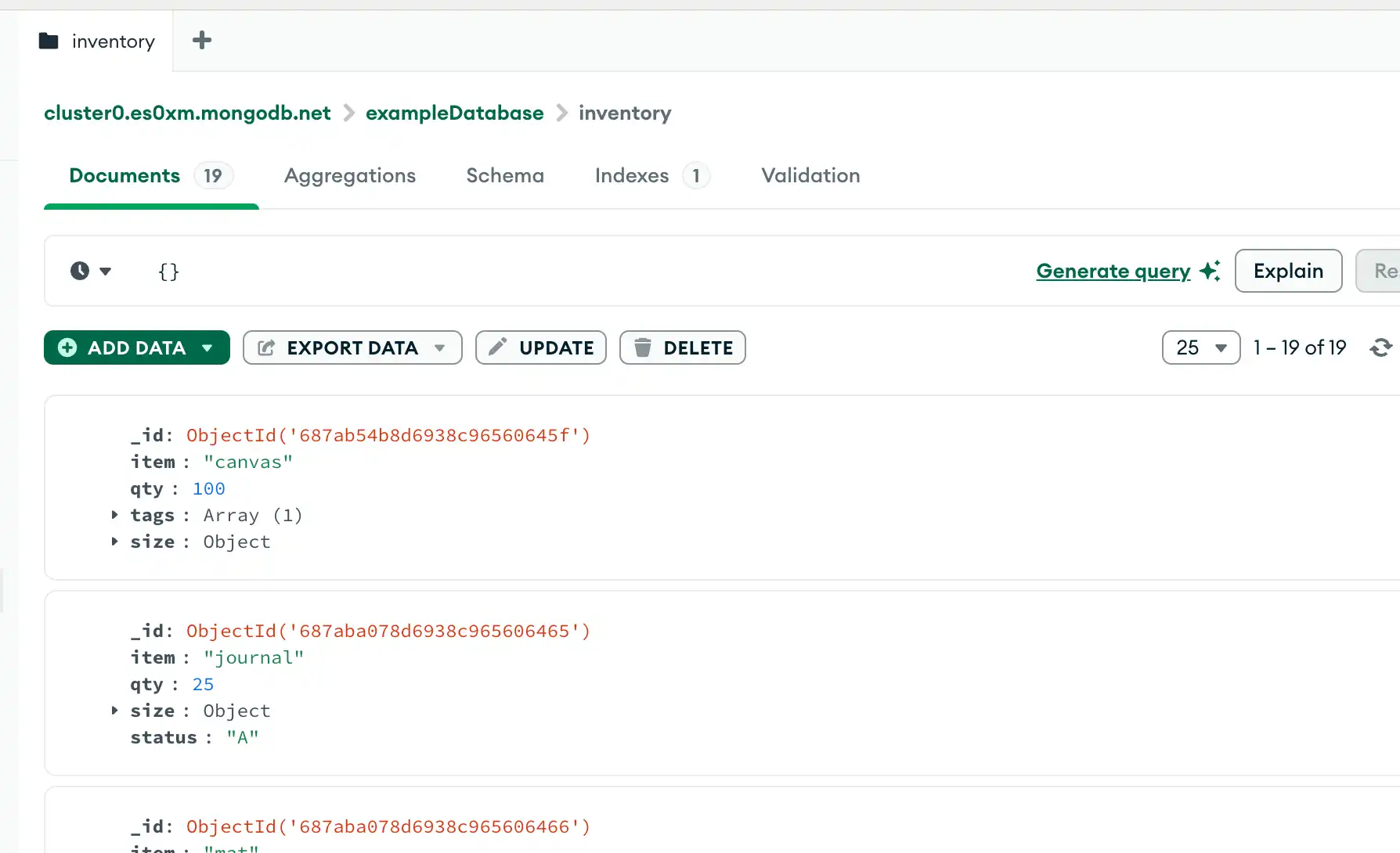
To view the newly inserted documents, specify a filter of 要查看新插入的文档,请在MongoDB Compass查询栏中指定{}筛选器,然后单击“查找”以查看您的文档。{} in the MongoDB Compass query bar and click Find to view your documents.
C
mongoc_bulk_operation_insert_with_opts returns 成功时返回true on success, or false if passed invalid arguments.true,传递无效参数时返回false。
To retrieve the inserted documents, use mongoc_collection_find_with_opts to query the collection:要检索插入的文档,请使用mongoc_collection_find_with_opts查询集合:
C#
To retrieve the inserted documents, query the collection:要检索插入的文档,请查询集合:
Go
To retrieve the inserted documents, query the collection:
Java(Async)
com.mongodb.reactivestreams.client.MongoCollection.html.insertMany returns a Publisher object. 返回Publisher对象。The 当订阅者请求数据时,Publisher inserts the document into a collection when subscribers request data.Publisher会将文档插入到集合中。
To retrieve the inserted documents, query the collection:要检索插入的文档,请查询集合:
Java(Sync)
To retrieve the inserted documents, query the collection:要检索插入的文档,请查询集合:
Kotlin(Coroutine)
MongoCollection.insertMany() returns an 返回InsertManyResult instance. The insertedIds field of InsertManyResult contains the _id values of the inserted documents.InsertManyResult实例。InsertManyResult的insertedIds字段包含插入文档的_id值。
To retrieve the inserted documents, query the collection:要检索插入的文档,请查询集合:
Motor
insert_many returns an instance of 返回pymongo.results.InsertManyResult whose inserted_ids field is a list containing the _id of each newly inserted document.pymongo.results.InsertManyResult的实例,其inserted_ids字段是一个包含每个新插入文档的_id的列表。
To retrieve the inserted documents, query the collection:要检索插入的文档,请查询集合:
Node.js
insertMany() returns a promise that provides a 返回一个提供result. result的promise。The result.insertedIds field contains an array with the _id of each newly inserted document.result.insertedIds字段包含一个数组,其中包含每个新插入文档的_id。
To retrieve the inserted documents, query the collection:要检索插入的文档,请查询集合:
PHP
Upon successful insert, the insertMany() method returns an instance of 方法返回一个MongoDB\\InsertManyResult whose getInsertedIds() method returns the _id of each newly inserted document.MongoDB\\InsertManyResult的实例,其getInsertedIds()方法返回每个新插入文档的_id。
To retrieve the inserted documents, query the collection:要检索插入的文档,请查询集合:
Python
insert_many returns an instance of 返回pymongo.results.InsertManyResult whose inserted_ids field is a list containing the _id of each newly inserted document.pymongo.results.InsertManyResult的实例,其inserted_ids字段是一个包含每个新插入文档的_id的列表。
To retrieve the inserted documents, query the collection:要检索插入的文档,请查询集合:
Ruby
Upon successful insert, the 插入成功后,insert_many() method returns an instance of Mongo::BulkWrite::Result whose inserted_ids attribute is a list containing the _id of each newly inserted document.insert_many()方法返回Mongo::BulkWrite::Result的一个实例,其inserted_ids属性是一个包含每个新插入文档的_id的列表。
To retrieve the inserted documents, query the collection:要检索插入的文档,请查询集合:
Scala
Upon successful insert, the 插入成功后,insertMany() method returns an Observable with a type parameter indicating when the operation has completed or with either a com.mongodb.DuplicateKeyException or com.mongodb.MongoException.insertMany()方法返回一个Observable,该Observable具有一个类型参数,指示操作何时完成,或者返回一个com.mongodb.DuplicateKeyException或com.mongodb.MongoException。
To retrieve the inserted documents, query the collection:要检索插入的文档,请查询集合:
MongoDB Shell
db.inventory.find( {} )Compass
C
mongoc_collection_t *collection;
bson_t *filter;
mongoc_cursor_t *cursor;

collection = mongoc_database_get_collection (db, "inventory");
filter = BCON_NEW (NULL);
cursor = mongoc_collection_find_with_opts (collection, filter, NULL, NULL);
Be sure to also clean up any open resources by calling the following methods, as appropriate:请确保根据需要调用以下方法来清理任何开放资源:
C#
var filter = Builders<BsonDocument>.Filter.Empty;
var result = collection.Find(filter).ToList();
Go
cursor, err := coll.Find(
	context.TODO(),
	bson.D{},
)
Java(Async)
FindPublisher<Document> findPublisher = collection.find(new Document());Java(Sync)
FindIterable<Document> findIterable = collection.find(new Document());Kotlin(Coroutine)
val flowInsertMany = collection
    .find(empty())
Motor
cursor = db.inventory.find({})Node.js
const cursor = db.collection('inventory').find({});PHP
$cursor = $db->inventory->find([]);Python
cursor = db.inventory.find({})Ruby
client[:inventory].find({})Scala
var findObservable = collection.find(Document())Insert Behavior插入行为
Collection Creation集合创建
If the collection does not currently exist, insert operations create the collection.如果该集合当前不存在,则插入操作将创建该集合。
_id Field字段
In MongoDB, each document stored in a standard collection requires a unique _id field that acts as a primary key. 在MongoDB中,存储在标准集合中的每个文档都需要一个唯一的_id字段作为主键。If an inserted document omits the 如果插入的文档省略了_id field, the MongoDB driver automatically generates an ObjectId for the _id field._id字段,MongoDB驱动程序会自动为_id字段生成一个ObjectId。
This also applies to documents inserted through update operations with upsert: true.这也适用于通过upsert:true更新操作插入的文档。
Atomicity原子性
All write operations in MongoDB are atomic on the level of a single document. For more information on MongoDB and atomicity, see Atomicity and Transactions.MongoDB中的所有写入操作都是单个文档级别的原子操作。有关MongoDB和原子性的更多信息,请参阅原子性和事务。
Write Acknowledgement写入确认
With write concerns, you can specify the level of acknowledgment requested from MongoDB for write operations. For more information, see Write Concern.对于写入关注,您可以指定MongoDB为写操作请求的确认级别。有关更多信息,请参阅写入关注。