MongoDB Tag Aware Sharding allows administrators to control data distribution in a sharded cluster by defining ranges of the shard key and tagging them to one or more shards.MongoDB标签感知分片允许管理员通过定义分片键的范围并将其标记到一个或多个分片来控制分片集群中的数据分布。
This tutorial uses Zones along with a multi-datacenter sharded cluster deployment and application-side logic to support distributed local writes, as well as high write availability in the event of a replica set election or datacenter failure.本教程使用区域以及多数据中心分片集群部署和应用程序端逻辑来支持分布式本地写入,以及在副本集选择或数据中心故障时的高写入可用性。
By defining the zones and the zone ranges before sharding an empty or a non-existing collection, the shard collection operation creates chunks for the defined zone ranges as well as any additional chunks to cover the entire range of the shard key values and performs an initial chunk distribution based on the zone ranges. 通过在对空的或不存在的集合进行分片之前定义区域和区域范围,分片集合操作为定义的区域范围创建块以及任何其他块,以覆盖分片键值的整个范围,并根据区域范围执行初始块分布。This initial creation and distribution of chunks allows for faster setup of zoned sharding. After the initial distribution, the balancer manages the chunk distribution going forward.这种块的初始创建和分发允许更快地设置分区分片。在初始分发之后,平衡器管理接下来的块分发。
See Pre-Define Zones and Zone Ranges for an Empty or Non-Existing Collection for an example.有关示例,请参阅空集合或不存在集合的预定义分区和分区范围。
Important
The concepts discussed in this tutorial require a specific deployment architecture, as well as application-level logic.本教程中讨论的概念需要特定的部署架构以及应用程序级逻辑。
These concepts require familiarity with MongoDB sharded clusters, replica sets, and the general behavior of zones.这些概念需要熟悉MongoDB分片集群、副本集和区域的一般行为。
This tutorial assumes an insert-only or insert-intensive workload. The concepts and strategies discussed in this tutorial are not well suited for use cases that require fast reads or updates.本教程假设只插入或插入密集型工作负载。本教程中讨论的概念和策略不太适合需要快速读取或更新的用例。
Scenario场景
Consider an insert-intensive application, where reads are infrequent and low priority compared to writes. The application writes documents to a sharded collection, and requires near-constant uptime from the database to support its SLAs or SLOs.考虑一个插入密集型应用程序,与写入相比,读取不频繁且优先级低。应用程序将文档写入到分片集合中,并要求数据库几乎恒定的正常运行时间来支持其SLA或SLO。
The following represents a partial view of the format of documents the application writes to the database:以下是应用程序写入数据库的文档格式的部分视图:
{
   "_id" : ObjectId("56f08c447fe58b2e96f595fa"),
   "message_id" : 329620,
   "datacenter" : "alfa",
   "userid" : 123,
   ...
}
{
   "_id" : ObjectId("56f08c447fe58b2e96f595fb"),
   "message_id" : 578494,
   "datacenter" : "bravo",
   "userid" : 456,
   ...
}
{
   "_id" : ObjectId("56f08c447fe58b2e96f595fc"),
   "message_id" : 689979,
   "datacenter" : "bravo",
   "userid" : 789,
   ...
}
Shard Key分片键
The collection uses the 该集合使用{ datacenter : 1, userid : 1 } compound index as the shard key.{ datacenter : 1, userid : 1 }复合索引作为分片键。
The 每个文档中的datacenter field in each document allows for creating a tag range on each distinct datacenter value. datacenter字段允许在每个不同的数据中心值上创建标记范围。Without the 如果没有datacenter field, it would not be possible to associate a document with a specific datacenter.datacenter字段,就不可能将文档与特定的数据中心相关联。
The userid field provides a high cardinality and low frequency component to the shard key relative to datacenter.userid字段为相对于数据中心的分片键提供了一个高基数和低频率的组件。
See Choosing a Shard Key for more general instructions on selecting a shard key.有关选择分片键的更多一般说明,请参阅选择分片键。
Architecture建筑学
The deployment consists of two datacenters, 该部署包括两个数据中心,alfa and bravo. alfa和bravo。There are two shards, 有两个分片,shard0000 and shard0001. Each shard is a replica set with three members. shard0000和shard0001。每个分片都是一个有三个成员的副本集。shard0000 has two members on alfa and one priority 0 member on bravo. shard0001 has two members on bravo and one priority 0 member on alfa.shard0000在alfa有两名成员,在bravo有一名优先级为0的成员。shard0001在bravo有两名成员,在alfa有一名优先级为0的成员。
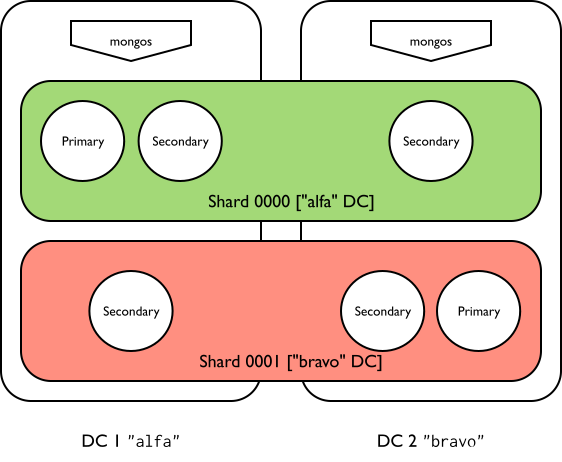
Tags标签
This application requires one tag per datacenter. Each shard has one tag assigned to it based on the datacenter containing the majority of its replica set members. There are two tag ranges, one for each datacenter.此应用程序要求每个数据中心有一个标签。每个分片都有一个根据包含其大多数副本集成员的数据中心分配给它的标签。有两个标记范围,每个数据中心一个。
alfaDatacenter数据中心Tag shards with a majority of members on this datacenter as将此数据中心上大多数成员的分片标记为alfa.alfa。Create a tag range with:使用以下内容创建标记范围:a lower bound of{ "datacenter" : "alfa", "userid" : MinKey },{ "datacenter" : "alfa", "userid" : MinKey }的下限,an upper bound of{ "datacenter" : "alfa", "userid" : MaxKey }, and{ "datacenter" : "alfa", "userid" : MaxKey }的上限,以及the tag标签alfa
bravoDatacenter数据中心Tag shards with a majority of members on this datacenter as将此数据中心上大多数成员的分片标记为bravo.bravo。Create a tag range with:使用以下内容创建标记范围:- a lower bound of
{ "datacenter" : "bravo", "userid" : MinKey }, - an upper bound of
{ "datacenter" : "bravo", "userid" : MaxKey }, and - the tag
bravo
- a lower bound of
Note
Based on the configured tags and tag ranges, 根据配置的标记和标记范围,mongos routes documents with datacenter : alfa to the alfa datacenter, and documents with datacenter : bravo to the bravo datacenter.mongos将具有datacenter : alfa的文档路由到alfa数据中心,将具有datacenter : bravo的文档路由至bravo数据中心。
Write Operations写入操作
If an inserted or updated document matches a configured tag range, it can only be written to a shard with the related tag.如果插入或更新的文档与配置的标记范围匹配,则只能将其写入具有相关标记的分片。
MongoDB can write documents that do not match a configured tag range to any shard in the cluster.MongoDB可以将与配置的标记范围不匹配的文档写入集群中的任何分片。
Balancer平衡器
The balancer migrates the tagged chunks to the appropriate shard. 平衡器将标记的块迁移到适当的分片。Until the migration, shards may contain chunks that violate configured tag ranges and tags. Once balancing completes, shards should only contain chunks whose ranges do not violate its assigned tags and tag ranges.在迁移之前,分片可能包含违反配置的标记范围和标记的块。一旦平衡完成,分片应该只包含其范围不违反其分配的标签和标签范围的块。
Adding or removing tags or tag ranges can result in chunk migrations. Depending on the size of your data set and the number of chunks a tag range affects, these migrations may impact cluster performance. 添加或删除标签或标签范围可能会导致块迁移。根据数据集的大小和标记范围影响的块数,这些迁移可能会影响集群性能。Consider running your balancer during specific scheduled windows. 考虑在特定的计划窗口期间运行平衡器。See Schedule the Balancing Window for a tutorial on how to set a scheduling window.有关如何设置计划窗口的教程,请参阅计划平衡窗口。
Application Behavior应用行为
By default, the application writes to the nearest datacenter. If the local datacenter is down, or if writes to that datacenter are not acknowledged within a set time period, the application switches to the other available datacenter by changing the value of the 默认情况下,应用程序会写入最近的数据中心。如果本地数据中心已关闭,或者在设定的时间段内未确认对该数据中心的写入,则应用程序会在尝试将文档写入数据库之前,通过更改datacenter field before attempting to write the document to the database.datacenter字段的值切换到其他可用的数据中心。
The application supports write timeouts. The application uses Write Concern to set a timeout for each write operation.应用程序支持写入超时。应用程序使用写入关注为每个写入操作设置timeout。
If the application encounters a write or timeout error, it modifies the 如果应用程序遇到写入或超时错误,它会修改每个文档中的datacenter field in each document and performs the write. This routes the document to the other datacenter. datacenter字段并执行写入。这会将文档路由到其他数据中心。If both datacenters are down, then writes cannot succeed. See Resolve Write Failure.如果两个数据中心都停机,则写入无法成功。请参阅解决写入失败。
The application periodically checks connectivity to any data centers marked as "down". If connectivity is restored, the application can continue performing normal write operations.该应用程序会定期检查与标记为“关闭”的任何数据中心的连接。如果连接恢复,应用程序可以继续执行正常的写入操作。
Given the switching logic, as well as any load balancers or similar mechanisms in place to handle client traffic between datacenters, the application cannot predict which of the two datacenters a given document was written to. 考虑到交换逻辑,以及任何负载均衡器或类似的机制来处理数据中心之间的客户端流量,应用程序无法预测给定文档被写入两个数据中心中的哪一个。To ensure that no documents are missed as a part of read operations, the application must perform broadcast queries by not including the 为了确保在读取操作中不会遗漏任何文档,应用程序必须通过不将datacenter field as a part of any query.datacenter字段作为任何查询的一部分来执行广播查询。
The application performs reads using a read preference of 应用程序使用读取首选项nearest to reduce latency.nearest执行读取,以减少延迟。
It is possible for a write operation to succeed despite a reported timeout error. The application responds to the error by attempting to re-write the document to the other datacenter - this can result in a document being duplicated across both datacenters. 尽管报告了超时错误,但写入操作仍有可能成功。应用程序通过尝试将文档重写到其他数据中心来响应错误,这可能会导致文档在两个数据中心之间重复。The application resolves duplicates as a part of the read logic.应用程序在读取逻辑中解析重复项。
Switching Logic切换逻辑
The application has logic to switch datacenters if one or more writes fail, or if writes are not acknowledged within a set time period. 如果一个或多个写入失败,或者在设定的时间段内未确认写入,应用程序有逻辑切换数据中心。The application modifies the 应用程序根据目标数据中心的标记修改datacenter field based on the target datacenter's tag to direct the document towards that datacenter.datacenter字段,以将文档定向到该数据中心。
For example, an application attempting to write to the 例如,试图写入alfa datacenter might follow this general procedure:alfa数据中心的应用程序可能会遵循以下一般过程:
Attempt to write document, specifying尝试写入文档,指定datacenter : alfa.datacenter : alfa。On write timeout or error, log在写入超时或错误时,将alfaas momentarily down.alfa记录为暂时关闭。Attempt to write same document, modifying尝试编写相同的文档,修改datacenter : bravo.datacenter : bravo。On write timeout or error, log在写入超时或错误时,将bravoas momentarily down.bravo记录为暂时关闭。If both如果alfaandbravoare down, log and report errors.alfa和bravo都宕机,记录并报告错误。
See Resolve Write Failure.请参阅解决写入失败。
Procedure过程
Configure Shard Tags配置分片标签
You must be connected to a 您必须连接到与目标分片集群关联的mongos associated with the target sharded cluster in order to proceed. You cannot create tags by connecting directly to a shard replica set member.mongos才能继续。您不能通过直接连接到分片副本集成员来创建标签。
Tag each shard.标记每个分片。
Tag each shard in the 用alfa data center with the alfa tag.alfa标签标记alfa数据中心中的每个分片。
sh.addShardTag("shard0000", "alfa")Tag each shard in the 用bravo data center with the bravo tag.bravo标签标记bravo数据中心中的每个分片。
sh.addShardTag("shard0001", "bravo")You can review the tags assigned to any given shard by running 您可以通过运行sh.status().sh.status()来查看分配给任何给定分片的标签。
Define ranges for each tag.为每个标签定义范围。
Define the range for the 定义alfa database and associate it to the alfa tag using the sh.addTagRange() method. This method requires:alfa数据库的范围,并使用sh.addTagRange()方法将其与alfa标记相关联。此方法需要:
The full namespace of the target collection.目标集合的完整命名空间。The inclusive lower bound of the range.范围的包容性下限。The exclusive upper bound of the range.范围的唯一上限。The name of the tag.标签的名称。
sh.addTagRange(
  "<database>.<collection>",
  { "datacenter" : "alfa", "userid" : MinKey },
  { "datacenter" : "alfa", "userid" : MaxKey },
  "alfa"
)
Define the range for the 定义bravo database and associate it to the bravo tag using the sh.addTagRange() method. This method requires:bravo数据库的范围,并使用sh.addTagRange()方法将其与bravo标记相关联。此方法需要:
The full namespace of the target collection.目标集合的完整命名空间。The inclusive lower bound of the range.范围的包容性下限。The exclusive upper bound of the range.范围的唯一上限。The name of the tag.标签的名称。
sh.addTagRange(
  "<database>.<collection>",
  { "datacenter" : "bravo", "userid" : MinKey },
  { "datacenter" : "bravo", "userid" : MaxKey },
  "bravo"
)
The MinKey and MaxKey values are reserved special values for comparisons. MinKey和MaxKey值是保留的特殊值,用于比较。MinKey always compares as less than every other possible value, while MaxKey always compares as greater than every other possible value. MinKey总是比其他所有可能值小,而MaxKey总是比所有其他可能值大。The configured ranges capture every user for each 配置的范围捕获每个datacenter.datacenter的每个用户。
Review the changes.查看更改。
The next time the balancer runs, it migrates data across the shards respecting the configured zones.下次平衡器运行时,它会根据配置的区域在分片之间迁移数据。
Once balancing finishes, the shards tagged as 一旦平衡完成,标记为alfa should only contain documents with datacenter : alfa, while shards tagged as bravo should only contain documents with datacenter : bravo.alfa的分片应该只包含datacate:alfa的文档,而标记为bravo的分片则应该只包含datacenter : bravo的文档。
You can review the chunk distribution by running 您可以通过运行sh.status().sh.status()来查看块分布。
Resolve Write Failure解决写入失败
When the application's default datacenter is down or inaccessible, the application changes the 当应用程序的默认数据中心关闭或无法访问时,应用程序会将datacenter field to the other datacenter.datacenter字段更改为其他数据中心。
For example, the application attempts to write the following document to the 例如,默认情况下,应用程序会尝试将以下文档写入alfa datacenter by default:alfa数据中心:
{
   "_id" : ObjectId("56f08c447fe58b2e96f595fa"),
   "message_id" : 329620,
   "datacenter" : "alfa",
   "userid" : 123,
   ...
}
If the application receives an error on attempted write, or if the write acknowledgment takes too long, the application logs the datacenter as unavailable and alters the 如果应用程序在尝试写入时收到错误,或者写入确认时间过长,则应用程序会将数据中心记录为不可用,并更改datacenter field to point to the bravo datacenter.datacenter字段以指向bravo数据中心。
{
   "_id" : ObjectId("56f08c457fe58b2e96f595fb"),
   "message_id" : 329620,
   "datacenter" : "bravo",
   "userid" : 123,
   ...
}
The application periodically checks the 应用程序会定期检查alfa datacenter for connectivity. If the datacenter is reachable again, the application can resume normal writes.alfa数据中心的连接情况。如果数据中心再次可访问,则应用程序可以恢复正常写入。
Note
It is possible that the original write to 对datacenter : alfa succeeded, especially if the error was related to a timeout. datacenter : alfa的原始写入可能成功,特别是如果错误与timeout有关。If so, the document with 如果是这样,message_id : 329620 may now be duplicated across both datacenters. Applications must resolve duplicates as a part of read operations.message_id:329620的文档现在可以在两个数据中心之间复制。应用程序必须在读取操作中解析重复项。
Resolve Duplicate Documents on Reads读取时解决重复文档
The application's switching logic allows for potential document duplication. When performing reads, the application resolves any duplicate documents on the application layer.应用程序的切换逻辑允许潜在的文档复制。执行读取时,应用程序会解析应用程序层上的任何重复文档。
The following query searches for documents where the 以下查询搜索userid is 123. Note that while userid is part of the shard key, the query does not include the datacenter field, and therefore does not perform a targeted read operation.userid为123的文档。请注意,虽然userid是分片键的一部分,但查询不包括datacenter字段,因此不会执行定向读取操作。
db.collection.find( { "userid" : 123 } )The results show that the document with 结果显示,message_id of 329620 has been inserted into MongoDB twice, probably as a result of a delayed write acknowledgment.message_id为329620的文档已被插入MongoDB两次,可能是由于延迟的写入确认。
{
  "_id" : ObjectId("56f08c447fe58b2e96f595fa"),
  "message_id" : 329620
  "datacenter" : "alfa",
  "userid" : 123,
  data : {...}
}
{
  "_id" : ObjectId("56f08c457fe58b2e96f595fb"),
  "message_id" : 329620
  "datacenter" : "bravo",
  "userid" : 123,
  ...
}
The application can either ignore the duplicates, taking one of the two documents, or it can attempt to trim the duplicates until only a single document remains.应用程序可以忽略重复项,取两个文档中的一个,也可以尝试修剪重复项,直到只剩下一个文档。
One method for trimming duplicates is to use the 修剪重复项的一种方法是使用ObjectId.getTimestamp() method to extract the timestamp from the _id field. ObjectId.getTimestamp()方法从_id字段中提取时间戳。The application can then keep either the first document inserted, or the last document inserted. This assumes the 然后,应用程序可以保留插入的第一个文档或插入的最后一个文档。这假设_id field uses the MongoDB ObjectId()._id字段使用MongoDB ObjectId()。
For example, using 例如,对具有getTimestamp() on the document with ObjectId("56f08c447fe58b2e96f595fa") returns:ObjectId("56f08c447fe58b2e96f595fa")的文档使用getTimestamp()返回:
ISODate("2016-03-22T00:05:24Z")Using 对具有getTimestamp() on the document with ObjectId("56f08c457fe58b2e96f595fb") returns:ObjectId("56f08c457fe58b2e96f595fb")的文档使用getTimestamp()返回:
ISODate("2016-03-22T00:05:25Z")