Docs Home / Compass / Connect / Advanced Options

In-Use Encryption Connection Tab使用中的加密连接选项卡

To use this connection option, you need a replica set or sharded cluster. Your replica set can be a single node or larger.要使用此连接选项,您需要一个副本集或分片集群。您的副本集可以是单个节点或更大的节点。

The In-Use Encryption connection tab allows you to connect your deployments with Queryable Encryption.“使用中的加密连接”选项卡允许您使用可查询加密连接部署。

Procedure过程

1

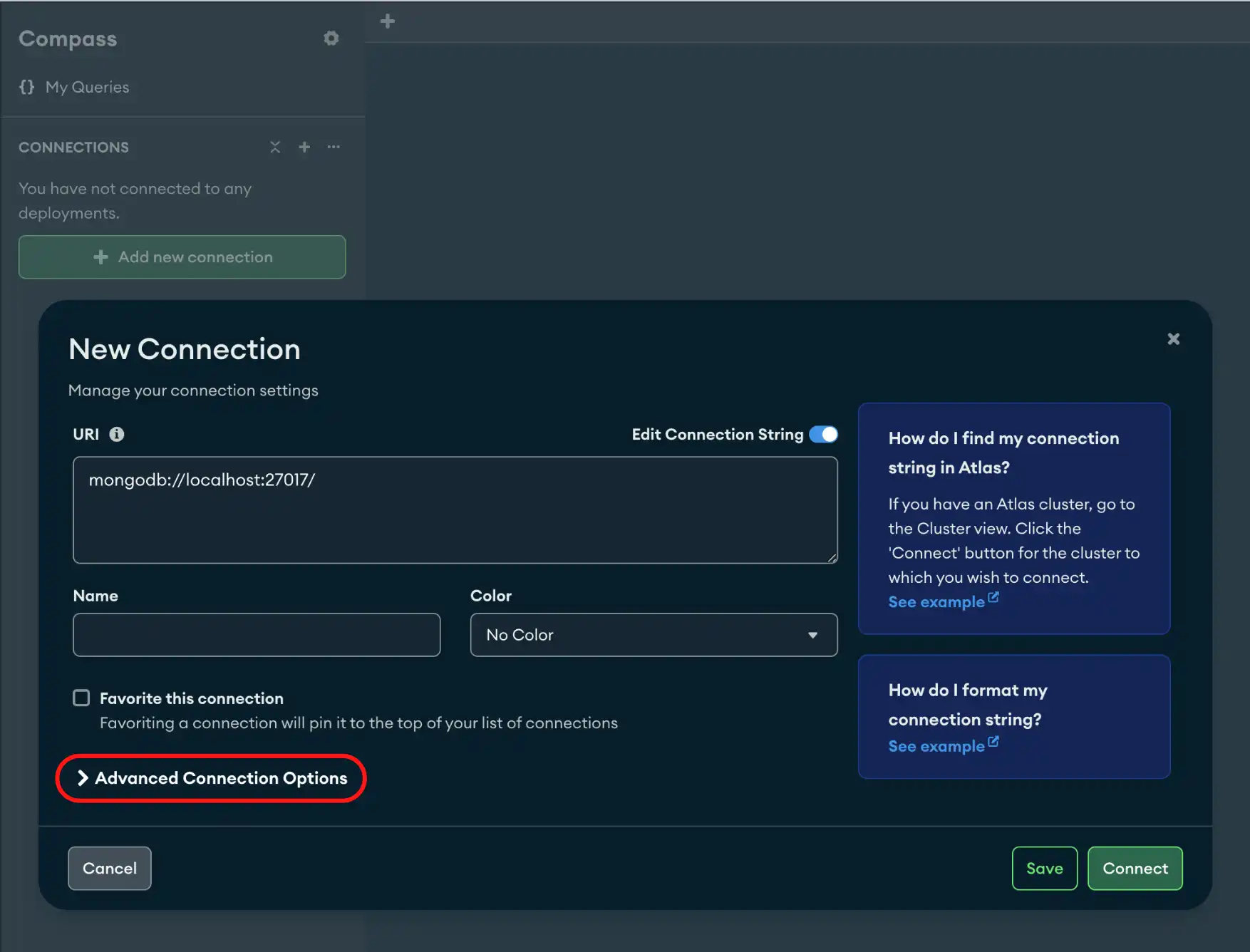
Open the New Connection modal.打开“新建连接”模式。

In the bottom panel of the Connections Sidebar, click Add New Connection to open the New Connection modal.在“连接”侧边栏的底部面板中,单击“添加新连接”以打开“新建连接”模式。

If you already have connections listed in the Connections Sidebar, click the icon on the top right of the sidebar to open the New Connection modal.如果您已经在“连接”侧边栏中列出了连接,请单击侧边栏右上角的图标以打开“新连接”模式。
2

Click Advanced Connection Options.单击“高级连接选项”。

New Advanced Connection Options
3

Click the In-Use Encryption tab.单击“使用中的加密”选项卡。

  1. Provide a Key Vault Namespace.提供“键库命名空间”。

    A Key Vault Namespace refers to a collection that contains all the data keys used for encryption and decryption.“键库命名空间”是指包含用于加密和解密的所有数据键的集合。

    Specify a collection in which data encryption keys are stored in the format <db>.<collection>. The non-official default database/collection for keyVault is encryption.__keyVault.指定一个集合,其中数据加密键以<db>.<collection>格式存储。keyVault的非官方默认数据库/集合是encryption.__keyVault

  2. Select a KMS Provider.选择“KMS提供程序”。

    You can select from the following Key Management Systems:您可以从以下键管理系统中进行选择:

4

Click Connect.单击“连接”。

KMS ProvidersKMS提供商

Local KMS本地KMS

You can locally manage your key as a KMS using the Local KMS option.您可以使用本地KMS选项将键作为KMS进行本地管理。

Click Generate Random Key to generate a 96-byte long base64-encoded string. You need this key to access encrypted and ecrypted data.单击“生成随机键”以生成96字节长的base64编码字符串。您需要此键来访问加密和解密的数据。

Warning

Compass does not save KMS credentials by default. Copy and save the key in an external location.Compass默认情况下不保存KMS凭据。复制键并将其保存在外部位置。

AWS

You can use AWS to manage your keys.您可以使用AWS来管理键。

Specify the following fields:

Field字段Required必需性Description描述
Access Key Id访问键idYesValue of your AWS access key Id.您的AWS访问键Id的值。
Secret Access Key秘密访问键YesValue of your AWS secret key.AWS键的值。
Session Token会话令牌NoValue of your AWS session token.您的AWS会话令牌的价值。
Certificate Authority证书颁发机构NoOne or more certificate files from trusted Certificate Authorities to validate the certificate provided by the deployment.来自受信任的证书颁发机构的一个或多个证书文件,用于验证部署提供的证书。
Client Certificate and Key客户端证书和键NoSpecifies the location of a local .pem file that contains either the client's TLS/SSL X.509 certificate or the client's TLS/SSL certificate and key.指定本地pem文件的位置,该文件包含客户端的TLS/SSL X.509证书或客户端的TLS/SSL证书和键。
Client Key Password客户端键密码NoIf the Client Private Key is protected with a password, you must provide the password.如果客户端私钥受密码保护,则必须提供密码。

GCP

You can use Google Cloud Services to manage your keys.您可以使用谷歌云服务来管理您的键。

Specify the following fields:指定以下字段:

Field字段Required必需性Description描述
Service Account Email服务帐户电子邮件YesThe service account email to authenticate.要验证的服务帐户电子邮件。
Private Key私钥YesA base64-encoded private key.base64编码的私钥。
Endpoint端点NoA host with an optional port.具有可选端口的主机。
Certificate Authority证书颁发机构NoOne or more certificate files from trusted Certificate Authorities to validate the certificate provided by the deployment.来自受信任的证书颁发机构的一个或多个证书文件,用于验证部署提供的证书。
Client Certificate and Key客户端证书和键NoSpecifies the location of a local .pem file that contains either the client's TLS/SSL X.509 certificate or the client's TLS/SSL certificate and key.指定本地pem文件的位置,该文件包含客户端的TLS/SSL X.509证书或客户端的TLS/SSL证书和键。
Client Key Password客户端键密码NoIf the Client Private Key is protected with a password, you must provide the password.如果客户端私钥受密码保护,则必须提供密码。

Azure

You can use Azure Key Vault to manage your keys.您可以使用Azure键库来管理您的键。

Specify the following fields:指定以下字段:

Field字段Required必需性Description描述
Tenant Id租户IdYesIdentifies the organization for the account.标识帐户的组织。
Client Id客户端IDYesAuthenticates a registered application.对已注册的应用程序进行身份验证。
Client Secret客户端键YesThe client secret to authenticate a registered application.用于验证已注册应用程序的客户端键。
Identity Platform Endpoint身份平台端点YesA host with an optional port.具有可选端口的主机。
Certificate Authority证书颁发机构NoOne or more certificate files from trusted Certificate Authorities to validate the certificate provided by the deployment.来自受信任的证书颁发机构的一个或多个证书文件,用于验证部署提供的证书。
Client Certificate and Key客户端证书和键NoSpecifies the location of a local .pem file that contains either the client's TLS/SSL X.509 certificate or the client's TLS/SSL certificate and key.指定本地.pem文件的位置,该文件包含客户端的TLS/SSL X.509证书或客户端的TLS/SSL证书和键。
Client Key Password客户端键密码NoIf the Client Private Key is protected with a password, you must provide the password.如果客户端私钥受密码保护,则必须提供密码。

KMIP

You can use KMIP to manage your keys.您可以使用KMIP来管理键。

Field字段Required必需性Description描述
EndpointYesThe endpoint consists of a hostname and port separated by a colon.端点由主机名和端口组成,用冒号分隔。
Certificate Authority证书颁发机构NoOne or more certificate files from trusted Certificate Authorities to validate the certificate provided by the deployment.来自受信任的证书颁发机构的一个或多个证书文件,用于验证部署提供的证书。来自受信任证书颁发机构的一个或多个证书文件,用于验证部署提供的证书。
Client Certificate and Key客户端证书和键NoSpecifies the location of a local .pem file that contains either the client's TLS/SSL X.509 certificate or the client's TLS/SSL certificate and key.指定本地pem文件的位置,该文件包含客户端的TLS/SSL X.509证书或客户端的TLS/SSL证书和键。
Client Key Password客户端键密码NoIf the Client Private Key is protected with a password, you must provide the password.如果客户端私钥受密码保护,则必须提供密码。

(Optional) (可选)Specify an EncryptedFieldsMap:

Add an optional client-side EncryptedFieldsMap for enhanced security. For more information, see Fields for Encryption.添加可选的客户端EncryptedFieldsMap以增强安全性。有关更多信息,请参阅加密字段