Docs Home / Compass / Connect / Advanced Options

Proxy / SSH Tunnel Connection Tab代理/SSH隧道连接选项卡

The Proxy / SSH Tunnel tab allows you to connect to your deployment with a Proxy method or SSH tunnel.“代理/SSH隧道”选项卡允许您使用代理方法或SSH隧道连接到部署。

Procedure过程

1

Open the New Connection modal.打开“新建连接”模式。

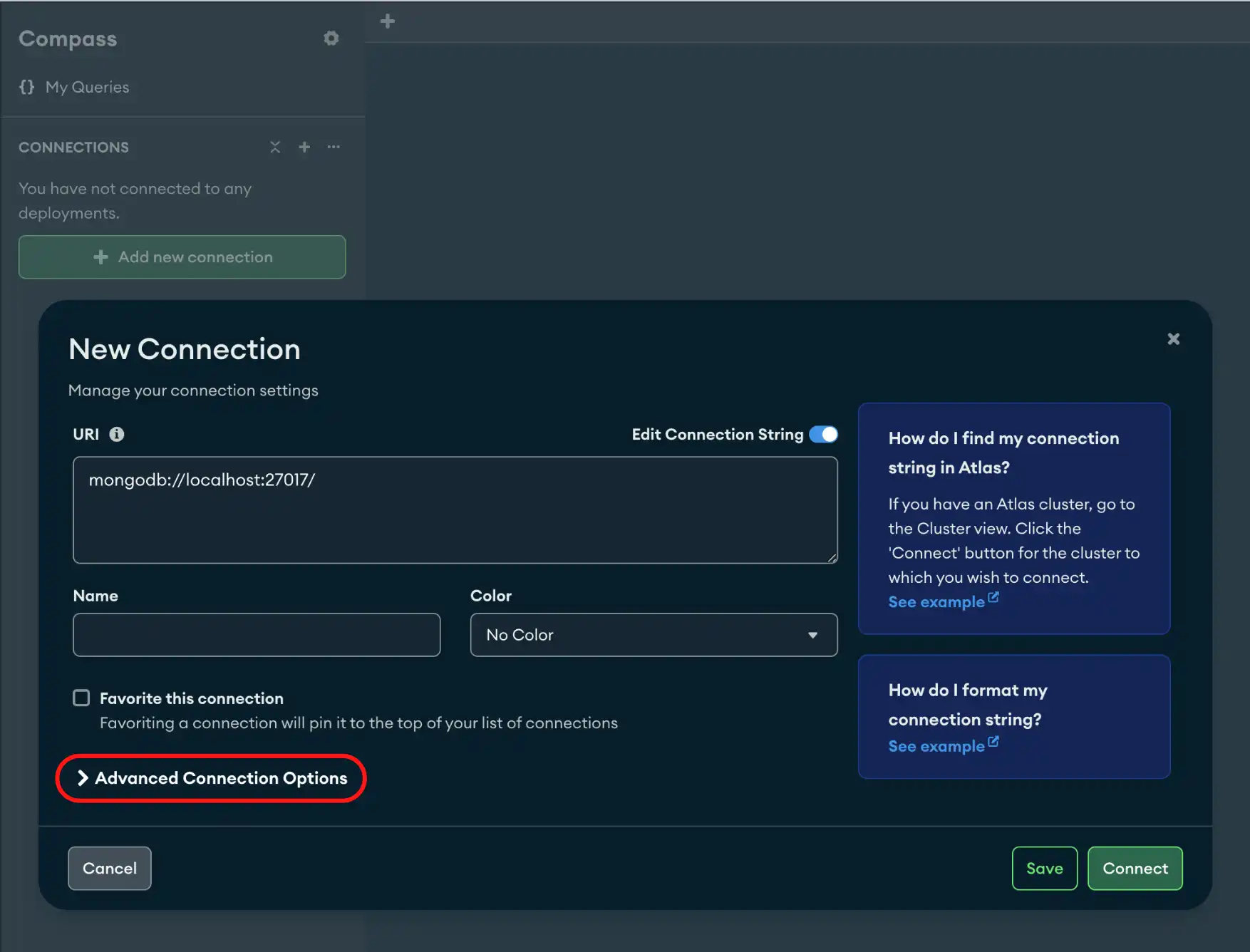
In the bottom panel of the Connections Sidebar, click Add New Connection to open the New Connection modal.在“连接”侧边栏的底部面板中,单击“添加新连接”以打开“新建连接”模式。

If you already have connections listed in the Connections Sidebar, click the icon on the top right of the sidebar to open the New Connection modal.如果您已经在“连接”侧边栏中列出了连接,请单击侧栏右上角的图标以打开“新连接”模式。
2

Click Advanced Connection Options.单击“高级连接选项”。

New Advanced Connection Options
3

Click the Proxy / SSH Tunnel tab.单击“代理/SSH隧道”选项卡。

You have the following connection options:您有以下连接选项:

Option选项Description描述
SSH with Password带密码的SSHConnects to a deployment using a SSH Tunnel and has the option to secure the connection with a password. For information on SSH connections and the fields for this connection option, see SSH Connection.使用SSH隧道连接到部署,并可以选择使用密码保护连接。有关SSH连接和此连接选项的字段的信息,请参阅SSH连接
SSH with Identity File带身份文件的SSHConnects to a deployment using a SSH Tunnel and uses an Identity File to secure the connection. For information on SSH connections and the fields for this connection option, see SSH Connection.使用SSH隧道连接到部署,并使用身份文件来保护连接。有关SSH连接和此连接选项的字段的信息,请参阅SSH连接
Socks5Connects to a deployment using a seperate proxy server. For more information on the fields for this connection option, see Socks5.使用单独的代理服务器连接到部署。有关此连接选项字段的更多信息,请参阅Socks5
Application-level Proxy应用程序级代理Connects to a deployment using application-level proxy settings specified in the Compass Settings panel.使用Compass设置面板中指定的应用程序级代理设置连接到部署。

SSH ConnectionSSH连接

To connect to a deployment using SSH with Password or SSH with Identity File, use the following fields:要使用“带密码的SSH”或“带身份文件的SSH”连接到部署,请使用以下字段:

Field字段Description描述
SSH HostnameBastion (jumpbox) hostname. This is the unique identifier (Fully Qualified Domain Name, or FQDN) for the computer to access.Bastion(跳转框)主机名。这是计算机要访问的唯一标识符(完全限定域名或FQDN)。
SSH PortPort used for the SSH connection. This defaults to 22, the standard port for SSH.用于SSH连接的端口。默认值为22,这是SSH的标准端口。
SSH UsernameThis is the user for which the profile to log into on the remote system. This is the user for which you want to establish the SSH connection.这是要在远程系统上登录配置文件的用户。这是您要为其建立SSH连接的用户。
SSH Password(Optional) Password used to secure the SSH connection. This is required if you are not using an identity file.(可选)用于保护SSH连接的密码。如果您不使用身份文件,则需要此项。
SSH Identity File

File from which the identity (private key) for SSH public key authentication is read.从中读取SSH公钥身份验证的标识(私钥)的文件。

Unix or OS X: If using OpenSSH, identity files are found in the ~/.ssh directory. By default, the private key files have one of the following file names:Unix或OS X:如果使用OpenSSH,身份文件可以在~/.ssh目录中找到。默认情况下,私钥文件具有以下文件名之一:

  • id_dsa
  • id_ecdsa
  • id_ed25519
  • id_rsa

On Windows, the location of the identity files depends on your choice of SSH client, such as PuTTY.在Windows上,身份文件的位置取决于您选择的SSH客户端,如PuTTY。

SSH Passphrase(Optional) If your private key is encrypted, provide the passphrase used to decrypt your private key. A passphrase provides an extra layer of security for an SSH connection.(可选)如果您的私钥已加密,请提供用于解密私钥的密码。密码为SSH连接提供了额外的安全层。
Behavior行为
  • In MongoDB Compass, SSH Tunnel Connections allow users to connect to replica sets.在MongoDB Compass中,“SSH隧道连接”允许用户连接到副本集。
  • Users can connect to replica sets using SSH Tunnels and TLS / SSL connections.用户可以使用SSH隧道和TLS/SSL连接连接到副本集。

Socks5

To connect to a deployment using Socks5, use the following fields:要使用“Socks5”连接到部署,请使用以下字段:

Field字段Description描述
Proxy HostnameDomain name, IPv4, or IPv6 address on which a socks5 proxy is listening.socks5代理正在侦听的域名、IPv4或IPv6地址。
Proxy Tunnel Port(Optional) TCP port number. Default is 1080.(可选)TCP端口号。默认值为1080。
Proxy Username(Optional) Username used to authenticate the connection with the proxy server.(可选)用于验证与代理服务器连接的用户名。
Proxy Password(Optional) Password used to authenticate the connection with the proxy server.(可选)用于验证与代理服务器连接的密码。
Behavior行为
  • If you specify a non-local Socks5 proxy host and provide a username and password authentication, you receive a warning stating that the credentials will be sent in plaintext.如果您指定了非本地Socks5代理主机并提供了用户名和密码身份验证,您将收到一条警告,说明凭据将以明文形式发送。
  • If you specify a remote Socks5 proxy host and do not enable TLS, you receive a warning stating that the proxy administrator will be able to intercept data sent and received by Compass.如果您指定了远程Socks5代理主机并且未启用TLS,您将收到一条警告,说明代理管理员将能够拦截Compass发送和接收的数据。
  • If you specify a proxy configuration with authentication options such as a username and password, Compass can't route some network resources, including map data for geographic visualizations, through the proxy.如果您指定了具有用户名和密码等身份验证选项的代理配置,Compass将无法通过代理路由某些网络资源,包括用于地理可视化的地图数据。
4

(Optional) For advanced connection configuration options, click the Advanced tab.(可选)有关高级连接配置选项,请单击“高级”选项卡。

5

Click Connect.单击“连接”。

Tip

To disconnect from your deployment, see Disconnect from MongoDB.要断开与部署的连接,请参阅断开与MongoDB的连接