You can use the MongoDB Extension for Github Copilot to export and test your application queries in playgrounds.您可以使用Github Copilot的MongoDB扩展在游乐场中导出和测试应用程序查询。
Note
The Export Code to Playground feature is only available if you enable MongoDB Extension for Github Copilot.仅当您为Github Copilot启用MongoDB扩展时,“导出代码到游乐场”功能才可用。
Export to Playground导出到游乐场
Use the following steps to test your application code in a playground:使用以下步骤在操场上测试应用程序代码:
Open the project file that contains the MongoDB query that you want to export.打开包含要导出的MongoDB查询的项目文件。
Right-click to select Export Code to Playground.右键单击以选择“将代码导出到游乐场”。
Right-click your selected code to open the options menu. Click MongoDB Copilot Extension > Export Code to Playground.右键单击所选代码以打开选项菜单。单击“MongoDB Copilot扩展”>“将代码导出到游乐场”。
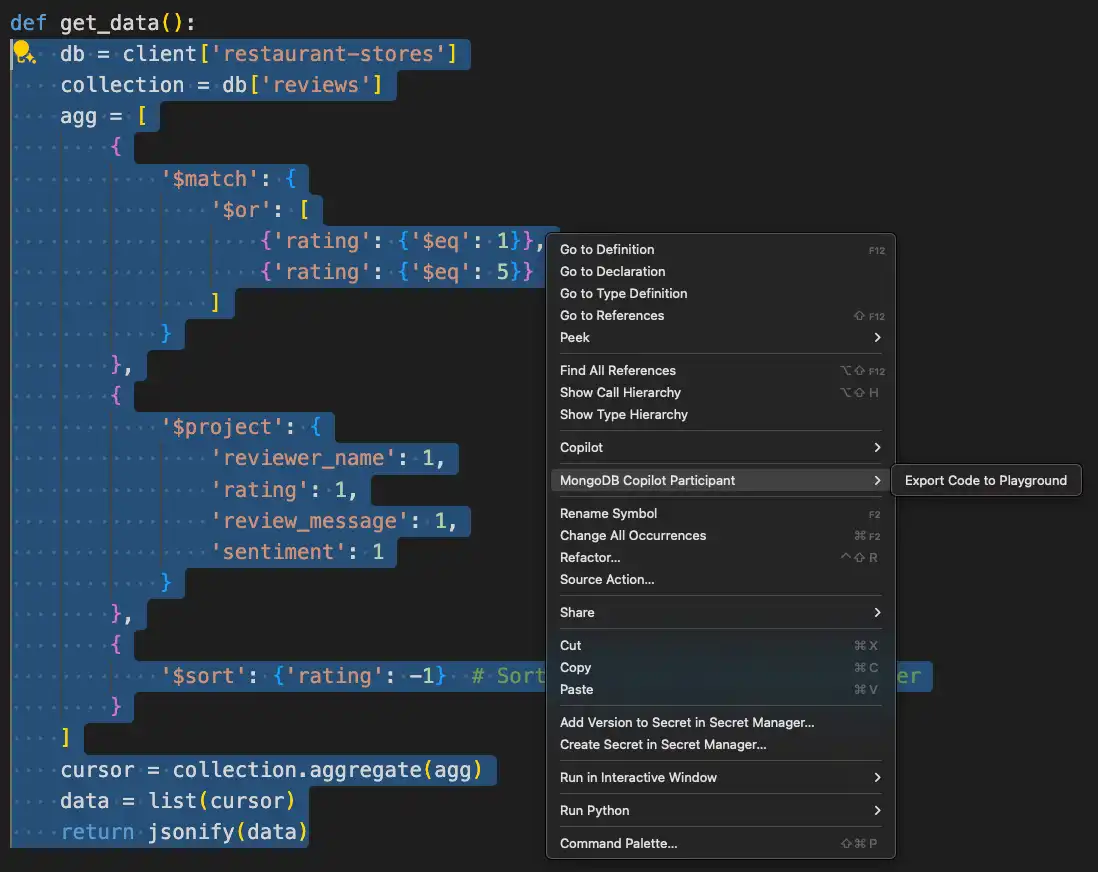
When you click Export Code to Playground, Visual Studio Code opens a new playground with your selected code in MongoDB shell syntax.当您单击“将代码导出到游乐场”时,Visual Studio Code将打开一个新的游乐场,其中包含您在MongoDB shell语法中选择的代码。
Once you export your code to a playground, you can click on the top right of your window to run your query.将代码导出到游乐场后,可以单击窗口右上角的运行查询。
You can also convert your code to a driver language with the Export to Language feature.您还可以使用导出到语言功能将代码转换为驱动程序语言。