Definition定义
$redactRestricts entire documents or content within documents from being outputted based on information stored in the documents themselves.根据文档本身存储的信息,限制输出整个文档或文档中的内容。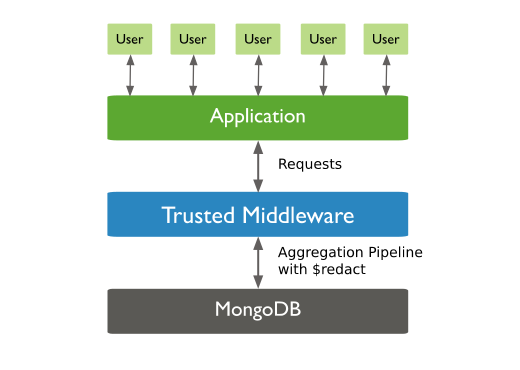
The$redactstage has the following prototype form:$redact阶段具有以下原型形式:{ $redact: <expression> }The argument can be any valid expression as long as it resolves to the参数可以是任何有效的表达式,只要它解析为$$DESCEND,$$PRUNE, or$$KEEPsystem variables. For more information on expressions, see Expressions.$$DESCEND、$$PRUNE或$$KEEP系统变量即可。有关表达式的详细信息,请参阅表达式。System Variable系统变量Description描述$$DESCEND$redactreturns the fields at the current document level, excluding embedded documents.返回当前文档级别的字段,不包括嵌入文档。To include embedded documents and embedded documents within arrays, apply the要在数组中包含嵌入式文档和嵌入式文档,请将$condexpression to the embedded documents to determine access for these embedded documents.$cond表达式应用于嵌入式文档,以确定这些嵌入式文档的访问权限。$$PRUNE$redactexcludes all fields at this current document/embedded document level, without further inspection of any of the excluded fields. This applies even if the excluded field contains embedded documents that may have different access levels.$redact排除当前文档/嵌入文档级别的所有字段,而不进一步检查任何排除的字段。即使排除字段包含可能具有不同访问级别的嵌入式文档,这也适用。$$KEEP$redactreturns or keeps all fields at this current document/embedded document level, without further inspection of the fields at this level.$redact返回或保留当前文档/嵌入文档级别的所有字段,而不进一步检查此级别的字段。This applies even if the included field contains embedded documents that may have different access levels.即使包含的字段包含可能具有不同访问级别的嵌入式文档,这也适用。
Examples示例
MongoDB Shell
The examples in this section use the 本节中的示例使用db.collection.aggregate() helper.db.collection.aggregate()辅助函数。
Evaluate Access at Every Document Level评估每个文档级别的访问权限
A forecasts collection contains documents of the following form where the tags field lists the different access values for that document/embedded document level; i.e. a value of [ "G", "STLW" ] specifies either "G" or "STLW" can access the data:forecasts(预测)集合包含以下形式的文档,其中标签字段列出了该文档/嵌入式文档级别的不同访问值;即,值[ "G", "STLW" ]指定"G"或"STLW"可以访问数据:
db.forecasts.insertOne(
   {
      _id: 1,
      title: "123 Department Report",
      tags: [ "G", "STLW" ],
      year: 2014,
      subsections: [
         {
         subtitle: "Section 1: Overview",
         tags: [ "SI", "G" ],
         content:  "Section 1: This is the content of section 1."
         },
         {
         subtitle: "Section 2: Analysis",
         tags: [ "STLW" ],
         content: "Section 2: This is the content of section 2."
         },
         {
         subtitle: "Section 3: Budgeting",
         tags: [ "TK" ],
         content: {
            text: "Section 3: This is the content of section 3.",
            tags: [ "HCS" ]
         }
         }
      ]
   }
)
A user has access to view information with either the tag 用户可以使用标签"STLW" or "G". To run a query on all documents with year 2014 for this user, include a $redact stage as in the following:"STLW"或"G"查看信息。要对该用户2014年的所有文档运行查询,请包含一个$redact阶段,如下所示:
var userAccess = [ "STLW", "G" ];
db.forecasts.aggregate(
   [
   { $match: { year: 2014 } },
   { $redact: {
      $cond: {
         if: { $gt: [ { $size: { $setIntersection: [ "$tags", userAccess ] } }, 0 ] },
         then: "$$DESCEND",
         else: "$$PRUNE"
         }
      }
   }
   ]
);
The aggregation operation returns the following "redacted" document:聚合操作返回以下“已编辑”文档:
{
   _id: 1,
   title: "123 Department Report",
   tags: [ "G", "STLW" ],
   year: 2014,
   subsections: [
      {
      subtitle: "Section 1: Overview",
      tags: [ "SI", "G" ],
      content: "Section 1: This is the content of section 1."
      },
      {
      subtitle: "Section 2: Analysis",
      tags: [ "STLW" ],
      content : "Section 2: This is the content of section 2."
      }
   ]
}Exclude All Fields at a Given Level排除给定级别的所有字段
A collection 集合accounts contains the following document:accounts包含以下文档:
db.accounts.insertOne(
   {
      _id: 1,
      level: 1,
      acct_id: "xyz123",
      cc: {
         level: 5,
         type: "yy",
         num: 000000000000,
         exp_date: ISODate("2015-11-01T00:00:00.000Z"),
         billing_addr: {
         level: 5,
         addr1: "123 ABC Street",
         city: "Some City"
         },
         shipping_addr: [
         {
            level: 3,
            addr1: "987 XYZ Ave",
            city: "Some City"
         },
         {
            level: 3,
            addr1: "PO Box 0123",
            city: "Some City"
         }
         ]
      },
      status: "A"
   }
)
In this example document, the 在此示例文档中,level field determines the access level required to view the data.level字段确定查看数据所需的访问级别。
To run a query on all documents with status 要对状态为A and exclude all fields contained in a document/embedded document at level 5, include a $redact stage that specifies the system variable "$$PRUNE" in the then field:A的所有文档运行查询,并排除级别5的文档/嵌入文档中包含的所有字段,请在then字段中包含一个$redact阶段,指定系统变量"$$PRUNE":
db.accounts.aggregate(
   [
      { $match: { status: "A" } },
      {
         $redact: {
         $cond: {
            if: { $eq: [ "$level", 5 ] },
            then: "$$PRUNE",
            else: "$$DESCEND"
         }
         }
      }
   ]
);
The $redact stage evaluates the level field to determine access. $redact阶段评估级别字段以确定访问权限。If the 如果level field equals 5, then exclude all fields at that level, even if the excluded field contains embedded documents that may have different level values, such as the shipping_addr field.level字段等于5,则排除该级别的所有字段,即使排除的字段包含可能具有不同level值的嵌入式文档,例如shipping_addr字段。
The aggregation operation returns the following "redacted" document:聚合操作返回以下“已编辑”文档:
{
   _id: 1,
   level: 1,
   acct_id: "xyz123",
   status: "A"
}
The result set shows that the 结果集显示,$redact stage excluded the field cc as a whole, including the shipping_addr field which contained embedded documents that had level field values equal to 3 and not 5.$redact阶段将字段cc作为一个整体排除在外,包括shipping_addr字段,该字段包含level(级别)字段值等于3而不是5的嵌入式文档。
Tip
Implement Field Level Redaction for steps to set up multiple combinations of access for the same data.
Node.js
The Node.js examples on this page use the 本页上的Node.js示例使用Atlas示例数据集中的sample_mflix database from the Atlas sample datasets. sample_mflix数据库。To learn how to create a free MongoDB Atlas cluster and load the sample datasets, see Get Started in the MongoDB Node.js driver documentation.要了解如何创建免费的MongoDB Atlas集群并加载示例数据集,请参阅MongoDB Node.js驱动程序文档中的入门。
To use the MongoDB Node.js driver to add a 要使用MongoDB Node.js驱动程序向聚合管道添加$redact stage to an aggregation pipeline, use the $redact operator in a pipeline object.$redact阶段,请在管道对象中使用$redact运算符。
The following example creates a pipeline stage that keeps documents in which the value of the 以下示例创建了一个管道阶段,用于保存imdb.rating field is greater than or equal to 9. The stage excludes all other documents. The example then runs the aggregation pipeline:imdb.rating字段值大于或等于9的文档。该阶段不包括所有其他文件。然后,该示例运行聚合管道:
const pipeline = [
  {
    $redact: {
      $cond: {
        if: { $gte: ["$imdb.rating", 9] },
        then: "$$KEEP",
        else: "$$PRUNE"
      }
    }
  }
];

const cursor = collection.aggregate(pipeline);
return cursor;
Learn More了解更多
To learn more about the system variables in this guide, see the Aggregation Variables page.要了解本指南中系统变量的更多信息,请参阅聚合变量页面。