You can query embedded documents in MongoDB by using the following methods:您可以使用以下方法查询MongoDB中的嵌入式文档:
Your programming language's driver.你的编程语言的驱动程序。The MongoDB Atlas UI. To learn more, see Query Embedded Documents with MongoDB Atlas.MongoDB Atlas用户界面。要了解更多信息,请参阅使用MongoDB Atlas查询嵌入式文档。- MongoDB Compass.
➤ Use the Select your language drop-down menu in the upper-right to set the language of the following examples or select MongoDB Compass.使用右上角的选择语言下拉菜单设置以下示例的语言,或选择MongoDB Compass。
MongoDB Shell
This page provides examples of query operations on embedded/nested documents using the 本页提供了使用db.collection.find() method in mongosh.mongosh中的db.collection.find()方法对嵌入式/嵌套文档进行查询操作的示例。
The examples on this page use the 此页面上的示例使用inventory collection. Connect to a test database in your MongoDB instance then create the inventory collection:inventory集合。连接到MongoDB实例中的测试数据库,然后创建inventory集合:
Compass
This page provides examples of query operations on embedded/nested documents using MongoDB Compass.本页提供了使用MongoDB Compass对嵌入式/嵌套文档进行查询操作的示例。
The examples on this page use the 此页面上的示例使用inventory collection. Connect to a test database in your MongoDB instance then create the inventory collection:inventory集合。连接到MongoDB实例中的测试数据库,然后创建inventory集合:
C
This page provides examples of query operations on embedded/nested documents using mongoc_collection_find_with_opts.本页提供了使用mongoc_collection_find_with_opts对嵌入式/嵌套文档进行查询操作的示例。
The examples on this page use the 此页面上的示例使用inventory collection. Connect to a test database in your MongoDB instance then create the inventory collection:inventory集合。连接到MongoDB实例中的测试数据库,然后创建inventory集合:
C#
This page provides examples of query operations on embedded/nested documents using the 本页提供了使用MongoDB C#驱动程序中的MongoCollection.Find() method in the MongoDB C# Driver.MongoCollection.Find()方法对嵌入式/嵌套文档进行查询操作的示例。
The examples on this page use the 此页面上的示例使用inventory collection. Connect to a test database in your MongoDB instance then create the inventory collection:inventory集合。连接到MongoDB实例中的测试数据库,然后创建inventory集合:
Go
This page provides examples of query operations on embedded/nested documents using the Collection.Find function in the MongoDB Go Driver.本页提供了使用MongoDB Go驱动程序中的Collection.Find函数对嵌入式/嵌套文档进行查询操作的示例。
The examples on this page use the 此页面上的示例使用inventory collection. Connect to a test database in your MongoDB instance then create the inventory collection:inventory集合。连接到MongoDB实例中的测试数据库,然后创建inventory集合:
Java(Async)
This page provides examples of query operations on embedded/nested documents using the com.mongodb.reactivestreams.client.MongoCollection.find method in the MongoDB Java Reactive Streams Driver.本页提供了使用MongoDB Java Reactive Streams驱动程序中的com.mongodb.reactivestreams.client.MongoCollection.find方法对嵌入式/嵌套文档进行查询操作的示例。
The examples on this page use the 此页面上的示例使用inventory collection. Connect to a test database in your MongoDB instance then create the inventory collection:inventory集合。连接到MongoDB实例中的测试数据库,然后创建inventory集合:
Java(Sync)
This page provides examples of query operations on embedded/nested documents using the com.mongodb.client.MongoCollection.find method in the MongoDB Java Synchronous Driver.本页提供了使用MongoDB Java同步驱动程序中的com.mongodb.client.MongoCollection.find方法对嵌入式/嵌套文档进行查询操作的示例。
Tip
The driver provides com.mongodb.client.model.Filters helper methods to facilitate the creation of filter documents. The examples on this page use these methods to create the filter documents.该驱动程序提供了com.mongodb.client.model.Filters辅助方法,以方便创建筛选器文档。本页上的示例使用这些方法创建筛选文档。
The examples on this page use the 此页面上的示例使用inventory collection. Connect to a test database in your MongoDB instance then create the inventory collection:inventory集合。连接到MongoDB实例中的测试数据库,然后创建inventory集合:
Kotlin(Coroutine)
This page provides examples of query operations on embedded/nested documents by using the 本页提供了使用MongoDB Kotlin协程驱动程序中的MongoCollection.find() method in the MongoDB Kotlin Coroutine Driver.MongoCollection.find()方法对嵌入式/嵌套文档进行查询操作的示例。
Tip
The driver provides com.mongodb.client.model.Filters helper methods to facilitate the creation of filter documents. The examples on this page use these methods to create the filter documents.该驱动程序提供了com.mongodb.client.model.Filters辅助方法,以方便创建筛选器文档。本页上的示例使用这些方法创建筛选文档。
The examples on this page use the 此页面上的示例使用inventory collection. Connect to a test database in your MongoDB instance then create the inventory collection:inventory集合。连接到MongoDB实例中的测试数据库,然后创建inventory集合:
Motor
This page provides examples of query operations on embedded/nested documents using the 此页面提供了使用Motor驱动程序中的motor.motor_asyncio.AsyncIOMotorCollection.find method in the Motor driver.motor.motor_asyncio.AsyncIOMotorCollection.find方法对嵌入式/嵌套文档进行查询操作的示例。
The examples on this page use the 此页面上的示例使用inventory collection. Connect to a test database in your MongoDB instance then create the inventory collection:inventory集合。连接到MongoDB实例中的测试数据库,然后创建inventory集合:
Node.js
This page provides examples of query operations on embedded/nested documents using the 本页提供了使用MongoDB Node.js驱动程序中的Collection.find() method in the MongoDB Node.js Driver.Collection.find()方法对嵌入式/嵌套文档进行查询操作的示例。
The examples on this page use the 此页面上的示例使用inventory collection. Connect to a test database in your MongoDB instance then create the inventory collection:inventory集合。连接到MongoDB实例中的测试数据库,然后创建inventory集合:
PHP
This page provides examples of query operations on embedded/nested documents using the 本页提供了使用MongoDB PHP库中的MongoDB\\Collection::find() method in the MongoDB PHP Library.MongoDB\\Collection::find()方法对嵌入式/嵌套文档进行查询操作的示例。
The examples on this page use the 此页面上的示例使用inventory collection. Connect to a test database in your MongoDB instance then create the inventory collection:inventory集合。连接到MongoDB实例中的测试数据库,然后创建inventory集合:
Python
This page provides examples of query operations on embedded/nested documents using the 本页提供了使用PyMongo Python驱动程序中的pymongo.collection.Collection.find method in the PyMongo Python driver.pymongo.collection.Collection.find方法对嵌入式/嵌套文档进行查询操作的示例。
The examples on this page use the 此页面上的示例使用inventory collection. Connect to a test database in your MongoDB instance then create the inventory collection:inventory集合。连接到MongoDB实例中的测试数据库,然后创建inventory集合:
Ruby
This page provides examples of query operations on embedded/nested documents using the Mongo::Collection#find() method in the MongoDB Ruby Driver.本页提供了使用MongoDB Ruby驱动程序中的Mongo::Collection#find()方法对嵌入式/嵌套文档进行查询操作的示例。
The examples on this page use the 此页面上的示例使用inventory collection. Connect to a test database in your MongoDB instance then create the inventory collection:inventory集合。连接到MongoDB实例中的测试数据库,然后创建inventory集合:
scala
This page provides examples of query operations on embedded/nested documents using the 本页提供了使用MongoDB Scala驱动程序中的collection.find() method in the MongoDB Scala Driver.collection.find()方法对嵌入式/嵌套文档进行查询操作的示例。
The examples on this page use the 此页面上的示例使用inventory collection. Connect to a test database in your MongoDB instance then create the inventory collection:inventory集合。连接到MongoDB实例中的测试数据库,然后创建inventory集合:
MongoDB Shell
db.inventory.insertMany( [
   { item: "journal", qty: 25, size: { h: 14, w: 21, uom: "cm" }, status: "A" },
   { item: "notebook", qty: 50, size: { h: 8.5, w: 11, uom: "in" }, status: "A" },
   { item: "paper", qty: 100, size: { h: 8.5, w: 11, uom: "in" }, status: "D" },
   { item: "planner", qty: 75, size: { h: 22.85, w: 30, uom: "cm" }, status: "D" },
   { item: "postcard", qty: 45, size: { h: 10, w: 15.25, uom: "cm" }, status: "A" }
]);
Compass
[
    { "item": "journal", "qty": 25, "size": { "h": 14, "w": 21, "uom": "cm" }, "status": "A" },
    { "item": "notebook", "qty": 50, "size": { "h": 8.5, "w": 11, "uom": "in" }, "status": "A" },
    { "item": "paper", "qty": 100, "size": { "h": 8.5, "w": 11, "uom": "in" }, "status": "D" },
    { "item": "planner", "qty": 75, "size": { "h": 22.85, "w": 30, "uom": "cm" }, "status": "D" },
    { "item": "postcard", "qty": 45, "size": { "h": 10, "w": 15.25, "uom": "cm" }, "status": "A" }
]
For instructions on inserting documents in MongoDB Compass, see Insert Documents.有关在MongoDB Compass中插入文档的说明,请参阅插入文档。
C
mongoc_collection_t *collection;
mongoc_bulk_operation_t *bulk;
bson_t *doc;
bool r;
bson_error_t error;
bson_t reply;

collection = mongoc_database_get_collection (db, "inventory");
bulk = mongoc_collection_create_bulk_operation_with_opts (collection, NULL);
doc = BCON_NEW (
   "item", BCON_UTF8 ("journal"),
   "qty", BCON_INT64 (25),
   "size", "{",
   "h", BCON_DOUBLE (14),
   "w", BCON_DOUBLE (21),
   "uom", BCON_UTF8 ("cm"),
   "}",
   "status", BCON_UTF8 ("A"));

r = mongoc_bulk_operation_insert_with_opts (bulk, doc, NULL, &error);
bson_destroy (doc);
if (!r) {
   MONGOC_ERROR ("%s\n", error.message);
   goto done;
}

doc = BCON_NEW (
   "item", BCON_UTF8 ("notebook"),
   "qty", BCON_INT64 (50),
   "size", "{",
   "h", BCON_DOUBLE (8.5),
   "w", BCON_DOUBLE (11),
   "uom", BCON_UTF8 ("in"),
   "}",
   "status", BCON_UTF8 ("A"));

r = mongoc_bulk_operation_insert_with_opts (bulk, doc, NULL, &error);
bson_destroy (doc);
if (!r) {
   MONGOC_ERROR ("%s\n", error.message);
   goto done;
}

doc = BCON_NEW (
   "item", BCON_UTF8 ("paper"),
   "qty", BCON_INT64 (100),
   "size", "{",
   "h", BCON_DOUBLE (8.5),
   "w", BCON_DOUBLE (11),
   "uom", BCON_UTF8 ("in"),
   "}",
   "status", BCON_UTF8 ("D"));

r = mongoc_bulk_operation_insert_with_opts (bulk, doc, NULL, &error);
bson_destroy (doc);
if (!r) {
   MONGOC_ERROR ("%s\n", error.message);
   goto done;
}

doc = BCON_NEW (
   "item", BCON_UTF8 ("planner"),
   "qty", BCON_INT64 (75),
   "size", "{",
   "h", BCON_DOUBLE (22.85),
   "w", BCON_DOUBLE (30),
   "uom", BCON_UTF8 ("cm"),
   "}",
   "status", BCON_UTF8 ("D"));

r = mongoc_bulk_operation_insert_with_opts (bulk, doc, NULL, &error);
bson_destroy (doc);
if (!r) {
   MONGOC_ERROR ("%s\n", error.message);
   goto done;
}

doc = BCON_NEW (
   "item", BCON_UTF8 ("postcard"),
   "qty", BCON_INT64 (45),
   "size", "{",
   "h", BCON_DOUBLE (10),
   "w", BCON_DOUBLE (15.25),
   "uom", BCON_UTF8 ("cm"),
   "}",
   "status", BCON_UTF8 ("A"));

r = mongoc_bulk_operation_insert_with_opts (bulk, doc, NULL, &error);
bson_destroy (doc);
if (!r) {
   MONGOC_ERROR ("%s\n", error.message);
   goto done;
}

/* "reply" is initialized on success or error */
r = (bool) mongoc_bulk_operation_execute (bulk, &reply, &error);
if (!r) {
   MONGOC_ERROR ("%s\n", error.message);
}
C#
var documents = new[]
{
    new BsonDocument
    {
        { "item", "journal" },
        { "qty", 25 },
        { "size", new BsonDocument { { "h", 14 }, { "w", 21 }, { "uom", "cm" } } },
        { "status", "A" }
    },
    new BsonDocument
    {
        { "item", "notebook" },
        { "qty", 50 },
        { "size", new BsonDocument { { "h", 8.5 }, { "w", 11 }, { "uom", "in" } } },
        { "status", "A" }
    },
    new BsonDocument
    {
        { "item", "paper" },
        { "qty", 100 },
        { "size", new BsonDocument { { "h", 8.5 }, { "w", 11 }, { "uom", "in" } } },
        { "status", "D" }
    },
    new BsonDocument
    {
        { "item", "planner" },
        { "qty", 75 },
        { "size", new BsonDocument { { "h", 22.85 }, { "w", 30 }, { "uom", "cm" } } },
        { "status", "D" }
    },
    new BsonDocument
    {
        { "item", "postcard" },
        { "qty", 45 },
        { "size", new BsonDocument { { "h", 10 }, { "w", 15.25 }, { "uom", "cm" } } },
        { "status", "A" } },
};
collection.InsertMany(documents);
Go
docs := []any{
	bson.D{
		{"item", "journal"},
		{"qty", 25},
		{"size", bson.D{
			{"h", 14},
			{"w", 21},
			{"uom", "cm"},
		}},
		{"status", "A"},
	},
	bson.D{
		{"item", "notebook"},
		{"qty", 50},
		{"size", bson.D{
			{"h", 8.5},
			{"w", 11},
			{"uom", "in"},
		}},
		{"status", "A"},
	},
	bson.D{
		{"item", "paper"},
		{"qty", 100},
		{"size", bson.D{
			{"h", 8.5},
			{"w", 11},
			{"uom", "in"},
		}},
		{"status", "D"},
	},
	bson.D{
		{"item", "planner"},
		{"qty", 75},
		{"size", bson.D{
			{"h", 22.85},
			{"w", 30},
			{"uom", "cm"},
		}},
		{"status", "D"},
	},
	bson.D{
		{"item", "postcard"},
		{"qty", 45},
		{"size", bson.D{
			{"h", 10},
			{"w", 15.25},
			{"uom", "cm"},
		}},
		{"status", "A"},
	},
}

result, err := coll.InsertMany(context.TODO(), docs)
Java(Async)
Publisher<Success> insertManyPublisher = collection.insertMany(asList(
        Document.parse("{ item: 'journal', qty: 25, size: { h: 14, w: 21, uom: 'cm' }, status: 'A' }"),
        Document.parse("{ item: 'notebook', qty: 50, size: { h: 8.5, w: 11, uom: 'in' }, status: 'A' }"),
        Document.parse("{ item: 'paper', qty: 100, size: { h: 8.5, w: 11, uom: 'in' }, status: 'D' }"),
        Document.parse("{ item: 'planner', qty: 75, size: { h: 22.85, w: 30, uom: 'cm' }, status: 'D' }"),
        Document.parse("{ item: 'postcard', qty: 45, size: { h: 10, w: 15.25, uom: 'cm' }, status: 'A' }")
));
Java(Sync)
collection.insertMany(asList(
        Document.parse("{ item: 'journal', qty: 25, size: { h: 14, w: 21, uom: 'cm' }, status: 'A' }"),
        Document.parse("{ item: 'notebook', qty: 50, size: { h: 8.5, w: 11, uom: 'in' }, status: 'A' }"),
        Document.parse("{ item: 'paper', qty: 100, size: { h: 8.5, w: 11, uom: 'in' }, status: 'D' }"),
        Document.parse("{ item: 'planner', qty: 75, size: { h: 22.85, w: 30, uom: 'cm' }, status: 'D' }"),
        Document.parse("{ item: 'postcard', qty: 45, size: { h: 10, w: 15.25, uom: 'cm' }, status: 'A' }")
));
Kotlin(Coroutine)
collection.insertMany(
    listOf(
        Document("item", "journal")
            .append("qty", 25)
            .append("size", Document("h", 14)
                .append("w", 21)
                .append("uom", "cm")
            )
            .append("status", "A"),
        Document("item", "notebook")
            .append("qty", 50)
            .append("size", Document("h", 8.5)
                .append("w", 11)
                .append("uom", "in")
            )
            .append("status", "A"),
        Document("item", "paper")
            .append("qty", 100)
            .append("size", Document("h", 8.5)
                .append("w", 11)
                .append("uom", "in")
            )
            .append("status", "D"),
        Document("item", "planner")
            .append("qty", 75)
            .append("size", Document("h", 22.85)
                .append("w", 30)
                .append("uom", "cm")
            )
            .append("status", "D"),
        Document("item", "postcard")
            .append("qty", 45)
            .append("size", Document("h", 10)
                .append("w", 15.25)
                .append("uom", "cm")
            )
            .append("status", "A"),
    )
)
Motor
# Subdocument key order matters in a few of these examples so we have
# to use bson.son.SON instead of a Python dict.
from bson.son import SON

await db.inventory.insert_many(
    [
        {
            "item": "journal",
            "qty": 25,
            "size": SON([("h", 14), ("w", 21), ("uom", "cm")]),
            "status": "A",
        },
        {
            "item": "notebook",
            "qty": 50,
            "size": SON([("h", 8.5), ("w", 11), ("uom", "in")]),
            "status": "A",
        },
        {
            "item": "paper",
            "qty": 100,
            "size": SON([("h", 8.5), ("w", 11), ("uom", "in")]),
            "status": "D",
        },
        {
            "item": "planner",
            "qty": 75,
            "size": SON([("h", 22.85), ("w", 30), ("uom", "cm")]),
            "status": "D",
        },
        {
            "item": "postcard",
            "qty": 45,
            "size": SON([("h", 10), ("w", 15.25), ("uom", "cm")]),
            "status": "A",
        },
    ]
)
Node.js
const documentsToInsert = [
  {
    item: 'journal',
    qty: 25,
    size: { h: 14, w: 21, uom: 'cm' },
    status: 'A',
  },
  {
    item: 'notebook',
    qty: 50,
    size: { h: 8.5, w: 11, uom: 'in' },
    status: 'P',
  },
  {
    item: 'paper',
    qty: 100,
    size: { h: 8.5, w: 11, uom: 'in' },
    status: 'D',
  },
  {
    item: 'planner',
    qty: 75,
    size: { h: 22.85, w: 30, uom: 'cm' },
    status: 'D',
  },
  {
    item: 'postcard',
    qty: 45,
    size: { h: 10, w: 15.25, uom: 'cm' },
    status: 'A',
  },
];

await collection.insertMany(documentsToInsert);
PHP
$insertManyResult = $db->inventory->insertMany([
    [
        'item' => 'journal',
        'qty' => 25,
        'size' => ['h' => 14, 'w' => 21, 'uom' => 'cm'],
        'status' => 'A',
    ],
    [
        'item' => 'notebook',
        'qty' => 50,
        'size' => ['h' => 8.5, 'w' => 11, 'uom' => 'in'],
        'status' => 'A',
    ],
    [
        'item' => 'paper',
        'qty' => 100,
        'size' => ['h' => 8.5, 'w' => 11, 'uom' => 'in'],
        'status' => 'D',
    ],
    [
        'item' => 'planner',
        'qty' => 75,
        'size' => ['h' => 22.85, 'w' => 30, 'uom' => 'cm'],
        'status' => 'D',
    ],
    [
        'item' => 'postcard',
        'qty' => 45,
        'size' => ['h' => 10, 'w' => 15.25, 'uom' => 'cm'],
        'status' => 'A',
    ],
]);
Python
db.inventory.insert_many(
    [
        {
            "item": "journal",
            "qty": 25,
            "size": {"h": 14, "w": 21, "uom": "cm"},
            "status": "A",
        },
        {
            "item": "notebook",
            "qty": 50,
            "size": {"h": 8.5, "w": 11, "uom": "in"},
            "status": "A",
        },
        {
            "item": "paper",
            "qty": 100,
            "size": {"h": 8.5, "w": 11, "uom": "in"},
            "status": "D",
        },
        {
            "item": "planner",
            "qty": 75,
            "size": {"h": 22.85, "w": 30, "uom": "cm"},
            "status": "D",
        },
        {
            "item": "postcard",
            "qty": 45,
            "size": {"h": 10, "w": 15.25, "uom": "cm"},
            "status": "A",
        },
    ]
)
Ruby
client[:inventory].insert_many([
                                { item: 'journal',
                                  qty: 25,
                                  size: { h: 14, w: 21, uom: 'cm' },
                                  status: 'A' },
                                { item: 'notebook',
                                  qty: 50,
                                  size: { h: 8.5, w: 11, uom: 'in' },
                                  status: 'A' },
                                { item: 'paper',
                                  qty: 100,
                                  size: { h: 8.5, w: 11, uom: 'in' },
                                  status: 'D' },
                                { item: 'planner',
                                  qty: 75,
                                  size: { h: 22.85, w: 30, uom: 'cm' },
                                  status: 'D' },
                                { item: 'postcard',
                                  qty: 45,
                                  size: { h: 10, w: 15.25, uom: 'cm' },
                                  status: 'A' }
                               ])
scala
collection.insertMany(Seq(
  Document("""{ item: "journal", qty: 25, size: { h: 14, w: 21, uom: "cm" }, status: "A" }"""),
  Document("""{ item: "notebook", qty: 50, size: { h: 8.5, w: 11, uom: "in" }, status: "A" }"""),
  Document("""{ item: "paper", qty: 100, size: { h: 8.5, w: 11, uom: "in" }, status: "D" }"""),
  Document("""{ item: "planner", qty: 75, size: { h: 22.85, w: 30, uom: "cm" }, status: "D" }"""),
  Document("""{ item: "postcard", qty: 45, size: { h: 10, w: 15.25, uom: "cm" }, status: "A" }""")
)).execute()
Query on Nested Field with Dot Notation用点表示法查询嵌套字段
To specify a query condition on fields in an embedded/nested document, use dot notation (要对嵌入/嵌套文档中的字段指定查询条件,请使用点表示法("field.nestedField")."field.nestedField")。
Note
When querying using dot notation, the field and nested field must be inside quotation marks.使用点表示法查询时,字段和嵌套字段必须在引号内。
Specify Equality Match on a Nested Field在嵌套字段上指定相等匹配
The following example selects all documents where the field 以下示例选择嵌套在uom nested in the size field equals "in":size字段中的字段uom等于"in"的所有文档:
MongoDB Shell
db.inventory.find( { "size.uom": "in" } )Compass
Copy the following filter into the Compass query bar and click Find:将以下筛选器复制到Compass查询栏中,然后单击“查找”:
{ "size.uom": "in" }C
mongoc_collection_t *collection;
bson_t *filter;
mongoc_cursor_t *cursor;

collection = mongoc_database_get_collection (db, "inventory");
filter = BCON_NEW ("size.uom", BCON_UTF8 ("in"));
cursor = mongoc_collection_find_with_opts (collection, filter, NULL, NULL);
C#
var filter = Builders<BsonDocument>.Filter.Eq("size.uom", "in");
var result = collection.Find(filter).ToList();
Go
cursor, err := coll.Find(
	context.TODO(),
	bson.D{{"size.uom", "in"}},
)
Java(Async)
findPublisher = collection.find(eq("size.uom", "in"));Java(Sync)
findIterable = collection.find(eq("size.uom", "in"));Kotlin(Coroutine)
val findFlow = collection
    .find(eq("size.uom", "in"))
Motor
cursor = db.inventory.find({"size.uom": "in"})Node.js
const cursor = db.collection('inventory').find({
  'size.uom': 'in'
});
PHP
$cursor = $db->inventory->find(['size.uom' => 'in']);Python
cursor = db.inventory.find({"size.uom": "in"})Ruby
client[:inventory].find('size.uom' => 'in')scala
findObservable = collection.find(equal("size.uom", "in"))Specify Match using Query Operator使用查询运算符指定匹配
MongoDB Shell
A query filter document can use the query operators to specify conditions in the following form:查询筛选文档可以使用查询运算符以以下形式指定条件:
{ <field1>: { <operator1>: <value1> }, ... }Compass
A query filter document can use the query operators to specify conditions in the following form:查询筛选文档可以使用查询运算符以以下形式指定条件:
{ <field1>: { <operator1>: <value1> }, ... }C
A query filter document can use the query operators to specify conditions in the following form:查询筛选文档可以使用查询运算符以以下形式指定条件:
{ <field1>: { <operator1>: <value1> }, ... }C#
In addition to the equality filter, MongoDB provides various query operators to specify filter conditions. Use the FilterDefinitionBuilder methods to create a filter document. For example:除了等式筛选器外,MongoDB还提供了各种查询运算符来指定筛选条件。使用FilterDefinitionBuilder方法创建筛选器文档。例如:
var builder = Builders<BsonDocument>.Filter;
builder.And(builder.Eq(<field1>, <value1>), builder.Lt(<field2>, <value2>));
Go
In addition to the equality filter, MongoDB provides various query operators to specify filter conditions. Use the bson package to create query operators for filter documents. For example:除了等式筛选器外,MongoDB还提供了各种查询运算符来指定筛选条件。使用bson包为筛选文档创建查询运算符。例如:
filter := bson.D{
    {"$and", bson.A{
        bson.D{{"field1", bson.D{{"$eq", value1}}}},
        bson.D{{"field2", bson.D{{"$lt", value2}}}},
    }},
}
Java(Async)
In addition to the equality condition, MongoDB provides various query operators to specify filter conditions. 除了相等条件外,MongoDB还提供了各种查询运算符来指定筛选条件。Use the com.mongodb.client.model.Filters helper methods to facilitate the creation of filter documents. For example:使用com.mongodb.client.model.Filters辅助方法来简化筛选器文档的创建。例如:
and(gte(<field1>, <value1>), lt(<field2>, <value2>), eq(<field3>, <value3>))Java(Sync)
In addition to the equality condition, MongoDB provides various query operators to specify filter conditions. 除了相等条件外,MongoDB还提供了各种查询运算符来指定筛选条件。Use the com.mongodb.client.model.Filters helper methods to facilitate the creation of filter documents. For example:使用com.mongodb.client.model.Filters辅助方法来简化筛选器文档的创建。例如:
and(gte(<field1>, <value1>), lt(<field2>, <value2>), eq(<field3>, <value3>))Kotlin(Coroutine)
In addition to the equality condition, MongoDB provides various query operators to specify filter conditions. 除了相等条件外,MongoDB还提供了各种查询运算符来指定筛选条件。Use the com.mongodb.client.model.Filters helper methods to facilitate the creation of filter documents. For example:使用com.mongodb.client.model.Filters辅助方法来简化筛选器文档的创建。例如:
and(gte(<field1>, <value1>), lt(<field2>, <value2>), eq(<field3>, <value3>))Motor
A query filter document can use the query operators to specify conditions in the following form:查询筛选文档可以使用查询运算符以以下形式指定条件:
{ <field1>: { <operator1>: <value1> }, ... }Node.js
A query filter document can use the query operators to specify conditions in the following form:查询筛选文档可以使用查询运算符以以下形式指定条件:
{ <field1>: { <operator1>: <value1> }, ... }PHP
A query filter document can use the query operators to specify conditions in the following form:查询筛选文档可以使用查询运算符以以下形式指定条件:
[ <field1> => [ <operator1> => <value1> ], ... ]Python
A query filter document can use the query operators to specify conditions in the following form:查询筛选文档可以使用查询运算符以以下形式指定条件:
{ <field1>: { <operator1>: <value1> }, ... }Ruby
A query filter document can use the query operators to specify conditions in the following form:查询筛选文档可以使用查询运算符以以下形式指定条件:
{ <field1> => { <operator1> => <value1> }, ... }scala
In addition to the equality condition, MongoDB provides various query operators to specify filter conditions. Use the 除了相等条件外,MongoDB还提供了各种查询运算符来指定筛选条件。使用com.mongodb.client.model.Filters_ helper methods to facilitate the creation of filter documents. For example:com.mongodb.client.model.Filters_助手方法来简化筛选器文档的创建。例如:
and(gte(<field1>, <value1>), lt(<field2>, <value2>), equal(<field3>, <value3>))The following query uses the less than operator (以下查询在$lt) on the field h embedded in the size field:size字段中嵌入的字段h上使用小于运算符($lt):
MongoDB Shell
db.inventory.find( { "size.h": { $lt: 15 } } )Compass
Copy the following filter into the Compass query bar and click Find:将以下筛选器复制到Compass查询栏中,然后单击“查找”:
{ "size.h": { $lt: 15 } }C
mongoc_collection_t *collection;
bson_t *filter;
mongoc_cursor_t *cursor;

collection = mongoc_database_get_collection (db, "inventory");
filter = BCON_NEW (
   "size.h", "{",
   "$lt", BCON_INT64 (15),
   "}");
cursor = mongoc_collection_find_with_opts (collection, filter, NULL, NULL);
C#
var filter = Builders<BsonDocument>.Filter.Lt("size.h", 15);
var result = collection.Find(filter).ToList();
Go
cursor, err := coll.Find(
	context.TODO(),
	bson.D{
		{"size.h", bson.D{
			{"$lt", 15},
		}},
	})
Java(Async)
findPublisher = collection.find(lt("size.h", 15));Java(Sync)
findIterable = collection.find(lt("size.h", 15));Kotlin(Coroutine)
val findFlow = collection
    .find(lt("size.h", 15))
Motor
cursor = db.inventory.find({"size.h": {"$lt": 15}})Node.js
const cursor = db.collection('inventory').find({
  'size.h': { $lt: 15 }
});
PHP
$cursor = $db->inventory->find(['size.h' => ['$lt' => 15]]);Python
cursor = db.inventory.find({"size.h": {"$lt": 15}})Ruby
client[:inventory].find('size.h' => { '$lt' => 15 })scala
findObservable = collection.find(lt("size.h", 15))Specify AND Condition指定AND条件
AND ConditionThe following query selects all documents where the nested field 以下查询选择嵌套字段h is less than 15, the nested field uom equals "in", and the status field equals "D":h小于15、嵌套字段uom等于"in"、status字段等于"D"的所有文档:
MongoDB Shell
db.inventory.find( { "size.h": { $lt: 15 }, "size.uom": "in", status: "D" } )Compass
Copy the following filter into the Compass query bar and click Find:将以下筛选器复制到Compass查询栏中,然后单击“查找”:
{ "size.h": { $lt: 15 }, "size.uom": "in", status: "D" }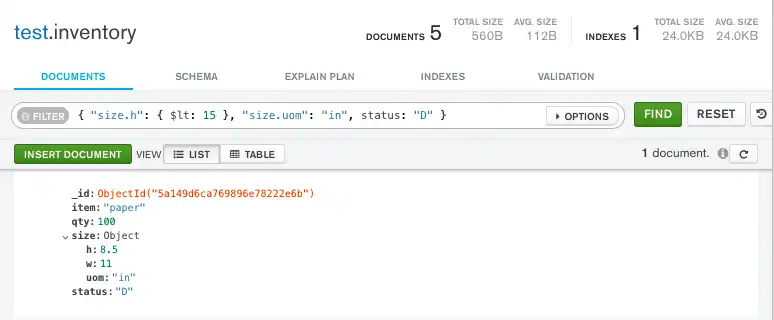
C
mongoc_collection_t *collection;
bson_t *filter;
mongoc_cursor_t *cursor;

collection = mongoc_database_get_collection (db, "inventory");
filter = BCON_NEW (
   "size.h", "{",
   "$lt", BCON_INT64 (15),
   "}",
   "size.uom", BCON_UTF8 ("in"),
   "status", BCON_UTF8 ("D"));
cursor = mongoc_collection_find_with_opts (collection, filter, NULL, NULL);
C#
var builder = Builders<BsonDocument>.Filter;
var filter = builder.And(builder.Lt("size.h", 15), builder.Eq("size.uom", "in"), builder.Eq("status", "D"));
var result = collection.Find(filter).ToList();
Go
cursor, err := coll.Find(
	context.TODO(),
	bson.D{
		{"size.h", bson.D{
			{"$lt", 15},
		}},
		{"size.uom", "in"},
		{"status", "D"},
	})
Java(Async)
findPublisher = collection.find(and(
        lt("size.h", 15),
        eq("size.uom", "in"),
        eq("status", "D")
));
Java(Sync)
findIterable = collection.find(and(
        lt("size.h", 15),
        eq("size.uom", "in"),
        eq("status", "D")
));
Kotlin(Coroutine)
val findFlow = collection
    .find(and(
        lt("size.h", 15),
        eq("size.uom", "in"),
        eq("status", "D")
    ))
Motor
cursor = db.inventory.find({"size.h": {"$lt": 15}, "size.uom": "in", "status": "D"})Node.js
const cursor = db.collection('inventory').find({
  'size.h': { $lt: 15 },
  'size.uom': 'in',
  status: 'D'
});
PHP
$cursor = $db->inventory->find([
    'size.h' => ['$lt' => 15],
    'size.uom' => 'in',
    'status' => 'D',
]);
Python
cursor = db.inventory.find({"size.h": {"$lt": 15}, "size.uom": "in", "status": "D"})Ruby
client[:inventory].find('size.h'   => { '$lt' => 15 },
                        'size.uom' => 'in',
                        'status'   => 'D')
scala
findObservable = collection.find(and(
  lt("size.h", 15),
  equal("size.uom", "in"),
  equal("status", "D")
))
Match an Embedded/Nested Document匹配嵌入/嵌套文档
MongoDB Shell
To specify an equality condition on a field that is an embedded/nested document, use the query filter document 要为嵌入/嵌套文档的字段指定相等条件,请使用查询筛选器文档{ <field>: <value> } where <value> is the document to match.{ <field>: <value> },其中<value>是要匹配的文档。
Compass
To specify an equality condition on a field that is an embedded/nested document, use the query filter document 要为嵌入/嵌套文档的字段指定相等条件,请使用查询筛选器文档{ <field>: <value> } where <value> is the document to match.{ <field>: <value> },其中<value>是要匹配的文档。
C
To specify an equality condition on a field that is an embedded/nested document, use the query filter document 要为嵌入/嵌套文档的字段指定相等条件,请使用查询筛选器文档{ <field>: <value> } where <value> is the document to match.{ <field>: <value> },其中<value>是要匹配的文档。
C#
To specify an equality condition on a field that is an embedded/nested document, construct a filter using the Eq method, where 要在嵌入/嵌套文档的字段上指定相等条件,请使用Eq方法构造一个筛选器,其中<value> is the document to match:<value>是要匹配的文档:
Builders<BsonDocument>.Filter.Eq(<field>, <value>)Go
To specify an equality condition on a field that is an embedded document, use the bson.D type to create a filter where 要在嵌入文档的字段上指定相等条件,请使用bson.D类型创建一个筛选器,其中<value> is the document to match:<value>是要匹配的文档:
filter := bson.D{
    {<field>, bson.D{
        {"nestedField1", value1},
        {"nestedField2", value2},
    }},
}
Java(Async)
To specify an equality condition on a field that is an embedded/nested document, use the filter document 要为嵌入/嵌套文档的字段指定相等条件,请使用筛选器文档eq( <field1>, <value>) where <value> is the document to match.eq( <field1>, <value>),其中<value>是要匹配的文档。
Java(Sync)
To specify an equality condition on a field that is an embedded/nested document, use the filter document 要为嵌入/嵌套文档的字段指定相等条件,请使用筛选器文档eq( <field1>, <value>) where <value> is the document to match.eq( <field1>, <value>),其中<value>是要匹配的文档。
Kotlin(Coroutine)
To specify an equality condition on a field that is an embedded document, use the Document class or 要在嵌入文档的字段上指定相等条件,请使用eq() method where <value> is the document to match:Document类或eq()方法,其中<value>是要匹配的文档:
eq(<field>, Document()
   .append("nestedField1", value1)
   .append("nestedField2", value2))
Motor
To specify an equality condition on a field that is an embedded/nested document, use the query filter document 要为嵌入/嵌套文档的字段指定相等条件,请使用查询筛选器文档{ <field>: <value> } where <value> is the document to match.{ <field>: <value> },其中<value>是要匹配的文档。
Node.js
To specify an equality condition on a field that is an embedded/nested document, use the query filter document 要为嵌入/嵌套文档的字段指定相等条件,请使用查询筛选器文档{ <field>: <value> } where <value> is the document to match.{ <field>: <value> },其中<value>是要匹配的文档。
PHP
To specify an equality condition on a field that is an embedded/nested document, use the query filter document 要为嵌入/嵌套文档的字段指定相等条件,请使用查询筛选器文档[ <field> => <value> ] where <value> is the document to match.[ <field> => <value> ],其中<value>是要匹配的文档。
Python
To specify an equality condition on a field that is an embedded/nested document, use the query filter document 要为嵌入/嵌套文档的字段指定相等条件,请使用查询筛选器文档{ <field>: <value> } where <value> is the document to match.{ <field>: <value> },其中<value>是要匹配的文档。
Ruby
To specify an equality condition on a field that is an embedded/nested document, use the query filter document 要为嵌入/嵌套文档的字段指定相等条件,请使用查询筛选器文档{ <field> => <value> } where <value> is the document to match.{ <field> => <value> },其中<value>是要匹配的文档。
scala
To specify an equality condition on a field that is an embedded/nested document, use the filter document 要为嵌入/嵌套文档的字段指定相等条件,请使用筛选器文档equal( <field1>, <value> ) where <value> is the document to match.equal( <field1>, <value> ),其中<value>是要匹配的文档。
For example, the following query selects all documents where the field 例如,以下查询选择字段size equals the document { h: 14, w: 21, uom: "cm" }:size等于文档{ h: 14, w: 21, uom: "cm" }的所有文档:
MongoDB Shell
db.inventory.find( { size: { h: 14, w: 21, uom: "cm" } } )Compass
Copy the following filter into the Compass query bar and click Find:将以下筛选器复制到Compass查询栏中,然后单击“查找”:
{ size: { h: 14, w: 21, uom: "cm" } }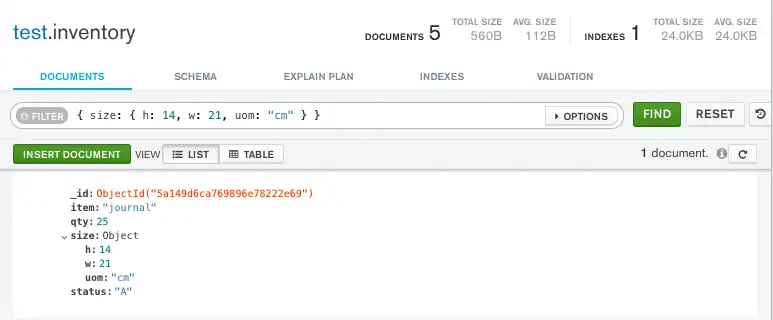
C
mongoc_collection_t *collection;
bson_t *filter;
mongoc_cursor_t *cursor;

collection = mongoc_database_get_collection (db, "inventory");
filter = BCON_NEW (
   "size", "{",
   "h", BCON_DOUBLE (14),
   "w", BCON_DOUBLE (21),
   "uom", BCON_UTF8 ("cm"),
   "}");
cursor = mongoc_collection_find_with_opts (collection, filter, NULL, NULL);
C#
var filter = Builders<BsonDocument>.Filter.Eq("size", new BsonDocument { { "h", 14 }, { "w", 21 }, { "uom", "cm" } });
var result = collection.Find(filter).ToList();
Go
cursor, err := coll.Find(
	context.TODO(),
	bson.D{
		{"size", bson.D{
			{"h", 14},
			{"w", 21},
			{"uom", "cm"},
		}},
	})
Java(Async)
FindPublisher<Document> findPublisher = collection.find(eq("size", Document.parse("{ h: 14, w: 21, uom: 'cm' }")));Java(Sync)
FindIterable<Document> findIterable = collection.find(eq("size", Document.parse("{ h: 14, w: 21, uom: 'cm' }")));Kotlin(Coroutine)
val findFlow = collection
    .find(eq("size", Document.parse("{ h: 14, w: 21, uom: 'cm' }")))
Motor
cursor = db.inventory.find({"size": SON([("h", 14), ("w", 21), ("uom", "cm")])})Node.js
const cursor = collection.find({
  size: { h: 14, w: 21, uom: 'cm' },
});
PHP
$cursor = $db->inventory->find(['size' => ['h' => 14, 'w' => 21, 'uom' => 'cm']]);Python
cursor = db.inventory.find({"size": {"h": 14, "w": 21, "uom": "cm"}})Ruby
client[:inventory].find(size: { h: 14, w: 21, uom: 'cm' })scala
var findObservable = collection.find(equal("size", Document("h" -> 14, "w" -> 21, "uom" -> "cm")))Warning
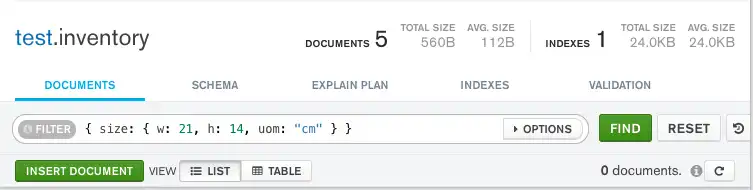
MongoDB does not recommend comparisons on embedded documents because the operations require an exact match of the specified MongoDB不建议对嵌入式文档进行比较,因为这些操作需要与指定的<value> document, including the field order.<value>文档完全匹配,包括字段顺序。
For example, the following query does not match any documents in the 例如,以下查询与inventory collection:inventory集合中的任何文档都不匹配:
MongoDB Shell
db.inventory.find( { size: { w: 21, h: 14, uom: "cm" } } )Compass
C
mongoc_collection_t *collection;
bson_t *filter;
mongoc_cursor_t *cursor;

collection = mongoc_database_get_collection (db, "inventory");
filter = BCON_NEW (
   "size", "{",
   "w", BCON_DOUBLE (21),
   "h", BCON_DOUBLE (14),
   "uom", BCON_UTF8 ("cm"),
   "}");
cursor = mongoc_collection_find_with_opts (collection, filter, NULL, NULL);
C#
var filter = Builders<BsonDocument>.Filter.Eq("size", new BsonDocument { { "w", 21 }, { "h", 14 }, { "uom", "cm" } });
var result = collection.Find(filter).ToList();
Go
cursor, err := coll.Find(
	context.TODO(),
	bson.D{
		{"size", bson.D{
			{"w", 21},
			{"h", 14},
			{"uom", "cm"},
		}},
	})
Java(Async)
findPublisher = collection.find(eq("size", Document.parse("{ w: 21, h: 14, uom: 'cm' }")));Java(Sync)
findIterable = collection.find(eq("size", Document.parse("{ w: 21, h: 14, uom: 'cm' }")));Kotlin(Coroutine)
val findFlow = collection
    .find(eq("size", Document.parse("{ w: 21, h: 14, uom: 'cm' }")))
Motor
cursor = db.inventory.find({"size": SON([("w", 21), ("h", 14), ("uom", "cm")])})Node.js
const cursor = db.collection('inventory').find({
  size: { w: 21, h: 14, uom: 'cm' }
});
PHP
$cursor = $db->inventory->find(['size' => ['w' => 21, 'h' => 14, 'uom' => 'cm']]);Python
cursor = db.inventory.find({"size": {"w": 21, "h": 14, "uom": "cm"}})Ruby
client[:inventory].find(size: { h: 21, w: 14, uom: 'cm' })scala
findObservable = collection.find(equal("size", Document("w" -> 21, "h" -> 14, "uom" -> "cm")))Queries that use comparisons on embedded documents can result in unpredictable behavior when used with a driver that does not use ordered data structures for expressing queries.当与不使用有序数据结构表达查询的驱动程序一起使用时,对嵌入式文档使用比较的查询可能会导致不可预测的行为。
Query Embedded Documents with MongoDB Atlas使用MongoDB Atlas查询嵌入式文档
The example in this section uses the sample movies dataset. To learn how to load the sample dataset into your MongoDB Atlas deployment, see Load Sample Data.本节中的示例使用示例电影数据集。要了解如何将示例数据集加载到MongoDB Atlas部署中,请参阅加载示例数据。
To query an embedded document in MongoDB Atlas, follow these steps:要查询MongoDB Atlas中的嵌入式文档,请执行以下步骤:
In the MongoDB Atlas UI, go to the Clusters page for your project.在MongoDB Atlas UI中,转到项目的“集群”页面。
Warning
Navigation Improvements In Progress导航改进正在进行中
We're currently rolling out a new and improved navigation experience. If the following steps don't match your view in the Atlas UI, see the preview Atlas documentation.我们目前正在推出一种新的、改进的导航体验。如果以下步骤与Atlas UI中的视图不匹配,请参阅Atlas预览文档。
If it's not already displayed, select the organization that contains your desired project from the Organizations menu in the navigation bar.如果尚未显示,请从导航栏的“组织”菜单中选择包含所需项目的组织。If it's not already displayed, select your project from the Projects menu in the navigation bar.如果尚未显示,请从导航栏中的“项目”菜单中选择您的项目。If it's not already displayed, click Clusters in the sidebar.如果尚未显示,请单击侧栏中的“集群”。
Navigate to the collection导航到集合
For the cluster that contains the sample data, click Browse Collections.对于包含示例数据的集群,单击“浏览集合”。In the left navigation pane, select the在左侧导航窗格中,选择sample_mflixdatabase.sample_mflix数据库。Select the选择moviescollection.movies集合。
Specify the query filter document指定查询筛选文档
Specify the query filter document in the Filter field. A query filter document uses query operators to specify search conditions.在“筛选器”字段中指定查询筛选器文档。查询筛选器文档使用查询运算符指定搜索条件。
Copy the following query filter document into the Filter search bar:将以下查询筛选器文档复制到“筛选器”搜索栏中:
{ "awards.wins": 1 }Additional Query Tutorials其他查询教程
For additional query examples, see:有关其他查询示例,请参阅: