In sharded clusters, you can create zones of sharded data based on the shard key. You can associate each zone with one or more shards in the cluster. A shard can associate with any number of zones. 在分片集群中,您可以根据分片键创建分片数据区域。您可以将每个区域与集群中的一个或多个分片相关联。一个分片可以与任意数量的区域相关联。In a balanced cluster, MongoDB migrates chunks covered by a zone only to those shards associated with the zone.在平衡集群中,MongoDB只将区域覆盖的块迁移到与该区域关联的那些分片。
Tip
By defining the zones and the zone ranges before sharding an empty or a non-existing collection, the shard collection operation creates chunks for the defined zone ranges as well as any additional chunks to cover the entire range of the shard key values and performs an initial chunk distribution based on the zone ranges. 通过在对空的或不存在的集合进行分片之前定义区域和区域范围,分片集合操作为定义的区域范围创建块以及任何其他块,以覆盖分片键值的整个范围,并根据区域范围执行初始块分布。This initial creation and distribution of chunks allows for faster setup of zoned sharding. After the initial distribution, the balancer manages the chunk distribution going forward.这种块的初始创建和分发允许更快地设置分区分片。在初始分发之后,平衡器管理接下来的块分发。
See Pre-Define Zones and Zone Ranges for an Empty or Non-Existing Collection for an example.有关示例,请参阅空集合或不存在集合的预定义分区和分区范围。
This tutorial uses Zones to route documents based on creation date either to shards zoned for supporting recent documents, or those zoned for supporting archived documents.本教程使用区域根据创建日期将文档路由到分区用于支持最新文档的分片,或分区用于支持存档文档的分块。
The following are some example use cases for segmenting data based on Service Level Agreement (SLA) or Service Level Objective (SLO):以下是基于服务水平协议(SLA)或服务水平目标(SLO)对数据进行分段的一些示例用例:
An application requires providing low-latency access to recently inserted / updated documents应用程序需要提供对最近插入/更新的文档的低延迟访问An application requires prioritizing low-latency access to a range or subset of documents应用程序需要优先考虑对一系列或子集文档的低延迟访问An application that benefits from ensuring specific ranges or subsets of data are stored on servers with hardware that suits the SLA's for accessing that data一种应用程序,它受益于确保特定范围或子集的数据存储在服务器上,服务器上的硬件适合SLA访问这些数据
The following diagram illustrates a sharded cluster that uses hardware based zones to satisfy data access SLAs or SLOs.下图说明了一个分片集群,它使用基于硬件的区域来满足数据访问SLA或SLO。
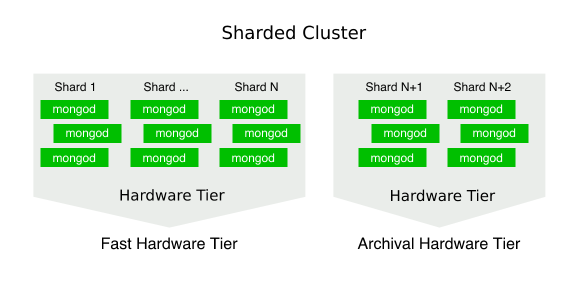
Scenario场景
A photo sharing application requires fast access to photos uploaded within the last 6 months. The application stores the location of each photo along with its metadata in the 照片共享应用程序需要快速访问过去6个月内上传的照片。该应用程序将每张照片的位置及其元数据存储在photoshare database under the data collection.data集合下的photoshare数据库中。
The following documents represent photos uploaded by a single user:以下文档代表单个用户上传的照片:
{
  "_id" : 10003010,
  "creation_date" : ISODate("2012-12-19T06:01:17.171Z"),
  "userid" : 123,
  "photo_location" : "example.net/storage/usr/photo_1.jpg"
}
{
  "_id" : 10003011,
  "creation_date" : ISODate("2013-12-19T06:01:17.171Z"),
  "userid" : 123,
  "photo_location" : "example.net/storage/usr/photo_2.jpg"
}
{
  "_id" : 10003012,
  "creation_date" : ISODate("2016-01-19T06:01:17.171Z"),
  "userid" : 123,
  "photo_location" : "example.net/storage/usr/photo_3.jpg"
}
Note that only the document with 请注意,只有_id : 10003012 was uploaded within the past year (as of June 2016)._id为10003012的文档是在过去一年内上传的(截至2016年6月)。
Shard Key分片钥匙
The photo collection uses the 照片集使用{ creation_date : 1 } index as the shard key.{ creation_date : 1 }索引作为分片键。
The 每个文档中的creation_date field in each document allows for creating zones on the creation date.creation_date字段允许在创建日期创建区域。
Architecture建筑
The sharded cluster deployment currently consists of three shards.分片集群部署目前由三个分片组成。

Zones区域
The application requires adding each shard to a zone based on its hardware tier. Each hardware tier represents a specific hardware configuration designed to satisfy a given SLA or SLO.应用程序需要根据其硬件层将每个分片添加到区域中。每个硬件层代表一个特定的硬件配置,旨在满足给定的SLA或SLO。

Fast Tier ("recent")快速层(“最近”)These are the fastest performing machines, with large amounts of RAM, fast SSD disks, and powerful CPUs.这些是性能最快的机器,具有大量RAM、快速SSD磁盘和强大的CPU。The zone requires a range with:该区域需要一个范围:a lower bound of{ creation_date : ISODate(YYYY-mm-dd)}, where the Year, Month, and Date specified byYYYY-mm-ddis within the last 6 months.{ creation_date : ISODate(YYYY-mm-dd)}的下限,其中YYYY-mm-dd指定的年、月和日期在过去6个月内。an upper bound of{ creation_date : MaxKey }.{ creation_date : MaxKey }的上限。
Archival Tier ("archive")归档层(“归档”)These machines use less RAM, slower disks, and more basic CPUs. However, they have a greater amount of storage per server.这些机器使用更少的RAM、更慢的磁盘和更基本的CPU。但是,它们每台服务器的存储量更大。The zone requires a range with:该区域需要一个范围:a lower bound of{ creation_date : MinKey }.{ creation_date : MinKey }的下限。an upper bound of{ creation_date : ISODate(YYYY-mm-dd)}, where the Year, Month, and Date match the values used for therecenttier's lower bound.{ creation_date : ISODate(YYYY-mm-dd)}的上限,其中年、月和日期与recent层的下限值匹配。
Note
As performance needs increase, adding additional shards and associating them to the appropriate zone based on their hardware tier allows for the cluster to scale horizontally.随着性能需求的增加,添加额外的分片并根据其硬件层将其关联到适当的区域,可以使集群水平扩展。
When defining zone ranges based on time spans, weigh the benefits of infrequent updates to the zone ranges against the amount of data that must be migrated on an update. For example, setting a limit of 1 year for data to be considered 'recent' likely covers more data than setting a limit of 1 month. 在基于时间跨度定义区域范围时,请权衡不频繁更新区域范围的好处与更新时必须迁移的数据量。例如,为被视为“最近”的数据设定1年的限制可能比设定1个月的限制涵盖更多的数据。While there are more migrations required when rotating on a 1 month scale, the amount of documents that must be migrated is lower than rotating on a 1 year scale.虽然以1个月为周期轮换时需要更多的迁移,但必须迁移的文档数量低于以1年为周期轮换。
Write Operations写入操作
With zones, if an inserted or updated document matches a configured zone, it can only be written to a shard inside that zone.对于区域,如果插入或更新的文档与配置的区域匹配,则只能将其写入该区域内的分片。
MongoDB can write documents that do not match a configured zone to any shard in the cluster.MongoDB可以将与配置区域不匹配的文档写入集群中的任何分片。
Read Operations读取操作
MongoDB can route queries to a specific shard if the query includes the shard key.如果查询包含分片键,MongoDB可以将查询路由到特定的分片。
For example, MongoDB can attempt a targeted read operation on the following query because it includes 例如,MongoDB可以尝试对以下查询进行有针对性的读取操作,因为它在查询文档中包含creation_date in the query document:creation_date:
photoDB = db.getSiblingDB("photoshare")
photoDB.data.find( { "creation_date" : ISODate("2015-01-01") } )
If the requested document falls within the 如果请求的文档落在recent zone range, MongoDB would route this query to the shards inside that zone, ensuring a faster read compared to a cluster-wide broadcast read operationrecent区域范围内,MongoDB会将此查询路由到该区域内的分片,确保与集群范围的广播读取操作相比读取速度更快
Balancer平衡器
The balancer migrates chunks to the appropriate shard respecting any configured zones. 平衡器根据任何配置的区域将块迁移到适当的分片。Until the migration, shards may contain chunks that violate configured zones. Once balancing completes, shards should only contain chunks whose ranges do not violate its assigned zones.在迁移之前,分片可能包含违反配置区域的块。一旦平衡完成,分片应该只包含范围不违反其分配区域的块。
Adding or removing zones or zone ranges can result in chunk migrations. Depending on the size of your data set and the number of chunks a zone or zone range affects, these migrations may impact cluster performance. 添加或删除区域或区域范围可能会导致块迁移。根据数据集的大小和区域或区域范围影响的块数,这些迁移可能会影响集群性能。Consider running your balancer during specific scheduled windows. 考虑在特定的计划窗口期间运行平衡器。See Schedule the Balancing Window for a tutorial on how to set a scheduling window.有关如何设置计划窗口的教程,请参阅计划平衡窗口。
Security安全
For sharded clusters running with Role-Based Access Control in Self-Managed Deployments, authenticate as a user with at least the 对于在自我管理部署中使用基于角色的访问控制运行的分片集群,请至少以clusterManager role on the admin database.admin数据库上clusterManager角色的用户身份进行身份验证。
Procedure过程
You must be connected to a 您必须连接到mongos to create zones or zone ranges. You cannot create zone or zone ranges by connecting directly to a shard.mongos才能创建区域或区域范围。您不能通过直接连接到分片来创建区域或区域范围。
Disable the Balancer禁用平衡器
The balancer must be disabled on the entire sharded cluster to ensure no migrations take place while configuring the new zones.必须在整个分片集群上禁用平衡器,以确保在配置新区域时不会发生迁移。
Use 使用sh.stopBalancer() to stop the balancer for the cluster.sh.stopBalancer()停止集群的平衡器。
sh.stopBalancer()Use 使用sh.isBalancerRunning() to check if the balancer process is currently running. Wait until any current balancing rounds have completed before proceeding.sh.isBalancerRunning()检查平衡器进程当前是否正在运行。等待所有当前平衡回合完成后再继续。
Add each shard to the appropriate zone将每个分片添加到相应的区域
Add 将shard0000 to the recent zone.shard0000添加到recent区域。
sh.addShardTag("shard0000", "recent")Add 将shard0001 to the recent zone.shard0001添加到recent区域。
sh.addShardTag("shard0001", "recent")Add 将shard0002 to the archive zone.shard0002添加到archive区域。
sh.addShardTag("shard0002", "archive")You can review the zone assigned to any given shard by running 您可以通过运行sh.status().sh.status()来查看分配给任何给定分片的区域。
Define ranges for each zone为每个区域定义范围
Define range for recent photos and associate it to the 定义最近照片的范围,并使用recent zone using the sh.addTagRange() method. This method requires:sh.addTagRange()方法将其与recent区域相关联。此方法需要:
the full namespace of the target collection.目标集合的完整命名空间。the inclusive lower bound of the range.范围的包容性下限。the exclusive upper bound of the range.该范围的唯一上限。the zone.该区域。
sh.addTagRange(
  "photoshare.data",
  { "creation_date" : ISODate("2016-01-01") },
  { "creation_date" : MaxKey },
  "recent"
)
Define range for older photos and associate it to the 定义旧照片的范围,并使用archive zone using the sh.addTagRange() method. This method requires:sh.addTagRange()方法将其与archive区域相关联。此方法需要:
the full namespace of the target collection.目标集合的完整命名空间。the inclusive lower bound of the range.范围的包容性下限。the exclusive upper bound of the range.该范围的唯一上限。the zone.该区域。
sh.addTagRange(
  "photoshare.data",
  { "creation_date" : MinKey },
  { "creation_date" : ISODate("2016-01-01") },
  "archive"
)
MinKey and MaxKey are reserved special values for comparisons.MinKey和MaxKey是保留用于比较的特殊值。
Enable the Balancer启用平衡器
Re-enable the balancer to rebalance the cluster.重新启用平衡器以重新平衡集群。
Use 使用sh.enableBalancing(), specifying the namespace of the collection, to start the balancersh.enableBalancing(),指定集合的命名空间,启动平衡器
sh.enableBalancing("photoshare.data")Use 使用sh.isBalancerRunning() to check if the balancer process is currently running.sh.isBalancerRunning()检查平衡器进程当前是否正在运行。
Review the changes查看更改
The next time the balancer runs, it splits and migrates chunks across the shards respecting configured zones.下次平衡器运行时,它会根据配置的区域在分片之间拆分和迁移块。
Once balancing finishes, the shards in the 平衡完成后,recent zone should only contain documents with creation_date greater than or equal to ISODate("2016-01-01"), while shards in the archive zone should only contain documents with creation_date less than ISODate("2016-01-01").recent区域中的分片应仅包含creation_date大于或等于ISODate("2016-01-01")的文档,而archive区域中的分片应仅包含create_date小于ISODate("2016-01-01")的文档。
You can confirm the chunk distribution by running 您可以通过运行sh.status().sh.status()来确认块分布。
Updating Zone Ranges更新区域范围
To update the shard ranges, perform the following operations as a part of a cron job or other scheduled procedure:要更新分片范围,请在cron作业或其他计划过程中执行以下操作:
Disable the Balancer禁用平衡器
The balancer must be disabled on the entire sharded cluster to ensure no migrations take place while configuring the new zones.必须在整个分片集群上禁用平衡器,以确保在配置新区域时不会发生迁移。
Use 使用sh.stopBalancer() to stop the balancer for the cluster.sh.stopBalancer()停止集群的平衡器。
sh.stopBalancer()Use 使用sh.isBalancerRunning() to check if the balancer process is currently running. Wait until any current balancing rounds have completed before proceeding.sh.isBalancerRunning()检查平衡器进程当前是否正在运行。等待所有当前平衡回合完成后再继续。
Remove the old shard zone ranges删除旧的分片区域范围
Remove the old 使用recent zone range using the sh.removeTagRange() method. This method requires:sh.removeTagRange()方法删除旧的recent区域范围。此方法需要:
the full namespace of the target collection.目标集合的完整命名空间。the inclusive lower bound of the range.范围的包容性下限。the exclusive upper bound of the range.该范围的唯一上限。
sh.removeTagRange(
  "photoshare.data",
  { "creation_date" : ISODate("2016-01-01") },
  { "creation_date" : MaxKey }
)
Remove the old 使用archive zone range using the sh.removeTagRange() method. This method requires:sh.removeTagRange()方法删除旧的archive区域范围。此方法需要:
the full namespace of the target collection.目标集合的完整命名空间。the inclusive lower bound of the range.范围的包容性下限。the exclusive upper bound of the range.该范围的唯一上限。
sh.removeTagRange(
  "photoshare.data",
  { "creation_date" : MinKey },
  { "creation_date" : ISODate("2016-01-01") }
)
MinKey and MaxKey are reserved special values for comparisons.MinKey和MaxKey是保留用于比较的特殊值。
Add the new zone range for each zone为每个区域添加新的区域范围
Define range for recent photos and associate it to the 定义最近照片的范围,并使用recent zone using the sh.addTagRange() method. This method requires:sh.addTagRange()方法将其与recent区域相关联。此方法需要:
the full namespace of the target collection.目标集合的完整命名空间。the inclusive lower bound of the range.范围的包容性下限。the exclusive upper bound of the range.该范围的唯一上限。the zone.该区域。
sh.addTagRange(
  "photoshare.data",
  { "creation_date" : ISODate("2016-06-01") },
  { "creation_date" : MaxKey },
  "recent"
)
Define range for older photos and associate it to the 定义旧照片的范围,并使用archive zone using the sh.addTagRange() method. This method requires:sh.addTagRange()方法将其与archive区域相关联。此方法需要:
the full namespace of the target collection.目标集合的完整命名空间。the inclusive lower bound of the range.范围的包容性下限。the exclusive upper bound of the range.该范围的唯一上限。the zone.该区域。
sh.addTagRange(
  "photoshare.data",
  { "creation_date" : MinKey },
  { "creation_date" : ISODate("2016-06-01") },
  "archive"
)
MinKey and MaxKey are reserved special values for comparisons.MinKey和MaxKey是保留用于比较的特殊值。
Enable the Balancer启用平衡器
Re-enable the balancer to rebalance the cluster.重新启用平衡器以重新平衡集群。
Use 使用sh.enableBalancing(), specifying the namespace of the collection, to start the balancersh.enableBalancing(),指定集合的命名空间,启动平衡器
sh.enableBalancing("photoshare.data")Use 使用sh.isBalancerRunning() to check if the balancer process is currently running.sh.isBalancerRunning()检查平衡器进程当前是否正在运行。
Review the changes查看更改
The next time the balancer runs, it migrates data across the shards respecting the configured zones.下次平衡器运行时,它会根据配置的区域在分片之间迁移数据。
Before balancing, the shards in the 在平衡之前,recent zone only contained documents with creation_date greater than or equal to ISODate("2016-01-01"), while shards in the archive zone only contained documents with creation_date less than ISODate("2016-01-01").recent区域中的分片仅包含creation_date大于或等于ISODate("2016-01-01")的文档,而archive区域中的分片仅包含creation _date小于ISODate("2016-01-01")的文件。
Once balancing finishes, the shards in the 平衡完成后,recent zone should only contain documents with creation_date greater than or equal to ISODate("2016-06-01"), while shards in the archive zone should only contain documents with creation_date less than ISODate("2016-06-01").recent区域中的分片应仅包含creation_date大于或等于ISODate("2016-06-01")的文档,而archive区域中的分片应仅包含create_date小于ISODate("2016-06-01")的文件。
You can confirm the chunk distribution by running 您可以通过运行sh.status().sh.status()来确认块分布。