You can update documents in MongoDB using the following methods:您可以使用以下方法更新MongoDB中的文档:
Your programming language's driver.编程语言的驱动程序。The MongoDB Atlas UI. To learn more, see Update a Document with MongoDB Atlas.MongoDB Atlas用户界面。要了解更多信息,请参阅使用MongoDB Atlas更新文档。- MongoDB Compass.
➤ Use the Select your language drop-down menu in the upper-right to set the language of the following examples.使用右上角的“选择语言”下拉菜单设置以下示例的语言。
MongoDB Shell
This page uses the following 此页面使用以下mongosh methods:mongosh方法:
db.collection.updateOne(<filter>, <update>, <options>)db.collection.updateMany(<filter>, <update>, <options>)db.collection.replaceOne(<filter>, <update>, <options>)
The examples on this page use the 此页面上的示例使用inventory collection. Connect to a test database in your MongoDB instance then create the inventory collection:inventory集合。连接到MongoDB实例中的测试数据库,然后创建inventory集合:
Compass
This page uses MongoDB Compass to update the documents.此页面使用MongoDB Compass更新文档。
The examples on this page use the 此页面上的示例使用inventory collection. Populate the inventory collection with the following documents:inventory集合。用以下文档填充inventory集合:
C
This page uses the following MongoDB C Driver methods:此页面使用以下MongoDB C驱动程序方法:
The examples on this page use the 此页面上的示例使用inventory collection. Connect to a test database in your MongoDB instance then create the inventory collection:inventory集合。连接到MongoDB实例中的测试数据库,然后创建inventory集合:
C#
This page uses the following MongoDB C# Driver methods:此页面使用以下MongoDB C#驱动程序方法:
The examples on this page use the 此页面上的示例使用inventory collection. Connect to a test database in your MongoDB instance then create the inventory collection:inventory集合。连接到MongoDB实例中的测试数据库,然后创建inventory集合:
Go
This page uses the following MongoDB Go Driver functions:此页面使用以下MongoDB Go驱动程序函数:
The examples on this page use the 此页面上的示例使用inventory collection. Connect to a test database in your MongoDB instance then create the inventory collection:inventory集合。连接到MongoDB实例中的测试数据库,然后创建inventory集合:
Java(Async)
This page uses the following Java Reactive Streams Driver methods:此页面使用以下Java Reactive Streams驱动程序方法:
com.mongodb.reactivestreams.client.MongoCollection.updateOnecom.mongodb.reactivestreams.client.MongoCollection.updateManycom.mongodb.reactivestreams.client.MongoCollection.replaceOne
The examples on this page use the 此页面上的示例使用inventory collection. Connect to a test database in your MongoDB instance then create the inventory collection:inventory集合。连接到MongoDB实例中的测试数据库,然后创建inventory集合:
Java(Sync)
This page uses the following Java Synchronous Driver methods:此页面使用以下Java同步驱动程序方法:
com.mongodb.client.MongoCollection.updateOnecom.mongodb.client.MongoCollection.updateManycom.mongodb.client.MongoCollection.replaceOne
The examples on this page use the 此页面上的示例使用inventory collection. Connect to a test database in your MongoDB instance then create the inventory collection:inventory集合。连接到MongoDB实例中的测试数据库,然后创建inventory集合:
Kotlin(Coroutine)
This page uses the following Kotlin Coroutine Driver methods:此页面使用以下Kotlin协程驱动程序方法:
The examples on this page use the 此页面上的示例使用inventory collection. Connect to a test database in your MongoDB instance then create the inventory collection:inventory集合。连接到MongoDB实例中的测试数据库,然后创建inventory集合:
Motor
This page uses the following Motor driver methods:此页面使用以下Motor驱动器方法:
motor.motor_asyncio.AsyncIOMotorCollection.update_onemotor.motor_asyncio.AsyncIOMotorCollection.update_manymotor.motor_asyncio.AsyncIOMotorCollection.replace_one
The examples on this page use the 此页面上的示例使用inventory collection. Connect to a test database in your MongoDB instance then create the inventory collection:inventory集合。连接到MongoDB实例中的测试数据库,然后创建inventory集合:
Node.js
This page uses the following MongoDB Node.js Driver methods:此页面使用以下MongoDB Node.js驱动程序方法:
The examples on this page use the 此页面上的示例使用inventory collection. Connect to a test database in your MongoDB instance then create the inventory collection:inventory集合。连接到MongoDB实例中的测试数据库,然后创建inventory集合:
PHP
This page uses the following MongoDB PHP Library methods:此页面使用以下MongoDB PHP库方法:
MongoDB\\Collection::updateOne()MongoDB\\Collection::updateMany()MongoDB\\Collection::replaceOne()
The examples on this page use the 此页面上的示例使用inventory collection. Connect to a test database in your MongoDB instance then create the inventory collection:inventory集合。连接到MongoDB实例中的测试数据库,然后创建inventory集合:
Python
This page uses the following PyMongo Python driver methods:此页面使用以下PyMongo Python驱动程序方法:
pymongo.collection.Collection.update_onepymongo.collection.Collection.update_manypymongo.collection.Collection.replace_one
The examples on this page use the 此页面上的示例使用inventory collection. Connect to a test database in your MongoDB instance then create the inventory collection:inventory集合。连接到MongoDB实例中的测试数据库,然后创建inventory集合:
Ruby
This page uses the following MongoDB Ruby Driver methods:此页面使用以下MongoDB Ruby驱动程序方法:
The examples on this page use the 此页面上的示例使用inventory collection. Connect to a test database in your MongoDB instance then create the inventory collection:inventory集合。连接到MongoDB实例中的测试数据库,然后创建inventory集合:
scala
This page uses the following MongoDB Scala Driver methods:此页面使用以下MongoDB Scala驱动程序方法:
The examples on this page use the 此页面上的示例使用inventory collection. Connect to a test database in your MongoDB instance then create the inventory collection:inventory集合。连接到MongoDB实例中的测试数据库,然后创建inventory集合:
MongoDB Shell
db.inventory.insertMany( [
   { item: "canvas", qty: 100, size: { h: 28, w: 35.5, uom: "cm" }, status: "A" },
   { item: "journal", qty: 25, size: { h: 14, w: 21, uom: "cm" }, status: "A" },
   { item: "mat", qty: 85, size: { h: 27.9, w: 35.5, uom: "cm" }, status: "A" },
   { item: "mousepad", qty: 25, size: { h: 19, w: 22.85, uom: "cm" }, status: "P" },
   { item: "notebook", qty: 50, size: { h: 8.5, w: 11, uom: "in" }, status: "P" },
   { item: "paper", qty: 100, size: { h: 8.5, w: 11, uom: "in" }, status: "D" },
   { item: "planner", qty: 75, size: { h: 22.85, w: 30, uom: "cm" }, status: "D" },
   { item: "postcard", qty: 45, size: { h: 10, w: 15.25, uom: "cm" }, status: "A" },
   { item: "sketchbook", qty: 80, size: { h: 14, w: 21, uom: "cm" }, status: "A" },
   { item: "sketch pad", qty: 95, size: { h: 22.85, w: 30.5, uom: "cm" }, status: "A" }
] );
Compass
[
    { "item": "canvas", "qty": 100, "size": { "h": 28, "w": 35.5, "uom": "cm" }, "status": "A" },
    { "item": "journal", "qty": 25, "size": { "h": 14, "w": 21, "uom": "cm" }, "status": "A" },
    { "item": "mat", "qty": 85, "size": { "h": 27.9, "w": 35.5, "uom": "cm" }, "status": "A" },
    { "item": "mousepad", "qty": 25, "size": { "h": 19, "w": 22.85, "uom": "cm" }, "status": "P" },
    { "item": "notebook", "qty": 50, "size": { "h": 8.5, "w": 11, "uom": "in" }, "status": "P" },
    { "item": "paper", "qty": 100, "size": { "h": 8.5, "w": 11, "uom": "in" }, "status": "D" },
    { "item": "planner", "qty": 75, "size": { "h": 22.85, "w": 30, "uom": "cm" }, "status": "D" },
    { "item": "postcard", "qty": 45, "size": { "h": 10, "w": 15.25, "uom": "cm" }, "status": "A" },
    { "item": "sketchbook", "qty": 80, "size": { "h": 14, "w": 21, "uom": "cm" }, "status": "A" },
    { "item": "sketch pad", "qty": 95, "size": { "h": 22.85, "w": 30.5, "uom": "cm" }, "status": "A" }
]
For instructions on inserting documents using MongoDB Compass, see Insert Documents.有关使用MongoDB Compass插入文档的说明,请参阅插入文档。
C
mongoc_collection_t *collection;
mongoc_bulk_operation_t *bulk;
bson_t *doc;
bool r;
bson_error_t error;
bson_t reply;

collection = mongoc_database_get_collection (db, "inventory");
bulk = mongoc_collection_create_bulk_operation_with_opts (collection, NULL);
doc = BCON_NEW (
   "item", BCON_UTF8 ("canvas"),
   "qty", BCON_INT64 (100),
   "size", "{",
   "h", BCON_DOUBLE (28),
   "w", BCON_DOUBLE (35.5),
   "uom", BCON_UTF8 ("cm"),
   "}",
   "status", BCON_UTF8 ("A"));

r = mongoc_bulk_operation_insert_with_opts (bulk, doc, NULL, &error);
bson_destroy (doc);
if (!r) {
   MONGOC_ERROR ("%s\n", error.message);
   goto done;
}

doc = BCON_NEW (
   "item", BCON_UTF8 ("journal"),
   "qty", BCON_INT64 (25),
   "size", "{",
   "h", BCON_DOUBLE (14),
   "w", BCON_DOUBLE (21),
   "uom", BCON_UTF8 ("cm"),
   "}",
   "status", BCON_UTF8 ("A"));

r = mongoc_bulk_operation_insert_with_opts (bulk, doc, NULL, &error);
bson_destroy (doc);
if (!r) {
   MONGOC_ERROR ("%s\n", error.message);
   goto done;
}

doc = BCON_NEW (
   "item", BCON_UTF8 ("mat"),
   "qty", BCON_INT64 (85),
   "size", "{",
   "h", BCON_DOUBLE (27.9),
   "w", BCON_DOUBLE (35.5),
   "uom", BCON_UTF8 ("cm"),
   "}",
   "status", BCON_UTF8 ("A"));

r = mongoc_bulk_operation_insert_with_opts (bulk, doc, NULL, &error);
bson_destroy (doc);
if (!r) {
   MONGOC_ERROR ("%s\n", error.message);
   goto done;
}

doc = BCON_NEW (
   "item", BCON_UTF8 ("mousepad"),
   "qty", BCON_INT64 (25),
   "size", "{",
   "h", BCON_DOUBLE (19),
   "w", BCON_DOUBLE (22.85),
   "uom", BCON_UTF8 ("cm"),
   "}",
   "status", BCON_UTF8 ("P"));

r = mongoc_bulk_operation_insert_with_opts (bulk, doc, NULL, &error);
bson_destroy (doc);
if (!r) {
   MONGOC_ERROR ("%s\n", error.message);
   goto done;
}

doc = BCON_NEW (
   "item", BCON_UTF8 ("notebook"),
   "qty", BCON_INT64 (50),
   "size", "{",
   "h", BCON_DOUBLE (8.5),
   "w", BCON_DOUBLE (11),
   "uom", BCON_UTF8 ("in"),
   "}",
   "status", BCON_UTF8 ("P"));

r = mongoc_bulk_operation_insert_with_opts (bulk, doc, NULL, &error);
bson_destroy (doc);
if (!r) {
   MONGOC_ERROR ("%s\n", error.message);
   goto done;
}

doc = BCON_NEW (
   "item", BCON_UTF8 ("paper"),
   "qty", BCON_INT64 (100),
   "size", "{",
   "h", BCON_DOUBLE (8.5),
   "w", BCON_DOUBLE (11),
   "uom", BCON_UTF8 ("in"),
   "}",
   "status", BCON_UTF8 ("D"));

r = mongoc_bulk_operation_insert_with_opts (bulk, doc, NULL, &error);
bson_destroy (doc);
if (!r) {
   MONGOC_ERROR ("%s\n", error.message);
   goto done;
}

doc = BCON_NEW (
   "item", BCON_UTF8 ("planner"),
   "qty", BCON_INT64 (75),
   "size", "{",
   "h", BCON_DOUBLE (22.85),
   "w", BCON_DOUBLE (30),
   "uom", BCON_UTF8 ("cm"),
   "}",
   "status", BCON_UTF8 ("D"));

r = mongoc_bulk_operation_insert_with_opts (bulk, doc, NULL, &error);
bson_destroy (doc);
if (!r) {
   MONGOC_ERROR ("%s\n", error.message);
   goto done;
}

doc = BCON_NEW (
   "item", BCON_UTF8 ("postcard"),
   "qty", BCON_INT64 (45),
   "size", "{",
   "h", BCON_DOUBLE (10),
   "w", BCON_DOUBLE (15.25),
   "uom", BCON_UTF8 ("cm"),
   "}",
   "status", BCON_UTF8 ("A"));

r = mongoc_bulk_operation_insert_with_opts (bulk, doc, NULL, &error);
bson_destroy (doc);
if (!r) {
   MONGOC_ERROR ("%s\n", error.message);
   goto done;
}

doc = BCON_NEW (
   "item", BCON_UTF8 ("sketchbook"),
   "qty", BCON_INT64 (80),
   "size", "{",
   "h", BCON_DOUBLE (14),
   "w", BCON_DOUBLE (21),
   "uom", BCON_UTF8 ("cm"),
   "}",
   "status", BCON_UTF8 ("A"));

r = mongoc_bulk_operation_insert_with_opts (bulk, doc, NULL, &error);
bson_destroy (doc);
if (!r) {
   MONGOC_ERROR ("%s\n", error.message);
   goto done;
}

doc = BCON_NEW (
   "item", BCON_UTF8 ("sketch pad"),
   "qty", BCON_INT64 (95),
   "size", "{",
   "h", BCON_DOUBLE (22.85),
   "w", BCON_DOUBLE (30.5),
   "uom", BCON_UTF8 ("cm"),
   "}",
   "status", BCON_UTF8 ("A"));

r = mongoc_bulk_operation_insert_with_opts (bulk, doc, NULL, &error);
bson_destroy (doc);
if (!r) {
   MONGOC_ERROR ("%s\n", error.message);
   goto done;
}

/* "reply" is initialized on success or error */
r = (bool) mongoc_bulk_operation_execute (bulk, &reply, &error);
if (!r) {
   MONGOC_ERROR ("%s\n", error.message);
}
C#
var documents = new[]
{
    new BsonDocument
    {
        { "item", "canvas" },
        { "qty", 100 },
        { "size", new BsonDocument { { "h", 28 }, { "w", 35.5 }, { "uom", "cm" } } },
        { "status", "A" }
    },
    new BsonDocument
    {
        { "item", "journal" },
        { "qty", 25 },
        { "size", new BsonDocument { { "h", 14 }, { "w", 21 }, { "uom", "cm" } } },
        { "status", "A" }
    },
    new BsonDocument
    {
        { "item", "mat" },
        { "qty", 85 },
        { "size", new BsonDocument { { "h", 27.9 }, { "w", 35.5 }, { "uom", "cm" } } },
        { "status", "A" }
    },
    new BsonDocument
    {
        { "item", "mousepad" },
        { "qty", 25 },
        { "size", new BsonDocument { { "h", 19 }, { "w", 22.85 }, { "uom", "cm" } } },
        { "status", "P" }
    },
    new BsonDocument
    {
        { "item", "notebook" },
        { "qty", 50 },
        { "size", new BsonDocument { { "h", 8.5 }, { "w", 11 }, { "uom", "in" } } },
        { "status", "P" } },
    new BsonDocument
    {
        { "item", "paper" },
        { "qty", 100 },
        { "size", new BsonDocument { { "h", 8.5 }, { "w", 11 }, { "uom", "in" } } },
        { "status", "D" }
    },
    new BsonDocument
    {
        { "item", "planner" },
        { "qty", 75 },
        { "size", new BsonDocument { { "h", 22.85 }, { "w", 30 }, { "uom", "cm" } } },
        { "status", "D" }
    },
    new BsonDocument
    {
        { "item", "postcard" },
        { "qty", 45 },
        { "size", new BsonDocument { { "h", 10 }, { "w", 15.25 }, { "uom", "cm" } } },
        { "status", "A" }
    },
    new BsonDocument
    {
        { "item", "sketchbook" },
        { "qty", 80 },
        { "size", new BsonDocument { { "h", 14 }, { "w", 21 }, { "uom", "cm" } } },
        { "status", "A" }
    },
    new BsonDocument
    {
        { "item", "sketch pad" },
        { "qty", 95 },
        { "size", new BsonDocument { { "h", 22.85 }, { "w", 30.5 }, { "uom", "cm" } } }, { "status", "A" } },
};
collection.InsertMany(documents);
Go
docs := []any{
	bson.D{
		{"item", "canvas"},
		{"qty", 100},
		{"size", bson.D{
			{"h", 28},
			{"w", 35.5},
			{"uom", "cm"},
		}},
		{"status", "A"},
	},
	bson.D{
		{"item", "journal"},
		{"qty", 25},
		{"size", bson.D{
			{"h", 14},
			{"w", 21},
			{"uom", "cm"},
		}},
		{"status", "A"},
	},
	bson.D{
		{"item", "mat"},
		{"qty", 85},
		{"size", bson.D{
			{"h", 27.9},
			{"w", 35.5},
			{"uom", "cm"},
		}},
		{"status", "A"},
	},
	bson.D{
		{"item", "mousepad"},
		{"qty", 25},
		{"size", bson.D{
			{"h", 19},
			{"w", 22.85},
			{"uom", "in"},
		}},
		{"status", "P"},
	},
	bson.D{
		{"item", "notebook"},
		{"qty", 50},
		{"size", bson.D{
			{"h", 8.5},
			{"w", 11},
			{"uom", "in"},
		}},
		{"status", "P"},
	},
	bson.D{
		{"item", "paper"},
		{"qty", 100},
		{"size", bson.D{
			{"h", 8.5},
			{"w", 11},
			{"uom", "in"},
		}},
		{"status", "D"},
	},
	bson.D{
		{"item", "planner"},
		{"qty", 75},
		{"size", bson.D{
			{"h", 22.85},
			{"w", 30},
			{"uom", "cm"},
		}},
		{"status", "D"},
	},
	bson.D{
		{"item", "postcard"},
		{"qty", 45},
		{"size", bson.D{
			{"h", 10},
			{"w", 15.25},
			{"uom", "cm"},
		}},
		{"status", "A"},
	},
	bson.D{
		{"item", "sketchbook"},
		{"qty", 80},
		{"size", bson.D{
			{"h", 14},
			{"w", 21},
			{"uom", "cm"},
		}},
		{"status", "A"},
	},
	bson.D{
		{"item", "sketch pad"},
		{"qty", 95},
		{"size", bson.D{
			{"h", 22.85},
			{"w", 30.5},
			{"uom", "cm"},
		}},
		{"status", "A"},
	},
}

result, err := coll.InsertMany(context.TODO(), docs)
Java(Async)
Publisher<Success> insertManyPublisher = collection.insertMany(asList(
        Document.parse("{ item: 'canvas', qty: 100, size: { h: 28, w: 35.5, uom: 'cm' }, status: 'A' }"),
        Document.parse("{ item: 'journal', qty: 25, size: { h: 14, w: 21, uom: 'cm' }, status: 'A' }"),
        Document.parse("{ item: 'mat', qty: 85, size: { h: 27.9, w: 35.5, uom: 'cm' }, status: 'A' }"),
        Document.parse("{ item: 'mousepad', qty: 25, size: { h: 19, w: 22.85, uom: 'cm' }, status: 'P' }"),
        Document.parse("{ item: 'notebook', qty: 50, size: { h: 8.5, w: 11, uom: 'in' }, status: 'P' }"),
        Document.parse("{ item: 'paper', qty: 100, size: { h: 8.5, w: 11, uom: 'in' }, status: 'D' }"),
        Document.parse("{ item: 'planner', qty: 75, size: { h: 22.85, w: 30, uom: 'cm' }, status: 'D' }"),
        Document.parse("{ item: 'postcard', qty: 45, size: { h: 10, w: 15.25, uom: 'cm' }, status: 'A' }"),
        Document.parse("{ item: 'sketchbook', qty: 80, size: { h: 14, w: 21, uom: 'cm' }, status: 'A' }"),
        Document.parse("{ item: 'sketch pad', qty: 95, size: { h: 22.85, w: 30.5, uom: 'cm' }, status: 'A' }")
));
Java(Sync)
collection.insertMany(asList(
        Document.parse("{ item: 'canvas', qty: 100, size: { h: 28, w: 35.5, uom: 'cm' }, status: 'A' }"),
        Document.parse("{ item: 'journal', qty: 25, size: { h: 14, w: 21, uom: 'cm' }, status: 'A' }"),
        Document.parse("{ item: 'mat', qty: 85, size: { h: 27.9, w: 35.5, uom: 'cm' }, status: 'A' }"),
        Document.parse("{ item: 'mousepad', qty: 25, size: { h: 19, w: 22.85, uom: 'cm' }, status: 'P' }"),
        Document.parse("{ item: 'notebook', qty: 50, size: { h: 8.5, w: 11, uom: 'in' }, status: 'P' }"),
        Document.parse("{ item: 'paper', qty: 100, size: { h: 8.5, w: 11, uom: 'in' }, status: 'D' }"),
        Document.parse("{ item: 'planner', qty: 75, size: { h: 22.85, w: 30, uom: 'cm' }, status: 'D' }"),
        Document.parse("{ item: 'postcard', qty: 45, size: { h: 10, w: 15.25, uom: 'cm' }, status: 'A' }"),
        Document.parse("{ item: 'sketchbook', qty: 80, size: { h: 14, w: 21, uom: 'cm' }, status: 'A' }"),
        Document.parse("{ item: 'sketch pad', qty: 95, size: { h: 22.85, w: 30.5, uom: 'cm' }, status: 'A' }")
));
Kotlin(Coroutine)
collection.insertMany(
    listOf(
        Document("item", "canvas")
            .append("qty", 100)
            .append("size", Document("h", 28).append("w", 35.5).append("uom", "cm"))
            .append("status", "A"),
        Document("item", "journal")
            .append("qty", 25)
            .append("size", Document("h", 14).append("w", 21).append("uom", "cm"))
            .append("status", "A"),
        Document("item", "mat")
            .append("qty", 85)
            .append("size", Document("h", 27.9).append("w", 35.5).append("uom", "cm"))
            .append("status", "A"),
        Document("item", "mousepad")
            .append("qty", 25)
            .append("size", Document("h", 19).append("w", 22.85).append("uom", "cm"))
            .append("status", "P"),
        Document("item", "notebook")
            .append("qty", 50)
            .append("size", Document("h", 8.5).append("w", 11).append("uom", "in"))
            .append("status", "P"),
        Document("item", "paper")
            .append("qty", 100)
            .append("size", Document("h", 8.5).append("w", 11).append("uom", "in"))
            .append("status", "D"),
        Document("item", "planner")
            .append("qty", 75)
            .append("size", Document("h", 22.85).append("w", 30).append("uom", "cm"))
            .append("status", "D"),
        Document("item", "postcard")
            .append("qty", 45)
            .append("size", Document("h", 10).append("w", 15.25).append("uom", "cm"))
            .append("status", "A"),
        Document("item", "sketchbook")
            .append("qty", 80)
            .append("size", Document("h", 14).append("w", 21).append("uom", "cm"))
            .append("status", "A"),
        Document("item", "sketch pad")
            .append("qty", 95)
            .append("size", Document("h", 22.85).append("w", 30.5).append("uom", "cm"))
            .append("status", "A"),
    )
)
Motor
await db.inventory.insert_many(
    [
        {
            "item": "canvas",
            "qty": 100,
            "size": {"h": 28, "w": 35.5, "uom": "cm"},
            "status": "A",
        },
        {
            "item": "journal",
            "qty": 25,
            "size": {"h": 14, "w": 21, "uom": "cm"},
            "status": "A",
        },
        {
            "item": "mat",
            "qty": 85,
            "size": {"h": 27.9, "w": 35.5, "uom": "cm"},
            "status": "A",
        },
        {
            "item": "mousepad",
            "qty": 25,
            "size": {"h": 19, "w": 22.85, "uom": "cm"},
            "status": "P",
        },
        {
            "item": "notebook",
            "qty": 50,
            "size": {"h": 8.5, "w": 11, "uom": "in"},
            "status": "P",
        },
        {
            "item": "paper",
            "qty": 100,
            "size": {"h": 8.5, "w": 11, "uom": "in"},
            "status": "D",
        },
        {
            "item": "planner",
            "qty": 75,
            "size": {"h": 22.85, "w": 30, "uom": "cm"},
            "status": "D",
        },
        {
            "item": "postcard",
            "qty": 45,
            "size": {"h": 10, "w": 15.25, "uom": "cm"},
            "status": "A",
        },
        {
            "item": "sketchbook",
            "qty": 80,
            "size": {"h": 14, "w": 21, "uom": "cm"},
            "status": "A",
        },
        {
            "item": "sketch pad",
            "qty": 95,
            "size": {"h": 22.85, "w": 30.5, "uom": "cm"},
            "status": "A",
        },
    ]
)
Node.js
await db.collection('inventory').insertMany([
  {
    item: 'canvas',
    qty: 100,
    size: { h: 28, w: 35.5, uom: 'cm' },
    status: 'A'
  },
  {
    item: 'journal',
    qty: 25,
    size: { h: 14, w: 21, uom: 'cm' },
    status: 'A'
  },
  {
    item: 'mat',
    qty: 85,
    size: { h: 27.9, w: 35.5, uom: 'cm' },
    status: 'A'
  },
  {
    item: 'mousepad',
    qty: 25,
    size: { h: 19, w: 22.85, uom: 'cm' },
    status: 'P'
  },
  {
    item: 'notebook',
    qty: 50,
    size: { h: 8.5, w: 11, uom: 'in' },
    status: 'P'
  },
  {
    item: 'paper',
    qty: 100,
    size: { h: 8.5, w: 11, uom: 'in' },
    status: 'D'
  },
  {
    item: 'planner',
    qty: 75,
    size: { h: 22.85, w: 30, uom: 'cm' },
    status: 'D'
  },
  {
    item: 'postcard',
    qty: 45,
    size: { h: 10, w: 15.25, uom: 'cm' },
    status: 'A'
  },
  {
    item: 'sketchbook',
    qty: 80,
    size: { h: 14, w: 21, uom: 'cm' },
    status: 'A'
  },
  {
    item: 'sketch pad',
    qty: 95,
    size: { h: 22.85, w: 30.5, uom: 'cm' },
    status: 'A'
  }
]);
PHP
$insertManyResult = $db->inventory->insertMany([
    [
        'item' => 'canvas',
        'qty' => 100,
        'size' => ['h' => 28, 'w' => 35.5, 'uom' => 'cm'],
        'status' => 'A',
    ],
    [
        'item' => 'journal',
        'qty' => 25,
        'size' => ['h' => 14, 'w' => 21, 'uom' => 'cm'],
        'status' => 'A',
    ],
    [
        'item' => 'mat',
        'qty' => 85,
        'size' => ['h' => 27.9, 'w' => 35.5, 'uom' => 'cm'],
        'status' => 'A',
    ],
    [
        'item' => 'mousepad',
        'qty' => 25,
        'size' => ['h' => 19, 'w' => 22.85, 'uom' => 'cm'],
        'status' => 'P',
    ],
    [
        'item' => 'notebook',
        'qty' => 50,
        'size' => ['h' => 8.5, 'w' => 11, 'uom' => 'in'],
        'status' => 'P',
    ],
    [
        'item' => 'paper',
        'qty' => 100,
        'size' => ['h' => 8.5, 'w' => 11, 'uom' => 'in'],
        'status' => 'D',
    ],
    [
        'item' => 'planner',
        'qty' => 75,
        'size' => ['h' => 22.85, 'w' => 30, 'uom' => 'cm'],
        'status' => 'D',
    ],
    [
        'item' => 'postcard',
        'qty' => 45,
        'size' => ['h' => 10, 'w' => 15.25, 'uom' => 'cm'],
        'status' => 'A',
    ],
    [
        'item' => 'sketchbook',
        'qty' => 80,
        'size' => ['h' => 14, 'w' => 21, 'uom' => 'cm'],
        'status' => 'A',
    ],
    [
        'item' => 'sketch pad',
        'qty' => 95,
        'size' => ['h' => 22.85, 'w' => 30.5, 'uom' => 'cm'],
        'status' => 'A',
    ],
]);
Python
db.inventory.insert_many(
    [
        {
            "item": "canvas",
            "qty": 100,
            "size": {"h": 28, "w": 35.5, "uom": "cm"},
            "status": "A",
        },
        {
            "item": "journal",
            "qty": 25,
            "size": {"h": 14, "w": 21, "uom": "cm"},
            "status": "A",
        },
        {
            "item": "mat",
            "qty": 85,
            "size": {"h": 27.9, "w": 35.5, "uom": "cm"},
            "status": "A",
        },
        {
            "item": "mousepad",
            "qty": 25,
            "size": {"h": 19, "w": 22.85, "uom": "cm"},
            "status": "P",
        },
        {
            "item": "notebook",
            "qty": 50,
            "size": {"h": 8.5, "w": 11, "uom": "in"},
            "status": "P",
        },
        {
            "item": "paper",
            "qty": 100,
            "size": {"h": 8.5, "w": 11, "uom": "in"},
            "status": "D",
        },
        {
            "item": "planner",
            "qty": 75,
            "size": {"h": 22.85, "w": 30, "uom": "cm"},
            "status": "D",
        },
        {
            "item": "postcard",
            "qty": 45,
            "size": {"h": 10, "w": 15.25, "uom": "cm"},
            "status": "A",
        },
        {
            "item": "sketchbook",
            "qty": 80,
            "size": {"h": 14, "w": 21, "uom": "cm"},
            "status": "A",
        },
        {
            "item": "sketch pad",
            "qty": 95,
            "size": {"h": 22.85, "w": 30.5, "uom": "cm"},
            "status": "A",
        },
    ]
)
Ruby
client[:inventory].insert_many([
                                { item: 'canvas',
                                  qty: 100,
                                  size: { h: 28, w: 35.5, uom: 'cm' },
                                  status: 'A' },
                                { item: 'journal',
                                  qty: 25,
                                  size: { h: 14, w: 21, uom: 'cm' },
                                  status: 'A' },
                                { item: 'mat',
                                  qty: 85,
                                  size: { h: 27.9, w: 35.5, uom: 'cm' },
                                  status: 'A' },
                                { item: 'mousepad',
                                  qty: 25,
                                  size: { h: 19, w: 22.85, uom: 'cm' },
                                  status: 'P' },
                                { item: 'notebook',
                                  qty: 50,
                                  size: { h: 8.5, w: 11, uom: 'in' },
                                  status: 'P' },
                                { item: 'paper',
                                  qty: 100,
                                  size: { h: 8.5, w: 11, uom: 'in' },
                                  status: 'D' },
                                { item: 'planner',
                                  qty: 75,
                                  size: { h: 22.85, w: 30, uom: 'cm' },
                                  status: 'D' },
                                { item: 'postcard',
                                  qty: 45,
                                  size: { h: 10, w: 15.25, uom: 'cm' },
                                  status: 'A' },
                                { item: 'sketchbook',
                                  qty: 80,
                                  size: { h: 14, w: 21, uom: 'cm' },
                                  status: 'A' },
                                { item: 'sketch pad',
                                  qty: 95,
                                  size: { h: 22.85, w: 30.5, uom: 'cm' },
                                  status: 'A' }
                              ])
scala
collection.insertMany(Seq(
  Document("""{ item: "canvas", qty: 100, size: { h: 28, w: 35.5, uom: "cm" }, status: "A" }"""),
  Document("""{ item: "journal", qty: 25, size: { h: 14, w: 21, uom: "cm" }, status: "A" }"""),
  Document("""{ item: "mat", qty: 85, size: { h: 27.9, w: 35.5, uom: "cm" }, status: "A" }"""),
  Document("""{ item: "mousepad", qty: 25, size: { h: 19, w: 22.85, uom: "cm" }, status: "P" }"""),
  Document("""{ item: "notebook", qty: 50, size: { h: 8.5, w: 11, uom: "in" }, status: "P" }"""),
  Document("""{ item: "paper", qty: 100, size: { h: 8.5, w: 11, uom: "in" }, status: "D" }"""),
  Document("""{ item: "planner", qty: 75, size: { h: 22.85, w: 30, uom: "cm" }, status: "D" }"""),
  Document("""{ item: "postcard", qty: 45, size: { h: 10, w: 15.25, uom: "cm" }, status: "A" }"""),
  Document("""{ item: "sketchbook", qty: 80, size: { h: 14, w: 21, uom: "cm" }, status: "A" }"""),
  Document("""{ item: "sketch pad", qty: 95, size: { h: 22.85, w: 30.5, uom: "cm" }, status: "A" }""")
)).execute()
Update Documents in a Collection更新集合中的文档
MongoDB Shell
To update a document, MongoDB provides update operators, such as 为了更新文档,MongoDB提供了更新运算符(如$set, to modify field values.$set)来修改字段值。
To use the update operators, pass to the update methods an update document of the form:要使用更新运算符,请将以下格式的更新文档传递给更新方法:
{
  <update operator>: { <field1>: <value1>, ... },
  <update operator>: { <field2>: <value2>, ... },
  ...
}
Some update operators, such as 如果字段不存在,某些更新运算符(如$set, will create the field if the field does not exist. See the individual update operator reference for details.$set)将创建该字段。有关详细信息,请参阅单个更新运算符参考。
Compass
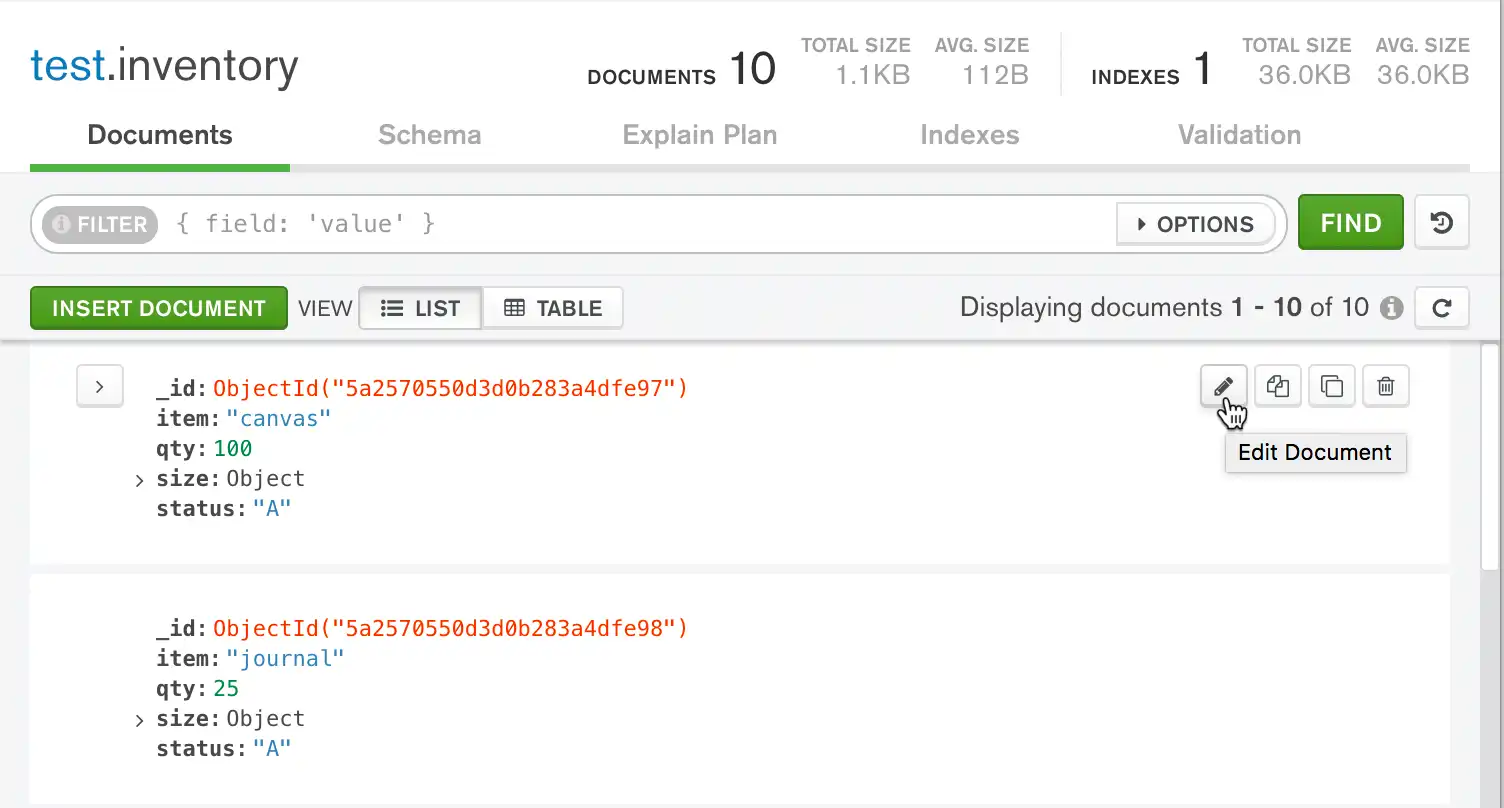
To update a document in Compass, hover over the target document and click the pencil icon:要在Compass中更新文档,请将鼠标悬停在目标文档上,然后单击铅笔图标:
After clicking the pencil icon, the document enters edit mode:点击铅笔图标后,文档进入编辑模式:
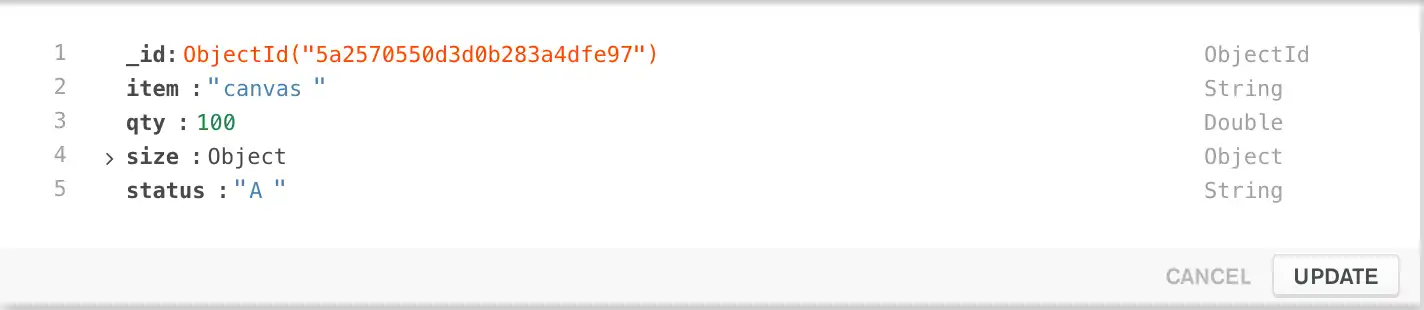
You can now change the this document by clicking the item you wish to change and modifying the value.现在,您可以通过单击要更改的项目并修改值来更改此文档。
For detailed instructions on updating documents in Compass, refer to the Compass documentation or follow the example below.有关更新Compass中文档的详细说明,请参阅Compass文档或遵循以下示例。
Once you are satisfied with your changes, click Update to save the updated document.一旦您对更改感到满意,请单击“更新”以保存更新的文档。
Click Cancel to revert any modifications made to the document and exit edit mode.单击“取消”以还原对文档所做的任何修改并退出编辑模式。
C#
To update a document, MongoDB provides update operators such as 为了更新文档,MongoDB提供了诸如$set to modify field values.$set之类的更新运算符来修改字段值。
To use the update operators, pass to the update methods an update document of the form:要使用更新运算符,请将以下格式的更新文档传递给更新方法:
{
  <update operator> => { <field1> => <value1>, ... },
  <update operator> => { <field2> => <value2>, ... },
  ...
}
Some update operators, such as 如果字段不存在,某些更新运算符(如$set, will create the field if the field does not exist. See the individual update operator reference for details.$set)将创建该字段。有关详细信息,请参阅单个更新运算符参考。
Go
To update a document, MongoDB provides update operators such as 为了更新文档,MongoDB提供了诸如$set to modify field values.$set之类的更新运算符来修改字段值。
Some update operators, such as 如果字段不存在,某些更新运算符(如$set, will create the field if the field does not exist. See the individual update operator reference for details.$set)将创建该字段。有关详细信息,请参阅单个更新运算符参考。
Java(Async)
To update a document, MongoDB provides update operators such as 为了更新文档,MongoDB提供了诸如$set to modify field values.$set之类的更新运算符来修改字段值。
The driver provides the com.mongodb.client.model.Updates class to facilitate the creation of update documents. For example:驱动程序提供了com.mongodb.client.model.Updates类,以方便创建更新文档。例如:
combine(set(<field1>, <value1>), set(<field2>, <value2>))For a list of the update helpers, see com.mongodb.client.model.Updates.有关更新帮助程序的列表,请参阅com.mongodb.client.model.Updates。
Some update operators, such as 如果字段不存在,某些更新运算符(如$set, will create the field if the field does not exist. See the individual update operator reference for details.$set)将创建该字段。有关详细信息,请参阅单个更新运算符参考。
Java(Sync)
To update a document, MongoDB provides update operators such as 为了更新文档,MongoDB提供了诸如$set to modify field values.$set之类的更新运算符来修改字段值。
The driver provides the com.mongodb.client.model.Updates class to facilitate the creation of update documents. For example:驱动程序提供了com.mongodb.client.model.Updates类,以方便创建更新文档。例如:
combine(set(<field1>, <value1>), set(<field2>, <value2>))For a list of the update helpers, see com.mongodb.client.model.Updates.有关更新帮助程序的列表,请参阅com.mongodb.client.model.Updates。
Some update operators, such as 如果字段不存在,某些更新运算符(如$set, will create the field if the field does not exist. See the individual update operator reference for details.$set)将创建该字段。有关详细信息,请参阅单个更新运算符参考。
Kotlin(Coroutine)
To update a document, MongoDB provides update operators such as 为了更新文档,MongoDB提供了诸如$set to modify field values.$set之类的更新运算符来修改字段值。
The driver provides the com.mongodb.client.model.Updates class to facilitate the creation of update documents. The following code shows an update document that uses methods from the 驱动程序提供了Updates builder class:com.mongodb.client.model.Updates类,以方便创建更新文档。以下代码显示了一个使用Updates构建器类中的方法的更新文档:
combine(set(<field1>, <value1>), set(<field2>, <value2>))Some update operators, such as 如果字段不存在,某些更新运算符(如$set, will create the field if the field does not exist. See the individual update operator reference for details.$set)将创建该字段。有关详细信息,请参阅单个更新运算符参考。
Motor
To update a document, MongoDB provides update operators such as 为了更新文档,MongoDB提供了诸如$set to modify field values.$set之类的更新运算符来修改字段值。
To use the update operators, pass to the update methods an update document of the form:要使用更新运算符,请将以下格式的更新文档传递给更新方法:
{
  <update operator>: { <field1>: <value1>, ... },
  <update operator>: { <field2>: <value2>, ... },
  ...
}
Some update operators, such as 如果字段不存在,某些更新运算符(如$set, will create the field if the field does not exist. See the individual update operator reference for details.$set)将创建该字段。有关详细信息,请参阅单个更新运算符参考。
Node.js
To update a document, MongoDB provides update operators such as 为了更新文档,MongoDB提供了诸如$set to modify field values.$set之类的更新运算符来修改字段值。
To use the update operators, pass to the update methods an update document of the form:要使用更新运算符,请将以下格式的更新文档传递给更新方法:
{
  <update operator>: { <field1>: <value1>, ... },
  <update operator>: { <field2>: <value2>, ... },
  ...
}
Some update operators, such as 如果字段不存在,某些更新运算符(如$set, will create the field if the field does not exist. See the individual update operator reference for details.$set)将创建该字段。有关详细信息,请参阅单个更新运算符参考。
PHP
To update a document, MongoDB provides update operators such as 为了更新文档,MongoDB提供了诸如$set to modify field values.$set之类的更新运算符来修改字段值。
To use the update operators, pass to the update methods an update document of the form:要使用更新运算符,请将以下格式的更新文档传递给更新方法:
[
  <update operator> => [ <field1> => <value1>, ... ],
  <update operator> => [ <field2> => <value2>, ... ],
  ...
]
Some update operators, such as 如果字段不存在,某些更新运算符(如$set, will create the field if the field does not exist. See the individual update operator reference for details.$set)将创建该字段。有关详细信息,请参阅单个更新运算符参考。
Python
To update a document, MongoDB provides update operators such as 为了更新文档,MongoDB提供了诸如$set to modify field values.$set之类的更新运算符来修改字段值。
To use the update operators, pass to the update methods an update document of the form:要使用更新运算符,请将以下格式的更新文档传递给更新方法:
{
  <update operator>: { <field1>: <value1>, ... },
  <update operator>: { <field2>: <value2>, ... },
  ...
}
Some update operators, such as $set, will create the field if the field does not exist. See the individual update operator reference for details.
Ruby
To update a document, MongoDB provides update operators such as 为了更新文档,MongoDB提供了诸如$set to modify field values.$set之类的更新运算符来修改字段值。
To use the update operators, pass to the update methods an update document of the form:要使用更新运算符,请将以下格式的更新文档传递给更新方法:
{
  <update operator> => { <field1> => <value1>, ... },
  <update operator> => { <field2> => <value2>, ... },
  ...
}
Some update operators, such as 如果字段不存在,某些更新运算符(如$set, will create the field if the field does not exist. See the individual update operator reference for details.$set)将创建该字段。有关详细信息,请参阅单个更新运算符参考。
scala
To update a document, MongoDB provides update operators such as 为了更新文档,MongoDB提供了诸如$set to modify field values.$set之类的更新运算符来修改字段值。
To use the update operators, pass to the update methods an update document of the form:要使用更新运算符,请将以下格式的更新文档传递给更新方法:
(
  set (<field1>, <value1>),
  set (<field2>, <value2>),
  ...
)
Some update operators, such as 如果字段不存在,某些更新运算符(如$set, will create the field if the field does not exist. See the individual update operator reference for details.$set)将创建该字段。有关详细信息,请参阅单个更新运算符参考。
Note
MongoDB can accept an aggregation pipeline to specify the modifications to make instead of an update document. For details, see the method reference page.MongoDB可以接受聚合管道来指定要进行的修改,而不是更新文档。有关详细信息,请参阅方法参考页。
Update a Single Document更新单个文档
MongoDB Shell
The following example uses the 以下示例在db.collection.updateOne() method on the inventory collection to update the first document where item equals "paper":inventory集合上使用db.collection.updateOne()方法来更新第一个项目等于“纸张”的文档:
Compass
The following example demonstrates using MongoDB Compass to modify a single document where 以下示例演示了如何使用MongoDB Compass修改item: paper in the inventory collection:inventory集合中item:paper所在的单个文档:
Note
This example uses the Compass Table View to modify the document. 此示例使用Compass表视图修改文档。The editing process using the Compass List View follows a similar approach.使用Compass列表视图的编辑过程遵循类似的方法。
For more information on the differences between Table View and List View in Compass, refer to the Compass documentation.有关Compass中表视图和列表视图之间差异的更多信息,请参阅Compass文档。
C#
The following example uses the 以下示例在IMongoCollection.UpdateOne() method on the inventory collection to update the first document where item equals "paper":inventory集合上使用IMongoCollection.UpdateOne()方法来更新第一个item等于"paper"的文档:
Go
The following example uses the Collection.UpdateOne method on the 以下示例使用inventory collection to update the first document where item equals "paper":inventory集合上的Collection.UpdateOne方法来更新第一个item等于"paper"的文档:
Java(Async)
The following example uses the com.mongodb.reactivestreams.client.MongoCollection.updateOne on the 以下示例使用inventory collection to update the first document where item equals "paper":inventory集合上的com.mongodb.reactivestreams.client.MongoCollection.updateOne来更新item等于"paper"的第一个文档:
Java(Sync)
The following example uses the com.mongodb.client.MongoCollection.updateOne method on the 以下示例使用inventory collection to update the first document where item equals "paper":inventory集合上的com.mongodb.client.MongoCollection.updateOne方法来更新第一个item等于"paper"的文档:
Kotlin(Coroutine)
The following example uses the 以下示例在MongoCollection.updateOne() method on the inventory collection to update the first document where item equals "paper":inventory集合上使用MongoCollection.updateOne()方法来更新item等于"paper"的第一个文档:
Motor
The following example uses the 以下示例使用update_one method on the inventory collection to update the first document where item equals "paper":inventory集合上的update_one方法更新第一个item等于"paper"的文档:
Node.js
The following example uses the 以下示例使用Collection.updateOne() method on the inventory collection to update the first document where item equals "paper":inventory集合上的Collection.updateOne()方法来更新item等于"paper"的第一个文档:
PHP
The following example uses the 以下示例在updateOne() method on the inventory collection to update the first document where item equals "paper":inventory集合中使用updateOne()方法更新第一个item等于"paper"的文档:
Python
The following example uses the 以下示例使用update_one method on the inventory collection to update the first document where item equals "paper":inventory集合上的update_one方法更新第一个item等于"paper"的文档:
Ruby
The following example uses the 以下示例使用update_one() method on the inventory collection to update the first document where item equals "paper":inventory集合上的update_one()方法来更新item等于"paper"的第一个文档:
scala
The following example uses the 以下示例在updateOne() method on the inventory collection to update the first document where item equals "paper":inventory集合中使用updateOne() method on the inventory collection to update the first document where item方法更新第一个item等于"paper"的文档:
MongoDB Shell
db.inventory.updateOne(
   { item: "paper" },
   {
     $set: { "size.uom": "cm", status: "P" },
     $currentDate: { lastModified: true }
   }
)
The update operation:更新操作:
uses the使用$setoperator to update the value of thesize.uomfield to"cm"and the value of thestatusfield to"P",$set运算符将size.uom字段的值更新为"cm",将status字段的值修改为"P",uses the使用$currentDateoperator to update the value of thelastModifiedfield to the current date. IflastModifiedfield does not exist,$currentDatewill create the field. See$currentDatefor details.$currentDate运算符将lastModified字段的值更新为当前日期。如果lastModified字段不存在,则$currentDate将创建该字段。有关详细信息,请参阅$currentDate。
Compass
Modify the target document as follows:按如下方式修改目标文档:
Change the将statusfield fromDtoP.status字段从D更改为P。Change the将size.uomfield fromintocm.size.uom字段从in更改为cm。Add a new field called添加一个名为lastModifiedwhose value will be today's date.lastModified的新字段,其值将是今天的日期。
Click the Table button in the top navigation to access the Table View:单击顶部导航中的“表格”按钮以访问表格视图: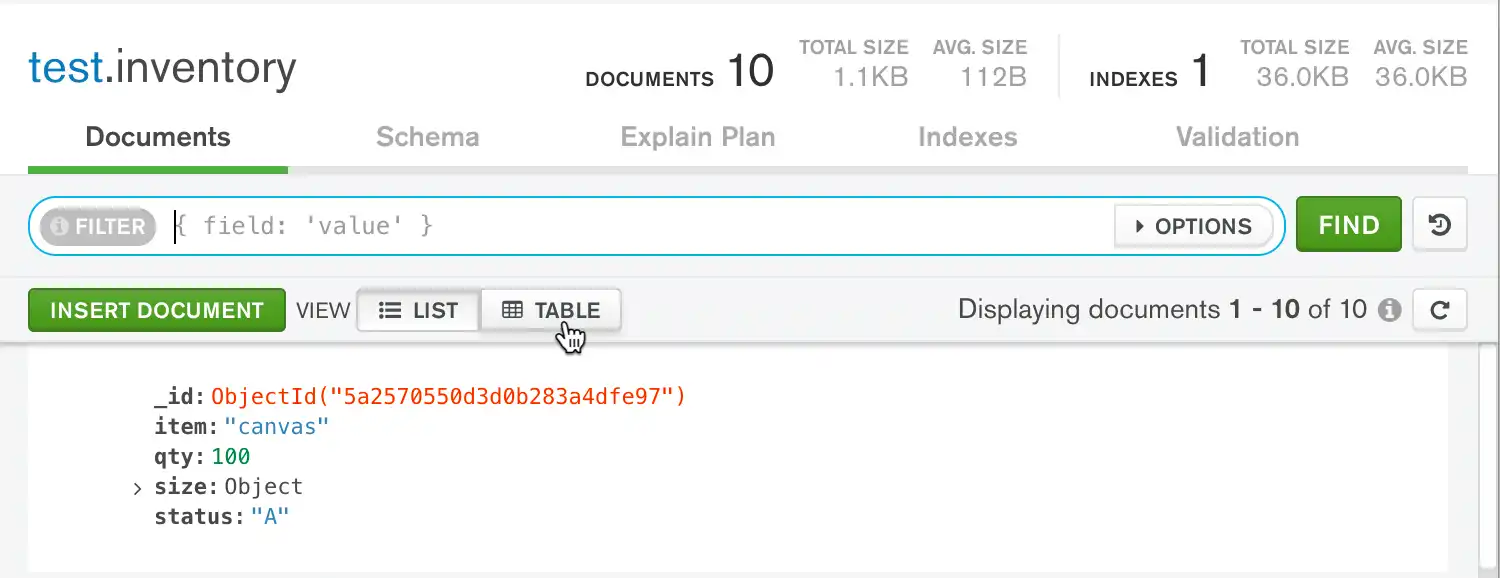
Use the Compass query bar to locate the target document.使用Compass查询栏定位目标文档。Copy the following filter document into the query bar and click Find:将以下筛选文档复制到查询栏中,然后单击“查找”:{ item: "paper" }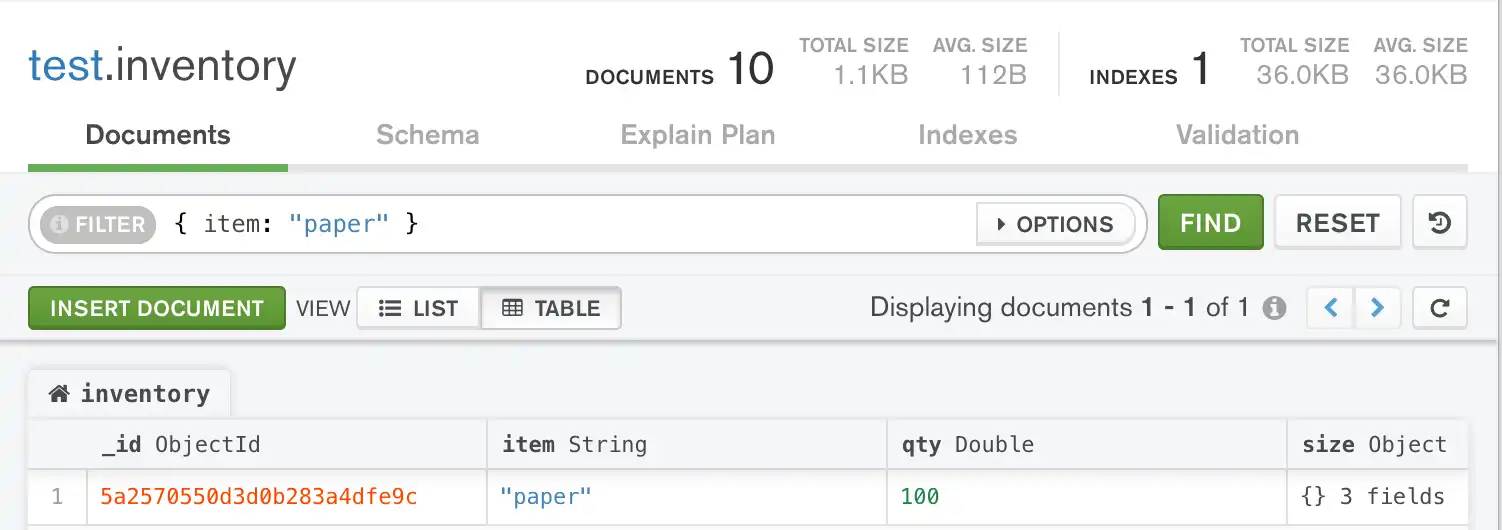
Hover over the将鼠标悬停在statusfield and click the pencil icon which appears on the right side of the document to enter edit mode:status字段上,然后单击出现在文档右侧的铅笔图标以进入编辑模式: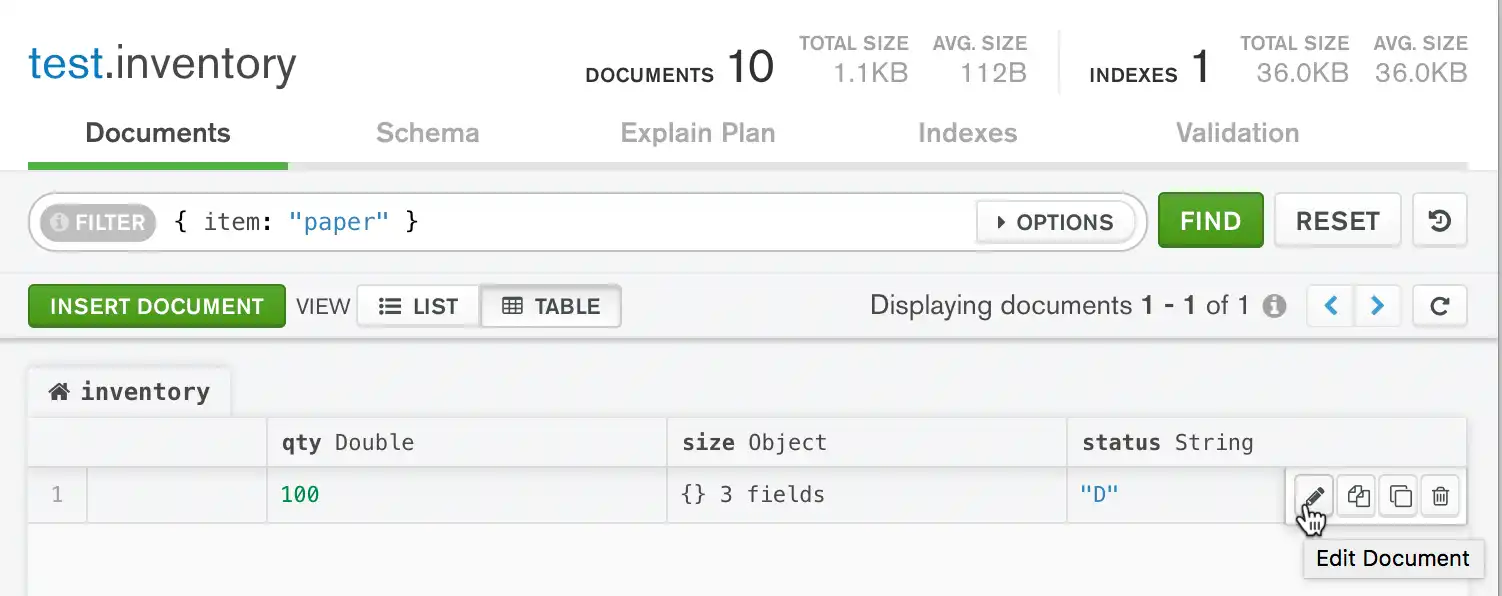
Change the value of the field to将字段的值更改为"P"."P"。Click the Update button below the field to save your changes.单击字段下方的“更新”按钮以保存更改。Hover over the将鼠标悬停在sizefield and click the outward-pointing arrows which appear on the right side of the field. This opens a new tab which displays the fields within thesizeobject:size字段上,然后单击字段右侧出现的向外指向的箭头。这将打开一个新选项卡,显示size对象中的字段: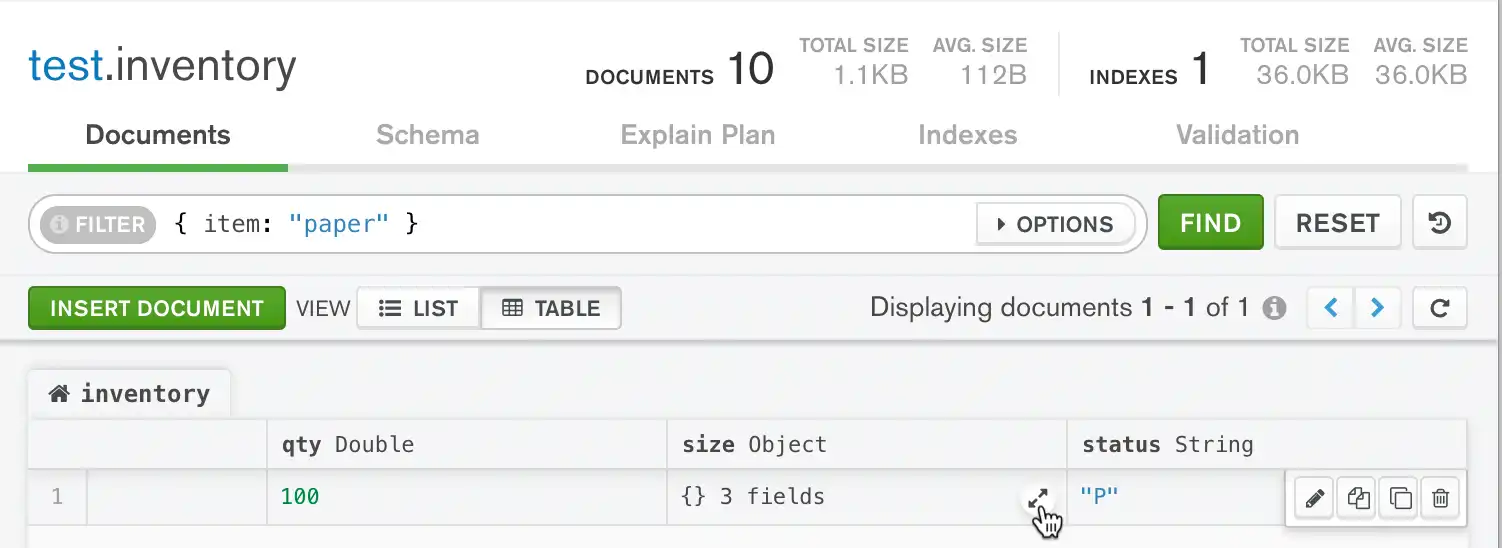
Using the same process outlined in steps 3-5 for editing the使用步骤3-5中概述的编辑statusfield, change the value of thesize.uomfield to"cm".status字段的相同过程,将size.uom字段的值更改为"cm"。Click the left-most tab above the table labelled单击标记为inventoryto return to the original table view, which displays the top-level document:inventory的表上方最左侧的选项卡,返回原始表视图,显示顶级文档: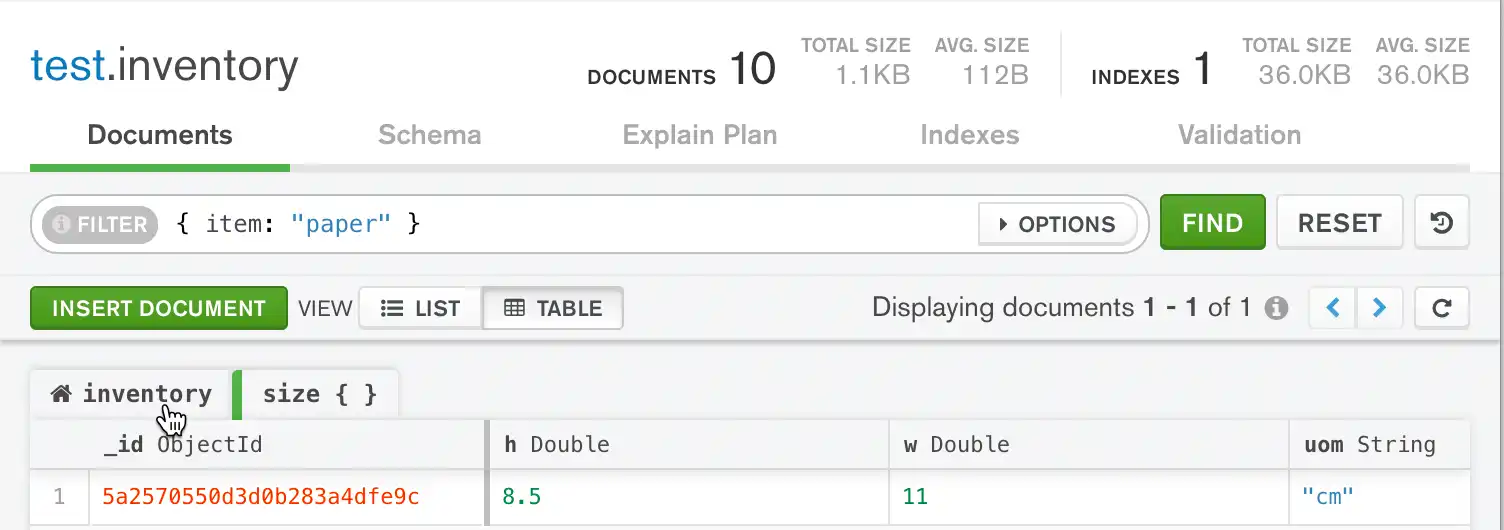
Hover over the将鼠标悬停在statusfield and click the pencil icon which appears on the right side of the document to re-enter edit mode.status字段上,然后单击出现在文档右侧的铅笔图标以重新进入编辑模式。Click inside of the单击statusfield and click the plus button icon which appears in the edit menu.status字段内部,然后单击编辑菜单中显示的加号按钮图标。Click the Add Field After status button which appears below the plus button:单击加号按钮下方显示的“在status后添加字段”按钮: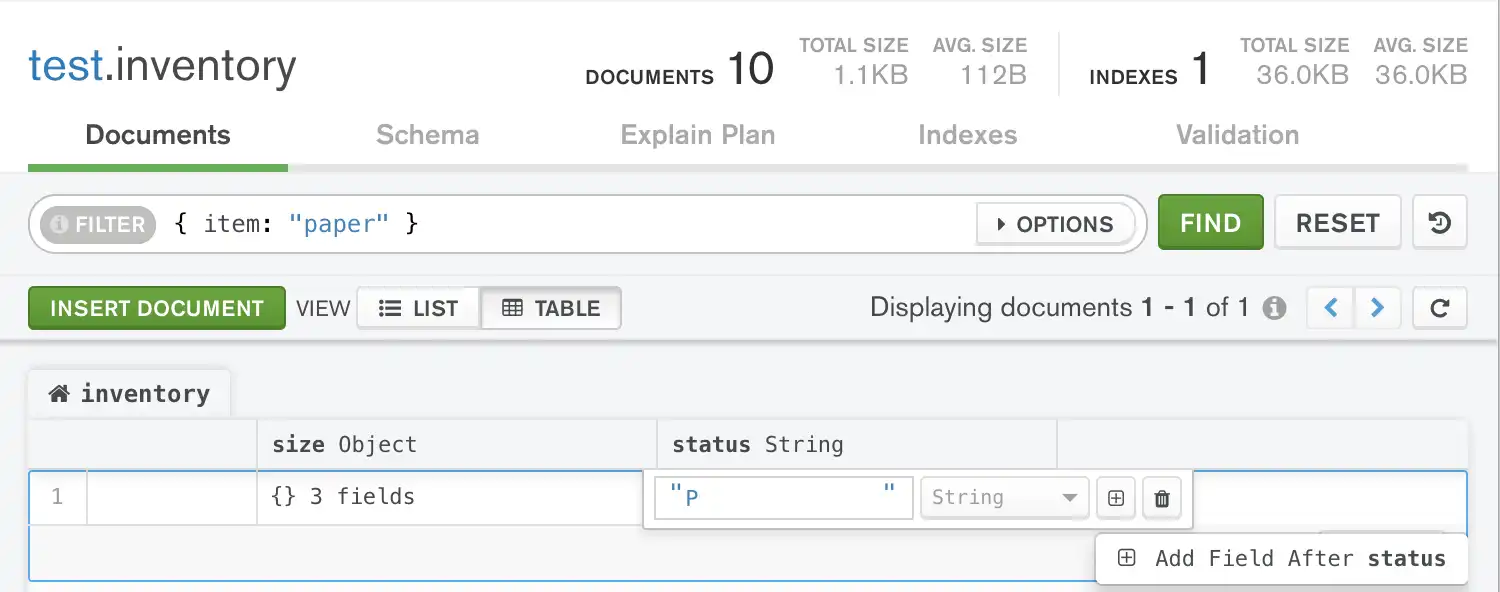
Add a new field called添加一个名为lastModifiedwith a value of today's date. Set the field type toDate:lastModified的新字段,其值为今天的日期。将字段类型设置为Date:
Click the Update button below the field to save your changes.单击字段下方的“更新”按钮以保存更改。Note
Because MongoDB Compass does not support由于MongoDB Compass不支持$currentDateor any other Field Update Operators, you must manually enter the date value in Compass.$currentDate或任何其他字段更新运算符,您必须在Compass中手动输入日期值。
C
mongoc_collection_t *collection;
bson_t *selector;
bson_t *update;
bool r;
bson_error_t error;

collection = mongoc_database_get_collection (db, "inventory");
selector = BCON_NEW ("item", BCON_UTF8 ("paper"));
update = BCON_NEW (
   "$set", "{",
   "size.uom", BCON_UTF8 ("cm"),
   "status", BCON_UTF8 ("P"),
   "}",
   "$currentDate", "{",
   "lastModified", BCON_BOOL (true),
   "}");

r = mongoc_collection_update_one(collection, selector, update, NULL, NULL, &error);
bson_destroy (selector);
bson_destroy (update);

if (!r) {
   MONGOC_ERROR ("%s\n", error.message);
   goto done;
}
C#
var filter = Builders<BsonDocument>.Filter.Eq("item", "paper");
var update = Builders<BsonDocument>.Update.Set("size.uom", "cm").Set("status", "P").CurrentDate("lastModified");
var result = collection.UpdateOne(filter, update);
The update operation:更新操作:
uses the使用$setoperator to update the value of thesize.uomfield to"cm"and the value of thestatusfield to"P",$set运算符将size.uom字段的值更新为"cm",将status字段的值修改为"P",uses the使用$currentDateoperator to update the value of thelastModifiedfield to the current date.$currentDate运算符将lastModified字段的值更新为当前日期。If如果lastModifiedfield does not exist,$currentDatewill create the field.lastModified字段不存在,则$currentDate将创建该字段。See有关详细信息,请参阅$currentDatefor details.$currentDate。
Go
result, err := coll.UpdateOne(
	context.TODO(),
	bson.D{
		{"item", "paper"},
	},
	bson.D{
		{"$set", bson.D{
			{"size.uom", "cm"},
			{"status", "P"},
		}},
		{"$currentDate", bson.D{
			{"lastModified", true},
		}},
	},
)
The update operation:更新操作:
uses the使用$setoperator to update the value of thesize.uomfield to"cm"and the value of thestatusfield to"P",$set运算符将size.uom字段的值更新为"cm",将状态字段的值修改为"P",uses the使用$currentDateoperator to update the value of thelastModifiedfield to the current date.$currentDate运算符将lastModified字段的值更新为当前日期。If如果lastModifiedfield does not exist,$currentDatewill create the field.lastModified字段不存在,则$currentDate将创建该字段。See有关详细信息,请参阅$currentDatefor details.$currentDate。
Java(Async)
Publisher<UpdateResult> updateOnePublisher = collection.updateOne(eq("item", "paper"),
        combine(set("size.uom", "cm"), set("status", "P"), currentDate("lastModified")));
The update operation:更新操作:
uses the使用$setoperator to update the value of thesize.uomfield to"cm"and the value of thestatusfield to"P",$set运算符将size.uom字段的值更新为"cm",将status字段的值修改为"P",uses the使用$currentDateoperator to update the value of thelastModifiedfield to the current date.$currentDate运算符将lastModified字段的值更新为当前日期。If如果lastModifiedfield does not exist,$currentDatewill create the field. See$currentDatefor details.lastModified字段不存在,则$currentDate将创建该字段。有关详细信息,请参阅$currentDate。
Java(Sync)
collection.updateOne(eq("item", "paper"),
        combine(set("size.uom", "cm"), set("status", "P"), currentDate("lastModified")));
The update operation:更新操作:
uses the使用$setoperator to update the value of thesize.uomfield to"cm"and the value of thestatusfield to"P",$set运算符将size.uom字段的值更新为"cm",将status字段的值修改为"P",uses the使用$currentDateoperator to update the value of thelastModifiedfield to the current date.$currentDate运算符将lastModified字段的值更新为当前日期。If如果lastModifiedfield does not exist,$currentDatewill create the field.lastModified字段不存在,则$currentDate将创建该字段。See有关详细信息,请参阅$currentDatefor details.$currentDate。
Kotlin(Coroutine)
collection.updateOne(eq("item", "paper"),
    combine(set("size.uom", "cm"), set("status", "P"), currentDate("lastModified")));
The update operation:更新操作:
uses the使用$setoperator to update the value of thesize.uomfield to"cm"and the value of thestatusfield to"P",$set运算符将size.uom字段的值更新为"cm",将status字段的值修改为"P",uses the使用$currentDateoperator to update the value of thelastModifiedfield to the current date.$currentDate运算符将lastModified字段的值更新为当前日期。If如果lastModifiedfield does not exist,$currentDatewill create the field.lastModified字段不存在,则$currentDate将创建该字段。See有关详细信息,请参阅$currentDatefor details.$currentDate。
Motor
await db.inventory.update_one(
    {"item": "paper"},
    {"$set": {"size.uom": "cm", "status": "P"}, "$currentDate": {"lastModified": True}},
)
The update operation:更新操作:
uses the使用$setoperator to update the value of thesize.uomfield to"cm"and the value of thestatusfield to"P",$set运算符将size.uom字段的值更新为"cm",将status字段的值修改为"P",uses the使用$currentDateoperator to update the value of thelastModifiedfield to the current date.$currentDate运算符将lastModified字段的值更新为当前日期。If如果lastModifiedfield does not exist,$currentDatewill create the field.lastModified字段不存在,则$currentDate将创建该字段。See有关详细信息,请参阅$currentDatefor details.$currentDate。
Node.js
await db.collection('inventory').updateOne(
  { item: 'paper' },
  {
    $set: { 'size.uom': 'cm', status: 'P' },
    $currentDate: { lastModified: true }
  }
);
The update operation:更新操作:
uses the使用$setoperator to update the value of thesize.uomfield to"cm"and the value of thestatusfield to"P",$set运算符将size.uom字段的值更新为"cm",将status字段的值修改为"P",uses the使用$currentDateoperator to update the value of thelastModifiedfield to the current date.$currentDate运算符将lastModified字段的值更新为当前日期。If如果lastModifiedfield does not exist,$currentDatewill create the field.lastModified字段不存在,则$currentDate将创建该字段。See有关详细信息,请参阅$currentDatefor details.$currentDate。
PHP
$updateResult = $db->inventory->updateOne(
    ['item' => 'paper'],
    [
        '$set' => ['size.uom' => 'cm', 'status' => 'P'],
        '$currentDate' => ['lastModified' => true],
    ],
);
The update operation:更新操作:
uses the使用$setoperator to update the value of thesize.uomfield to"cm"and the value of thestatusfield to"P",$set运算符将size.uom字段的值更新为"cm",将status字段的值修改为"P",uses the使用$currentDateoperator to update the value of thelastModifiedfield to the current date.$currentDate运算符将lastModified字段的值更新为当前日期。If如果lastModifiedfield does not exist,$currentDatewill create the field.lastModified字段不存在,则$currentDate将创建该字段。See有关详细信息,请参阅$currentDatefor details.$currentDate。
Python
db.inventory.update_one(
    {"item": "paper"},
    {"$set": {"size.uom": "cm", "status": "P"}, "$currentDate": {"lastModified": True}},
)
Ruby
client[:inventory].update_one({ item: 'paper'},
                              { '$set' => { 'size.uom' => 'cm', 'status' => 'P' },
                                '$currentDate' => { 'lastModified' => true } })
The update operation:更新操作:
uses the使用$setoperator to update the value of thesize.uomfield to"cm"and the value of thestatusfield to"P",$set运算符将size.uom字段的值更新为"cm",将status字段的值修改为"P",uses the使用$currentDateoperator to update the value of thelastModifiedfield to the current date.$currentDate运算符将lastModified字段的值更新为当前日期。If如果lastModified字段不存在,则lastModifiedfield does not exist,$currentDatewill create the field.$currentDate将创建该字段。See有关详细信息,请参阅$currentDatefor details.$currentDate。
scala
collection.updateOne(equal("item", "paper"),
  combine(set("size.uom", "cm"), set("status", "P"), currentDate("lastModified"))
).execute()
The update operation:更新操作:
uses the使用$setoperator to update the value of thesize.uomfield to"cm"and the value of thestatusfield to"P",$set运算符将size.uom字段的值更新为"cm",将status字段的值修改为"P",uses the使用$currentDateoperator to update the value of thelastModifiedfield to the current date.$currentDate运算符将lastModified字段的值更新为当前日期。If如果lastModifiedfield does not exist,$currentDatewill create the field.lastModified字段不存在,则$currentDate将创建该字段。See有关详细信息,请参阅$currentDatefor details.$currentDate。
Update Multiple Documents更新多个文档
MongoDB Shell
The following example uses the 以下示例在db.collection.updateMany() method on the inventory collection to update all documents where qty is less than 50:inventory集合上使用db.collection.updateMany()方法来更新所有qty小于50的文档:
Compass
You can update only one document at a time in MongoDB Compass. To update multiple documents, connect to your MongoDB deployment from 在MongoDB Compass中,一次只能更新一个文档。要更新多个文档,请从mongosh or a MongoDB driver and follow the examples in this section for your preferred method.mongosh或MongoDB驱动程序连接到MongoDB部署,并按照本节中的示例选择首选方法。
C#
The following example uses the 以下示例在IMongoCollection.UpdateMany() method on the inventory collection to update all documents where qty is less than 50:inventory集合上使用IMongoCollection.UpdateMany()方法来更新所有qty小于50的文档:
Go
The following example uses the Collection.UpdateMany method on the 以下示例使用inventory collection to update all documents where qty is less than 50:inventory集合上的Collection.UpdateMany方法来更新qty小于50的所有文档:
Java(Async)
The following example uses the com.mongodb.reactivestreams.client.MongoCollection.updateMany method on the 以下示例使用inventory collection to update all documents where qty is less than 50:inventory集合上的com.mongodb.reactivestreams.client.MongoCollection.updateMany方法更新所有qty小于50的文档:
Java(Sync)
The following example uses the com.mongodb.client.MongoCollection.updateMany method on the 以下示例使用inventory collection to update all documents where qty is less than 50:inventory集合上的com.mongodb.client.MongoCollection.updateMany方法更新所有qty小于50的文档:
Kotlin(Coroutine)
The following example uses the 以下示例在MongoCollection.updateMany() method on the inventory collection to update all documents where qty is less than 50:inventory集合上使用MongoCollection.updateMany()方法来更新所有qty小于50的文档:
Motor
The following example uses the 以下示例使用update_many method on the inventory collection to update all documents where qty is less than 50:inventory集合上的update_many方法更新所有qty小于50的文档:
Node.js
The following example uses the 以下示例使用Collection.updateMany() method on the inventory collection to update all documents where qty is less than 50:inventory集合上的Collection.updateMany()方法来更新所有qty小于50的文档:
PHP
The following example uses the 以下示例在updateMany() method on the inventory collection to update all documents where qty is less than 50:inventory集合中使用updateMany()方法来更新所有qty小于50的文档:
Python
The following example uses the 以下示例使用update_many method on the inventory collection to update all documents where qty is less than 50:inventory集合上的update_many方法更新所有qty小于50的文档:
Ruby
The following example uses the 以下示例使用update_many() method on the inventory collection to update all documents where qty is less than 50:inventory集合上的update_many()方法更新所有qty小于50的文档:
scala
The following example uses the 以下示例在updateMany() method on the inventory collection to update all documents where qty is less than 50:inventory集合中使用updateMany()方法来更新所有qty小于50的文档:
MongoDB Shell
db.inventory.updateMany(
   { "qty": { $lt: 50 } },
   {
     $set: { "size.uom": "in", status: "P" },
     $currentDate: { lastModified: true }
   }
)
The update operation:更新操作:
uses the使用$setoperator to update the value of thesize.uomfield to"in"and the value of thestatusfield to"P",$set运算符将size.uom字段的值更新为"in",将status字段的值修改为"P",uses the使用$currentDateoperator to update the value of thelastModifiedfield to the current date.$currentDate运算符将lastModified字段的值更新为当前日期。If如果lastModifiedfield does not exist,$currentDatewill create the field.lastModified字段不存在,则$currentDate将创建该字段。See有关详细信息,请参阅$currentDatefor details.$currentDate。
C
mongoc_collection_t *collection;
bson_t *selector;
bson_t *update;
bool r;
bson_error_t error;

collection = mongoc_database_get_collection (db, "inventory");
selector = BCON_NEW (
   "qty", "{",
   "$lt", BCON_INT64 (50),
   "}");
update = BCON_NEW (
   "$set", "{",
   "size.uom", BCON_UTF8 ("in"),
   "status", BCON_UTF8 ("P"),
   "}",
   "$currentDate", "{",
   "lastModified", BCON_BOOL (true),
   "}");

r = mongoc_collection_update_many(collection, selector, update, NULL, NULL, &error);
bson_destroy (selector);
bson_destroy (update);

if (!r) {
   MONGOC_ERROR ("%s\n", error.message);
   goto done;
}
C#
var filter = Builders<BsonDocument>.Filter.Lt("qty", 50);
var update = Builders<BsonDocument>.Update.Set("size.uom", "in").Set("status", "P").CurrentDate("lastModified");
var result = collection.UpdateMany(filter, update);
The update operation:更新操作:
uses the使用$setoperator to update the value of thesize.uomfield to"in"and the value of thestatusfield to"P",$set运算符将size.uom字段的值更新为"in",将status字段的值修改为"P",uses the使用$currentDateoperator to update the value of thelastModifiedfield to the current date.$currentDate运算符将lastModified字段的值更新为当前日期。If如果lastModifiedfield does not exist,$currentDatewill create the field.lastModified字段不存在,则$currentDate将创建该字段。See有关详细信息,请参阅$currentDatefor details.$currentDate。
Go
result, err := coll.UpdateMany(
	context.TODO(),
	bson.D{
		{"qty", bson.D{
			{"$lt", 50},
		}},
	},
	bson.D{
		{"$set", bson.D{
			{"size.uom", "cm"},
			{"status", "P"},
		}},
		{"$currentDate", bson.D{
			{"lastModified", true},
		}},
	},
)
The update operation:更新操作:
uses the使用$setoperator to update the value of thesize.uomfield to"in"and the value of thestatusfield to"P",$set运算符将size.uom字段的值更新为"in",将status字段的值修改为"P",uses the使用$currentDateoperator to update the value of thelastModifiedfield to the current date.$currentDate运算符将lastModified字段的值更新为当前日期。If如果lastModifiedfield does not exist,$currentDatewill create the field.lastModified字段不存在,则$currentDate将创建该字段。See有关详细信息,请参阅$currentDatefor details.$currentDate。
Java(Async)
Publisher<UpdateResult> updateManyPublisher = collection.updateMany(lt("qty", 50),
        combine(set("size.uom", "in"), set("status", "P"), currentDate("lastModified")));
The update operation:更新操作:
uses the使用$setoperator to update the value of thesize.uomfield to"in"and the value of thestatusfield to"P",$set运算符将size.uom字段的值更新为"in",将status字段的值修改为"P",uses the使用$currentDateoperator to update the value of thelastModifiedfield to the current date.$currentDate运算符将lastModified字段的值更新为当前日期。If如果lastModified字段不存在,则lastModifiedfield does not exist,$currentDatewill create the field.$currentDate将创建该字段。See有关详细信息,请参阅$currentDatefor details.$currentDate。
Java(Sync)
collection.updateMany(lt("qty", 50),
        combine(set("size.uom", "in"), set("status", "P"), currentDate("lastModified")));
The update operation:更新操作:
uses the使用$setoperator to update the value of thesize.uomfield to"in"and the value of thestatusfield to"P",$set运算符将size.uom字段的值更新为"in",将status字段的值修改为"P",uses the使用$currentDateoperator to update the value of thelastModifiedfield to the current date.$currentDate运算符将lastModified字段的值更新为当前日期。If如果lastModifiedfield does not exist,$currentDatewill create the field.lastModified字段不存在,则$currentDate将创建该字段。See有关详细信息,请参阅$currentDatefor details.$currentDate。
Kotlin(Coroutine)
collection.updateOne(eq("item", "paper"),
    combine(set("size.uom", "cm"), set("status", "P"), currentDate("lastModified")));
The update operation:更新操作:
uses the使用$setoperator to update the value of thesize.uomfield to"in"and the value of thestatusfield to"P",$set运算符将size.uom字段的值更新为"in",将status字段的值修改为"P",uses the使用$currentDateoperator to update the value of thelastModifiedfield to the current date.$currentDate运算符将lastModified字段的值更新为当前日期。If如果lastModifiedfield does not exist,$currentDatewill create the field.lastModified字段不存在,则$currentDate将创建该字段。See有关详细信息,请参阅$currentDatefor details.$currentDate。
Motor
await db.inventory.update_many(
    {"qty": {"$lt": 50}},
    {"$set": {"size.uom": "in", "status": "P"}, "$currentDate": {"lastModified": True}},
)
The update operation:更新操作:
uses the使用$setoperator to update the value of thesize.uomfield to"in"and the value of thestatusfield to"P",$set运算符将size.uom字段的值更新为"in",将status字段的值修改为"P",uses the使用$currentDateoperator to update the value of thelastModifiedfield to the current date.$currentDate运算符将lastModified字段的值更新为当前日期。If如果lastModifiedfield does not exist,$currentDatewill create the field.lastModified字段不存在,则$currentDate将创建该字段。See有关详细信息,请参阅$currentDatefor details.$currentDate。
Node.js
await db.collection('inventory').updateMany(
  { qty: { $lt: 50 } },
  {
    $set: { 'size.uom': 'in', status: 'P' },
    $currentDate: { lastModified: true }
  }
);
The update operation:更新操作:
uses the使用$setoperator to update the value of thesize.uomfield to"in"and the value of thestatusfield to"P",$set运算符将size.uom字段的值更新为"in",将status字段的值修改为"P",uses the使用$currentDateoperator to update the value of thelastModifiedfield to the current date.$currentDate运算符将lastModified字段的值更新为当前日期。If如果lastModifiedfield does not exist,$currentDatewill create the field.lastModified字段不存在,则$currentDate将创建该字段。See有关详细信息,请参阅$currentDatefor details.$currentDate。
PHP
$updateResult = $db->inventory->updateMany(
    ['qty' => ['$lt' => 50]],
    [
        '$set' => ['size.uom' => 'cm', 'status' => 'P'],
        '$currentDate' => ['lastModified' => true],
    ],
);
The update operation:更新操作:
uses the使用$setoperator to update the value of thesize.uomfield to"in"and the value of thestatusfield to"P",$set运算符将size.uom字段的值更新为"in",将status字段的值修改为"P",uses the使用$currentDateoperator to update the value of thelastModifiedfield to the current date.$currentDate运算符将lastModified字段的值更新为当前日期。If如果lastModifiedfield does not exist,$currentDatewill create the field.lastModified字段不存在,则$currentDate将创建该字段。See有关详细信息,请参阅$currentDatefor details.$currentDate。
Python
db.inventory.update_many(
    {"qty": {"$lt": 50}},
    {"$set": {"size.uom": "in", "status": "P"}, "$currentDate": {"lastModified": True}},
)
Ruby
client[:inventory].update_many({ qty: { '$lt' => 50 } },
                              { '$set' => { 'size.uom' => 'in', 'status' => 'P' },
                                '$currentDate' => { 'lastModified' => true } })
The update operation:更新操作:
uses the使用$setoperator to update the value of thesize.uomfield to"in"and the value of thestatusfield to"P",$set运算符将size.uom字段的值更新为"in",将status字段的值修改为"P",uses the使用$currentDateoperator to update the value of thelastModifiedfield to the current date.$currentDate运算符将lastModified字段的值更新为当前日期。If如果lastModifiedfield does not exist,$currentDatewill create the field.lastModified字段不存在,则$currentDate将创建该字段。See有关详细信息,请参阅$currentDatefor details.$currentDate。
scala
collection.updateMany(lt("qty", 50),
  combine(set("size.uom", "in"), set("status", "P"), currentDate("lastModified"))
).execute()
The update operation:更新操作:
uses the使用$setoperator to update the value of thesize.uomfield to"in"and the value of thestatusfield to"P",$set运算符将size.uom字段的值更新为"in",将status字段的值修改为"P",uses the使用$currentDateoperator to update the value of thelastModifiedfield to the current date.$currentDate运算符将lastModified字段的值更新为当前日期。If如果lastModifiedfield does not exist,$currentDatewill create the field.lastModified字段不存在,则$currentDate将创建该字段。See有关详细信息,请参阅$currentDatefor details.$currentDate。
Replace a Document替换文档
MongoDB Shell
To replace the entire content of a document except for the 要替换文档中除_id field, pass an entirely new document as the second argument to db.collection.replaceOne()._id字段外的全部内容,请将一个全新的文档作为第二个参数传递给db.collection.replaceOne()。
When replacing a document, the replacement document must consist of only field/value pairs. The replacement document cannot include update operators expressions.替换文档时,替换文档必须仅包含字段/值对。替换文档不能包含更新运算符表达式。
The replacement document can have different fields from the original document. In the replacement document, you can omit the 替换文档可以具有与原始文档不同的字段。在替换文档中,您可以省略_id field since the _id field is immutable. However, if you do include the _id field, it must have the same value as the current value._id字段,因为_id字段是不可变的。但是,如果您确实包含_id字段,则它必须具有与当前值相同的值。
The following example replaces the first document from the 以下示例替换了inventory collection where item: "paper":inventory集合中item: "paper"的第一个文档:
Compass
You can't replace a document in MongoDB Compass. To replace a document, connect to your MongoDB deployment from 您无法在MongoDB Compass中替换文档。要替换文档,请从mongosh or a MongoDB driver and follow the examples in this section for your preferred method.mongosh或MongoDB驱动程序连接到MongoDB部署,并按照本节中的示例选择您喜欢的方法。
C#
To replace the entire content of a document except for the 要替换文档中除_id field, pass an entirely new document as the second argument to IMongoCollection.ReplaceOne()._id字段外的全部内容,请将一个全新的文档作为第二个参数传递给IMongoCollection.ReplaceOne()。
When replacing a document, the replacement document must consist of only field/value pairs. The replacement document cannot include update operators expressions.替换文档时,替换文档必须仅包含字段/值对。替换文档不能包含更新运算符表达式。
The replacement document can have different fields from the original document. In the replacement document, you can omit the 替换文档可以具有与原始文档不同的字段。在替换文档中,您可以省略_id field since the _id field is immutable. However, if you do include the _id field, it must have the same value as the current value._id字段,因为_id字段是不可变的。但是,如果您确实包含_id字段,则它必须具有与当前值相同的值。
The following example replaces the first document from the 以下示例替换了inventory collection where item: "paper":inventory集合中item: "paper"的第一个文档:
Go
To replace the entire content of a document except for the 要替换文档中除_id field, pass an entirely new document as the second argument to Collection.ReplaceOne._id字段外的全部内容,请将一个全新的文档作为第二个参数传递给Collection.ReplaceOne。
When replacing a document, the replacement document must consist of only field/value pairs. The replacement document cannot include update operators expressions.替换文档时,替换文档必须仅包含字段/值对。替换文档不能包含更新运算符表达式。
The replacement document can have different fields from the original document. In the replacement document, you can omit the 替换文档可以具有与原始文档不同的字段。在替换文档中,您可以省略_id field since the _id field is immutable. However, if you do include the _id field, it must have the same value as the current value._id字段,因为_id字段是不可变的。但是,如果您确实包含_id字段,则它必须具有与当前值相同的值。
The following example replaces the first document from the 以下示例替换了inventory collection where item: "paper":inventory集合中item: "paper"的第一个文档:
Java(Async)
To replace the entire content of a document except for the 要替换文档中除_id field, pass an entirely new document as the second argument to com.mongodb.reactivestreams.client.MongoCollection.replaceOne._id字段外的全部内容,请将一个全新的文档作为第二个参数传递给com.mongodb.reactivestreams.client.MongoCollection.replaceOne。
When replacing a document, the replacement document must consist of only field/value pairs. The replacement document cannot include update operators expressions.替换文档时,替换文档必须仅包含字段/值对。替换文档不能包含更新运算符表达式。
The replacement document can have different fields from the original document. In the replacement document, you can omit the 替换文档可以具有与原始文档不同的字段。在替换文档中,您可以省略_id field since the _id field is immutable. However, if you do include the _id field, it must have the same value as the current value._id字段,因为_id字段是不可变的。但是,如果您确实包含_id字段,则它必须具有与当前值相同的值。
The following example replaces the first document from the 以下示例替换了inventory collection where item: "paper":inventory集合中item: "paper"的第一个文档:
Java(Sync)
To replace the entire content of a document except for the 要替换文档中除_id field, pass an entirely new document as the second argument to com.mongodb.client.MongoCollection.replaceOne._id字段外的全部内容,请将一个全新的文档作为第二个参数传递给com.mongodb.client.MongoCollection.replaceOne。
When replacing a document, the replacement document must consist of only field/value pairs. The replacement document cannot include update operators expressions.替换文档时,替换文档必须仅包含字段/值对。替换文档不能包含更新运算符表达式。
The replacement document can have different fields from the original document. In the replacement document, you can omit the 替换文档可以具有与原始文档不同的字段。在替换文档中,您可以省略_id field since the _id field is immutable. _id字段,因为_id字段是不可变的。However, if you do include the 但是,如果您确实包含_id field, it must have the same value as the current value._id字段,则它必须具有与当前值相同的值。
The following example replaces the first document from the 以下示例替换了inventory collection where item: "paper":inventory集合中item: "paper"的第一个文档:
Kotlin(Coroutine)
To replace the entire content of a document except for the 要替换文档中除_id field, pass an entirely new document as the second argument to the MongoCollection.replaceOne() method._id字段外的全部内容,请将一个全新的文档作为第二个参数传递给MongoCollection.replaceOne()方法。
When replacing a document, the replacement document must consist of only field/value pairs. The replacement document cannot include update operators expressions.替换文档时,替换文档必须仅包含字段/值对。替换文档不能包含更新运算符表达式。
The replacement document can have different fields from the original document. In the replacement document, you can omit the 替换文档可以具有与原始文档不同的字段。在替换文档中,您可以省略_id field since the _id field is immutable. _id字段,因为_id字段是不可变的。However, if you do include the 但是,如果您确实包含_id field, it must have the same value as the current value._id字段,则它必须具有与当前值相同的值。
The following example replaces the first document from the 以下示例替换了inventory collection where item: "paper":inventory集合中item: "paper"的第一个文档:
Motor
To replace the entire content of a document except for the 要替换文档中除_id field, pass an entirely new document as the second argument to replace_one._id字段外的全部内容,请传递一个全新的文档作为replace_one的第二个参数。
When replacing a document, the replacement document must consist of only field/value pairs. The replacement document cannot include update operators expressions.替换文档时,替换文档必须仅包含字段/值对。替换文档不能包含更新运算符表达式。
The replacement document can have different fields from the original document. In the replacement document, you can omit the 替换文档可以具有与原始文档不同的字段。在替换文档中,您可以省略_id field since the _id field is immutable. However, if you do include the _id field, it must have the same value as the current value._id字段,因为_id字段是不可变的。但是,如果您确实包含_id字段,则它必须具有与当前值相同的值。
The following example replaces the first document from the 以下示例替换了inventory collection where item: "paper":inventory集合中item: "paper"的第一个文档:
Node.js
To replace the entire content of a document except for the 要替换文档中除_id field, pass an entirely new document as the second argument to Collection.replaceOne()._id字段外的全部内容,请将一个全新的文档作为第二个参数传递给Collection.replaceOne()。
When replacing a document, the replacement document must consist of only field/value pairs. The replacement document cannot include update operators expressions.替换文档时,替换文档必须仅包含字段/值对。替换文档不能包含更新运算符表达式。
The replacement document can have different fields from the original document. In the replacement document, you can omit the 替换文档可以具有与原始文档不同的字段。在替换文档中,您可以省略_id field since the _id field is immutable. However, if you do include the _id field, it must have the same value as the current value.<_id字段,因为_id字段是不可变的。但是,如果您确实包含_id字段,则它必须具有与当前值相同的值</p>
The following example replaces the first document from the 以下示例替换了inventory collection where item: "paper":inventory集合中item: "paper"的第一个文档:
PHP
To replace the entire content of a document except for the 要替换文档中除_id field, pass an entirely new document as the second argument to replaceOne()._id字段外的全部内容,请传递一个全新的文档作为replaceOne()的第二个参数。
When replacing a document, the replacement document must consist of only field/value pairs. The replacement document cannot include update operators expressions.替换文档时,替换文档必须仅包含字段/值对。替换文档不能包含更新运算符表达式。
The replacement document can have different fields from the original document. In the replacement document, you can omit the 替换文档可以具有与原始文档不同的字段。在替换文档中,您可以省略_id field since the _id field is immutable. _id字段,因为_id字段是不可变的。However, if you do include the 但是,如果您确实包含_id field, it must have the same value as the current value._id字段,则它必须具有与当前值相同的值。
The following example replaces the first document from the 以下示例替换了inventory collection where item: "paper":inventory集合中item: "paper"的第一个文档:
Python
To replace the entire content of a document except for the 要替换文档中除_id field, pass an entirely new document as the second argument to replace_one._id字段外的全部内容,请传递一个全新的文档作为replace_one的第二个参数。
When replacing a document, the replacement document must consist of only field/value pairs. The replacement document cannot include update operators expressions.替换文档时,替换文档必须仅包含字段/值对。替换文档不能包含更新运算符表达式。
The replacement document can have different fields from the original document. In the replacement document, you can omit the 替换文档可以具有与原始文档不同的字段。在替换文档中,您可以省略_id field since the _id field is immutable. _id字段,因为_id字段是不可变的。However, if you do include the 但是,如果您确实包含_id field, it must have the same value as the current value._id字段,则它必须具有与当前值相同的值。
The following example replaces the first document from the 以下示例替换了inventory collection where item: "paper":inventory集合中item: "paper"的第一个文档:
Ruby
To replace the entire content of a document except for the 要替换文档中除_id field, pass an entirely new document as the second argument to replace_one()._id字段外的全部内容,请将一个全新的文档作为replace_one()的第二个参数传递。
When replacing a document, the replacement document must consist of only field/value pairs. The replacement document cannot include update operators expressions.替换文档时,替换文档必须仅包含字段/值对。替换文档不能包含更新运算符表达式。
The replacement document can have different fields from the original document. In the replacement document, you can omit the 替换文档可以具有与原始文档不同的字段。在替换文档中,您可以省略_id field since the _id field is immutable. _id字段,因为_id字段是不可变的。However, if you do include the 但是,如果您确实包含_id field, it must have the same value as the current value._id字段,则它必须具有与当前值相同的值。
The following example replaces the first document from the 以下示例替换了inventory collection where item: "paper":inventory集合中item: "paper"的第一个文档:
scala
To replace the entire content of a document except for the 要替换文档中除_id field, pass an entirely new document as the second argument to replaceOne()_id字段外的全部内容,请传递一个全新的文档作为replaceOne()的第二个参数
When replacing a document, the replacement document must consist of only field/value pairs. The replacement document cannot include update operators expressions.替换文档时,替换文档必须仅包含字段/值对。替换文档不能包含更新运算符表达式。
The replacement document can have different fields from the original document. In the replacement document, you can omit the 替换文档可以具有与原始文档不同的字段。在替换文档中,您可以省略_id field since the _id field is immutable. However, if you do include the _id field, it must have the same value as the current value._id字段,因为_id字段是不可变的。但是,如果您确实包含_id字段,则它必须具有与当前值相同的值。
The following example replaces the first document from the 以下示例替换了inventory collection where item: "paper":inventory集合中item: "paper"的第一个文档:
MongoDB Shell
db.inventory.replaceOne(
   { item: "paper" },
   { item: "paper", instock: [ { warehouse: "A", qty: 60 }, { warehouse: "B", qty: 40 } ] }
)
C
mongoc_collection_t *collection;
bson_t *selector;
bson_t *replacement;
bool r;
bson_error_t error;

collection = mongoc_database_get_collection (db, "inventory");
selector = BCON_NEW ("item", BCON_UTF8 ("paper"));
replacement = BCON_NEW (
   "item", BCON_UTF8 ("paper"),
   "instock", "[",
   "{",
   "warehouse", BCON_UTF8 ("A"),
   "qty", BCON_INT64 (60),
   "}","{",
   "warehouse", BCON_UTF8 ("B"),
   "qty", BCON_INT64 (40),
   "}",
   "]");

/* MONGOC_UPDATE_NONE means "no special options" */
r = mongoc_collection_replace_one(collection, selector, replacement, NULL, NULL, &error);
bson_destroy (selector);
bson_destroy (replacement);

if (!r) {
   MONGOC_ERROR ("%s\n", error.message);
   goto done;
}
Be sure to also clean up any open resources by calling the following methods, as appropriate:请确保根据需要调用以下方法来清理任何开放资源:
C#
var filter = Builders<BsonDocument>.Filter.Eq("item", "paper");
var replacement = new BsonDocument
{
    { "item", "paper" },
    { "instock", new BsonArray
        {
            new BsonDocument { { "warehouse", "A" }, { "qty", 60 } },
            new BsonDocument { { "warehouse", "B" }, { "qty", 40 } } }
        }
};
var result = collection.ReplaceOne(filter, replacement);
Go
result, err := coll.ReplaceOne(
	context.TODO(),
	bson.D{
		{"item", "paper"},
	},
	bson.D{
		{"item", "paper"},
		{"instock", bson.A{
			bson.D{
				{"warehouse", "A"},
				{"qty", 60},
			},
			bson.D{
				{"warehouse", "B"},
				{"qty", 40},
			},
		}},
	},
)
Java(Async)
Publisher<UpdateResult> replaceOnePublisher = collection.replaceOne(eq("item", "paper"),
        Document.parse("{ item: 'paper', instock: [ { warehouse: 'A', qty: 60 }, { warehouse: 'B', qty: 40 } ] }"));
Java(Sync)
collection.replaceOne(eq("item", "paper"),
        Document.parse("{ item: 'paper', instock: [ { warehouse: 'A', qty: 60 }, { warehouse: 'B', qty: 40 } ] }"));
Kotlin(Coroutine)
collection.replaceOne(eq("item", "paper"),
    Document.parse("{ item: 'paper', instock: [ { warehouse: 'A', qty: 60 }, { warehouse: 'B', qty: 40 } ] }"));
Motor
await db.inventory.replace_one(
    {"item": "paper"},
    {
        "item": "paper",
        "instock": [{"warehouse": "A", "qty": 60}, {"warehouse": "B", "qty": 40}],
    },
)
Node.js
await db.collection('inventory').replaceOne(
  { item: 'paper' },
  {
    item: 'paper',
    instock: [
      { warehouse: 'A', qty: 60 },
      { warehouse: 'B', qty: 40 }
    ]
  }
);
PHP
$updateResult = $db->inventory->replaceOne(
    ['item' => 'paper'],
    [
        'item' => 'paper',
        'instock' => [
            ['warehouse' => 'A', 'qty' => 60],
            ['warehouse' => 'B', 'qty' => 40],
        ],
    ],
);
Python
db.inventory.replace_one(
    {"item": "paper"},
    {
        "item": "paper",
        "instock": [{"warehouse": "A", "qty": 60}, {"warehouse": "B", "qty": 40}],
    },
)
Ruby
client[:inventory].replace_one({ item: 'paper' },
                               { item: 'paper',
                                 instock: [ { warehouse: 'A', qty: 60 },
                                            { warehouse: 'B', qty: 40 } ] })
scala
collection.replaceOne(equal("item", "paper"),
  Document("""{ item: "paper", instock: [ { warehouse: "A", qty: 60 }, { warehouse: "B", qty: 40 } ] }""")
).execute()
Update a Document with MongoDB Atlas使用MongoDB Atlas更新文档
Note
You can update only one document at a time in the MongoDB Atlas UI. To update multiple documents or replace an entire document, connect to your Atlas deployment from 在MongoDB Atlas UI中,一次只能更新一个文档。要更新多个文档或替换整个文档,请从mongosh or a MongoDB driver and follow the examples on this page for your preferred method.mongosh或MongoDB驱动程序连接到Atlas部署,并按照本页上的示例选择首选方法。
The example in this section uses the sample supplies dataset. 本节中的示例使用示例供应数据集。To learn how to load the sample dataset into your MongoDB Atlas deployment, see Load Sample Data.要了解如何将示例数据集加载到MongoDB Atlas部署中,请参阅加载示例数据。
To update a document in MongoDB Atlas, follow these steps:要更新MongoDB Atlas中的文档,请执行以下步骤:
In the MongoDB Atlas UI, go to the Clusters page for your project.在MongoDB Atlas UI中,转到项目的“集群”页面。
Warning
Navigation Improvements In Progress导航改进正在进行中
We're currently rolling out a new and improved navigation experience. If the following steps don't match your view in the Atlas UI, see the preview Atlas documentation.我们目前正在推出一种新的、改进的导航体验。如果以下步骤与Atlas UI中的视图不匹配,请参阅Atlas预览文档。
If it's not already displayed, select the organization that contains your desired project from the Organizations menu in the navigation bar.如果尚未显示,请从导航栏的“组织”菜单中选择包含所需项目的组织。If it's not already displayed, select your project from the Projects menu in the navigation bar.如果尚未显示,请从导航栏中的“项目”菜单中选择项目。If it's not already displayed, click Clusters in the sidebar.如果尚未显示,请单击侧栏中的“集群”。
Navigate to the collection.导航到集合。
For the cluster that contains the sample data, click Browse Collections.对于包含示例数据的集群,单击“浏览集合”。In the left navigation pane, select the在左侧导航窗格中,选择sample_suppliesdatabase.sample_supplies数据库。Select the选择salescollection.sales集合。
Specify a query filter document.指定查询筛选器文档。
You can specify a query filter document in the Filter field. 您可以在“筛选器”字段中指定 查询筛选器文档。A query filter document uses query operators to specify search conditions.查询筛选器文档使用查询运算符指定搜索条件。
Copy the following query filter document into the Filter search bar and click Apply:将以下查询筛选器文档复制到“筛选器”搜索栏中,然后单击“应用”:
{ saleDate: { $gte: { $date: "2016-01-01T00:00-00:00" }, $lte: { $date: "2016-01-02T00:00-00:00" } } }This query filter returns all documents in the 此查询筛选器返回sample_supplies.sales collection where saleDate is on or between January 1 and 2, 2016 UTC time.sample_supplies.sales集合中saleDate在2016 UTC时间1月1日至2日之间的所有文档。
Edit a document.编辑文档。
To edit a document displayed in the query results, hover over the document and click on the pencil icon. In the document editor, you can:要编辑查询结果中显示的文档,请将鼠标悬停在文档上,然后单击铅笔图标。在文档编辑器中,您可以:
Add a new field.添加新字段。Delete an existing field.删除现有字段。Edit a field's name, value, or type.编辑字段的名称、值或类型。Revert a specific change.还原特定更改。
For detailed instructions, see Create, View, Update, and Delete Documents.有关详细说明,请参阅创建、查看、更新和删除文档。
Behavior行为
Atomicity原子性
All write operations in MongoDB are atomic on the level of a single document. For more information on MongoDB and atomicity, see Atomicity and Transactions.MongoDB中的所有写入操作都是单个文档级别的原子操作。有关MongoDB和原子性的更多信息,请参阅原子性和事务。
_id Field字段
Once set, you cannot update the value of the 设置后,您无法更新_id field nor can you replace an existing document with a replacement document that has a different _id field value._id字段的值,也无法用具有不同_id字段值的替换文档替换现有文档。
Idempotent Operations临时运营
Use the 仅对幂等运算使用updateMany() method only for idempotent operations.updateMany()方法。
Field Order字段排序
For write operations, MongoDB preserves the order of the document fields except for the following cases:对于写操作,MongoDB会保留文档字段的顺序,但以下情况除外:
Upsert Option选项
MongoDB Shell
If 如果updateOne(), updateMany(), or replaceOne() includes upsert : true and no documents match the specified filter, then the operation creates a new document and inserts it. updateOne()、updateMany()或replaceOne()包含upsert:true,并且没有文档与指定的筛选器匹配,则该操作将创建一个新文档并插入它。If there are matching documents, then the operation modifies or replaces the matching document or documents.如果有匹配的文档,则操作会修改或替换匹配的文档。
For details on the new document created, see the individual reference pages for the methods.有关创建的新文档的详细信息,请参阅方法的各个参考页。
Compass
The upsert option is not available through MongoDB Compass.MongoDB Compass不提供追加销售选项。
C#
If UpdateOne(), UpdateMany(), or ReplaceOne() includes an UpdateOptions argument instance with the IsUpsert option set to true and no documents match the specified filter, then the operation creates a new document and inserts it. If there are matching documents, then the operation modifies or replaces the matching document or documents.如果有匹配的文档,则操作会修改或替换匹配的文档。
For details on the new document created, see the individual reference pages for the methods.有关创建的新文档的详细信息,请参阅方法的各个参考页。
Go
If Collection.UpdateOne includes the Upsert option set to true and no documents match the specified filter, then the operation creates a new document and inserts it. If there are matching documents, then the operation modifies or replaces the matching document or documents.
For details on the new document created, see the individual reference pages for the methods.如果有匹配的文档,则该操作会修改或替换匹配的文档。有关创建的新文档的详细信息,请参阅各个参考页面中的方法。
Java(Async)
If the update and replace methods include the UpdateOptions parameter that specifies UpdateOptions.upsert(true) and no documents match the specified filter, then the operation creates a new document and inserts it. If there are matching documents, then the operation modifies or replaces the matching document or documents.如果更新和替换方法包含指定UpdateOptions.upsert(true)的>UpdateOptions参数,并且没有文档与指定的筛选器匹配,则该操作将创建一个新文档并插入它。如果有匹配的文档,则该操作用于修改或替换匹配的一个或多个文档。
For details on the new document created, see the individual reference pages for the methods.有关创建的新文档的详细信息,请参阅方法的各个参考页。
Java(Sync)
If the update and replace methods include the com.mongodb.client.model.UpdateOptions parameter that specifies com.mongodb.client.model.UpdateOptions.upsert(true) and no documents match the specified filter, then the operation creates a new document and inserts it. If there are matching documents, then the operation modifies or replaces the matching document or documents.如果更新和替换方法包括指定com.mongodb.client.model.UpdateOptions.upsert(true)的com.mongodb.client.model.UpdateOptions参数,并且没有文档与指定的筛选器匹配,则该操作将创建一个新文档并插入它。如果有匹配的文档,则该操作将修改或替换匹配的文档。
For details on the new document created, see the individual reference pages for the methods.有关创建的新文档的详细信息,请参阅方法的各个参考页。
Kotlin(Coroutine)
If the update and replace methods include the com.mongodb.client.model.UpdateOptions parameter that specifies 如果更新和替换方法包含指定upsert(true), and no documents match the specified filter, then the operation creates a new document and inserts it. upsert(true)的com.mongodb.client.model.UpdateOptions参数,并且没有文档与指定的筛选器匹配,则该操作将创建一个新文档并插入它。If there are matching documents, then the operation modifies or replaces the matching document or documents.如果有匹配的文档,则操作会修改或替换匹配的文档。
For details on the new document created, see the individual reference pages for the methods.有关创建的新文档的详细信息,请参阅方法的各个参考页。
Motor
If 如果update_one, update_many, or replace_one includes upsert : true and no documents match the specified filter, then the operation creates a new document and inserts it. If there are matching documents, then the operation modifies or replaces the matching document or documents.update_one、update_many或replace_one包含upsert:true,并且没有文档与指定的筛选器匹配,则操作将创建一个新文档并插入它。如果有匹配的文档,则操作会修改或替换匹配的文档。
For details on the new document created, see the individual reference pages for the methods.有关创建的新文档的详细信息,请参阅方法的各个参考页。
Node.js
If 如果updateOne(), updateMany(), or replaceOne() include upsert : true in the options parameter document and no documents match the specified filter, then the operation creates a new document and inserts it. updateOne()、updateMany()或replaceOne()在options参数文档中包含upsert:true,并且没有文档与指定的筛选器匹配,则该操作将创建一个新文档并插入它。If there are matching documents, then the operation modifies or replaces the matching document or documents.如果有匹配的文档,则操作会修改或替换匹配的文档。
For details on the new document created, see the individual reference pages for the methods.有关创建的新文档的详细信息,请参阅方法的各个参考页。
PHP
If 如果updateOne(), updateMany(), or replaceOne() includes upsert => true and no documents match the specified filter, then the operation creates a new document and inserts it. updateOne()、updateMany()或replaceOne()包含upstart=>true,并且没有文档与指定的筛选器匹配,则该操作将创建一个新文档并插入它。If there are matching documents, then the operation modifies or replaces the matching document or documents.如果有匹配的文档,则操作会修改或替换匹配的文档。
For details on the new document created, see the individual reference pages for the methods.有关创建的新文档的详细信息,请参阅方法的各个参考页。
Python
If 如果update_one, update_many, or replace_one includes upsert : true and no documents match the specified filter, then the operation creates a new document and inserts it. update_one、update_many或replace_one包含upsert:true,并且没有文档与指定的筛选器匹配,则该操作将创建一个新文档并插入它。If there are matching documents, then the operation modifies or replaces the matching document or documents.如果有匹配的文档,则操作会修改或替换匹配的文档。
For details on the new document created, see the individual reference pages for the methods.有关创建的新文档的详细信息,请参阅方法的各个参考页。
Ruby
If 如果update_one(), update_many(), or replace_one() includes upsert => true and no documents match the specified filter, then the operation creates a new document and inserts it. update_one()、update_many()或replace_one()包含upsert => true,并且没有文档与指定的筛选器匹配,则操作将创建一个新文档并插入它。If there are matching documents, then the operation modifies or replaces the matching document or documents.如果有匹配的文档,则操作会修改或替换匹配的文档。
For details on the new document created, see the individual reference pages for the methods.有关创建的新文档的详细信息,请参阅方法的各个参考页。
scala
If 如果updateOne(), updateMany(), or replaceOne() includes upsert => true and no documents match the specified filter, then the operation creates a new document and inserts it. updateOne()、updateMany()或replaceOne()包含upsert=>true,并且没有文档与指定的筛选器匹配,则该操作将创建一个新文档并插入它。If there are matching documents, then the operation modifies or replaces the matching document or documents.如果有匹配的文档,则操作会修改或替换匹配的文档。
For details on the new document created, see the individual reference pages for the methods.有关创建的新文档的详细信息,请参阅方法的各个参考页。
Write Acknowledgement写入确认
With write concerns, you can specify the level of acknowledgment requested from MongoDB for write operations. For details, see Write Concern.对于写入关注,您可以指定MongoDB为写操作请求的确认级别。有关详细信息,请参阅写入关注。