You can create time series collections using a MongoDB Playground.您可以使用MongoDB Playground创建时间序列集合。
Prerequisites先决条件
If you have not done so already, you must complete the following prerequisites before you can create a time series collection with a MongoDB Playground:如果您还没有这样做,则必须完成以下先决条件,然后才能使用MongoDB Playground创建时间序列集合:
Create a Time Series Collection创建时间序列集合
Once you connect to your deployment using MongoDB for VS code, use the left navigation to:使用MongoDB for VS Code连接到部署后,使用左侧导航:
Expand an active connection and hover over the database where you want your collection to exist.展开活动连接,将鼠标悬停在您希望集合所在的数据库上。Click the icon that appears.单击出现的图标。A MongoDB playground automatically opens with a template form to create both regular collections and time series collections.MongoDB游乐场会自动打开一个模板表单,以创建常规集合和时间序列集合。Delete the regular collection form and uncomment the time series form.删除常规集合表格,取消时间序列表格的注释。Fill in the provided fields with details for your time series collection.在提供的字段中填写时间序列集合的详细信息。To run the playground, click the Play Button at the top right of the VS code navigation bar.要运行游乐场,请单击VS Code导航栏右上角的“播放”按钮。
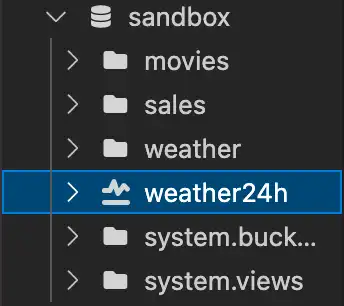
After running the playground with the time series collection, the left navigation will update the collection icon to identify it is a time series collection.使用时间序列集合运行游乐场后,左侧导航将更新集合图标,以标识它是一个时间序列集合。
Tip
To learn more about time series collections, see Time Series Collections要了解有关时间序列集合的更多信息,请参阅时间序列集合To add documents to the collection, see Create Documents with VS Code.要将文档添加到集合中,请参阅使用VS Code创建文档。
Example示例
This example creates a time series collection named 此示例在weather in the test database.test数据库中创建了一个名为weather的时间序列集合。
To use this example, start with a collection template from your MongoDB Playgrounds. Delete the template form for regular collections and keep the template for time series collections found below the regular collection template.要使用此示例,请从MongoDB游乐场中的集合模板开始。删除常规集合的模板表单,并保留常规集合模板下方的时间序列集合模板。
 use('test');

 db.createCollection(
  "weather",
  {
     timeseries: {
        timeField: "timestamp",
        granularity: "hours",
        bucketMaxSpanSeconds: 60,
        bucketRoundingSeconds: 60
     }
  }
)
In the example:在示例中:
use('test')selects the database where the collection is added to.选择要将集合添加到的数据库。timeseriesspecifies fields to create a time series collection.指定用于创建时间序列集合的字段。timeField: "timestamp"names the field that contains the dates in the time series documents. In this case, it is命名时间序列文档中包含日期的字段。在这种情况下,它是timestamp.timestamp。granularity: "hours"defines the time scale by which the documents are stored.定义存储文档的时间尺度。bucketMaxSpanSecondsdefines a maximum time span of 60 seconds for each bucket.为每个桶定义了60秒的最大时间跨度。bucketRoundingSecondsspecifies the time interval that determines the starting timestamp for a new bucket.指定确定新桶的开始时间戳的时间间隔。
When you press the Play Button, MongoDB for VS Code splits your Playground and outputs the following result in the Playground Results.json pane to confirm the creation of the time series collection.当您按下“播放”按钮时,MongoDB for VS Code会拆分游乐场,并在游乐场Results.json窗格中输出以下结果,以确认时间序列集合的创建。
{
   "ok": 1
}
The weather collection also appears in your collection list, and is marked with the time series icon.weather集合也会出现在集合列表中,并标有时间序列图标。