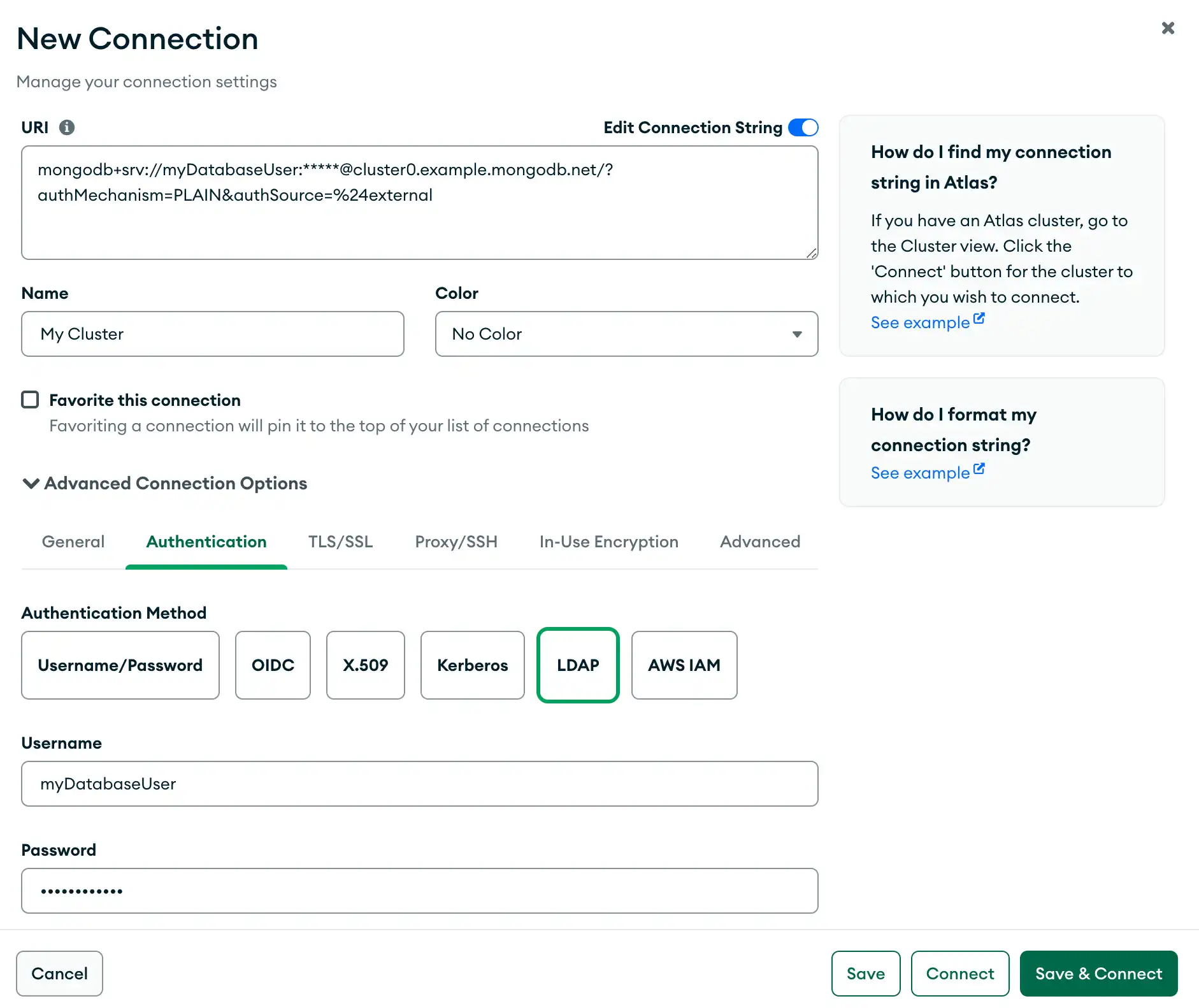
The Authentication tab allows you to connect to deployments that require authentication. To learn about authentication mechanisms within MongoDB, see Authentication Mechanisms.“身份验证”选项卡允许您连接到需要身份验证的部署。要了解MongoDB中的身份验证机制,请参阅身份验证机制。
Procedure过程
Open the New Connection modal.打开“新建连接”模式。
In the bottom panel of the Connections Sidebar, click Add New Connection to open the New Connection modal.在“连接”侧边栏的底部面板中,单击“添加新连接”以打开“新建连接”模式。
If you already have connections listed in the Connections Sidebar, click the icon on the top right of the sidebar to open the New Connection modal.如果您已经在“连接”侧边栏中列出了连接,请单击侧边栏右上角的图标以打开“新连接”模式。
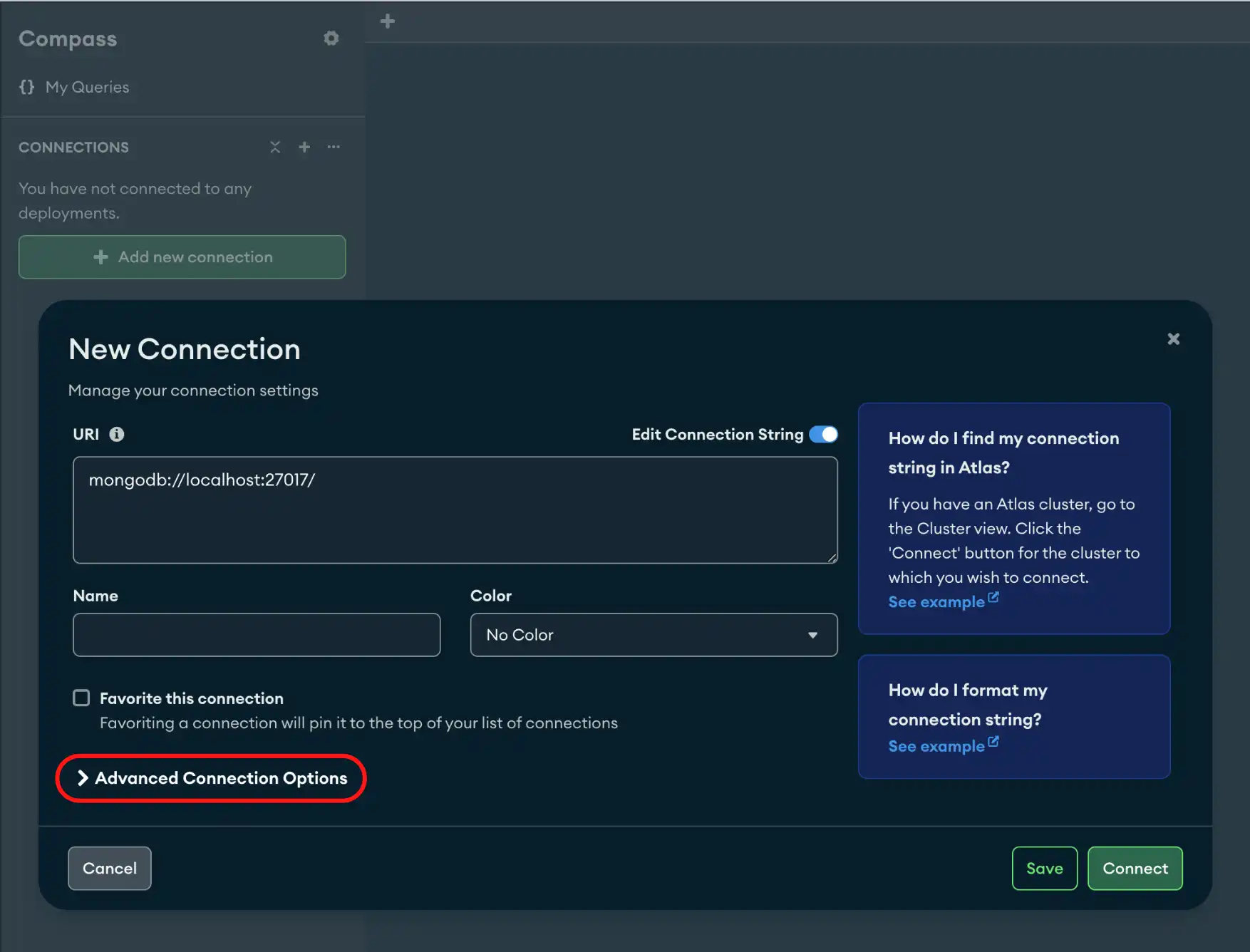
Click the Authentication tab.单击“身份验证”选项卡。
Select your authentication method from the following options:从以下选项中选择身份验证方法:
Username / Password用户名/密码
Provide the following information:提供以下信息:
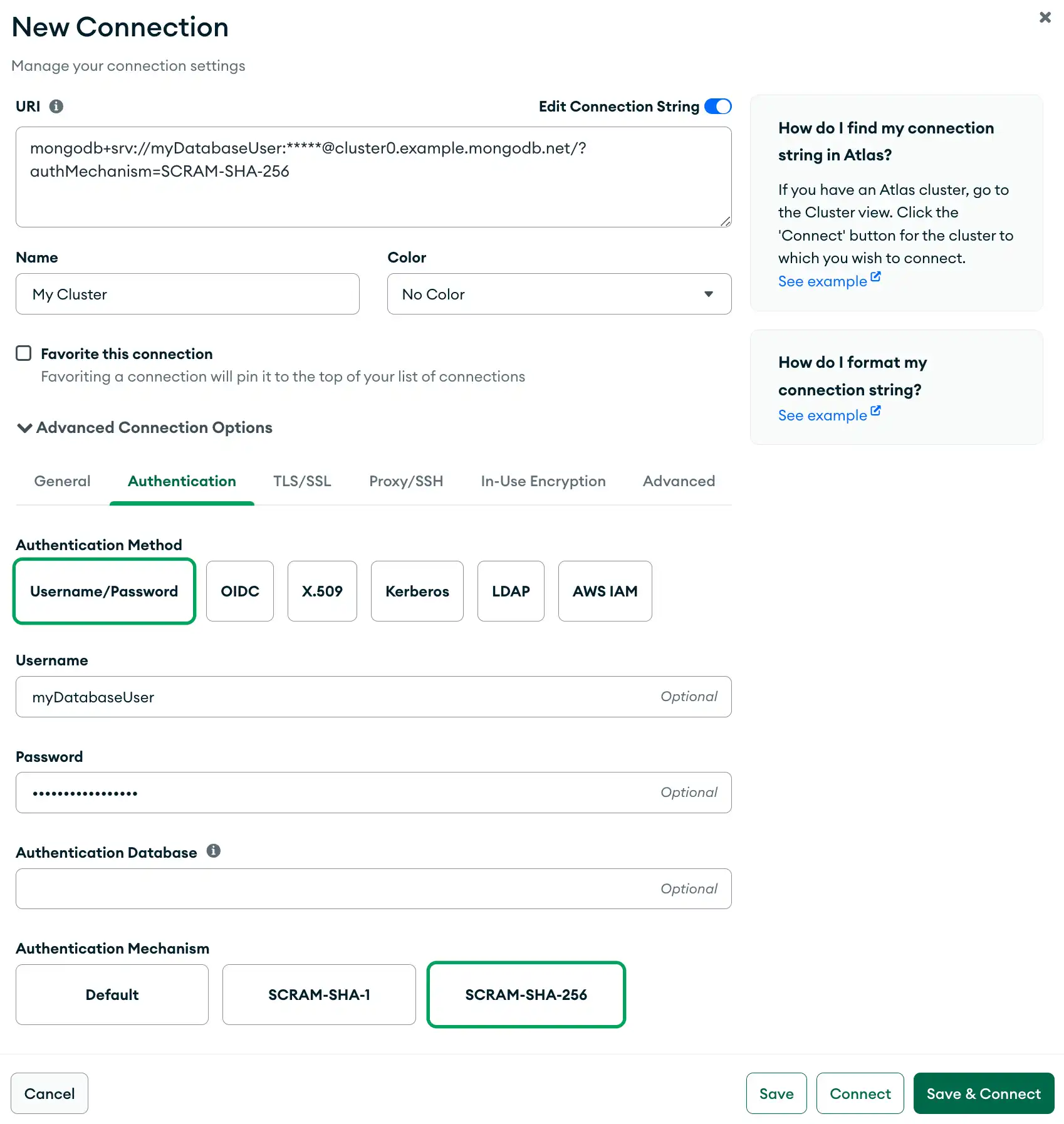
Username用户名Password密码(Optional) Authentication Database(可选)身份验证数据库Authentication Mechancism:身份验证机制:Default默认TheDefaultsetting selects the first authentication mechanism supported by the server according to an order of preference.Default设置根据优先顺序选择服务器支持的第一个身份验证机制。With the在Defaultsetting, MongoDB tries to authenticate using the following mechanisms in the order they are listed:Default设置下,MongoDB会尝试按照以下列出的顺序使用以下机制进行身份验证:SCRAM-SHA-256SCRAM-SHA-1MONGODB-CR
- SCRAM-SHA-1
- SCRAM-SHA-256
OIDC
Select OIDC if the deployment uses OpenID Connect as its authentication mechanism.如果部署使用OpenID Connect作为其身份验证机制,请选择“OIDC”。
Provide the following information:提供以下信息:
http://localhost:27097/redirect.http://localhost:27097/redirect。 | |
| |
|
X.509
Select X.509 if the deployment uses X.509 as its authentication mechanism.如果部署使用X.509作为其身份验证机制,请选择“X.509”。
Note
X.509 Authentication requires a client certificate. To enable TLS and add a client certificate, see the TLS / SSL tab in Compass.X.509身份验证需要客户端证书。要启用TLS并添加客户端证书,请参阅Compass中的TLS/SSL选项卡。
Kerberos
Select Kerberos if the deployment uses Kerberos as its authentication mechanism.如果部署使用KerberosKerberos作为其身份验证机制,请选择“Kerberos”。
Provide the following information:提供以下信息:
mongod and mongos instance (or mongod.exe and mongos.exe on Windows) must have an associated service name. The default is mongodb.mongod和mongos实例(或Windows上的mongod.exe和mongos.exe)都必须有一个关联的服务名称。默认值是mongodb。 | |||||||
(cname) when constructing the principal for MongoDB Compass. | |||||||
| |||||||
showKerberosPasswordField选项。 |
Authenticate as a Different Kerberos User on Windows在Windows上以不同的Kerberos用户身份进行身份验证
When you authenticate with Kerberos on Windows, the Principal you specify must match the principal of the security context that Compass is running. Normally, this is the logged-in user who is running Compass.当您在Windows上使用Kerberos进行身份验证时,您指定的主体必须与Compass正在运行的安全上下文的“主体”相匹配。通常,这是运行Compass的登录用户。
To authenticate as a different Kerberos user, run MongoDB Compass as the chosen user and specify the Principal for that user. To run MongoDB Compass as a different user, either:要作为其他Kerberos用户进行身份验证,请以所选用户的身份运行MongoDB Compass,并为该用户指定主体。要以其他用户身份运行MongoDB Compass,请执行以下操作之一:
Hold Shift and right-click the MongoDB Compass program icon to select Run as a different user.按住Shift键,右键单击MongoDB Compass程序图标,选择“以其他用户身份运行”。Use the使用runascommand-line tool. For example, the following command runs MongoDB Compass as a user namedadmin:runas命令行工具。例如,以下命令以名为admin的用户身份运行MongoDB Compass:runas /profile /user:mymachine\admin <path to MongoDB Compass>
After you start MongoDB Compass as the chosen user, to authenticate against your Kerberos-enabled MongoDB deployment, specify the Principal for the corresponding user.以所选用户身份启动MongoDB Compass后,要根据启用Kerberos的MongoDB部署进行身份验证,请为相应用户指定主体。
LDAP
Note
Select LDAP if the deployment uses LDAP as its authentication mechanism.如果部署使用LDAP作为其身份验证机制,请选择“LDAP”。
Provide the following information:提供以下信息:
Username用户名Password密码
AWS IAM
Select AWS IAM if the deployment uses AWS IAM as its authentication mechanism.如果部署使用AWS IAM作为其身份验证机制,请选择“AWS IAM”。
The following fields are optional as they can be defined on your platform using their respective AWS IAM environment variables. MongoDB Compass will use these environment variable values to authenticate; you do not need to specify them in the connection string.以下字段是可选的,因为它们可以在平台上使用各自的AWS IAM环境变量进行定义。MongoDB Compass将使用这些环境变量值进行身份验证;您不需要在连接字符串中指定它们。
(Optional) AWS Access Key Id(可选)AWS访问键Id(Optional) AWS Secret Access Key(可选)AWS秘密访问键(Optional) AWS Session Token(可选)AWS会话令牌
Tip
To disconnect from your deployment, see Disconnect from MongoDB.要断开与部署的连接,请参阅断开与MongoDB的连接。
Examples示例
Username and Password Authentication用户名和密码验证
The following example specifies a connection with username and password authentication with SCRAM-SHA-256 in the Authentication tab.以下示例在“身份验证”选项卡中指定了使用SCRAM-SHA-256进行用户名和密码身份验证的连接。
LDAP AuthenticationLDAP身份验证
Alternatively, the following example specifies a connection with LDAP authentication in the Authentication tab.或者,以下示例在“身份验证”选项卡中指定了使用LDAP身份验证的连接。